> ## Documentation Index
> Fetch the complete documentation index at: https://promptwatch.com/docs/llms.txt
> Use this file to discover all available pages before exploring further.
# 360 Insights
> 360 Insights joins AI crawls, AI-referred visits, and citations on the same pages, adds topic and search overlays, and shows where AI systems discover, cite, and drive traffic to your site.
### What 360 Insights is
Most of your AI data lives in separate places: crawler logs show which bots fetched which pages, visitor analytics show which visits came from AI answers, and citations show which pages models used as sources. 360 Insights puts all three on the same axis, the page, so you can see a single URL's full story at once. In the app it is titled the **360 Dashboard**, a unified view of crawler logs and citation clicks with geography and trend context.
You reach it from **360 Insights** in the sidebar, under Agent Analytics. It has three tabs and a 7-day or 30-day period toggle:
* **AI insights**: the per-page table and the crawler, referrer, and country breakdowns.
* **Topic insights**: your pages grouped by theme.
* **Search insights**: your Google and Bing search traffic overlaid on AI activity.
### The per-page table: every signal for a URL in one row
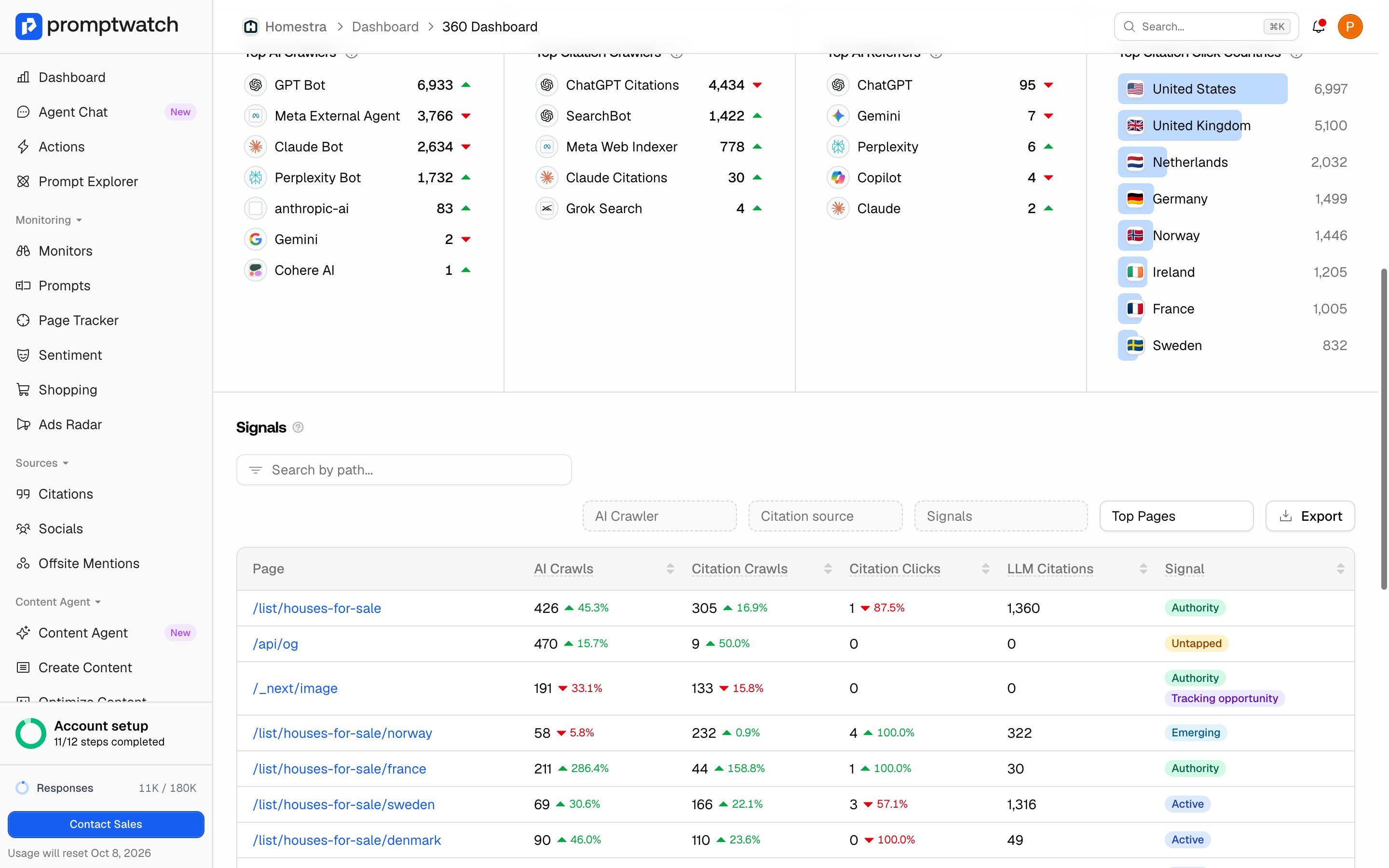
The **AI insights** tab leads with a row per page, and the columns are the point of the whole feature:
* **AI Crawls**: fetches from indexing and ingestion bots such as GPTBot and ClaudeBot, the crawlers building the models' knowledge. This excludes answer-fetch bots.
* **Citation Crawls**: fetches from answer-fetch bots such as ChatGPT-User and Perplexity-User, which pull a page in the moment to cite it in an answer.
* **Citation Clicks**: the AI-referred visits that actually landed on the page.
* **LLM Citations**: how many times the page was cited across your tracked prompts.
Reading across a row tells you the difference between a page models ingest, a page they fetch to cite, and a page that earns a click. The [difference between AI crawls and citation crawls](/docs/academy/ai-crawler-insights) matters here, and so does the [difference between a citation and a mention](/docs/academy/citations-vs-mentions).
A **Signal** badge summarizes each page into one of a few states, so you can act without reading every number. **Authority** pages are already working; **Active** pages show some AI activity but have not stood out yet; **Emerging** pages are gaining AI attention; **Untapped** pages get crawled but earn few citations or clicks; **Dormant** and **Low Signal** pages are quiet. A **Tracking opportunity** badge marks pages with significant AI referrer traffic but no tracked citations; adding prompts or a monitor for them puts that visibility on the board. The overview cards above the table give the project totals, followed by the period leaders: Top AI Crawlers, Top Citation Crawlers, Top AI Referrers, and Top Citation Click Countries.
 ### Topic insights: which themes AI crawls and cites
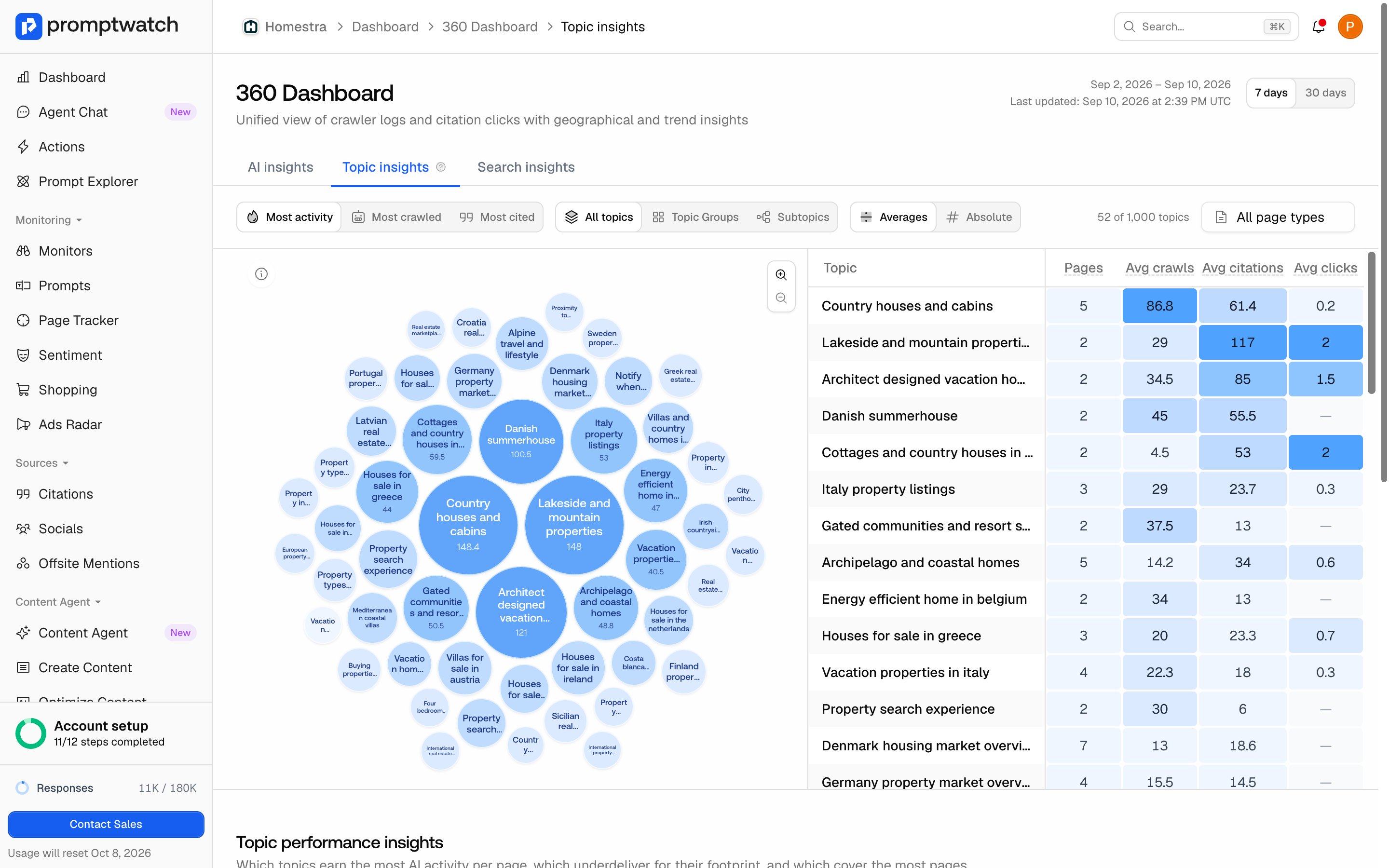
The **Topic insights** tab groups your sitemap pages by theme, so you can see performance a level up from individual URLs. It compares crawls, citations, and clicks across themes and ranks them into **Best Performing**, **Worst Performing**, and **Most Popular** topics, with a topic explorer to browse the groupings. The explorer sorts by **Most activity**, **Most crawled**, or **Most cited**, switches between **Averages** and **Absolute** numbers, and clicking a topic drills from group to subtopic to the pages behind it. A worst-performing topic that covers many pages is a content area AI notices but does not reward, which is where to look first. Topic insights needs a connected sitemap and crawler logs so Promptwatch can generate the page themes.
### Topic insights: which themes AI crawls and cites
The **Topic insights** tab groups your sitemap pages by theme, so you can see performance a level up from individual URLs. It compares crawls, citations, and clicks across themes and ranks them into **Best Performing**, **Worst Performing**, and **Most Popular** topics, with a topic explorer to browse the groupings. The explorer sorts by **Most activity**, **Most crawled**, or **Most cited**, switches between **Averages** and **Absolute** numbers, and clicking a topic drills from group to subtopic to the pages behind it. A worst-performing topic that covers many pages is a content area AI notices but does not reward, which is where to look first. Topic insights needs a connected sitemap and crawler logs so Promptwatch can generate the page themes.
 ### Search insights: overlaying Google and Bing
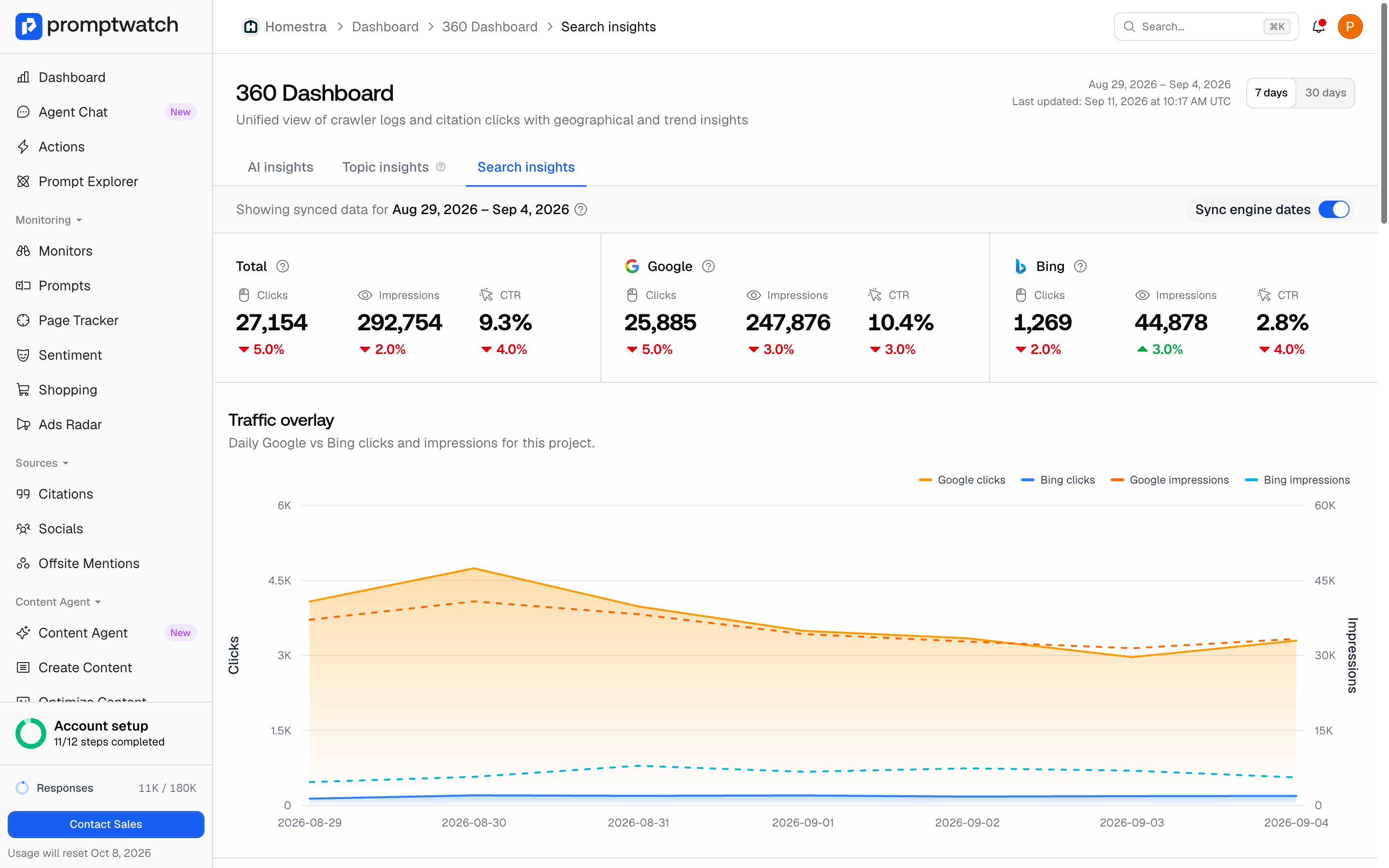
The **Search insights** tab puts your traditional search traffic next to your AI activity on the same pages. It overlays Google and Bing clicks and impressions against AI crawls and citations, joins them by URL path in a Pages table, and ranks your top Google and Bing queries with a branded and non-branded split. It answers a question the other tabs cannot: are the pages winning in AI answers the same ones winning in classic search, or are they pulling apart?
### Search insights: overlaying Google and Bing
The **Search insights** tab puts your traditional search traffic next to your AI activity on the same pages. It overlays Google and Bing clicks and impressions against AI crawls and citations, joins them by URL path in a Pages table, and ranks your top Google and Bing queries with a branded and non-branded split. It answers a question the other tabs cannot: are the pages winning in AI answers the same ones winning in classic search, or are they pulling apart?
 The overlay is fed by two connections, each set up in two steps: connect the account once for the organization, then choose the site for each project.
#### Connect Google Search Console
Google Search Console follows the connect-then-attach pattern. Connect one or more Google accounts under **Settings → Search Console**, then attach the right property inside each project. The full walkthrough, with screenshots, is in [Google Search Console](/docs/academy/google-search-console).
#### Connect Bing Webmaster
Bing Webmaster works the same way: connect one or more Bing accounts under **Settings → Bing Webmaster**, then attach the matching verified site inside each project. The full walkthrough, with screenshots, is in [Bing Webmaster](/docs/academy/bing-webmaster).
Once either source is connected and a site is attached, the Search insights tab fills in; until then it shows a prompt to connect. The daily Bing totals include Copilot, news, image, and video alongside classic web results, so the chart doubles as a read on one more AI surface. The Pages and top-queries tables are a separate weekly, web-only feed.
### What plan you need
360 Insights is a plan-gated feature. It is included on Essential, Professional, and Business (the brand plans) and on Enterprise, and it is not part of the Explore plan or the agency plans. On a plan without it, the dashboard shows a locked overlay with an upgrade path. See [plans and billing](/docs/academy/plans-and-billing) for how the tiers compare.
### Turning the signals into work
Start on the AI insights tab and use the **Signals** filter. Untapped pages, crawled often but rarely cited, are your fastest wins: the model already reads them, so the gap is in how citable and current they are. Emerging pages are worth protecting and expanding. Then move to Search insights to see whether your AI-visible pages also carry search demand, which tells you where a single piece of content can pay off twice. For the crawl-to-citation-to-visit funnel behind these numbers, see [attributing AI traffic](/docs/academy/attributing-ai-traffic).
The overlay is fed by two connections, each set up in two steps: connect the account once for the organization, then choose the site for each project.
#### Connect Google Search Console
Google Search Console follows the connect-then-attach pattern. Connect one or more Google accounts under **Settings → Search Console**, then attach the right property inside each project. The full walkthrough, with screenshots, is in [Google Search Console](/docs/academy/google-search-console).
#### Connect Bing Webmaster
Bing Webmaster works the same way: connect one or more Bing accounts under **Settings → Bing Webmaster**, then attach the matching verified site inside each project. The full walkthrough, with screenshots, is in [Bing Webmaster](/docs/academy/bing-webmaster).
Once either source is connected and a site is attached, the Search insights tab fills in; until then it shows a prompt to connect. The daily Bing totals include Copilot, news, image, and video alongside classic web results, so the chart doubles as a read on one more AI surface. The Pages and top-queries tables are a separate weekly, web-only feed.
### What plan you need
360 Insights is a plan-gated feature. It is included on Essential, Professional, and Business (the brand plans) and on Enterprise, and it is not part of the Explore plan or the agency plans. On a plan without it, the dashboard shows a locked overlay with an upgrade path. See [plans and billing](/docs/academy/plans-and-billing) for how the tiers compare.
### Turning the signals into work
Start on the AI insights tab and use the **Signals** filter. Untapped pages, crawled often but rarely cited, are your fastest wins: the model already reads them, so the gap is in how citable and current they are. Emerging pages are worth protecting and expanding. Then move to Search insights to see whether your AI-visible pages also carry search demand, which tells you where a single piece of content can pay off twice. For the crawl-to-citation-to-visit funnel behind these numbers, see [attributing AI traffic](/docs/academy/attributing-ai-traffic).