> ## Documentation Index
> Fetch the complete documentation index at: https://promptwatch.com/docs/llms.txt
> Use this file to discover all available pages before exploring further.
# The Action Board
> The Action Board turns your AI visibility data into a prioritized list of concrete GEO tasks, discovered and maintained by an agent.
### What is the Action Board?
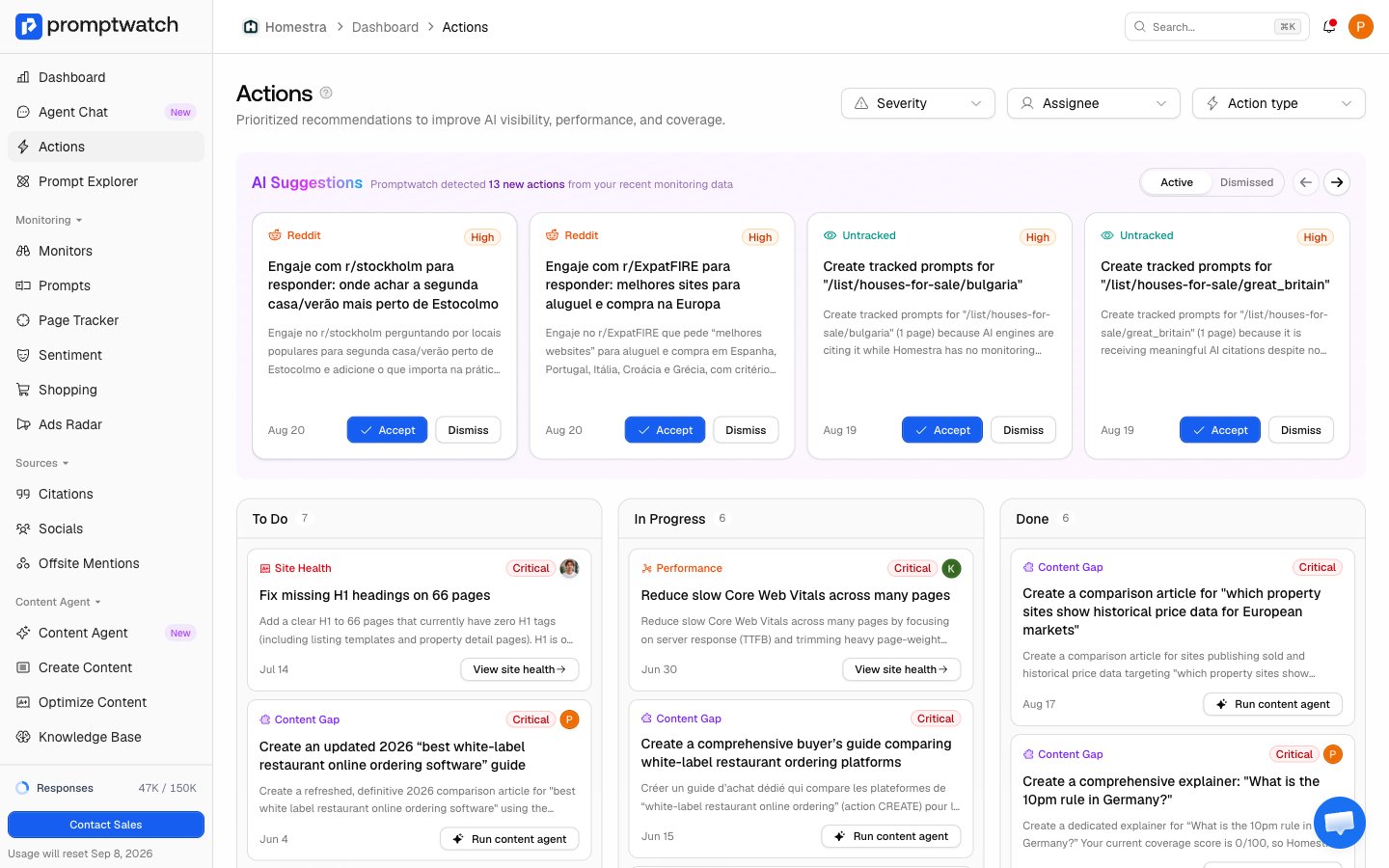
The Action Board is a kanban board of concrete GEO tasks, generated from your project's data. Promptwatch continuously monitors how AI represents your brand across responses, citations, content gaps, sentiment, Reddit threads, and AI crawler activity, and a GEO action agent cross-references those signals to surface the highest-impact things to do. Instead of digging through raw data, you work a short, prioritized list.
Find it under **Actions** in the sidebar. Monitor pages have their own scoped view of the same board, filtered to actions related to that monitor's prompts.
 ### Where actions come from
Three sources feed the board, and knowing which one produced an action tells you how much scrutiny it earned:
* **The discovery agent**: an agent investigates your data on a rotating daily focus, one theme per day across the week: content gaps, site performance and health, page signals, Reddit, offsite mentions, and sentiment. It works evidence-first: it pulls your current board state, gathers fresh data with tools, drafts candidates, deduplicates against what is already on the board, and only saves actions the data justifies, capped at a small batch per run so the board stays workable. These land as **Suggested** for you to accept or dismiss.
* **Setup actions**: when a core integration is missing (sitemap, crawler logs, visitor analytics, Google Search Console), a check creates a setup action programmatically, no AI involved. These land directly in **To Do** at high severity, because everything else the agent does works better with those data sources connected.
* **You, via Agent Chat**: the chat agent can create actions when you ask it to, either typed like the agent's own, or a free-form custom action when nothing fits. Chat-created actions land in **To Do**. See [Asking Agent Chat](/docs/academy/agent-chat).
### What's on a card
Every card carries what you need to triage without opening it:
* **Title and description**: the concrete fix and why it matters with the numbers behind it, so the card preview alone tells you what to do.
* **Severity**: critical, high, medium, or low, which drives ordering. See [How actions are prioritized](/docs/academy/how-actions-are-prioritized).
* **A call to action**: most action types link into the matching feature (the content gap report, the Reddit thread, the page in site health), so acting takes one click. Custom actions open the card instead.
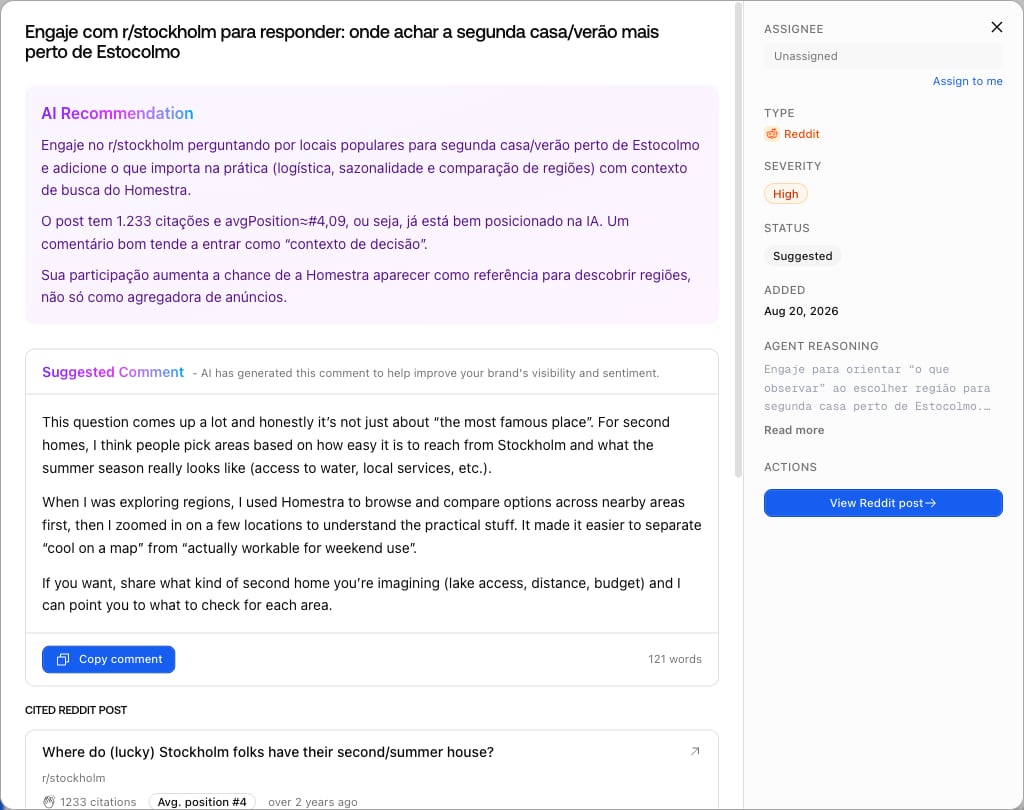
Open a card to assign a teammate, read the agent's evidence trail, see related prompts when the action is tied to tracked prompts, and discuss in comments with a full activity timeline.
### Where actions come from
Three sources feed the board, and knowing which one produced an action tells you how much scrutiny it earned:
* **The discovery agent**: an agent investigates your data on a rotating daily focus, one theme per day across the week: content gaps, site performance and health, page signals, Reddit, offsite mentions, and sentiment. It works evidence-first: it pulls your current board state, gathers fresh data with tools, drafts candidates, deduplicates against what is already on the board, and only saves actions the data justifies, capped at a small batch per run so the board stays workable. These land as **Suggested** for you to accept or dismiss.
* **Setup actions**: when a core integration is missing (sitemap, crawler logs, visitor analytics, Google Search Console), a check creates a setup action programmatically, no AI involved. These land directly in **To Do** at high severity, because everything else the agent does works better with those data sources connected.
* **You, via Agent Chat**: the chat agent can create actions when you ask it to, either typed like the agent's own, or a free-form custom action when nothing fits. Chat-created actions land in **To Do**. See [Asking Agent Chat](/docs/academy/agent-chat).
### What's on a card
Every card carries what you need to triage without opening it:
* **Title and description**: the concrete fix and why it matters with the numbers behind it, so the card preview alone tells you what to do.
* **Severity**: critical, high, medium, or low, which drives ordering. See [How actions are prioritized](/docs/academy/how-actions-are-prioritized).
* **A call to action**: most action types link into the matching feature (the content gap report, the Reddit thread, the page in site health), so acting takes one click. Custom actions open the card instead.
Open a card to assign a teammate, read the agent's evidence trail, see related prompts when the action is tied to tracked prompts, and discuss in comments with a full activity timeline.
 ### The board keeps itself honest
The board is not an append-only backlog. On each run, the agent reviews suggested and to-do items for that day's theme that have sat untouched for about a week, and when fresh data shows an action is outdated or already handled, it updates the description and severity, or dismisses it. It also avoids flooding: it checks how many open items each action type already has before adding more.
New actions trigger an in-app notification, and owners can receive a weekly action digest email. See [Notifications](/docs/academy/notifications).
### How to read it
Work top-left: accept or dismiss the Suggested row first, then pull the highest-severity To Do items. Each column is sorted by severity, then recency, so the top card is always the agent's best current answer to "what should I do next?" For the mechanics of moving an action through the flow, see [Working an action to done](/docs/academy/working-an-action).
### The board keeps itself honest
The board is not an append-only backlog. On each run, the agent reviews suggested and to-do items for that day's theme that have sat untouched for about a week, and when fresh data shows an action is outdated or already handled, it updates the description and severity, or dismisses it. It also avoids flooding: it checks how many open items each action type already has before adding more.
New actions trigger an in-app notification, and owners can receive a weekly action digest email. See [Notifications](/docs/academy/notifications).
### How to read it
Work top-left: accept or dismiss the Suggested row first, then pull the highest-severity To Do items. Each column is sorted by severity, then recency, so the top card is always the agent's best current answer to "what should I do next?" For the mechanics of moving an action through the flow, see [Working an action to done](/docs/academy/working-an-action).