> ## Documentation Index
> Fetch the complete documentation index at: https://promptwatch.com/docs/llms.txt
> Use this file to discover all available pages before exploring further.
# Attributing AI traffic to revenue
> A playbook for connecting the chain from AI crawls to citations to clicks to revenue, using crawler insights, citations, and visitor analytics together.
AI search creates value in a chain: a crawler reads your page, a model cites it in an answer, a reader clicks through, and some of those visitors buy. Each link lives in a different dataset, which is why AI traffic so often goes unattributed: the crawl is in your server logs, the citation is in the model's answer, the click is in your analytics, and nobody joins them. Promptwatch tracks the first three links directly; this playbook walks the chain in order and ends with connecting it to revenue in your own numbers.
Work through it for one high-intent page first, your pricing page or top product page, then generalize.
### Step 1: Confirm crawlers reach your money pages
Open [AI crawler insights](/docs/academy/ai-crawler-insights) and filter by the page's path. You want to see recent, successful (200) fetches from the bots that matter for citations. No crawls, or crawls ending in 403s, means the rest of the chain can't start; fix that first using [Crawlability](/docs/academy/crawlability). The reasoning: attribution work on a page AI models can't read is wasted effort.
### Step 2: Confirm the page gets cited
Add the page to the [Page Tracker](/docs/academy/page-tracker) and check its Responses and Prompts counts, or find it in the [citations view](/docs/academy/understanding-sources). Crawled but never cited is its own diagnosis: the models read the page and chose other sources, which points to a content problem, not an access problem. Cited pages move to step 3.
### Step 3: Measure the clicks
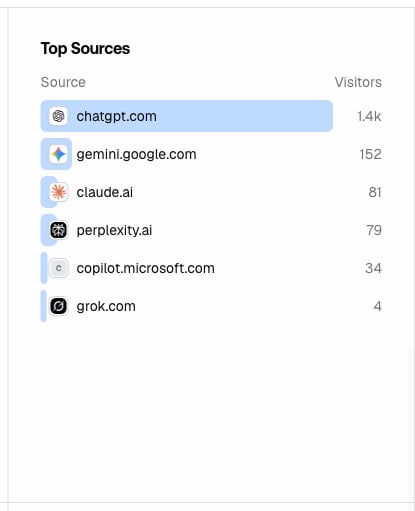
This is where [visitor analytics](/docs/academy/visitor-analytics) comes in. Once the tracking script is installed (via Google Tag Manager or directly in your site header), Promptwatch captures visits arriving from AI platforms, identified by their referrer, so a click from a ChatGPT answer is distinguishable from one from Perplexity:
* **Referrer stats**: visits broken down by referrer domain, so you can size each AI platform as a traffic source.
* **Top pages**: which of your pages AI-referred visitors actually land on. Compare this against your cited pages: a page with many citations and few clicks is a positioning problem inside the answer, a page with clicks is earning its citations.
* **Top sources, locations, and devices**: who these visitors are and how they arrive, useful when deciding what experience to serve them.
 The Page Tracker shows the join directly: for each tracked page on your domain, a citation-clicks sparkline next to a citation-crawls sparkline, so crawl, citation, and click sit in one row.
 ### Step 4: Connect clicks to revenue
Promptwatch measures through the click; revenue lives in your own analytics or CRM. The join key is the referrer. In your analytics tool, segment sessions by the same AI referrer domains you see in visitor analytics (chatgpt.com, perplexity.ai, and the rest of your top sources) and read conversion rate and revenue for that segment like any other channel. Two practices make this reliable:
* **Compare the same pages**: attribute at the landing-page level. If AI-referred sessions land on your pricing page (step 3 tells you), measure conversions from those sessions, not sitewide.
* **Expect understated numbers**: some AI-referred visits arrive without a referrer, and answer engines influence purchases without any click at all, the reader sees your brand recommended and searches for you directly. Treat referrer-based revenue as the floor of the channel's value, and watch branded search alongside it.
### Step 5: Report the chain, not just the last click
For each key page, you can now state: crawled N times, cited in M responses, X AI-referred visits, Y conversions. That full chain is what makes the number credible to stakeholders, because every step is observable, and it tells you where to invest: no crawls means fix access, no citations means fix content, no clicks means fix how you appear inside answers, no revenue means fix the landing page. For repeatable scenarios built on this data, see [Crawler and traffic use cases](/docs/academy/crawler-use-cases).
### Step 4: Connect clicks to revenue
Promptwatch measures through the click; revenue lives in your own analytics or CRM. The join key is the referrer. In your analytics tool, segment sessions by the same AI referrer domains you see in visitor analytics (chatgpt.com, perplexity.ai, and the rest of your top sources) and read conversion rate and revenue for that segment like any other channel. Two practices make this reliable:
* **Compare the same pages**: attribute at the landing-page level. If AI-referred sessions land on your pricing page (step 3 tells you), measure conversions from those sessions, not sitewide.
* **Expect understated numbers**: some AI-referred visits arrive without a referrer, and answer engines influence purchases without any click at all, the reader sees your brand recommended and searches for you directly. Treat referrer-based revenue as the floor of the channel's value, and watch branded search alongside it.
### Step 5: Report the chain, not just the last click
For each key page, you can now state: crawled N times, cited in M responses, X AI-referred visits, Y conversions. That full chain is what makes the number credible to stakeholders, because every step is observable, and it tells you where to invest: no crawls means fix access, no citations means fix content, no clicks means fix how you appear inside answers, no revenue means fix the landing page. For repeatable scenarios built on this data, see [Crawler and traffic use cases](/docs/academy/crawler-use-cases).