> ## Documentation Index
> Fetch the complete documentation index at: https://promptwatch.com/docs/llms.txt
> Use this file to discover all available pages before exploring further.
# Product map: what every menu item does
> A one-line guide to every item in the Promptwatch sidebar, in the order you see them, with links to the pages that explain each one in depth.
The Promptwatch sidebar is organized by workflow: monitor what AI says, trace where it gets its sources, act on the gaps with content, and measure what AI systems do on your own site. This page walks the menu top to bottom, one line per item, so you always know where to click.
 ### Top level
* **Dashboard**: your project's home screen with the Brand Visibility chart and headline metrics. See [Reading your dashboard](/docs/academy/reading-your-dashboard).
* **Agent Chat**: a chat interface that answers questions about your own visibility data and can run analyses for you. Hidden on white-label workspaces. See [Agent Chat](/docs/academy/agent-chat).
* **Actions**: the Action Board, a prioritized list of recommendations (content gaps, sentiment, Reddit, offsite, site health, performance, untracked and untapped pages, and setup). See [Action Board](/docs/academy/action-board).
* **Prompt Explorer**: generates suggested prompts from Google Search Console data, "People also asked" questions, a seed query, or a website page. See [Prompt Explorer](/docs/academy/prompt-explorer).
### Monitoring
* **Monitors**: your panels of prompts that run on a schedule across the AI models you chose. The heart of the product. See [What is a monitor](/docs/academy/what-is-a-monitor).
* **Prompts**: every prompt across your monitors in one table, with bulk editing. See [Choosing the right prompts](/docs/academy/right-prompts-to-track). Two sub-items:
* **Responses**: every individual AI answer, filterable by model, mention, and citation. See [Understanding responses](/docs/academy/understanding-responses).
* **Query Fanouts**: the sub-queries a model searched while composing an answer, when the model exposes them. See [Query fanouts](/docs/academy/query-fanouts).
* **Page Tracker**: watches specific URLs (yours or a competitor's) and shows the prompts and responses that cite them. See [Page Tracker](/docs/academy/page-tracker).
* **Sentiment**: how positively AI answers describe your brand over time, with a weekly AI summary. See [Sentiment tracking](/docs/academy/sentiment-tracking) and [Sentiment score](/docs/academy/sentiment-score).
* **Shopping**: product visibility inside ChatGPT Shopping results. See [Shopping overview](/docs/academy/shopping-overview).
* **Ads Radar**: sponsored placements, advertisers, and landing pages that appear in AI search results for your tracked prompts. See [Ads Radar](/docs/academy/ads-radar).
### Sources
* **Citations**: the URLs and domains AI answers cite as sources, aggregated across your responses. See [Using citations](/docs/academy/understanding-sources). One sub-item:
* **Positions**: where in the source list each cited URL lands, tracked over time. See [Citation rank](/docs/academy/citation-rank).
* **Socials**: community sources cited in AI answers. See [Social source types](/docs/academy/source-types-socials). Two sub-items:
* **Reddit**: cited Reddit threads and the communities behind them. See [Reddit citations](/docs/academy/source-types-reddit).
* **YouTube**: cited videos and channels. See [YouTube citations](/docs/academy/source-types-youtube).
* **Offsite Mentions**: third-party pages cited by AI that discuss your brand, opportunities to influence sources you don't own. See [Offsite mentions](/docs/academy/offsite-mentions).
### Content Agent
* **Content Agent**: the automated content pipeline: it plans a schedule, drafts articles against your visibility gaps, and routes them through review. Hidden on white-label workspaces. See [Content Agent overview](/docs/academy/content-agent-overview).
* **Create Content**: generate a single article on demand instead of on a schedule. See [Create Content](/docs/academy/create-content).
* **Optimize Content**: improve an existing page for AI visibility rather than writing a new one. See [Optimize content](/docs/academy/optimize-content).
* **Knowledge Base**: the facts, positioning, and source material the Content Agent writes from. See [Knowledge Base](/docs/academy/knowledge-base).
* **Content Gap**: how well your site answers tracked prompts, and which prompts have no matching page. See [Content gap](/docs/academy/content-gap).
### Agent Analytics
* **Crawler Logs**: requests AI bots (GPTBot, ClaudeBot, PerplexityBot, and others) make to your website. See [AI crawler insights](/docs/academy/ai-crawler-insights). One sub-item:
* **Top Pages**: the pages those bots request most.
* **Visitor Analytics**: human visitors who arrived from an AI assistant, detected by referrer. See [Visitor analytics](/docs/academy/visitor-analytics).
* **360 Insights**: crawler activity and AI-referred visits combined in one view, broken down by page, referrer, and country.
### Brand Hub
* **Brand Book**: your brand's identity as Promptwatch understands it: name, aliases, website, description, industry, language, and country. See [Brand profile](/docs/academy/brand-profile). Three sub-items: **AI Agent** (default writing settings, tone of voice, and language for AI-generated content), **Personas** (audience profiles that shape how prompts are asked, see [Persona best practices](/docs/academy/personas)), and **Brand Merging** (combine duplicate brand entries detected in responses).
* **Competitors**: the brands you compare against. Managed per project and used by every monitor. See [Identifying your competitors](/docs/academy/identifying-your-competitors).
* **Sitemap**: your site structure as Promptwatch sees it, the basis for content recommendations. See [Sitemap](/docs/academy/sitemap). One sub-item: **Health**, crawler, speed, and SEO checks across the site. See [Site health](/docs/academy/site-health).
### Settings
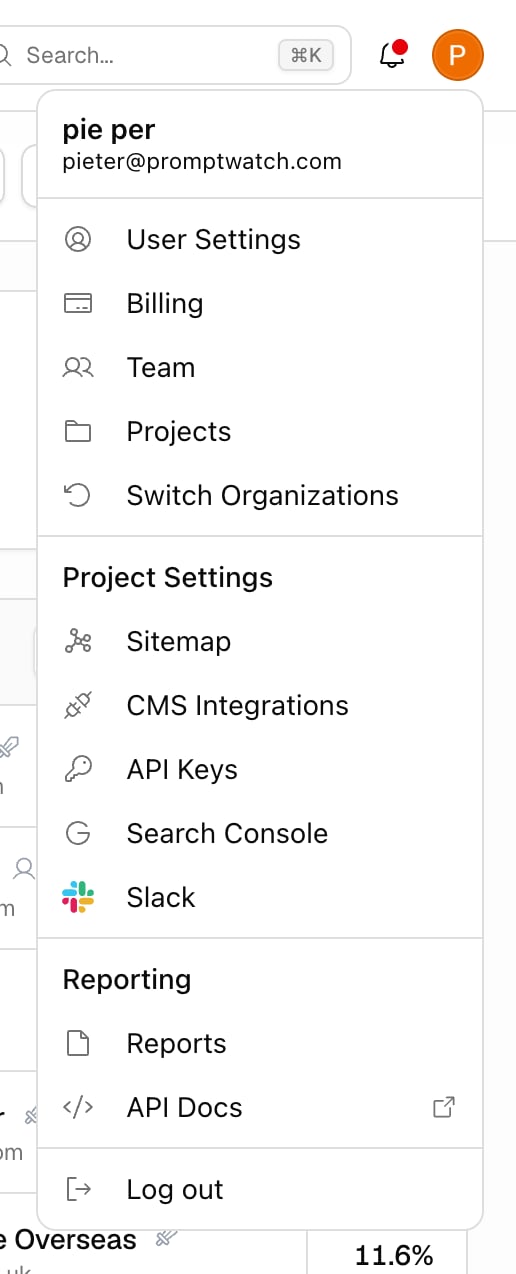
Open settings from your account menu. What you see depends on your role, whether your access is limited to specific projects, and whether the workspace is white-label:
* **User Settings**: your name, job role, and email notification preferences.
* **Billing**: plan, invoices, and payment method. See [Plans and billing](/docs/academy/plans-and-billing).
* **Team**: invite members and manage roles. See [Team and roles](/docs/academy/team-and-roles).
* **Projects**: create, rename, or remove projects. See [Create your project](/docs/academy/create-your-project).
* **API Keys**: keys for the REST API and MCP server. See [MCP](/docs/academy/mcp).
* **Search Console**: connect Google Search Console. See [Google Search Console](/docs/academy/google-search-console).
* **Slack**: connect a Slack workspace, map channels to projects, and review agent chats. Organization owners only. See [Agent Chat](/docs/academy/agent-chat).
### Top level
* **Dashboard**: your project's home screen with the Brand Visibility chart and headline metrics. See [Reading your dashboard](/docs/academy/reading-your-dashboard).
* **Agent Chat**: a chat interface that answers questions about your own visibility data and can run analyses for you. Hidden on white-label workspaces. See [Agent Chat](/docs/academy/agent-chat).
* **Actions**: the Action Board, a prioritized list of recommendations (content gaps, sentiment, Reddit, offsite, site health, performance, untracked and untapped pages, and setup). See [Action Board](/docs/academy/action-board).
* **Prompt Explorer**: generates suggested prompts from Google Search Console data, "People also asked" questions, a seed query, or a website page. See [Prompt Explorer](/docs/academy/prompt-explorer).
### Monitoring
* **Monitors**: your panels of prompts that run on a schedule across the AI models you chose. The heart of the product. See [What is a monitor](/docs/academy/what-is-a-monitor).
* **Prompts**: every prompt across your monitors in one table, with bulk editing. See [Choosing the right prompts](/docs/academy/right-prompts-to-track). Two sub-items:
* **Responses**: every individual AI answer, filterable by model, mention, and citation. See [Understanding responses](/docs/academy/understanding-responses).
* **Query Fanouts**: the sub-queries a model searched while composing an answer, when the model exposes them. See [Query fanouts](/docs/academy/query-fanouts).
* **Page Tracker**: watches specific URLs (yours or a competitor's) and shows the prompts and responses that cite them. See [Page Tracker](/docs/academy/page-tracker).
* **Sentiment**: how positively AI answers describe your brand over time, with a weekly AI summary. See [Sentiment tracking](/docs/academy/sentiment-tracking) and [Sentiment score](/docs/academy/sentiment-score).
* **Shopping**: product visibility inside ChatGPT Shopping results. See [Shopping overview](/docs/academy/shopping-overview).
* **Ads Radar**: sponsored placements, advertisers, and landing pages that appear in AI search results for your tracked prompts. See [Ads Radar](/docs/academy/ads-radar).
### Sources
* **Citations**: the URLs and domains AI answers cite as sources, aggregated across your responses. See [Using citations](/docs/academy/understanding-sources). One sub-item:
* **Positions**: where in the source list each cited URL lands, tracked over time. See [Citation rank](/docs/academy/citation-rank).
* **Socials**: community sources cited in AI answers. See [Social source types](/docs/academy/source-types-socials). Two sub-items:
* **Reddit**: cited Reddit threads and the communities behind them. See [Reddit citations](/docs/academy/source-types-reddit).
* **YouTube**: cited videos and channels. See [YouTube citations](/docs/academy/source-types-youtube).
* **Offsite Mentions**: third-party pages cited by AI that discuss your brand, opportunities to influence sources you don't own. See [Offsite mentions](/docs/academy/offsite-mentions).
### Content Agent
* **Content Agent**: the automated content pipeline: it plans a schedule, drafts articles against your visibility gaps, and routes them through review. Hidden on white-label workspaces. See [Content Agent overview](/docs/academy/content-agent-overview).
* **Create Content**: generate a single article on demand instead of on a schedule. See [Create Content](/docs/academy/create-content).
* **Optimize Content**: improve an existing page for AI visibility rather than writing a new one. See [Optimize content](/docs/academy/optimize-content).
* **Knowledge Base**: the facts, positioning, and source material the Content Agent writes from. See [Knowledge Base](/docs/academy/knowledge-base).
* **Content Gap**: how well your site answers tracked prompts, and which prompts have no matching page. See [Content gap](/docs/academy/content-gap).
### Agent Analytics
* **Crawler Logs**: requests AI bots (GPTBot, ClaudeBot, PerplexityBot, and others) make to your website. See [AI crawler insights](/docs/academy/ai-crawler-insights). One sub-item:
* **Top Pages**: the pages those bots request most.
* **Visitor Analytics**: human visitors who arrived from an AI assistant, detected by referrer. See [Visitor analytics](/docs/academy/visitor-analytics).
* **360 Insights**: crawler activity and AI-referred visits combined in one view, broken down by page, referrer, and country.
### Brand Hub
* **Brand Book**: your brand's identity as Promptwatch understands it: name, aliases, website, description, industry, language, and country. See [Brand profile](/docs/academy/brand-profile). Three sub-items: **AI Agent** (default writing settings, tone of voice, and language for AI-generated content), **Personas** (audience profiles that shape how prompts are asked, see [Persona best practices](/docs/academy/personas)), and **Brand Merging** (combine duplicate brand entries detected in responses).
* **Competitors**: the brands you compare against. Managed per project and used by every monitor. See [Identifying your competitors](/docs/academy/identifying-your-competitors).
* **Sitemap**: your site structure as Promptwatch sees it, the basis for content recommendations. See [Sitemap](/docs/academy/sitemap). One sub-item: **Health**, crawler, speed, and SEO checks across the site. See [Site health](/docs/academy/site-health).
### Settings
Open settings from your account menu. What you see depends on your role, whether your access is limited to specific projects, and whether the workspace is white-label:
* **User Settings**: your name, job role, and email notification preferences.
* **Billing**: plan, invoices, and payment method. See [Plans and billing](/docs/academy/plans-and-billing).
* **Team**: invite members and manage roles. See [Team and roles](/docs/academy/team-and-roles).
* **Projects**: create, rename, or remove projects. See [Create your project](/docs/academy/create-your-project).
* **API Keys**: keys for the REST API and MCP server. See [MCP](/docs/academy/mcp).
* **Search Console**: connect Google Search Console. See [Google Search Console](/docs/academy/google-search-console).
* **Slack**: connect a Slack workspace, map channels to projects, and review agent chats. Organization owners only. See [Agent Chat](/docs/academy/agent-chat).
 ### Two more things in the sidebar
* **Refer & Earn**: bottom of the sidebar on Essential and Professional plans. Hidden for viewers and on white-label workspaces.
* **Usage meter**: the footer shows your response usage for the current billing period, so you can see quota before it runs out. See [Managing your response limit](/docs/academy/response-limits).
Some items hide by workspace brand, project access, role, or plan. Agent Chat and Content Agent are hidden on white-label workspaces. Team, Projects, API Keys, Search Console, and Slack hide if your access is limited to specific projects; API Keys, Search Console, and Slack also hide on white-label, and Slack is owners only. Viewers don't see the usage meter. If a menu item from this page is missing in your sidebar, that is usually why.
### Two more things in the sidebar
* **Refer & Earn**: bottom of the sidebar on Essential and Professional plans. Hidden for viewers and on white-label workspaces.
* **Usage meter**: the footer shows your response usage for the current billing period, so you can see quota before it runs out. See [Managing your response limit](/docs/academy/response-limits).
Some items hide by workspace brand, project access, role, or plan. Agent Chat and Content Agent are hidden on white-label workspaces. Team, Projects, API Keys, Search Console, and Slack hide if your access is limited to specific projects; API Keys, Search Console, and Slack also hide on white-label, and Slack is owners only. Viewers don't see the usage meter. If a menu item from this page is missing in your sidebar, that is usually why.