> ## Documentation Index
> Fetch the complete documentation index at: https://promptwatch.com/docs/llms.txt
> Use this file to discover all available pages before exploring further.
# Site health
> The Health tab reports page-level SEO issues, speed metrics, and content stats from the latest crawl of your sitemap pages, so you can fix what holds AI visibility back.
Site health is a report on what a crawler finds when it reads your pages: which pages load, how fast, how much content they carry, and which basic SEO elements are missing. The data comes from Promptwatch's latest stored crawl of the pages in your synced sitemap; it reflects the last crawl rather than starting a new one, and it requires a project website and a [synced sitemap](/docs/academy/sitemap).
You'll find it under **Sitemap → Health**.
 ### What the page shows
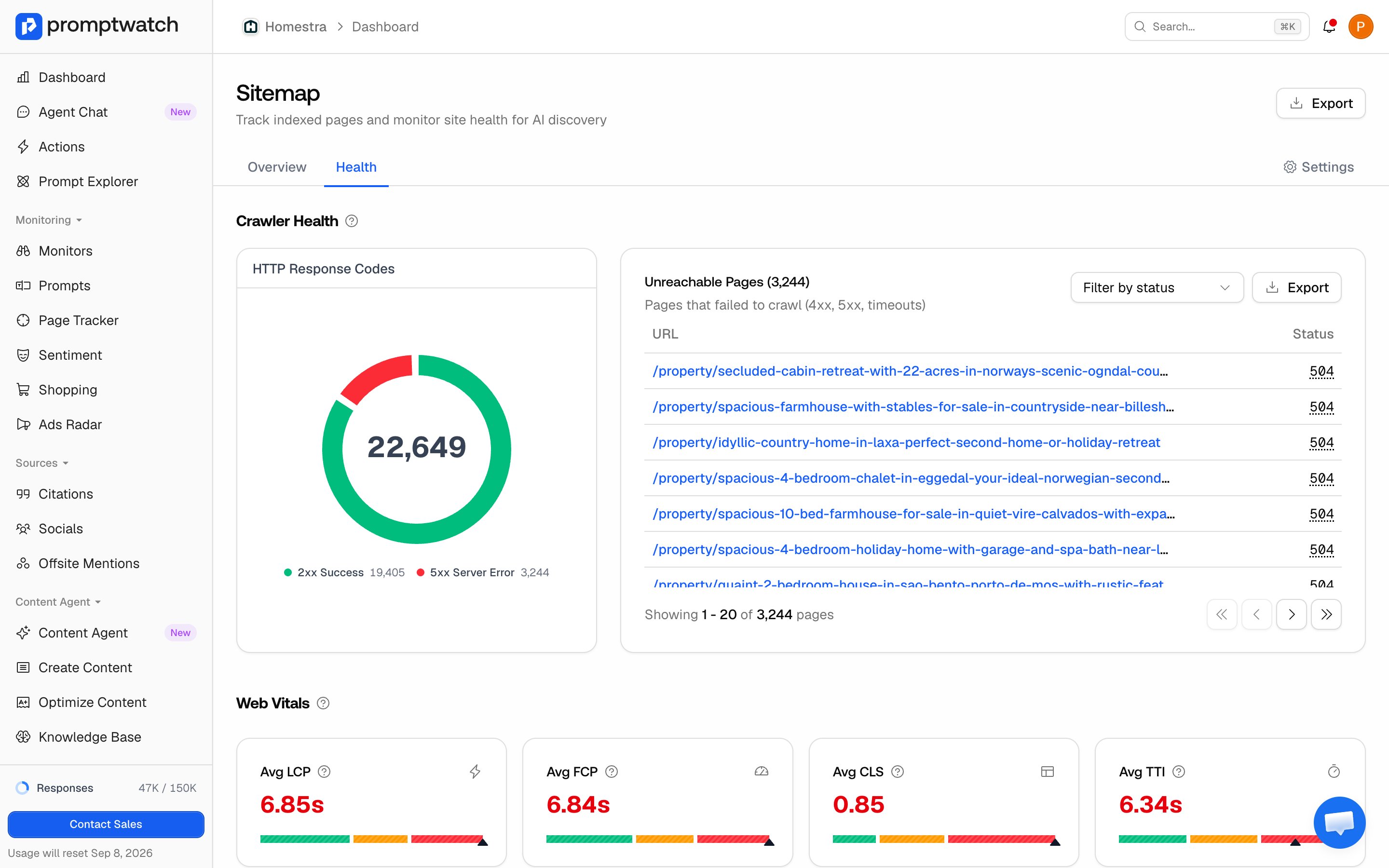
* **Crawler health**: the HTTP status breakdown across your sitemap pages, so you can see how much of your site returns 200 versus redirects, 4xx, and 5xx before digging into any single page.
* **Web vitals**: overall performance stats for the crawled pages.
* **Speed analytics**: time to first byte (TTFB) and time to interactive (TTI), each as an average plus p75 and p95. Largest contentful paint (LCP) sits under Web vitals as an average, next to FCP and CLS. The percentiles matter more than the average: a good average with a bad p95 means your slowest pages are very slow.
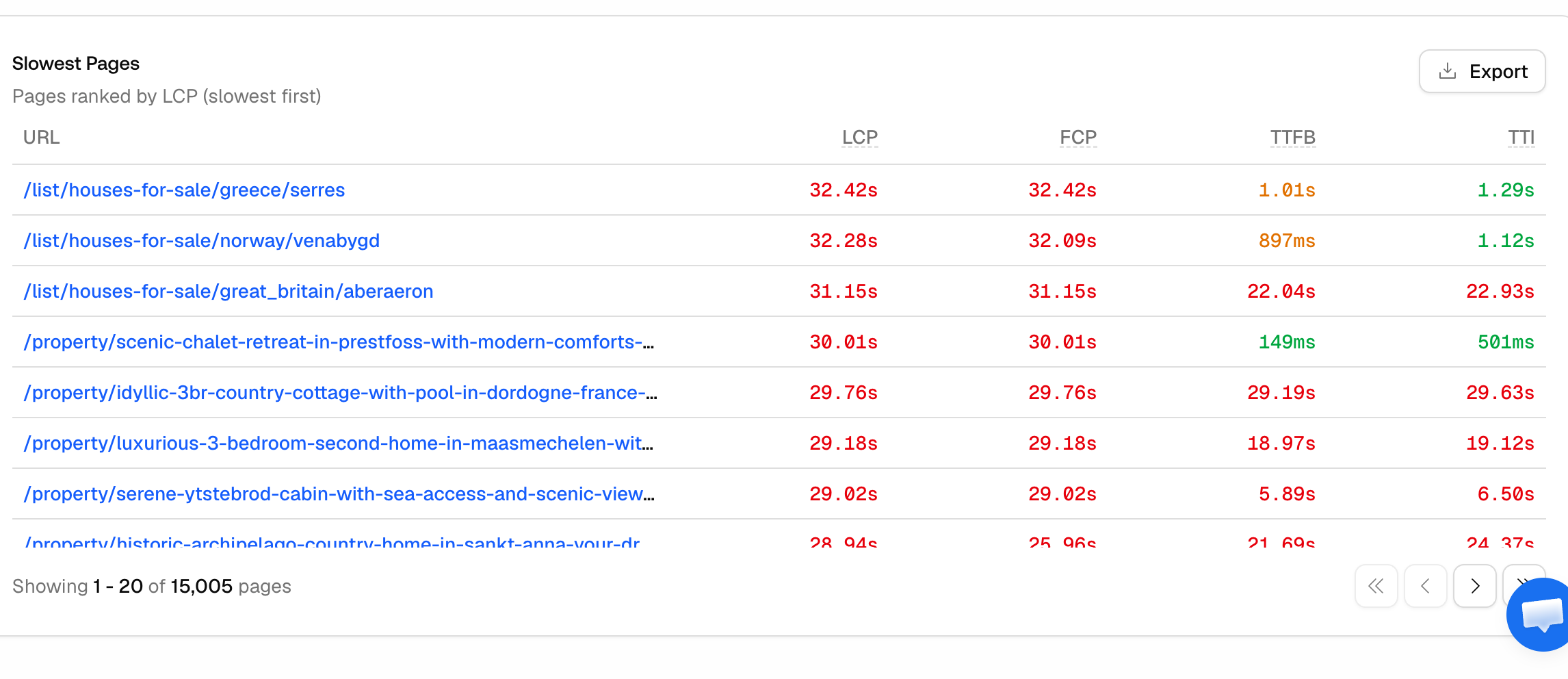
* **Page performance**: the slowest pages, listed with their LCP, FCP, TTFB, and TTI. A page only appears here when its LCP is 4 seconds or worse, the threshold for "poor", so this list is a to-do list, not a ranking of everything.
### What the page shows
* **Crawler health**: the HTTP status breakdown across your sitemap pages, so you can see how much of your site returns 200 versus redirects, 4xx, and 5xx before digging into any single page.
* **Web vitals**: overall performance stats for the crawled pages.
* **Speed analytics**: time to first byte (TTFB) and time to interactive (TTI), each as an average plus p75 and p95. Largest contentful paint (LCP) sits under Web vitals as an average, next to FCP and CLS. The percentiles matter more than the average: a good average with a bad p95 means your slowest pages are very slow.
* **Page performance**: the slowest pages, listed with their LCP, FCP, TTFB, and TTI. A page only appears here when its LCP is 4 seconds or worse, the threshold for "poor", so this list is a to-do list, not a ranking of everything.
 * **SEO insights**: counts per issue type (below), content depth (pages by word-count bucket), and the link profile (average internal and external links per page).
### The checks
Site health runs exactly five page-level SEO checks:
* **Missing page title**: the page has no title tag, or an empty one.
* **Missing meta description**: the page has no meta description, or an empty one.
* **Missing H1 heading**: the page has no H1 heading.
* **Multiple H1 headings**: the page has more than one H1, which muddies what the page is about.
* **Thin content (under 300 words)**: the page's extracted text is under 300 words. Thin pages give AI crawlers little to work with, so they rarely become citations.
The SEO Issues table lists the affected URLs; filter it by issue type to work through them URL by URL.
### How to work the report
* **Status codes first**: 4xx and 5xx pages are invisible to crawlers no matter how good the content is. Fix or redirect them first.
* **Then thin content on pages that matter**: cross-reference your most crawled pages from [AI crawler insights](/docs/academy/ai-crawler-insights); a heavily crawled page with under 300 words is attention being wasted.
* **Then titles, descriptions, and H1s**: these are cheap fixes that clarify to any retrieval system what the page is about.
* **Speed last, worst first**: work the slowest-pages list from the top. A 4-second LCP hurts every visitor, including the AI-referred ones you're trying to win.
### After you fix issues
The report updates when those pages are crawled again, not when the sitemap XML is re-synced, so changes don't reflect instantly. Successful pages refresh on a recrawl cycle of roughly 60 days, or you can recrawl a single URL from its Insights page. If you restructured URLs, make sure the sitemap itself is current first; [How to change your sitemap](/docs/academy/change-sitemap) covers that. For fixing issues at the content level rather than the page level, the [Content Gap analysis](/docs/academy/content-gap) picks up where site health leaves off.
* **SEO insights**: counts per issue type (below), content depth (pages by word-count bucket), and the link profile (average internal and external links per page).
### The checks
Site health runs exactly five page-level SEO checks:
* **Missing page title**: the page has no title tag, or an empty one.
* **Missing meta description**: the page has no meta description, or an empty one.
* **Missing H1 heading**: the page has no H1 heading.
* **Multiple H1 headings**: the page has more than one H1, which muddies what the page is about.
* **Thin content (under 300 words)**: the page's extracted text is under 300 words. Thin pages give AI crawlers little to work with, so they rarely become citations.
The SEO Issues table lists the affected URLs; filter it by issue type to work through them URL by URL.
### How to work the report
* **Status codes first**: 4xx and 5xx pages are invisible to crawlers no matter how good the content is. Fix or redirect them first.
* **Then thin content on pages that matter**: cross-reference your most crawled pages from [AI crawler insights](/docs/academy/ai-crawler-insights); a heavily crawled page with under 300 words is attention being wasted.
* **Then titles, descriptions, and H1s**: these are cheap fixes that clarify to any retrieval system what the page is about.
* **Speed last, worst first**: work the slowest-pages list from the top. A 4-second LCP hurts every visitor, including the AI-referred ones you're trying to win.
### After you fix issues
The report updates when those pages are crawled again, not when the sitemap XML is re-synced, so changes don't reflect instantly. Successful pages refresh on a recrawl cycle of roughly 60 days, or you can recrawl a single URL from its Insights page. If you restructured URLs, make sure the sitemap itself is current first; [How to change your sitemap](/docs/academy/change-sitemap) covers that. For fixing issues at the content level rather than the page level, the [Content Gap analysis](/docs/academy/content-gap) picks up where site health leaves off.