> ## Documentation Index
> Fetch the complete documentation index at: https://promptwatch.com/docs/llms.txt
> Use this file to discover all available pages before exploring further.
# Cloudflare Logpush
> Configure crawler log ingestion via Cloudflare Logpush (Enterprise)
Push logs from Cloudflare to our endpoints
Cloudflare Logpush is currently an Enterprise-only feature. If you don't see the Logpush option, you'll need to upgrade to the Enterprise Cloudflare plan.
## Step 1: Create an API Key
Create an API key in Promptwatch. Go to **Settings → API Keys** in your [Promptwatch dashboard](https://app.promptwatch.com).
## Step 2: Create a Logpush Job
Go to your Cloudflare dashboard, select your domain and navigate to **Analytics & Logs** > **Logpush** > **Create a Logpush job**.
## Step 3: Configure HTTP Destination
For destination select **HTTP destination**. Enter the following HTTP endpoint URL:
```
https://logs.promptwatch.com/event/cloudflare?header_authorization=Bearer%20YOUR_API_KEY
```
Replace `YOUR_API_KEY` with your actual API key.
## Step 4: Configure Logpush Job
For dataset select **HTTP Requests** and configure the logpush job as follows:
**Name:** `promptwatch-crawler-logs`
**If logs match:**
* Field: ClientRequestHost
* Operator: Equals
* Value: YOUR\_DOMAIN (example: app.promptwatch.com)
**Send the following fields:**
*Request*
* ClientIP
* ClientRequestHost
* ClientRequestMethod
* ClientRequestReferer
* ClientRequestURI
* ClientRequestUserAgent
*General*
* WorkerSubrequest (allows us to filter out requests initiated from a Worker, since they will be seen as duplicate)
*Performance*
* EdgeStartTimestamp
*Response*
* EdgeResponseContentType
* EdgeResponseStatus
**Advanced options:** Keep the default settings as is. The timestamp format should be `rfc3339`, which is the default format.
## Optional: Filter on known AI Crawler user agents
Promptwatch identifies AI crawlers automatically and only stores AI crawler visits, all other traffic is discarded. You can safely send all your server logs without worrying about non-crawler data being retained.
If you prefer to only forward AI crawler traffic, you can use the user agents listed below to pre-filter on your side. Keep in mind that you'll need to maintain this list yourself as new crawlers emerge.
| Name | User Agent | Full User Agent | Description |
| ----------------- | --------------- | ------------------------------------------------------------------------------------------------------------------------------------------------------------------------------------- | ---------------------------------------------------------------------------- |
| GPT Bot | `GPTBot` | `Mozilla/5.0 AppleWebKit/537.36 (KHTML, like Gecko); compatible; GPTBot/1.3; +https://openai.com/gptbot` | Used to crawl content for training OpenAI's generative AI foundation models. |
| SearchBot | `OAI-SearchBot` | `Mozilla/5.0 (Macintosh; Intel Mac OS X 10_15_7) AppleWebKit/537.36 (KHTML, like Gecko) Chrome/131.0.0.0 Safari/537.36; compatible; OAI-SearchBot/1.3; +https://openai.com/searchbot` | Used by ChatGPT search to surface websites in search results. |
| ChatGPT Citations | `ChatGPT-User` | `Mozilla/5.0 AppleWebKit/537.36 (KHTML, like Gecko); compatible; ChatGPT-User/1.0; +https://openai.com/bot` | Used for user actions in ChatGPT when visiting web pages. |
| Ads Bot | `OAI-AdsBot` | `Mozilla/5.0 AppleWebKit/537.36 (KHTML, like Gecko); compatible; OAI-AdsBot/1.0; +https://openai.com/adsbot` | Used to validate the safety of web pages submitted as ads on ChatGPT. |
| Name | User Agent | Full User Agent | Description |
| ----------------- | ------------------ | ---------------------------------------------------------------------------------------------------------------- | -------------------------------------------------------------------------------------------------------------- |
| Claude Bot | `ClaudeBot` | `Mozilla/5.0 AppleWebKit/537.36 (KHTML, like Gecko); compatible; ClaudeBot/1.0; +claudebot@anthropic.com)` | Used to crawl content for training Anthropic's generative AI models. |
| Claude Citations | `Claude-User` | `Mozilla/5.0 AppleWebKit/537.36 (KHTML, like Gecko); compatible; Claude-User/1.0; +claudebot@anthropic.com)` | When individuals ask questions to Claude or use Claude Code, it may access websites using a Claude-User agent. |
| Claude Search Bot | `Claude-SearchBot` | `Mozilla/5.0 AppleWebKit/537.36 (KHTML, like Gecko; compatible; Claude-SearchBot/1.0; +searchbot@anthropic.com)` | Navigates the web to improve search result quality for users. |
| Claude Web | `claude-web` | `Mozilla/5.0 (compatible; claude-web/1.0; +http://www.anthropic.com/bot.html)` | Targeted crawler for recent web content, feeding the Claude browser agent with updated site data. |
| Anthropic AI | `anthropic-ai` | `Mozilla/5.0 (compatible; anthropic-ai/1.0; +http://www.anthropic.com/bot.html)` | Primary Anthropic crawler that collects broad web data for Claude model development. |
| Name | User Agent | Full User Agent | Description |
| -------------------- | ----------------- | ---------------------------------------------------------------------------------------------------------------------------------------------------------------------------------------------------------------------------------------------- | -------------------------------------------------------------------------------------------------------- |
| Gemini | `Google-Extended` | `Mozilla/5.0 (compatible; Google-Extended/1.0; +http://www.google.com/bot.html)` | Controls whether content can be used for training Gemini AI models. |
| Google Mobile Agent | `Google-Agent` | `Mozilla/5.0 (Linux; Android 6.0.1; Nexus 5X Build/MMB29P) AppleWebKit/537.36 (KHTML, like Gecko) Chrome/W.X.Y.Z Mobile Safari/537.36 (compatible; Google-Agent; +https://developers.google.com/crawling/docs/crawlers-fetchers/google-agent)` | Used by Google AI agents to autonomously browse the web and complete tasks on behalf of users (mobile). |
| Google Desktop Agent | `Google-Agent` | `Mozilla/5.0 AppleWebKit/537.36 (KHTML, like Gecko; compatible; Google-Agent; +https://developers.google.com/crawling/docs/crawlers-fetchers/google-agent) Chrome/W.X.Y.Z Safari/537.36` | Used by Google AI agents to autonomously browse the web and complete tasks on behalf of users (desktop). |
| Name | User Agent | Full User Agent | Description |
| -------------------- | ----------------- | ----------------------------------------------------------------------------------------------------------------------------- | -------------------------------------------------------------------------------- |
| Perplexity Bot | `PerplexityBot` | `Mozilla/5.0 AppleWebKit/537.36 (KHTML, like Gecko; compatible; PerplexityBot/1.0; +https://perplexity.ai/perplexitybot)` | Used to surface and link websites in Perplexity search results. |
| Perplexity Citations | `Perplexity-User` | `Mozilla/5.0 AppleWebKit/537.36 (KHTML, like Gecko; compatible; Perplexity-User/1.0; +https://perplexity.ai/perplexity-user)` | Used for user actions in Perplexity when visiting web pages to answer questions. |
| Name | User Agent | Full User Agent | Description |
| --------- | ----------- | ------------------------------------------------------------------------- | ----------------------------------------------------------------------------------------------- |
| Cohere AI | `cohere-ai` | `Mozilla/5.0 (compatible; cohere-ai/1.0; +http://www.cohere.ai/bot.html)` | Collects textual data for Cohere's language models, helping refine large-scale text generation. |
| Name | User Agent | Full User Agent | Description |
| -------------------- | ----------------- | ---------------------------------------------------------------------------------------------------------------------- | --------------------------------------------------------------------------------------------------- |
| Mistral AI Citations | `MistralAI-User` | `Mozilla/5.0 AppleWebKit/537.36 (KHTML, like Gecko; compatible; MistralAI-User/1.0; +https://docs.mistral.ai/robots)` | Used for user actions in LeChat when visiting web pages to answer questions. |
| Mistral AI Index | `MistralAI-Index` | `Mozilla/5.0 AppleWebKit/537.36 (KHTML, like Gecko; compatible; MistralAI-Index/1.0; +https://docs.mistral.ai/robots)` | Used to index content for Mistral AI's search engine, which helps answer user questions in Le Chat. |
| Name | User Agent | Full User Agent | Description |
| -------- | ------------- | ------------------------------------------------------------------------------ | ------------------------------------------------------------------- |
| DeepSeek | `DeepSeekBot` | `Mozilla/5.0 (compatible; DeepSeekBot/1.0; +http://www.deepseek.com/bot.html)` | Used to crawl content for training DeepSeek's generative AI models. |
| Name | User Agent | Full User Agent | Description |
| ---------------- | ----------------- | ------------------------------------- | --------------------------------------------- |
| Grok Bot | `GrokBot` | `GrokBot/1.0 (+https://x.ai)` | Used for training Grok AI. |
| Grok Search | `xAI-Grok` | `xAI-Grok/1.0 (+https://grok.com)` | Used for Grok's search capabilities. |
| Grok Deep Search | `Grok-DeepSearch` | `Grok-DeepSearch/1.0 (+https://x.ai)` | Used for Grok's advanced search capabilities. |
## Step 5: Verify Cloudflare Proxy is Enabled
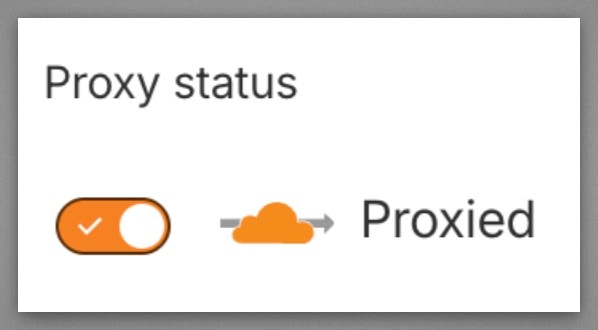
Verify your domain's DNS records have the **Cloudflare proxy enabled** (orange cloud icon). Logpush for HTTP Requests only captures traffic that flows through the Cloudflare network. If the proxy is off (gray cloud / "DNS only"), Cloudflare never sees the requests and can't push logs.
Go to your Cloudflare dashboard → **DNS** → **Records** and make sure the **Proxy status** shows the orange cloud ("Proxied") for your domain's A/AAAA/CNAME records.
 ## Step 6: Finish
Once submitted, your Cloudflare Logpush job will automatically send crawler logs to Promptwatch when an AI crawler visits your website. Depending on how active your website is, this can take a few minutes to appear.
For a full list of API response codes, see [API Response Codes](/docs/crawler-logs/api-responses).
## Step 6: Finish
Once submitted, your Cloudflare Logpush job will automatically send crawler logs to Promptwatch when an AI crawler visits your website. Depending on how active your website is, this can take a few minutes to appear.
For a full list of API response codes, see [API Response Codes](/docs/crawler-logs/api-responses).
