> ## Documentation Index
> Fetch the complete documentation index at: https://promptwatch.com/docs/llms.txt
> Use this file to discover all available pages before exploring further.

# Cloudflare Workers

> Deploy a Cloudflare Worker to stream crawler logs

<div style={{ display: "flex", alignItems: "center", justifyContent: "center", marginBottom: 0 }}>
  <img alt="Cloudflare" height="40" src="https://www.promptwatch.com/docs/integration-logos/card/cloudflare.png" width="40" />
</div>

<p style={{ textAlign: "center", color: "#6b7280", marginTop: 8, marginBottom: 24 }}>
  Deploy a Worker to analyze your traffic
</p>

<Tabs>
  <Tab title="Auto Deploy">
    <p className="font-medium text-sm">Create an access token so Promptwatch can deploy the crawler log Worker for you</p>

    <p className="text-muted-foreground text-xs">
      We'll automatically discover your Cloudflare zone, upload the script, and configure the route.
    </p>

    <p className="font-bold text-muted-foreground text-xs italic">The token is only used for this deployment and is never stored.</p>

    ### Step 1: Create an API token on Cloudflare

    <p className="text-muted-foreground text-xs">
      Go to{" "}
      <a href="https://dash.cloudflare.com/profile/api-tokens">dash.cloudflare.com → My Profile → API Tokens</a>{" "}
      and create a new <span className="font-medium">Custom Token</span>.
    </p>

    <p className="text-muted-foreground text-xs">Enable the following permissions:</p>

    * **Account / Workers Scripts / Edit** — Upload the crawler-log Worker script
    * **Zone / Zone / Read** — Locate your Cloudflare zone by domain name
    * **Zone / Workers Routes / Edit** — Attach the script to your domain route

    ### Step 2: Paste the token and deploy

    <p className="text-muted-foreground text-xs">We'll take it from here — the rest is automatic.</p>

    <Note>
      Auto-deploy is only available inside the Promptwatch app. Open **Crawler Logs → Settings**, select **Cloudflare Workers**, switch to the **Auto Deploy** tab, paste your Cloudflare API token, and click **Deploy Worker**.
    </Note>
  </Tab>

  <Tab title="Manual">
    ### Step 1: Create an API Key

    Create an API key in Promptwatch. Go to **Settings → API Keys** in your [Promptwatch dashboard](https://app.promptwatch.com).

    ### Step 2: Create an Application

    Create a new application in your Cloudflare account:

    1. Go to your [Cloudflare dashboard](https://dash.cloudflare.com) → **Workers & Pages**
    2. Click **Create application**
    3. Click **Start with Hello World!**
    4. Give it a name (e.g., `promptwatch-analytics`)
    5. Click **Deploy**

    ### Step 3: Paste the Worker Script

    On the Worker page, click **Edit** in the top right corner and paste in the code below:

    ```javascript theme={null}
    /**
     * Cloudflare Worker - stream page views to analytics server
     *
     * Sends JSON in the expected crawler logs schema.
     * Content type filtering is handled server-side.
     */
    const ANALYTICS_ENDPOINT = "https://logs.promptwatch.com/event";

    export default {
      async fetch(request, env, ctx) {
        const { pathname, search } = new URL(request.url);

        // 1. Make the upstream request (cache/origin)
        const response = await fetch(request);
        
        const contentType = response.headers.get("content-type")?.split(";")[0];
        const queryString = search.startsWith("?") && search.length > 1 ? search.slice(1) : null;

        // 2. Build the log object
        const log = {
          timestamp: new Date().toISOString(),
          status_code: response.status,
          request_method: request.method,
          request_path: pathname,
          query_string: queryString,
          content_type: contentType,
          client_ip: request.headers.get("CF-Connecting-IP") || null,
          hostname: request.headers.get("Host") || null,
          user_agent: request.headers.get("User-Agent") || null,
          referrer: request.headers.get("Referer") || null,
        };

        // 3. Fire-and-forget upload - never delays the visitor
        ctx.waitUntil(
          fetch(ANALYTICS_ENDPOINT, {
            method: "POST",
            headers: {
              "Content-Type": "application/json",
              "X-API-Key": env.ANALYTICS_KEY,
            },
            body: JSON.stringify(log),
          }).catch(() => {}), // swallow network errors
        );

        return response;
      },
    };
    ```

    Promptwatch identifies AI crawlers automatically and only stores AI crawler visits, all other traffic is discarded. You can safely send all your server logs without worrying about non-crawler data being retained.

    If you prefer to only forward AI crawler traffic, you can use the user agents listed below to pre-filter on your side. Keep in mind that you'll need to maintain this list yourself as new crawlers emerge.

    <AccordionGroup>
      <Accordion title="OpenAI (4)">
        | Name              | User Agent      | Full User Agent                                                                                                                                                                       | Description                                                                  |
        | ----------------- | --------------- | ------------------------------------------------------------------------------------------------------------------------------------------------------------------------------------- | ---------------------------------------------------------------------------- |
        | GPT Bot           | `GPTBot`        | `Mozilla/5.0 AppleWebKit/537.36 (KHTML, like Gecko); compatible; GPTBot/1.3; +https://openai.com/gptbot`                                                                              | Used to crawl content for training OpenAI's generative AI foundation models. |
        | SearchBot         | `OAI-SearchBot` | `Mozilla/5.0 (Macintosh; Intel Mac OS X 10_15_7) AppleWebKit/537.36 (KHTML, like Gecko) Chrome/131.0.0.0 Safari/537.36; compatible; OAI-SearchBot/1.3; +https://openai.com/searchbot` | Used by ChatGPT search to surface websites in search results.                |
        | ChatGPT Citations | `ChatGPT-User`  | `Mozilla/5.0 AppleWebKit/537.36 (KHTML, like Gecko); compatible; ChatGPT-User/1.0; +https://openai.com/bot`                                                                           | Used for user actions in ChatGPT when visiting web pages.                    |
        | Ads Bot           | `OAI-AdsBot`    | `Mozilla/5.0 AppleWebKit/537.36 (KHTML, like Gecko); compatible; OAI-AdsBot/1.0; +https://openai.com/adsbot`                                                                          | Used to validate the safety of web pages submitted as ads on ChatGPT.        |
      </Accordion>

      <Accordion title="Anthropic (5)">
        | Name              | User Agent         | Full User Agent                                                                                                  | Description                                                                                                    |
        | ----------------- | ------------------ | ---------------------------------------------------------------------------------------------------------------- | -------------------------------------------------------------------------------------------------------------- |
        | Claude Bot        | `ClaudeBot`        | `Mozilla/5.0 AppleWebKit/537.36 (KHTML, like Gecko); compatible; ClaudeBot/1.0; +claudebot@anthropic.com)`       | Used to crawl content for training Anthropic's generative AI models.                                           |
        | Claude Citations  | `Claude-User`      | `Mozilla/5.0 AppleWebKit/537.36 (KHTML, like Gecko); compatible; Claude-User/1.0; +claudebot@anthropic.com)`     | When individuals ask questions to Claude or use Claude Code, it may access websites using a Claude-User agent. |
        | Claude Search Bot | `Claude-SearchBot` | `Mozilla/5.0 AppleWebKit/537.36 (KHTML, like Gecko; compatible; Claude-SearchBot/1.0; +searchbot@anthropic.com)` | Navigates the web to improve search result quality for users.                                                  |
        | Claude Web        | `claude-web`       | `Mozilla/5.0 (compatible; claude-web/1.0; +http://www.anthropic.com/bot.html)`                                   | Targeted crawler for recent web content, feeding the Claude browser agent with updated site data.              |
        | Anthropic AI      | `anthropic-ai`     | `Mozilla/5.0 (compatible; anthropic-ai/1.0; +http://www.anthropic.com/bot.html)`                                 | Primary Anthropic crawler that collects broad web data for Claude model development.                           |
      </Accordion>

      <Accordion title="Google (3)">
        | Name                 | User Agent        | Full User Agent                                                                                                                                                                                                                                | Description                                                                                              |
        | -------------------- | ----------------- | ---------------------------------------------------------------------------------------------------------------------------------------------------------------------------------------------------------------------------------------------- | -------------------------------------------------------------------------------------------------------- |
        | Gemini               | `Google-Extended` | `Mozilla/5.0 (compatible; Google-Extended/1.0; +http://www.google.com/bot.html)`                                                                                                                                                               | Controls whether content can be used for training Gemini AI models.                                      |
        | Google Mobile Agent  | `Google-Agent`    | `Mozilla/5.0 (Linux; Android 6.0.1; Nexus 5X Build/MMB29P) AppleWebKit/537.36 (KHTML, like Gecko) Chrome/W.X.Y.Z Mobile Safari/537.36 (compatible; Google-Agent; +https://developers.google.com/crawling/docs/crawlers-fetchers/google-agent)` | Used by Google AI agents to autonomously browse the web and complete tasks on behalf of users (mobile).  |
        | Google Desktop Agent | `Google-Agent`    | `Mozilla/5.0 AppleWebKit/537.36 (KHTML, like Gecko; compatible; Google-Agent; +https://developers.google.com/crawling/docs/crawlers-fetchers/google-agent) Chrome/W.X.Y.Z Safari/537.36`                                                       | Used by Google AI agents to autonomously browse the web and complete tasks on behalf of users (desktop). |
      </Accordion>

      <Accordion title="Perplexity (2)">
        | Name                 | User Agent        | Full User Agent                                                                                                               | Description                                                                      |
        | -------------------- | ----------------- | ----------------------------------------------------------------------------------------------------------------------------- | -------------------------------------------------------------------------------- |
        | Perplexity Bot       | `PerplexityBot`   | `Mozilla/5.0 AppleWebKit/537.36 (KHTML, like Gecko; compatible; PerplexityBot/1.0; +https://perplexity.ai/perplexitybot)`     | Used to surface and link websites in Perplexity search results.                  |
        | Perplexity Citations | `Perplexity-User` | `Mozilla/5.0 AppleWebKit/537.36 (KHTML, like Gecko; compatible; Perplexity-User/1.0; +https://perplexity.ai/perplexity-user)` | Used for user actions in Perplexity when visiting web pages to answer questions. |
      </Accordion>

      <Accordion title="Cohere (1)">
        | Name      | User Agent  | Full User Agent                                                           | Description                                                                                     |
        | --------- | ----------- | ------------------------------------------------------------------------- | ----------------------------------------------------------------------------------------------- |
        | Cohere AI | `cohere-ai` | `Mozilla/5.0 (compatible; cohere-ai/1.0; +http://www.cohere.ai/bot.html)` | Collects textual data for Cohere's language models, helping refine large-scale text generation. |
      </Accordion>

      <Accordion title="Mistral (2)">
        | Name                 | User Agent        | Full User Agent                                                                                                        | Description                                                                                         |
        | -------------------- | ----------------- | ---------------------------------------------------------------------------------------------------------------------- | --------------------------------------------------------------------------------------------------- |
        | Mistral AI Citations | `MistralAI-User`  | `Mozilla/5.0 AppleWebKit/537.36 (KHTML, like Gecko; compatible; MistralAI-User/1.0; +https://docs.mistral.ai/robots)`  | Used for user actions in LeChat when visiting web pages to answer questions.                        |
        | Mistral AI Index     | `MistralAI-Index` | `Mozilla/5.0 AppleWebKit/537.36 (KHTML, like Gecko; compatible; MistralAI-Index/1.0; +https://docs.mistral.ai/robots)` | Used to index content for Mistral AI's search engine, which helps answer user questions in Le Chat. |
      </Accordion>

      <Accordion title="DeepSeek (1)">
        | Name     | User Agent    | Full User Agent                                                                | Description                                                         |
        | -------- | ------------- | ------------------------------------------------------------------------------ | ------------------------------------------------------------------- |
        | DeepSeek | `DeepSeekBot` | `Mozilla/5.0 (compatible; DeepSeekBot/1.0; +http://www.deepseek.com/bot.html)` | Used to crawl content for training DeepSeek's generative AI models. |
      </Accordion>

      <Accordion title="xAI / Grok (3)">
        | Name             | User Agent        | Full User Agent                       | Description                                   |
        | ---------------- | ----------------- | ------------------------------------- | --------------------------------------------- |
        | Grok Bot         | `GrokBot`         | `GrokBot/1.0 (+https://x.ai)`         | Used for training Grok AI.                    |
        | Grok Search      | `xAI-Grok`        | `xAI-Grok/1.0 (+https://grok.com)`    | Used for Grok's search capabilities.          |
        | Grok Deep Search | `Grok-DeepSearch` | `Grok-DeepSearch/1.0 (+https://x.ai)` | Used for Grok's advanced search capabilities. |
      </Accordion>
    </AccordionGroup>

    ### Step 4: Environment Variables

    In your Worker settings, add a secret for your API key:

    1. Open the **Settings** tab for your Worker
    2. Under **Variables and secrets**, click **Add**
    3. Select **Secret**
    4. Set the name to `ANALYTICS_KEY`
    5. Set the value to the API key you created in Step 1

    ### Step 5: Deploy to a Route

    Deploy your Worker to a route:

    1. Navigate to **Domains**
    2. Select the domain you're setting up
    3. In the left-hand navigation, click **Worker Routes**
    4. Add a new route: `yourdomain.com/*`
    5. Select your Worker from the dropdown
    6. Save and deploy

    <Warning>
      The Worker will intercept all requests to your domain. It transparently passes through all traffic while logging HTML page views to Promptwatch.
    </Warning>

    ### Step 6: Verify Cloudflare Proxy is Enabled

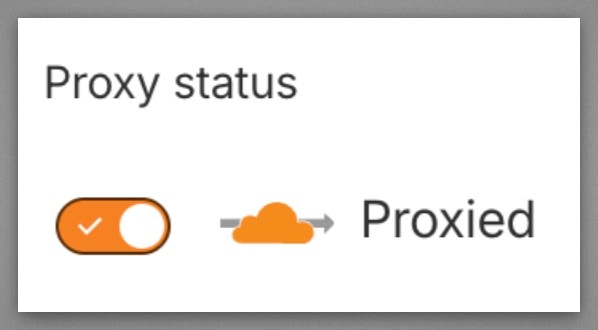
    Verify your domain's DNS records have the **Cloudflare proxy enabled** (orange cloud icon). Workers Routes only intercept traffic that flows through the Cloudflare network. If the proxy is off (gray cloud / "DNS only"), requests go directly to your origin and bypass the Worker entirely.

    Go to your Cloudflare dashboard → **DNS** → **Records** and make sure the **Proxy status** shows the orange cloud ("Proxied") for your domain's A/AAAA/CNAME records.

    <img src="https://mintcdn.com/promptwatch/zIch_xXSzUzN_M1-/crawler-logs/cloudflare-proxy-enabled.jpeg?fit=max&auto=format&n=zIch_xXSzUzN_M1-&q=85&s=f4e04ea761a7e82b5d64bef4cdf474ce" alt="Cloudflare DNS proxy enabled" style={{ maxWidth: 240, borderRadius: 8 }} width="598" height="330" data-path="crawler-logs/cloudflare-proxy-enabled.jpeg" />

    ### Step 7: Finish

    Once deployed, your Worker will automatically send crawler logs to Promptwatch.
  </Tab>
</Tabs>

<Note>
  For a full list of API response codes, see [API Response Codes](/docs/crawler-logs/api-responses).
</Note>