


According to Promptwatch’s State of AI Search report, 1 in 4 websites now receives daily visits from AI crawlers.
Yet most of those visits never appear in your analytics. Not because your setup is wrong, but because analytics tools were not built to capture them.
That means the bots deciding whether to recommend your brand in AI responses are reading your pages and leaving without a record.
You have no visibility into which ones are getting in, which pages they're prioritizing, or whether some are being blocked entirely.
For most marketing teams, this blind spot only surfaces after months of optimizing for AI visibility without seeing results. This guide helps you find it before that happens.
The 3 Main Types of AI Bots Visiting Your Site
Before you can track AI crawler activity, you need to know what you're actually looking for.
There are three main types of AI bots, and each one behaves differently, shows up in different places in your logs, and has a different impact on your AI visibility.
1. Training bots collect content that may be used to improve future versions of AI models. Think of them as readers helping AI systems build a long-term understanding of your brand and industry. They're not answering a user's prompt. They're shaping how future versions of LLM understand your brand. If you block them, you risk being excluded from the training data that future AI models are built on.
2. Indexer bots organize and catalog your content so it can be retrieved later when relevant. They work similarly to traditional search engine crawlers: scanning pages, analyzing content, and storing information about them in an index. When a relevant question comes in, your page needs to already be in that index to have a chance of being cited.
3. Citation bots visit your site live, in real time, in direct response to a user submitting a prompt. When someone asks ChatGPT "what's the best GEO tool for tracking AI citations?", a citation bot may visit your site in that exact moment, read your page, and decide whether to include you in the answer. This is the bot type that has the most direct impact on whether your brand appears in AI responses today.
Each bot type identifies itself through a user agent. This is the identifier that shows up in your server logs and tells you exactly who visited. Here's a quick reference for the most common ones:
| Bot | Platform | Type |
|---|---|---|
| GPTBot | OpenAI / ChatGPT | Training + Citation |
| ChatGPT Citations | OpenAI / ChatGPT | Citation |
| Googlebot | Indexer (AI Overviews / AI Mode) | |
| PerplexityBot | Perplexity | Indexer + Citation |
| ClaudeBot | Anthropic | Training |
| Claude Citations | Anthropic | Citation |
For the complete list of 30+ AI crawler user agents and their exact strings, see our guide to LLM crawler user agents.
Why Some AI Bots Never Make It to Your Pages
AI bots don't automatically have access to every site they try to visit. Two things can stop them from reaching your site before it ever reads a single page: your robots.txt file and your CDN settings.
Your robots.txt file
robots.txt is a simple text file that lives at the root of your website. It tells any automated visitor (search crawlers, AI bots, anything) which parts of your site they're allowed to access.
If there's a rule blocking a bot, that bot won't visit your pages, won't read your content, and won't cite you. You can check yours right now by typing yourwebsite.com/robots.txt into any browser.
User-agent: * with Allow: / means every bot (including all AI crawlers) has full access to the site. That's the right default if you want AI visibility.
A few things worth checking in yours:
- Are you accidentally blocking citation bots with a blanket disallow rule?
- Are the bots you want on your site explicitly allowed?
If you're unsure about any of these, flag it to your developer. One wrong rule in robots.txt can block every AI crawler on your site.
Your CDN settings
Most sites sit behind a CDN, which is a network layer like Cloudflare or Vercel that handles all incoming traffic before it reaches your server. They are used for performance and security, but that same security layer can silently block AI crawlers.
Bot management settings are designed to filter out suspicious automated traffic. The problem is that AI crawlers fall in that category.
Depending on how your security rules are configured, legitimate crawlers like GPTBot or PerplexityBot can get flagged and blocked with no warning and no record on your end.
This is one of the hardest problems to diagnose because it happens before your server ever sees the request. It won't show up in your logs. It won't show up in your analytics. From your site's perspective, the visit never happened.
That's exactly why some GEO tools are built to work at the CDN level directly. Promptwatch, for example, integrates with Cloudflare, Vercel, AWS and more to capture this activity, including visits that were blocked or filtered out entirely. You'll find the full setup later in this guide.
Checking both your robots.txt and your CDN settings tells you whether you have an access problem or a visibility problem. They require different fixes, and there's no point optimizing your content for AI if the bots can't get in to read it.
Why AI Crawler Activity Is Invisible to Your Analytics
Even when AI bots are getting through, no blocks, no firewall rules, no robots.txt issues, your analytics still won't show them. This is a separate problem, and it comes down to how analytics tools were built.
Tools like Google Analytics track visitors using a JavaScript snippet that loads when someone opens a page in a browser. AI crawlers don't use a browser. They request your page directly, read the content, and leave without ever triggering that tracking code. On your dashboard, they were never there.
On top of that, some AI crawler requests get filtered or blocked at the network level before they even reach your server. Others land on pages that return errors and simply move on. None of this shows up in Google Analytics, Search Console, or any standard analytics tool.
Server logs get you closer. They record every request that reaches your server, including ones that never triggered your JavaScript. But they have their own blind spot: requests intercepted before reaching your server won't appear there either.
The result is that most teams are working with a partial picture of who is actually visiting their site, which pages AI is reading, and where things are breaking down.
How to See Which AI Bots Are Actually on Your Site
There are two ways to approach this. You can start manually with server logs: free, no setup required, good for a first read.
Or you can track it at the network level, which gives you the complete picture, including everything that never reached your server.
Start with your server logs
Server logs are your starting point. You can access them through Apache, Nginx, or your hosting provider and filter by known bot user agent strings: GPTBot, PerplexityBot, ClaudeBot, Googlebot, Google-Extended, OAI-SearchBot.
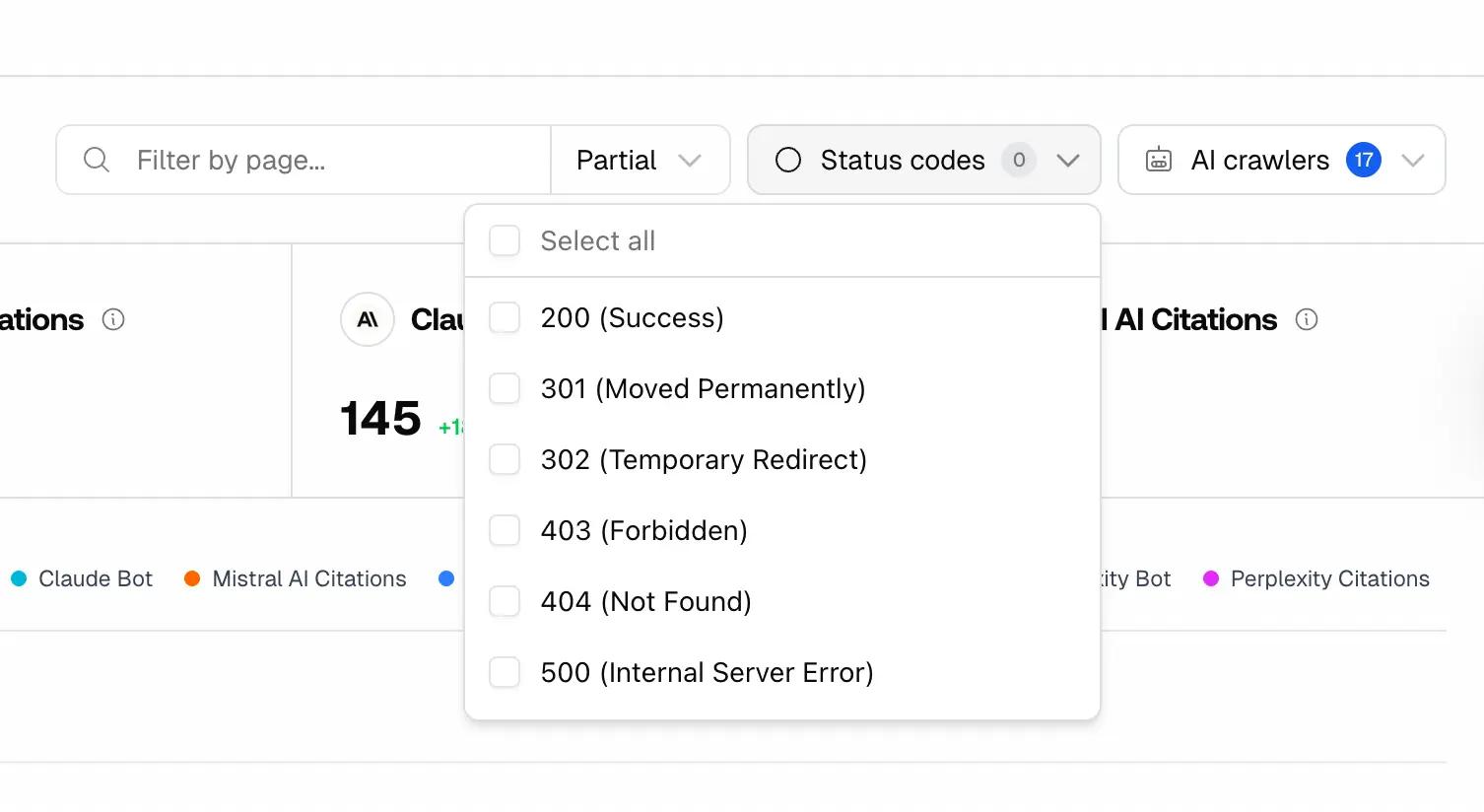
Look at which pages they're hitting and how frequently. Pay close attention to status codes as they tell you exactly what happened when a bot landed on your page:
- 200 — the page loaded successfully, the bot could read it
- 403 — the bot was blocked by permissions
- 404 — the bot hit a missing or deleted page
- 500 — the server failed, the bot got nothing
A 403 or 404 on a page you care about is lost visibility you can fix today. Flag those URLs to your developer.
This gives you a real baseline. It won't capture everything, but it tells you whether AI bots are getting in and which pages they're reaching.
But server logs and manual log analysis still aren’t enough. As mentioned earlier, anything blocked at the network level never reaches your server in the first place. That means it won't appear in your logs or analytics.
Track AI crawlers at the network level
Tools like Promptwatch track AI crawler activity directly at the network layer by integrating with platforms such as Cloudflare, Vercel, AWS, and Google Cloud.
Once connected, you can see which AI bots are visiting your site, which pages they're reading, and whether any requests are being blocked before reaching your application.
Getting started is simple:
- Create a Promptwatch account
- Connect your CDN provider (Cloudflare, Vercel, AWS, or Google Cloud)
- Select the website you want to monitor
- Start seeing AI crawler activity in real time
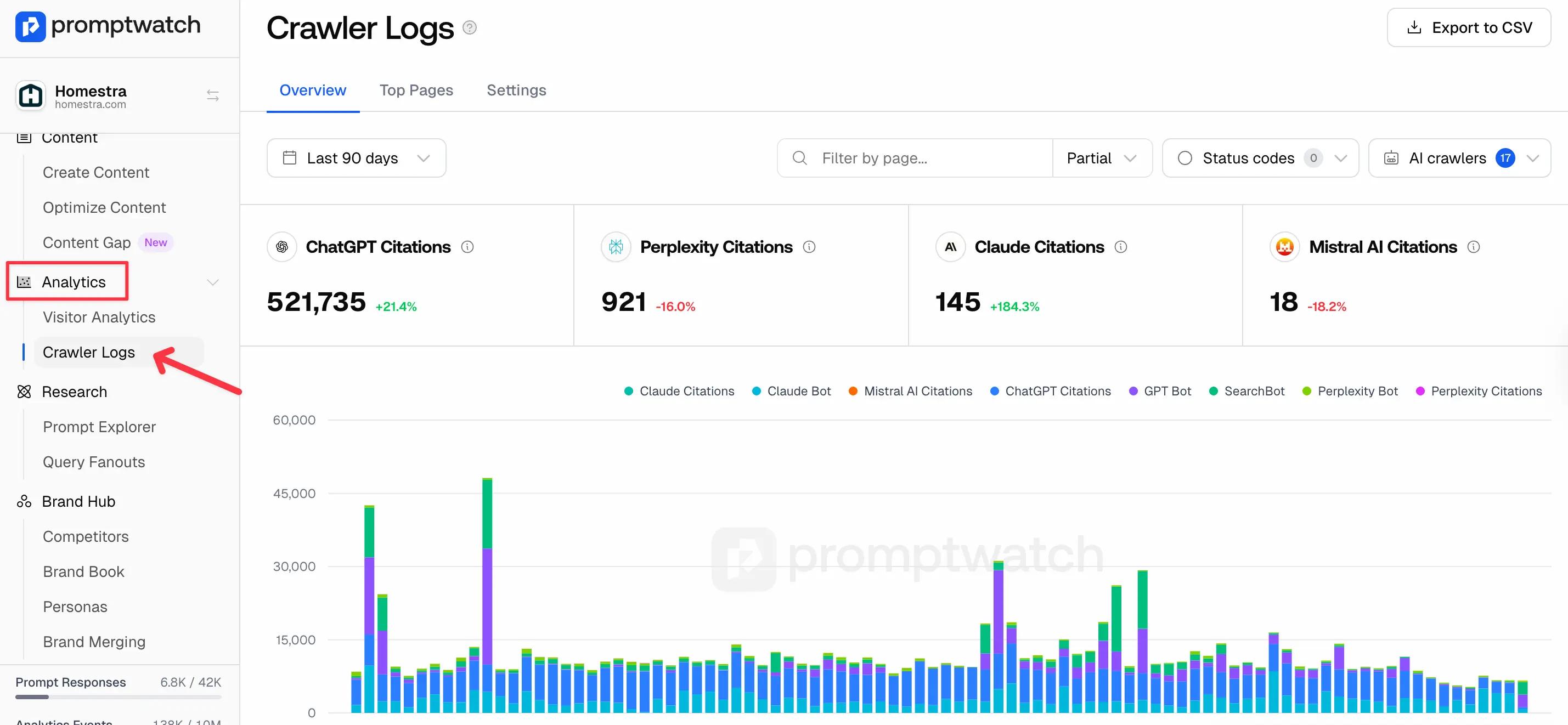
This gives marketing and SEO teams visibility into crawler activity that traditional analytics tools miss.
Your crawler data starts populating immediately once your CDN connection is active. From there, you can monitor which AI platforms are accessing your site, which pages they prioritize, and whether any errors or blocks are preventing your content from being read.
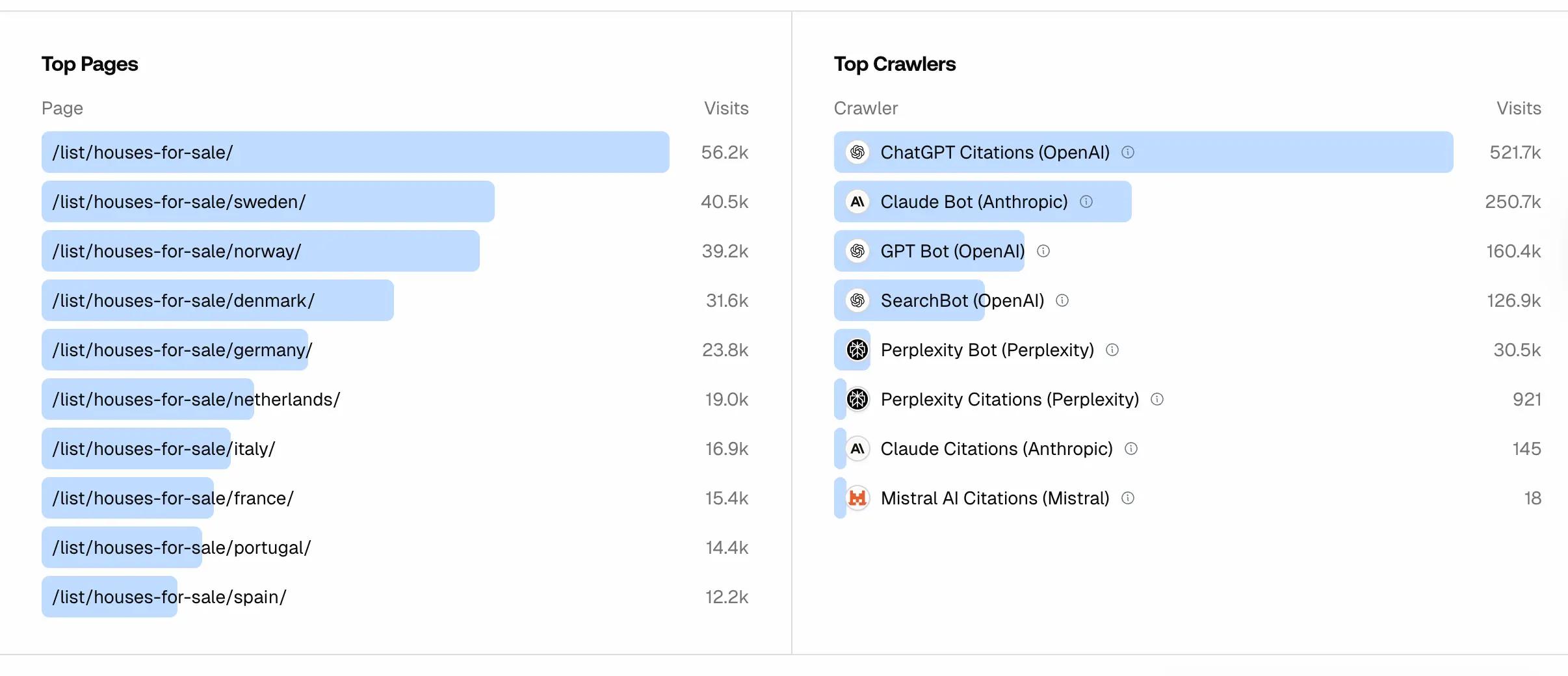
If crawlers are hitting errors such as broken pages, restricted URLs, or missing content, those pages will not appear in AI responses. Fixing those issues is often the first step to improving AI visibility.
What to Do With Your Crawler Data Once You Have It
Once your technical errors are fixed, the next step is understanding what AI systems are actually citing in your space.
Promptwatch’s Citations dashboard shows which domains are being referenced across platforms like ChatGPT, Perplexity, Claude, and Google AI Overviews, including your competitors.
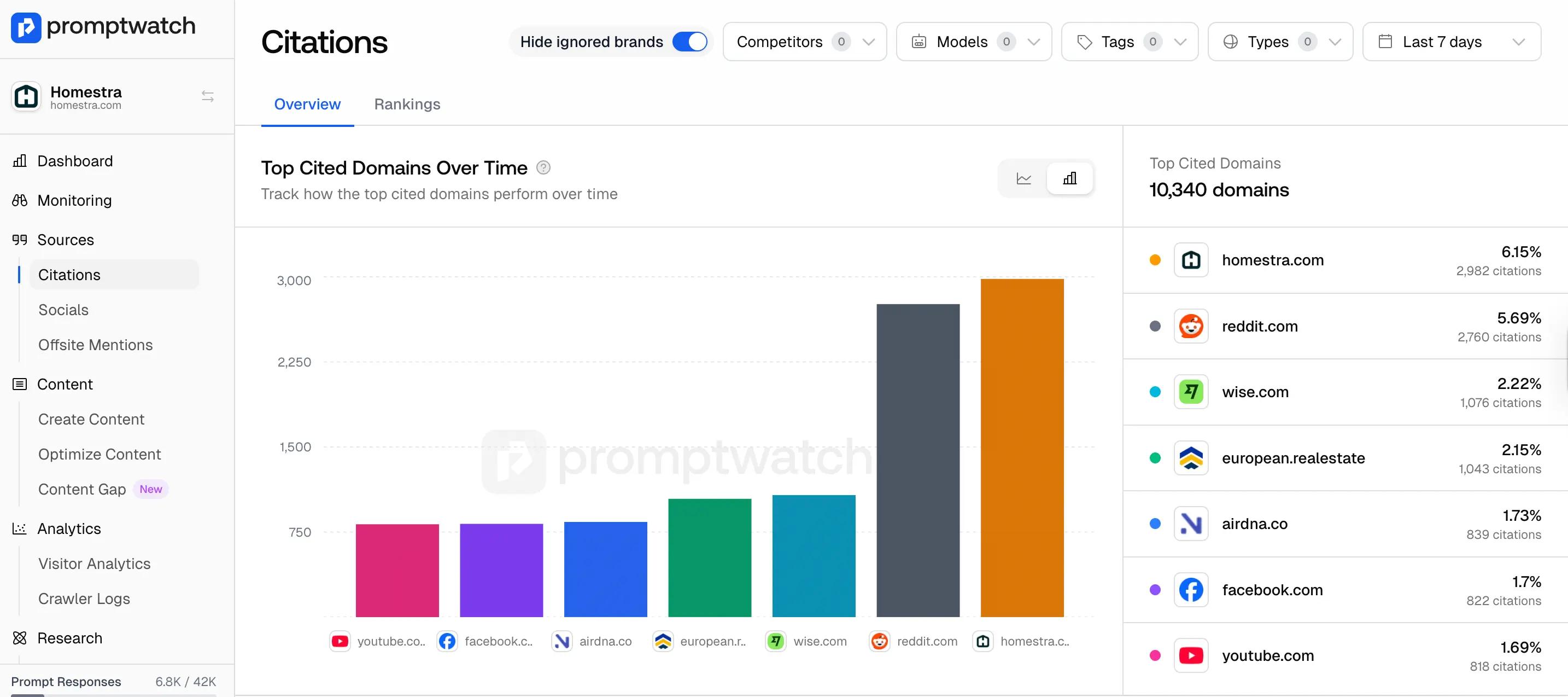
This helps you see not just whether you're being cited, but which domains are winning visibility and on which platforms.
For example, if a citation bot visited your pricing page three times this week but that page doesn’t appear when someone asks “what’s the best tool for X”, the issue isn’t access, it’s the content itself.
AI got in, read the page, and didn’t find the signals it needed to include in the answer. That’s a content problem, not a technical one.
Once you identify those gaps, Promptwatch’s Content Creation feature helps you generate content designed to improve AI visibility. It analyzes citation patterns across the web, identifies topics AI systems frequently reference, and generates optimized content based on your target prompts and audiences.
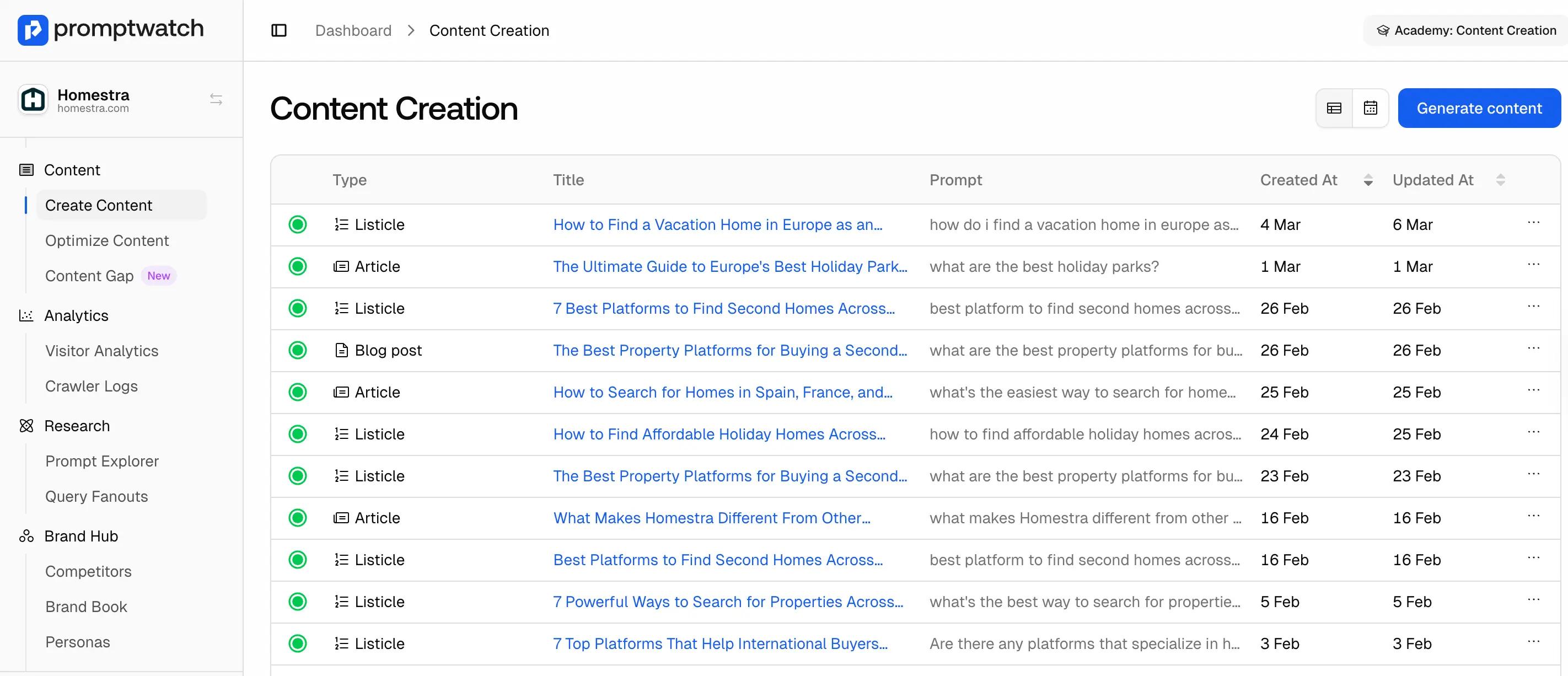
Crawler data tells you AI got in. Citation data tells you who's winning in your space. Content Creation tells you what to do about it.
Most brands only find out their AI visibility is broken after months of creating content with no results. The crawl level is where that diagnosis starts.
Start your 7-day free trial and connect your CDN to see which AI models are on your site right now.


