Improvement
Smoother AI Content Streaming
AI-generated content now streams more smoothly in the editor, with tokens appearing at a natural pace instead of in choppy bursts.

AI-generated content now streams more smoothly in the editor, with tokens appearing at a natural pace instead of in choppy bursts.
The content editor now disables the submit button when the prompt is empty, limits AI text selection to 2,500 characters to prevent oversized requests, and the prompts table shows when each prompt was created.
Filter your offsite mentions by type and source to zero in on the third-party citations that matter most. Quickly find mentions from specific content types or platforms.
Track your brand visibility in Kazakhstan with the new Kazakh language option for prompts and monitors.
The Sitemap page is now accessible directly from the main app sidebar, making it quicker to check AI crawler activity on your sitemap.
Track your brand visibility in even more markets. We've added Lithuanian, Latvian, Ukrainian, and Chinese (Simplified and Traditional) language options for prompts and monitors.
You can now add brand aliases right when creating a new project or during onboarding. No need to visit Brand Book separately: set up alternative names and spellings from the start.
The content optimization modal now features a sidebar layout that makes it easier to navigate between sections. Required settings are shown first, and you can save and go back between steps without losing your progress.
Generate detailed PDF reports for individual monitors. Share performance data, visibility scores, and competitor comparisons with stakeholders in a clean, printable format.
Our full list of known AI crawler user agents is now published in the docs and in-app. Copy individual user agents or the entire list to configure your own crawler log filtering.
Added new Google-Agent user agents to crawler detection. Your crawler logs now identify and track the latest Google AI crawlers accessing your content.
AI Mode is no longer restricted to specific countries. You can now select AI Mode as a search type for monitors in any supported country.
Generate and optimize content programmatically through the REST API v2. Use the same AI-powered content creation tools available in the dashboard directly from your own applications and workflows.
Connect your AI coding tools directly to your Promptwatch data. Our new MCP (Model Context Protocol) server lets you query visibility scores, citations, prompts, and more from tools like Cursor and Claude Desktop, right in your workflow.
Track how often your brand is mentioned in AI responses over time. A new mentions chart on the visibility dashboard shows trends in mention frequency, making it easier to spot growth or drops at a glance.
Google Search Console connections now work at the project level instead of the organization level. Connect multiple GSC properties to different projects and import topics directly from Search Console into the Prompt Explorer.
A round of fixes to keep things running smoothly: visibility scores now filter correctly when tags are applied, brand merging no longer times out for brands with many similar names, deleted projects no longer cause redirect loops, and AI responses are sorted by newest first by default.
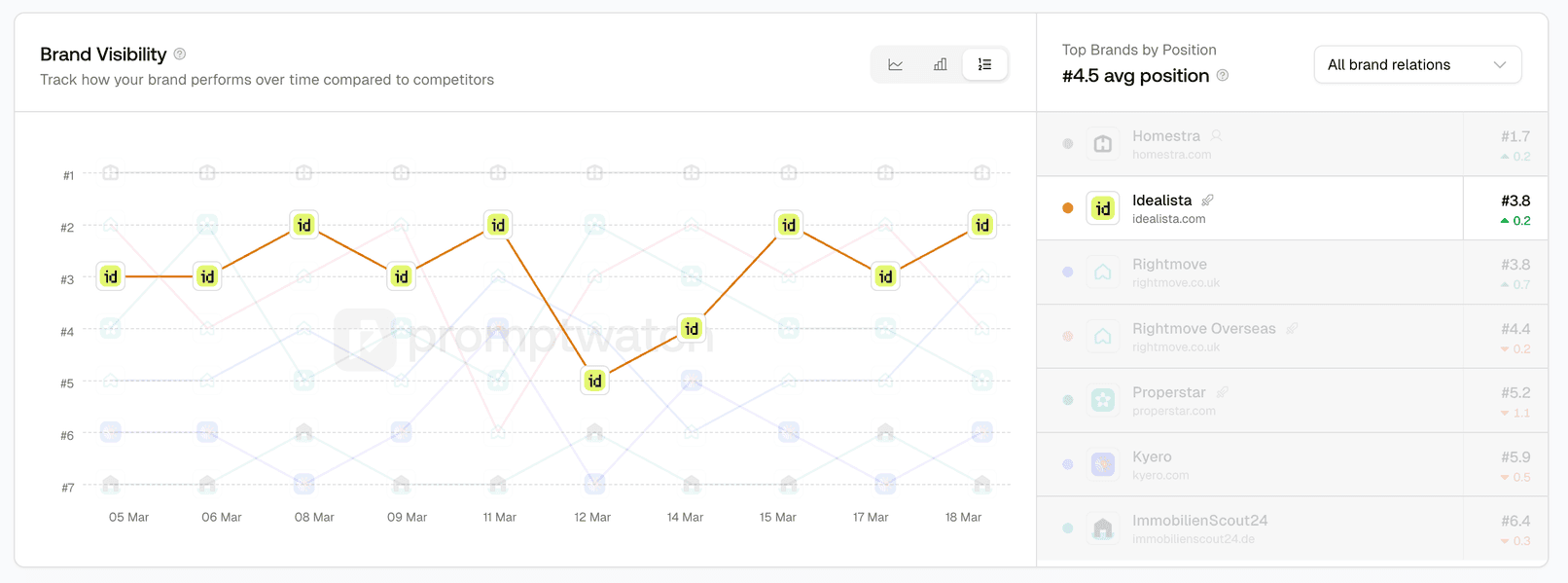
See where your brand ranks in AI responses. A new chart shows your average position and rank across prompts over time, helping you understand whether AI models are listing you first or further down.
Two new dedicated reports are now available. The Query Fan-Out report shows how AI models expand your queries into sub-queries, and the YouTube Citation report lets you see which videos are being cited, how often, and by which AI models.
Dive deeper into how third-party sites are cited alongside your brand. New stats and breakdowns show which offsite sources appear most frequently in AI responses, helping you understand the competitive citation landscape.
Join thousands of companies using Promptwatch to monitor and improve their presence in AI search results.

