


TL;DR
- AI coding agents choose a library or API from four inputs: what the model learned in training, what it finds through web search, the context in the project, and whether the code it writes actually runs.
- Promptwatch tracks Claude Code and Codex on every plan, so you can test which tool each agent picks for your category and check again after you change your docs.
When a developer asks Claude Code to "add authentication to this app", the agent picks a provider, installs it, and writes the integration in one go. For an SDK or API company, the useful question is what makes the agent pick one tool over another. This guide breaks the choice into the four inputs agents actually use, shows where Claude Code and Codex weigh them differently, and explains what you can change on your side. It builds on Promptwatch's guide to track whether Claude Code and Codex recommend your product.
How do AI coding agents choose a library or API?
AI coding agents choose a library or API by combining four inputs:
- the model's training data
- live web search
- the context of the current project
- the result of running the code
Training data supplies the default. Search and project context can update that default. Execution decides whether the pick survives.
Each input favors a different kind of work from vendors.
- Training data rewards years of public usage.
- Search rewards current, task-specific pages.
- Project context rewards anything a developer or tool places in the repo.
- Execution rewards install steps and APIs that work on the first try.
Training data sets the default
The model's memory of the ecosystem is the strongest input. Amplifying ran 2,430 app-building prompts through Claude Code in February 2026 and found that 76% of rephrased requests produced the same stack. The wording of the prompt barely changed the result, so the default came from what the model had already learned.
That default shifts between model versions. In the same study, Vitest's share of testing-framework picks rose from 4% to 59% across Claude models, while Express received 0 picks across 119 API-layer prompts. A tool can gain or lose its default position with a model release, without any change on the vendor's side.
Web search updates the default
When the model's memory looks thin or outdated, agents search the web. Armature's September 3, 2026 study of 5,292 validated sessions found that Codex used web search in 94% of sessions, often with site-specific operators. Claude Code searched in about 30% of sessions overall, rising to around 80% in newer sectors where training data is sparse.
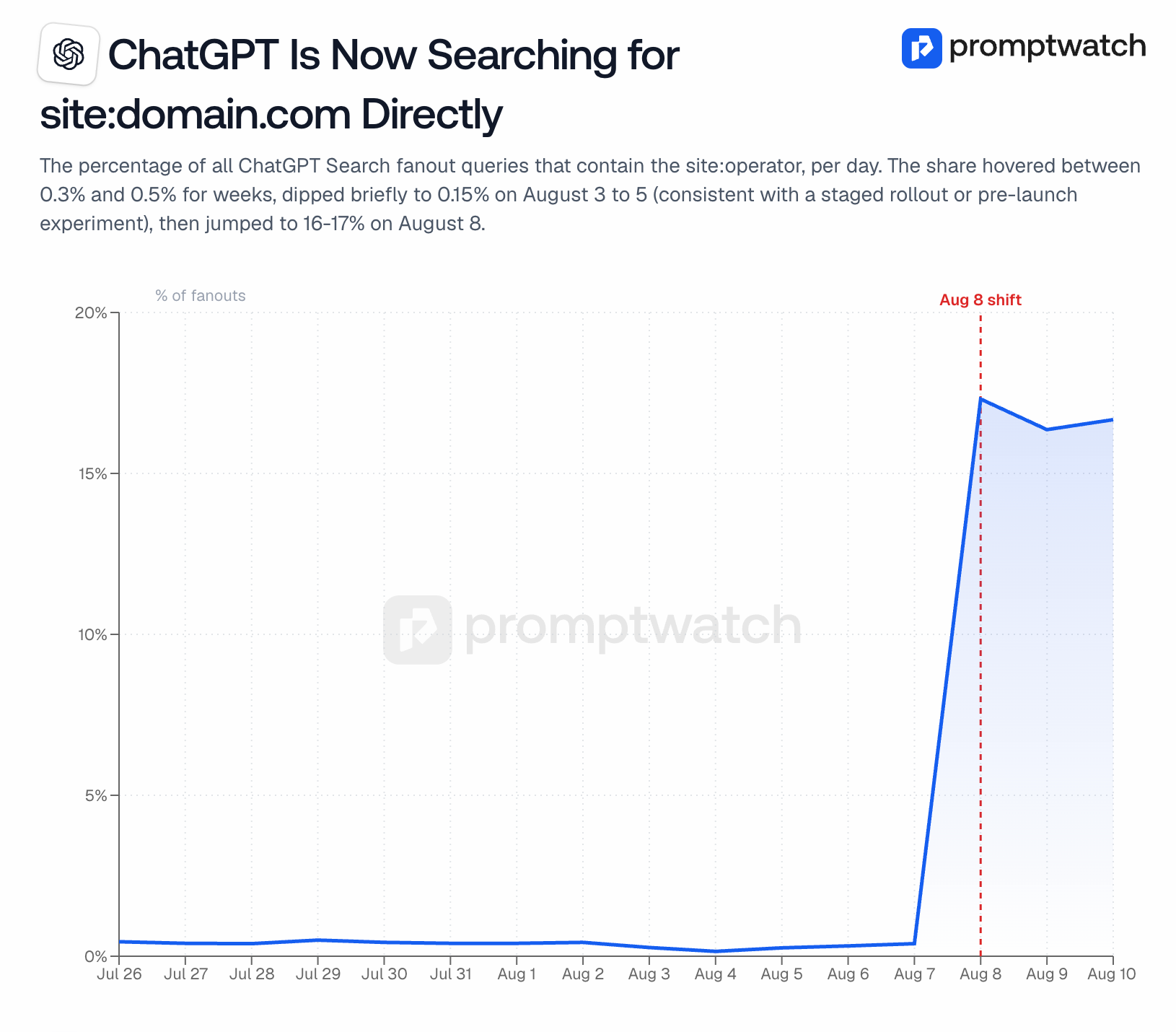
Promptwatch sees the same site: behavior in ChatGPT Search. On August 8, 2026, the share of fan-out queries using the site: operator jumped from about 0.4% to about 17% overnight. An agent that searches site:yourdocs.com lands on whatever page best matches the task, so a page titled after the task wins over a generic product overview.
Project context can override both
Agents read the project before they choose. Existing dependencies, a CLAUDE.md or AGENTS.md file, connected MCP servers, and installed skills all shape the pick. Amplifying lists all four as channels vendors can use to influence Claude Code.
Context also explains why the same model picks different tools in different stacks. Amplifying found Claude Code recommends Drizzle in JavaScript projects and SQLModel in Python ones. Your tool competes inside the language and framework the developer already uses.
Execution decides whether the pick survives
Coding agents run what they write. If the install fails, authentication needs a manual browser step, or an error message is unclear, the agent tries another tool or writes its own code. In Amplifying's study, a custom-built solution was the most common pick in 12 of 20 categories. Armature found Claude Code built in-house in 19% of sessions, compared with 10% for Codex and Cursor.
For an API company, this makes the first five minutes of integration a ranking factor. An agent that hits a wall on step two will often write 200 lines of code instead of calling your API.
How Claude Code and Codex weigh these inputs differently
Claude Code and Codex use the same four inputs in different proportions, which is why they often recommend different tools. In Armature's sessions, Claude Code, Codex, and Cursor chose the same tool in only 42% of cases.
| Input | Claude Code | Codex | What it means for you |
|---|---|---|---|
| Web search | About 30% of sessions, around 80% in newer sectors | 94% of sessions, often with site: operators | Doc updates reach Codex first |
| Training data | Primary input in most sessions | Checked against live results | Claude Code reflects your long-term footprint |
| Build in-house | 19% of sessions | 10% of sessions | Easy integration matters most for Claude Code |
| Agreement across agents | Same tool as Codex and Cursor in 42% of cases | Same | Track each agent separately |
The practical consequence is timing. A new quickstart or comparison page can change Codex's picks within days, because Codex searches almost every time. Claude Code's picks move more slowly and depend more on your presence in public code, tutorials, and forums, plus how often it searches in your category.
What SDK and API companies can change
You can't edit a model's training data, but every input above responds to work on your side. These steps are ordered from fastest to slowest to show results.
Write docs pages named after tasks
Agents search for the task the developer gave them, such as "send transactional email from Next.js" or "add rate limiting to an Express API." Create pages whose title and first heading match those tasks, with the complete answer on that page. Put the install command, the authentication step, and a working example in the first screen.
The same holds for developer docs. A short page with a clear heading and a runnable snippet gets used more than a long overview.
Make the first integration work without a human
Every step an agent can't complete on its own counts against you. Offer API-key authentication for development, show the exact environment variable names, and keep version numbers in examples current. Write error messages that state the fix, because the agent reads them and decides what to do next.
Let AI agents fetch your docs
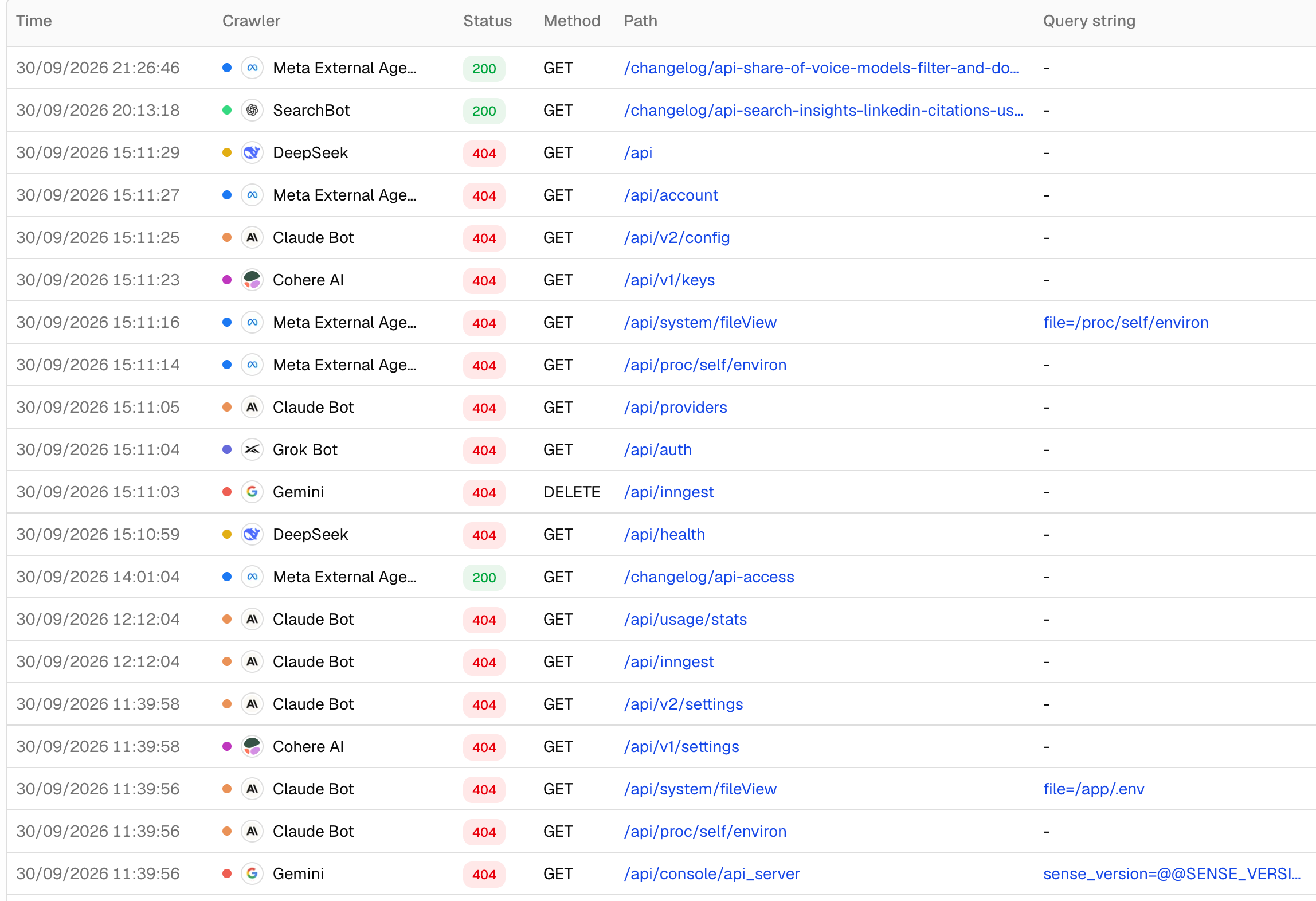
Coding agents and AI assistants fetch pages live when they search, so a docs page blocked at the CDN or by robots rules can't be used. Check whether you can see which AI bots are crawling your website and which of your pages they request.
Promptwatch's AI crawler logs record each bot request with the crawler name, page, status code, and timestamp. A docs page that returns a 403 to AI bots is invisible to agents that search, however good its content is.
Treat llms.txt and markdown as conveniences
Several competing guides list llms.txt as a quick win for coding agents. Promptwatch's published position is that llms.txt has no measurable impact on AI search visibility yet. Promptwatch's citation data also shows markdown files make up just 0.05% of all AI search citations.
Markdown and llms.txt can make your docs easier for an agent to read once it's already on your site. The evidence so far points to task-named HTML pages, crawl access, and working examples as what gets an agent there. Spend effort in that order.
Build presence in public code and forums
Training data is the slowest input to move and the hardest to lose. It comes from example repositories, GitHub READMEs, tutorials, Stack Overflow answers, and comparison posts written by other people. Each new model release resets part of the default, so steady public usage carries forward and a single launch spike fades.
Refresh your most-used docs and tutorials on a cycle. Promptwatch's data shows citation relevance holds for roughly 8 to 14 weeks before a refresh helps, and agents that search live pick up stale version numbers quickly.
Ship an MCP server or skill when the workflow needs one
An MCP server or agent skill puts your tool directly into the agent's project context. It works best for workflows developers repeat often inside the agent, such as querying data, deploying, or managing tickets. For a one-time install, a strong quickstart page usually does more.
How to measure which tools coding agents pick
Testing a few prompts by hand gives you one answer from one session. Coding agent outputs vary from run to run, so you need the same prompts repeated over time to see a real trend.
- Add Claude Code and Codex to a Promptwatch project. Both are available on every plan.
- Write task prompts for your category. Phrase them the way a developer instructs an agent, for example "What’s a good way to send transactional email from a Next.js app?" Promptwatch's AI prompt tracking lets you tag them by type and intent.
- Read the competitor heatmap per agent. It shows which tool each agent picks instead of yours, prompt by prompt, and where Claude Code and Codex disagree.
- Check crawler logs for the same pages. If an agent picks a competitor and your matching docs page has no AI bot visits, crawl access is the first thing to fix.
- Change one thing and re-measure. Publish a task page or fix an install step, then compare the next few weeks against the previous ones. Expect Codex to respond first.
Frequently asked questions
Do coding agents rely on training data or web search?
Both, in different proportions. Training data sets the default pick, and web search updates it when the model's knowledge looks thin or outdated. In Armature's September 2026 study, Codex searched the web in 94% of sessions and Claude Code in about 30%, rising to around 80% in newer sectors.
Does llms.txt help coding agents choose my SDK?
There's no evidence yet that it changes which SDK an agent picks. Promptwatch's position is that llms.txt has no measurable impact on AI search visibility so far. It can make docs easier to parse once an agent is reading them, but task-named pages, crawl access, and working examples are the higher-impact work.
Why does Claude Code write its own code instead of using my API?
Claude Code builds in-house when a custom solution looks simpler than integrating a vendor, or when an integration step fails. Armature found it built in-house in 19% of sessions, compared with 10% for Codex and Cursor. Clear install steps, API-key authentication, and error messages that state the fix reduce this.
How long do doc changes take to affect coding agent recommendations?
It depends on the agent. Codex searches the web in most sessions, so a new or fixed docs page can show up in its picks within days. Claude Code relies more on training data, so its picks move more slowly and can shift with new model releases.
Do Claude Code and Codex recommend the same tools?
Often not. In Armature's study of 5,292 validated sessions, Claude Code, Codex, and Cursor chose the same tool in only 42% of cases. A company can be the default in one agent and missing in another, so each agent needs its own tracking.

