

TL;DR
- To track AI search visibility by buyer persona, run the same prompt set once per persona and compare visibility, share of voice, and citations between the runs.
- Persona stacking adds a short buyer profile (role, situation, constraints, priorities) around each tracked prompt at run time, so the AI engine answers as if that person asked.
- A single blended visibility score averages every buyer together, which hides the segment where a competitor is winning.
- In Promptwatch, persona stacking is a monitor setting: each response is tagged with the persona that asked it, so a score change traces back to a specific buyer.
A technical evaluator and a CFO can type the same question into ChatGPT and walk away with different shortlists. AI engines read context about who is asking and adjust what they recommend, which sources they search, and how they describe each brand. Persona stacking is how you measure that difference instead of guessing at it.
This guide covers what persona stacking is, how it works inside a Promptwatch monitor, how to write a persona that actually changes the answer, and how to read the results.
Your blended visibility score averages away the buyer who signs the contract
Most AI visibility tracking runs prompts as an anonymous user. That gives you one number per prompt, averaged across every model and every run. It answers "how visible are we in general?" The question a revenue team asks is narrower: visible to whom?
In B2B, the people researching a purchase rarely want the same thing. The engineer checks API limits and SOC 2. The department head checks seat pricing and time-to-value. The economic buyer checks vendor stability and total cost of ownership. When each of them asks an AI engine "what's the best tool for X," the engine weighs different criteria, runs different searches, and can name different brands.
A blended score flattens that into one average. If you lead with technical evaluators and trail badly with budget owners, the average can look healthy while the buyer who approves the spend never hears your name.
The stakes are higher because the whole journey now runs inside the answer engine.
“We believe everything now happens in one chat, from discovery to decision. You don't have those drop-offs anymore.”
If research and the decision happen in one conversation, the persona asking that conversation decides which brands make the shortlist.
What is persona stacking?
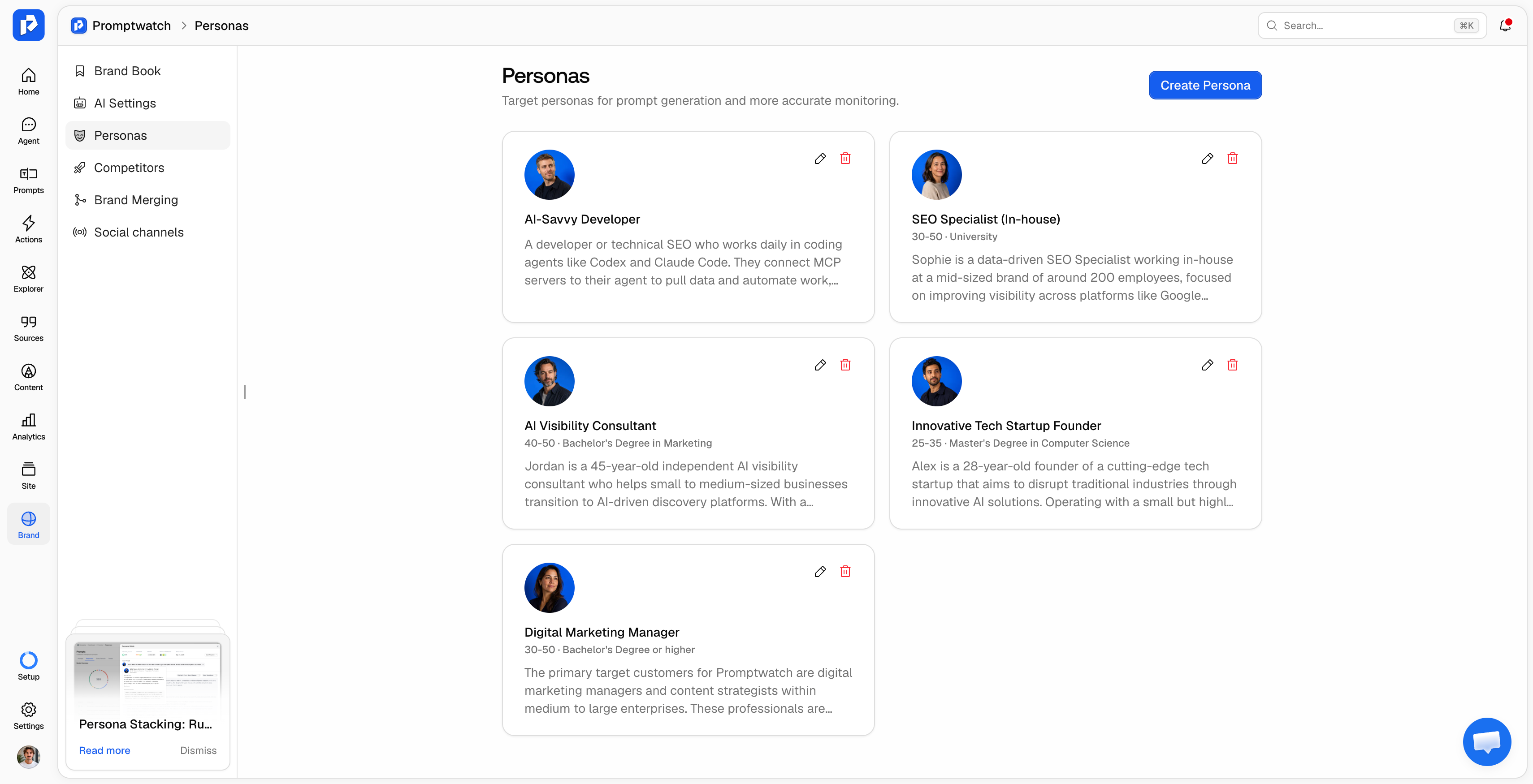
Persona stacking is a prompt-tracking method where a written buyer profile is added around each tracked prompt at run time, so the AI engine answers as that buyer. The tracked prompt text stays the same. Only the context about who is asking changes, which lets you compare visibility for each audience on an identical prompt set.
The term comes from the "stack": persona context on top, tracked prompt underneath, sent together to the engine on every scheduled collection. Promptwatch calls this setting persona stacking. Other vendors describe similar ideas as persona-based prompt tracking or audience segmentation.
Persona stacking vs. writing persona-flavored prompts
The common workaround is to write the persona into the prompt itself: "As a CFO at a 500-person SaaS company, what's the best AI visibility tool?" That works for a one-off check, and it creates three problems at scale.
First, every persona needs its own copy of every prompt, so a 50-prompt set becomes 200 prompts for four personas. Second, the prompts drift apart over time as people edit one copy and forget the others, and the comparison stops being clean. Third, you can't easily switch the persona off to see the general-audience baseline.
Persona stacking keeps one prompt set and swaps the profile around it. The comparison between personas stays fair because the question underneath is identical.
Persona stacking vs. ChatGPT memory and personalization
Personalization is the strongest objection to AI visibility tracking. In November 2025, SEO consultant Lily Ray reported that her own ChatGPT answers rarely matched what tracking tools showed, because ChatGPT rewrote her prompts with what it knew about her, including her New York City location (PPC Land coverage). ChatGPT uses conversation history, custom instructions, and location.
There are two ways to respond to that. The first is to track from clean, logged-out sessions, so no single account's history skews the data. Promptwatch does this by scraping the real ChatGPT, Gemini, Perplexity, and Google AI interfaces through location-matched sessions. API responses can differ from what users see, so before trusting any dataset, check whether AI search monitoring tools query the real ChatGPT or fake it via API.
Clean sessions also remove the one piece of personalization that matters most for B2B: who the buyer is. Persona stacking puts that context back in a controlled, repeatable form. You get the stable baseline of a clean session plus the role-specific answer a real buyer would get, without one person's chat history muddying the data.
A persona simulates context. It doesn't replicate a specific user's months of memory, and no tracking tool can. What it gives you is a consistent, comparable view of how the engine treats each buyer type.
How persona stacking works inside a monitor
In Promptwatch, a monitor is a panel of prompts that runs on a repeating schedule (daily by default) across the AI models you choose, scoped to one country, one language, and optionally a US state or city. A persona is an optional setting on that monitor. Personas live in the project's Brand Book, so every monitor in the project can reuse them.
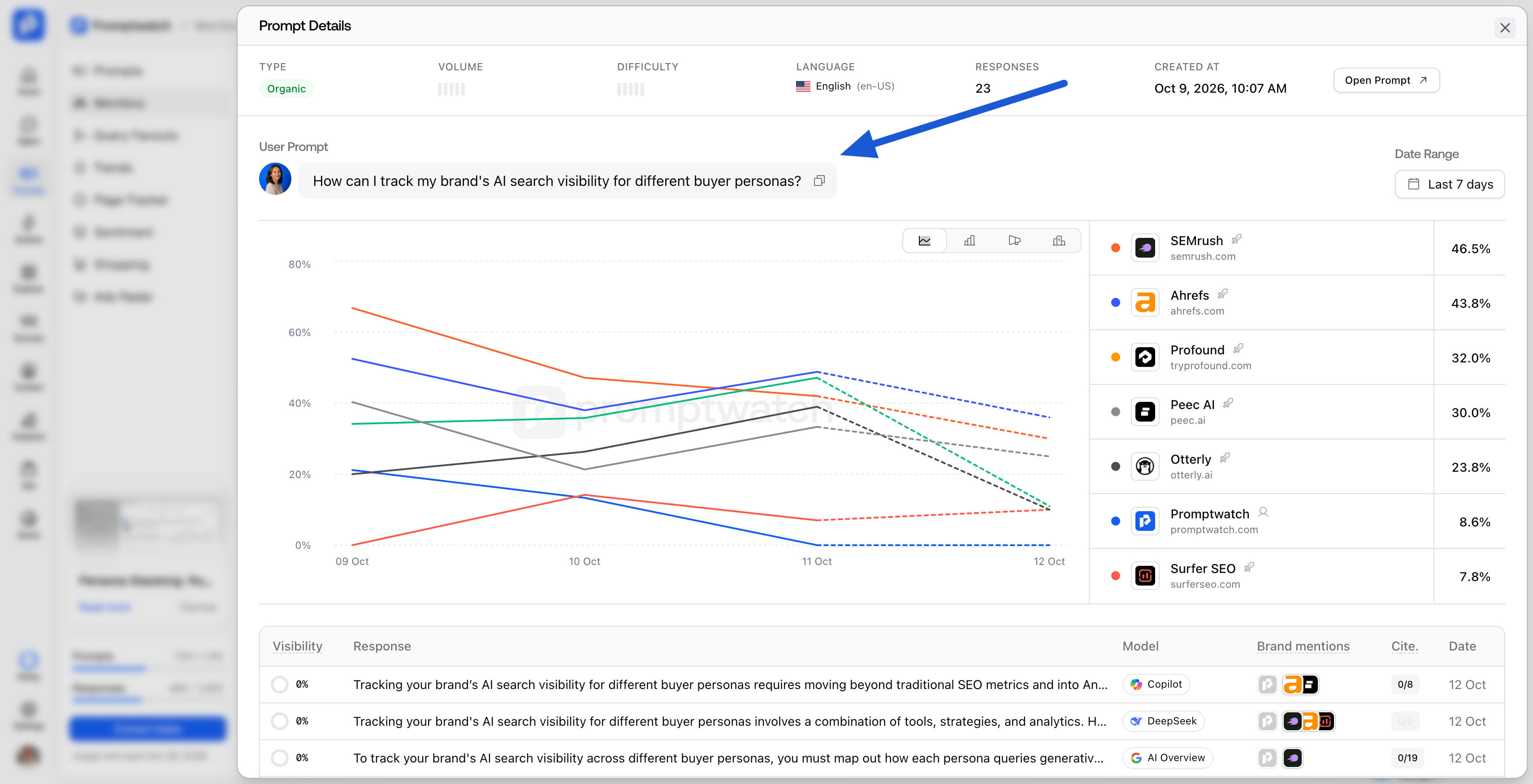
The run works in four steps:
- Persona. You write or generate a persona: a name, a short description, optional age range and education level, and a persona prompt describing who the person is and how they decide.
- Stack. At run time, the persona prompt wraps each tracked prompt. The tracked prompt text itself doesn't change.
- Collect. The stacked prompt runs on every collection across the monitor's models, through the same real-interface collection as any other monitor.
- Label. Each response carries a Persona card with the persona's name and traits, so any score movement traces back to the audience that produced it.
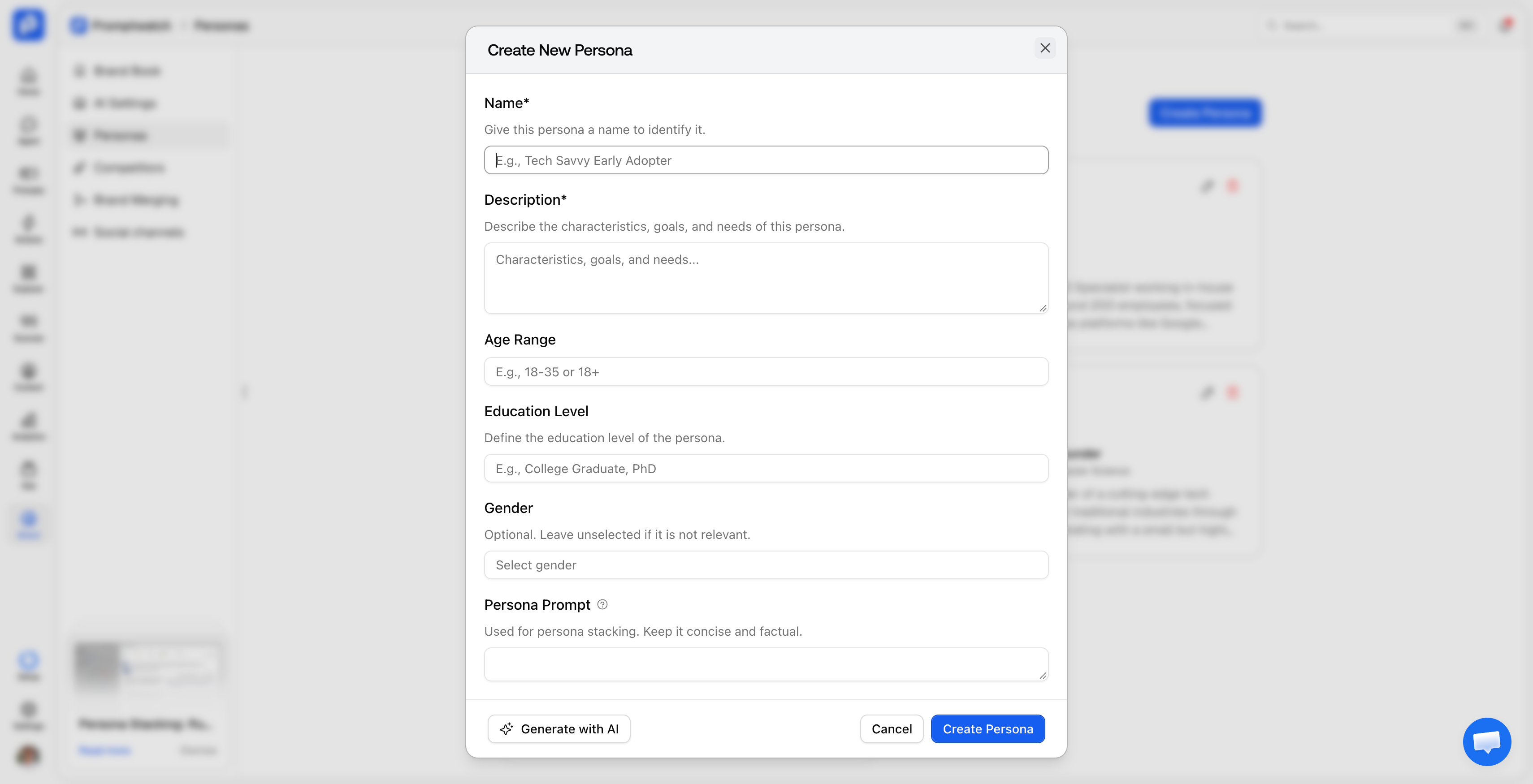
Setup rules worth knowing
- One persona per monitor. To compare audiences, run one monitor per persona with the same prompts. This keeps each time series clean.
- 30-character minimum. The stacking toggle stays disabled until the persona prompt has at least 30 characters.
- Off by default. With stacking off, a monitor collects the general-audience answer.
- Applies on the next run. Turning stacking on (in the Create Monitor dialog or later in monitor settings) takes effect on the next scheduled collection.
- Protected once used. A persona that has produced responses can't be deleted, and edits to a persona also apply to past responses that used it.
- Generate with AI. The "Generate with AI" option fills every persona field from your project's brand details, and you edit the result.
Persona stacking runs alongside the rest of AI prompt tracking in Promptwatch: prompt types, intent types, tags, query fan-outs, and geo targeting all still apply inside a persona monitor.
Four B2B personas that get different AI answers
The four buyer types below show up in most B2B software deals. Each one asks AI engines different questions and rewards different content. Use the table as a starting point for your own persona set.
| Persona | What they ask AI | What the engine weighs | Content that tends to earn the citation |
|---|---|---|---|
| Technical evaluator | API rate limits, SOC 2, self-hosting, migration effort | Documentation depth, integration specifics, security proof | Docs, API references, security pages, GitHub |
| Department head | Pricing tiers, seat limits, time-to-value | Clear pricing, onboarding speed, peer adoption | Pricing pages, comparison pages, case studies |
| Economic buyer | Total cost of ownership, vendor stability, acquisition risk | Funding, customer base, contract terms | Funding news, analyst coverage, review sites |
| First-time evaluator | Basic category questions ("what is X," "do I need X") | Category leaders and plain explanations | Explainers, glossaries, listicles |
Technical evaluator
This buyer filters out vendors on hard requirements. If your docs don't state an API limit or a compliance certification plainly, the engine has nothing to cite and moves to a competitor whose docs do. Track this persona against prompts that name specific technical requirements.
Department head
The department head wants to know whether the team can start this quarter at a price the budget allows. Engines answering this persona lean on public pricing and implementation detail. Brands that gate pricing behind a sales call often lose this persona by default.
Economic buyer
The economic buyer cares about risk. Answers for this persona pull more from news, funding announcements, and third-party coverage than from your own site, which makes off-site mentions the main lever here.
First-time evaluator
This buyer doesn't know the category yet and often defaults to the most recognizable name. Visibility here depends on whether your explainers and category definitions are the ones the engine reaches for.
How to write a persona that changes the answer
A persona works when it gives the engine decision context: who the buyer is, what constrains them, and what they need from an answer. The Promptwatch persona guidelines come down to three rules: describe the person's role, situation, constraints, priorities, and decision factors; leave your brand and products out; and don't script the wording of the answer.
Here is a persona prompt from Promptwatch's own project, used on a monitor that tracks how Codex and Claude Code recommend MCP servers:
You are a developer or technical SEO who works in coding agents like Codex and Claude Code and connects MCP servers to them. You want practical, technical answers about tools for GEO and AI search visibility, including setup steps, authentication, and which tools can read or change data.
It names a role, a working environment, and what the person needs from an answer. It says nothing about which tool to pick.
Compare that with a weaker pattern: a long biography that mentions the person already uses your product, praises your features, and describes what they think of your competitors. Naming your brand biases the engine toward it, inflates your visibility score, and tells you nothing about how a real buyer in that role would be treated.
Where good persona inputs come from
The best personas come from evidence about real buyers, gathered from places your team already has access to:
- Sales and customer success calls: the job titles in your deals and the objections each one raises.
- CRM and win/loss notes: which roles sign, which ones block, and why.
- Google Search Console: the questions people already ask that lead to your site.
- Market research: category entry points, the situations that send someone looking for a solution.
That last source is underused. One Promptwatch customer builds test prompts from it directly:
“We use unexpected sources like market research: take the category entry points, put 'I want' in front of each one, and let AI generate test prompts. That's much better than letting a stakeholder create his own prompts, because he usually only asks about things already on his website.”
The same logic applies to personas. A persona built from what buyers actually say beats one built from how the marketing team would like to be described. Once the personas are set, the guide on how to choose prompts to track covers the prompt side of the setup.
Reading the results: share of voice per persona
With one monitor per persona running the same prompts, the comparison is direct. Open each monitor and compare three numbers.
- Visibility score per persona. Promptwatch scores every response as Position + Context − Competitors, and unmentioned responses count as zero. A gap of several points between two persona monitors on the same prompts means the engine treats those buyers differently. The visibility score guide explains the formula in full.
- Share of voice per persona. AI share of voice shows which competitors take the space you lose. A competitor that leads only with economic buyers points to a different fix than one that leads everywhere.
- Citations per persona. If the technical persona's answers cite documentation and the economic buyer's answers cite news coverage, you know which content type to build for each segment.
Turning a persona gap into a fix
Each kind of gap points to a specific action:
- The engine searches for something your site doesn't answer. Content Gap Analysis checks the persona's query fan-outs against your indexed pages and flags the unanswered sub-questions. The content agent can draft the missing page, grounded in your own citation data.
- The engine cites third-party sources that never mention you. Off-site Mentions shows which publications, review sites, and Reddit threads the engine relies on for that persona, so PR and outreach can target them.
- You're mentioned but described poorly. Sentiment per persona shows whether the engine hedges or speaks positively about you for each buyer.
Promptwatch's own marketing team uses this structure: its "Journey Funnel" monitor tags prompts by persona, journey, and stage (four personas across five stages, from noticing a problem to deciding) and refreshes it every quarter.
Which AI visibility tool offers persona stacking?
Promptwatch is the only AI visibility tool with persona stacking. It is available on every Promptwatch plan, starting with Essential at $95/month, with one persona per monitor.
Three things make it usable for day-to-day tracking:
- Run-time stacking. The persona prompt wraps each tracked prompt on every collection, so the AI engine answers as that buyer while the prompt set stays identical across personas.
- Persona-labeled responses. Every response carries a Persona card, so a change in visibility, share of voice, or citations traces back to the buyer who triggered it.
- Everything else a monitor does. A persona monitor keeps real-interface collection across 11 AI platforms, country, state, and city targeting on every plan, and citation, crawler, and visitor data in the same project.
For a wider look at the category, see our roundup of GEO tools for custom prompt tracking.
Persona tracking FAQ
How many personas should I track per market?
Start with the buyer roles that appear in your actual deals, usually three or four for a B2B buying committee. Each persona is its own monitor running the full prompt set, so responses scale with personas. For example, 20 prompts across 4 models collected daily uses about 2,400 responses per persona per month.
Does a persona change the citations, or only the brands mentioned?
It can change both. Persona context can shift which searches an engine runs before answering, which changes the sources it retrieves and cites. Compare the Citations view across persona monitors to see whether the cited domains differ for each buyer.
Can I combine personas with country, language, and city targeting?
Yes. Each Promptwatch monitor is scoped to one country and one language, with optional US state or city targeting, plus one optional persona. A monitor can track "CFO, Germany, German" while another tracks "CFO, United States, English" on the same prompts.
Is persona stacking available on the Essential plan?
Yes. Persona stacking is available on every Promptwatch plan, including Essential at $95/month, with one persona per monitor.
Will a persona skew my historical visibility data?
Switching the persona on an existing monitor mixes two setups in one chart. To keep a clean series, use "Copy to new monitor" and attach the new persona to the copy (the copy doesn't carry the persona over). Edits to a persona's text also apply to the labels on past responses that used it.

