


TL;DR
- To research which prompts to track for GEO, collect the questions your audience already asks (Search Console, People Also Ask, forums, sales calls), turn your SEO keywords into conversational prompts, and group them by business topic and prompt type.
- A good prompt list covers informational, commercial, and branded prompts for every core topic, with most of the weight on non-branded prompts where new customers find you.
- Validate each candidate before tracking it: check its demand, run it across several AI models, and confirm your site has content that answers it.
- Promptwatch suggests prompts from your Search Console queries and site content, shows prompt volume and difficulty for each one, and records the query fan-outs AI runs so you can see which prompts your pages can actually answer.
AI prompt research is a bit of a black box. Unlike traditional search engines, large language models don't reveal the exact prompts people use, publish keyword reports, or provide search volume data.
That makes one question especially challenging: Which prompts should you track? As an AI SEO agency founder, I get asked this all the time by clients. So, I built a framework that combines SEO data and user research to identify the prompts your audience is most likely to use. This guide will walk you through the process.
The main challenges of AI prompt research
In traditional search, everything was relatively predictable and measurable.
You have access to search volume, keyword difficulty, ranking data, and other metrics that help you decide which queries to target. Search results are also fairly stable, making it easier to measure performance over time.
AI search is fundamentally different for three reasons:
- People prompt differently. Users don't search with short keyword phrases anymore. Instead, they ask longer, more personalized, and context-rich questions. Even when two people have the same intent, they may express it in completely different ways.
- There's no prompt data. Unlike Google, AI platforms don't publish prompt data, so there's no equivalent of a keyword planner or Search Console that tells you what people are asking.
- LLM answers are volatile. Even if you knew the exact prompts, measuring AI visibility would still be difficult because LLM responses are highly volatile. The same prompt can produce different answers depending on who's asking, when it's asked, the model being used, and the surrounding context.
In fact, research from SparkToro found there's less than a 1% chance that ChatGPT or Google's AI will return the exact same list of brands in any two responses when the same prompt is run 100 times.
Prompts are also getting longer. Seer Interactive observed real people using AI tools across seven studies (387 prompts, July 2025 to June 2026): the median prompt grew from 16 to 20 words, and keyword-style prompts fell from 18% to 3% of all prompts. A tracked prompt that reads like a two-word keyword describes almost nobody.
These three challenges fundamentally change how prompt research should be approached. Instead of tracking a handful of keywords once a week, you need to build a diverse library of prompts that reflects real user intent and monitor them repeatedly over time.
3 types of prompts you should be tracking
People use AI for a variety of reasons. Some want to learn more about a topic, some are comparing options, and others want to validate a brand before purchasing.
For that reason, your prompt list should reflect each stage of the buying journey:
| Prompt type | Goal | Example |
|---|---|---|
| Informational prompts | Measure how often your content is cited as a source and whether AI systems recognize your brand as a trusted authority on a topic | "How does generative engine optimization work?" |
| Commercial prompts | Track how often your brand and products are mentioned, recommended, or compared when users are evaluating solutions | "What's the best AI SEO tool for tracking ChatGPT visibility?" |
| Branded prompts | Monitor how AI describes your brand, including brand facts, positioning, sentiment, strengths, and potential inaccuracies | "Is Promptwatch a good choice for small businesses?" |
My prompt research framework
Because AI platforms don't expose prompt data, you have to reconstruct it from multiple sources. No single source provides a complete picture, but together they give you a reliable approximation of how your audience interacts with AI.
The framework consists of three steps:
- Gather real user questions from Google Search Console, People Also Ask, forums, and customer conversations.
- Transform SEO keywords into conversational AI prompts to expand your prompt library.
- Organize prompts into clusters based on core business topics.
Let's dive deeper into each step.
Step 1: Gather real user queries
The best prompts are rooted in real user behavior. While you can't see the exact questions people ask ChatGPT or other AI assistants, you can identify the problems they're trying to solve by analyzing the questions they already ask elsewhere.
Here are some of the best sources for discovering potential prompts:
- Google Search Console
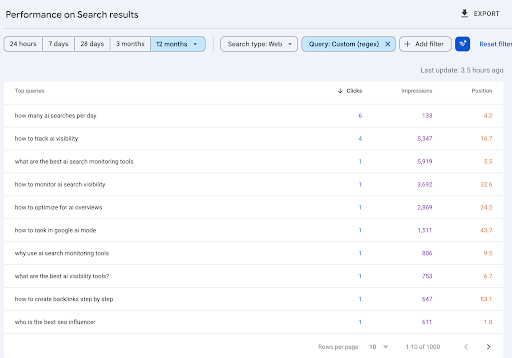
Your Google Search Console data is one of the most valuable sources because it contains the actual queries people use to find your website.
Although many searches are short keyword phrases, you'll also find plenty of questions and conversational queries that can be adapted into AI prompts.
To find these queries, open the Performance report, switch to the Queries tab, and apply a Custom (regex) filter.
Use the following expression to surface question-style searches:
^(who|what|when|where|why|how|which|can|does|do|is|are|should|will|could|would)\b
- People Also Ask box
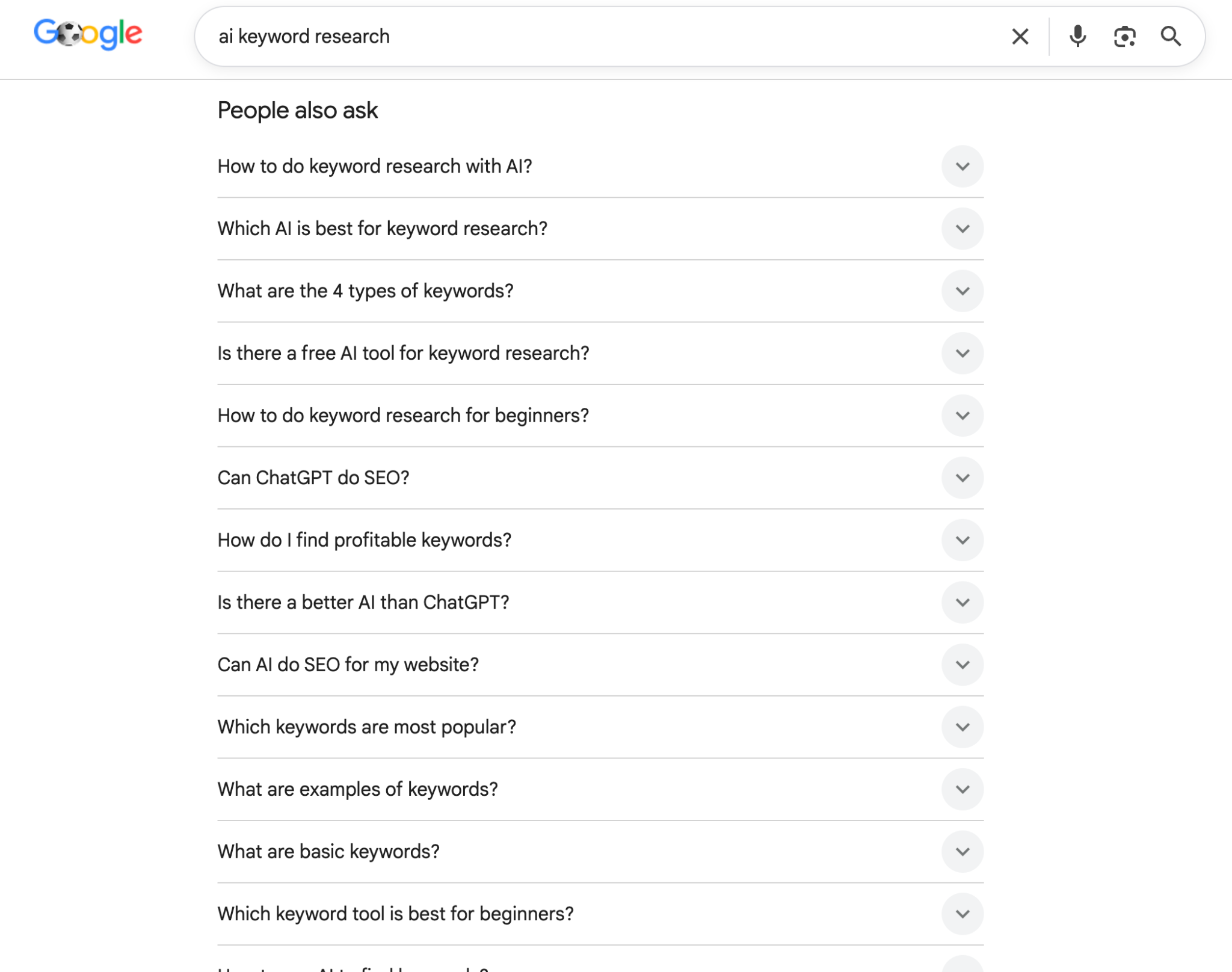
Google's People Also Ask (PAA) box is another excellent source of prompt ideas. The questions shown in PAA are generated from common search behavior and often reflect the follow-up questions users have as they research a topic.
Search for your primary keywords and record the questions that appear in the PAA section. Expand multiple questions, as Google will continue to load additional related questions.
- Discussion forums
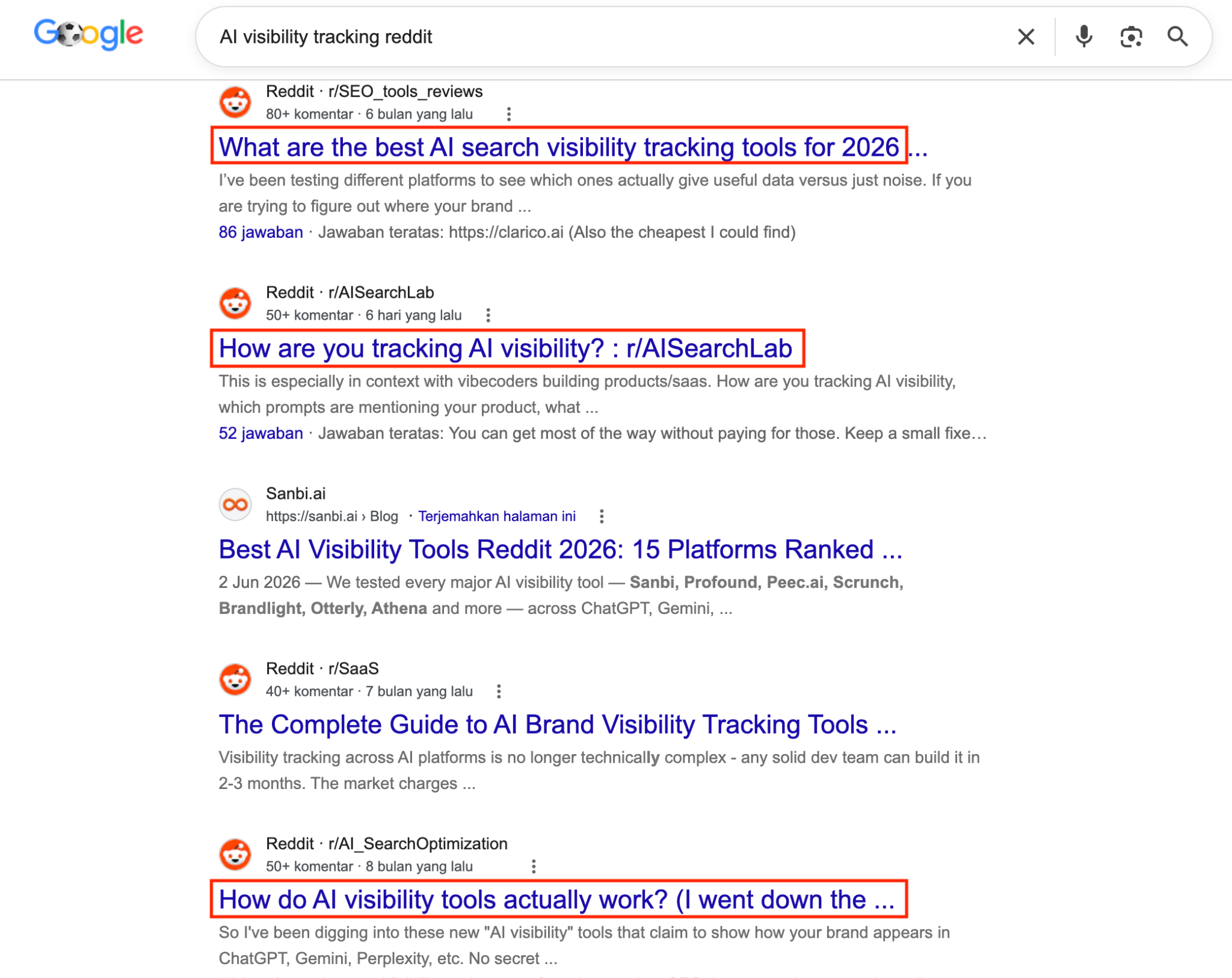
Many of your target audience are already asking questions in Reddit, Quora, and industry-specific forums. These discussions are particularly valuable because they capture the natural, conversational language people use when seeking advice, comparing products, or solving problems.
You can search for relevant threads in Google by typing your niche keyword + the name of the forum. For example: "AI visibility tracking reddit."
- Discovery calls
One of the best ways to understand how people discover your business through AI is to ask them directly. During discovery calls or sales conversations, include a few questions about how they found you before they reached out.
For example, ask:
- Did you use Google or an AI assistant to find us?
- If you used AI, which platform did you use (e.g., ChatGPT, Gemini, Claude, Perplexity)?
- What prompt or question did you ask?
- Did the AI recommend our company directly, or did it suggest an article or website that led you to us?
Step 2: Use search keywords to support prompt discovery
Search keywords are a valuable source of prompt ideas because they represent topics, problems, and needs that your audience is already actively searching for.
While the way people search on Google is different with AI assistants, the underlying intent behind those searches is the same. You just need to add contextual modifiers that reflect the user's situation, goals, or constraints.
Here's how:
Gather SEO keywords from your SEO tool
Pull your keyword data from Ahrefs, Semrush, or any other keyword research tools that you're using.
Focus on keywords that are relevant to your business, especially:
- Commercial keywords (e.g. best crm software)
- Branded keywords (e.g. how much does salesforce cost)
- Competitor comparison keywords (e.g. salesforce vs hubspot)
These will become the foundation of your prompt library.
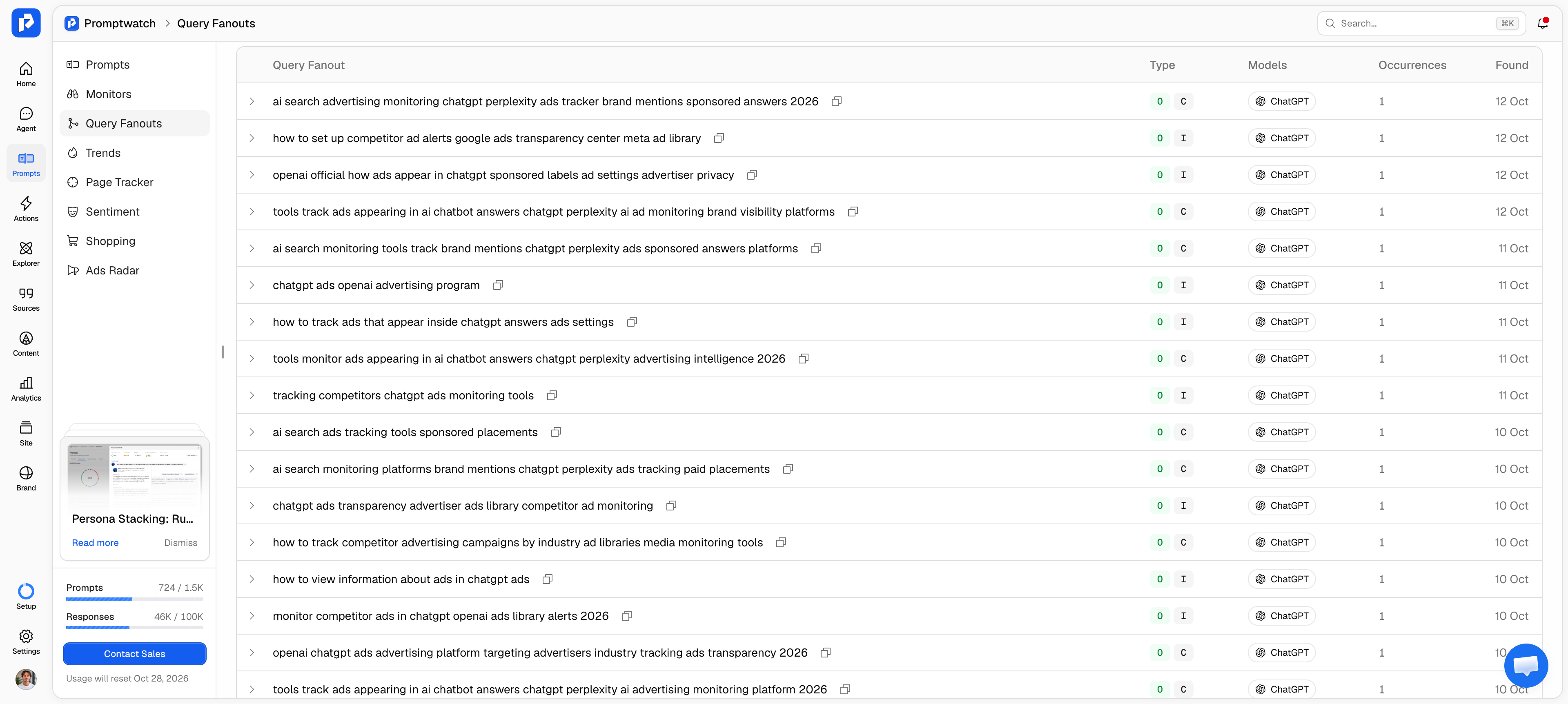
Analyze the fan-out queries for your main topics
Fan-out queries are the related questions and subtopics AI models search internally when generating a response.
Analyzing these queries helps you discover keyword variations and subtopics that may not appear in your original prompt list. They often reveal the supporting questions you should also be tracking.
Transform those keywords into prompts
Once you have your keyword list, feed those keywords into an AI assistant like Claude or ChatGPT and ask it to transform them into realistic prompts.
For each keyword, ask the AI model to suggest different angles based on:
- Use cases. How different audiences might use the product or solution.
- User profiles. How prompts change based on company size, industry, role, or level of expertise.
- Pain points. The specific problems users are trying to solve.
- Comparison scenarios. How users evaluate alternatives or competitors.
- Buying criteria. The factors users consider before making a decision.
- Constraints. Budget, team size, technical requirements, or other limitations.
For example, the keyword "project management software" could become:
- What's the best project management software for a remote marketing team?
- Which project management tool is easiest for a small business to adopt?
- As a startup founder, what project management software should I use?
- Monday.com vs Asana: which is better for managing client projects?
- What project management tools are affordable for a team of 10?
Step 3: Cluster your prompts based on core business topics
Once you have collected prompts from different sources, the next step is to organize them into structured clusters.
Avoid treating every prompt as a standalone query. Instead, group related prompts into topic clusters based on your core business areas. This makes your prompt tracking more scalable and helps you understand your AI visibility at the topic level rather than looking at individual prompts in isolation.
Also, include the prompt type (informational, commercial, and branded prompts) for each query. This gives you a complete view of how AI platforms represent your brand, from general education to product recommendations and brand evaluation.
For example, here's what a resource management platform's prompt library looks like:
| Core topic | Prompt | Prompt type |
|---|---|---|
| Resource management software | How does resource planning work? | Informational |
| Why do companies need resource management tools? | Informational | |
| What's the best resource management platform? | Commercial | |
| Float vs Resource Guru: which tool is better? | Branded | |
| Team capacity management | How do I calculate team capacity? | Informational |
| Best tools for tracking employee availability | Commercial | |
| Does Resource Guru help with resource forecasting? | Branded |
How do you validate which prompts are worth tracking?
Sean's framework gives you a long list of candidate prompts. Validation turns it into a tracking list: every prompt you keep should have demand behind it, a business reason to win it, and a page on your site that could answer it.
Stakeholder input is the most common way a list goes wrong. Internal teams tend to suggest prompts about things the website already covers, which inflates visibility and hides the gaps. One fix is to start from how customers describe their needs:
"We use unexpected sources like market research: take the category entry points, put 'I want' in front of each one, and let AI generate test prompts. That's much better than letting a stakeholder create his own prompts, because he usually only asks about things already on his website."
Check prompt volume and difficulty
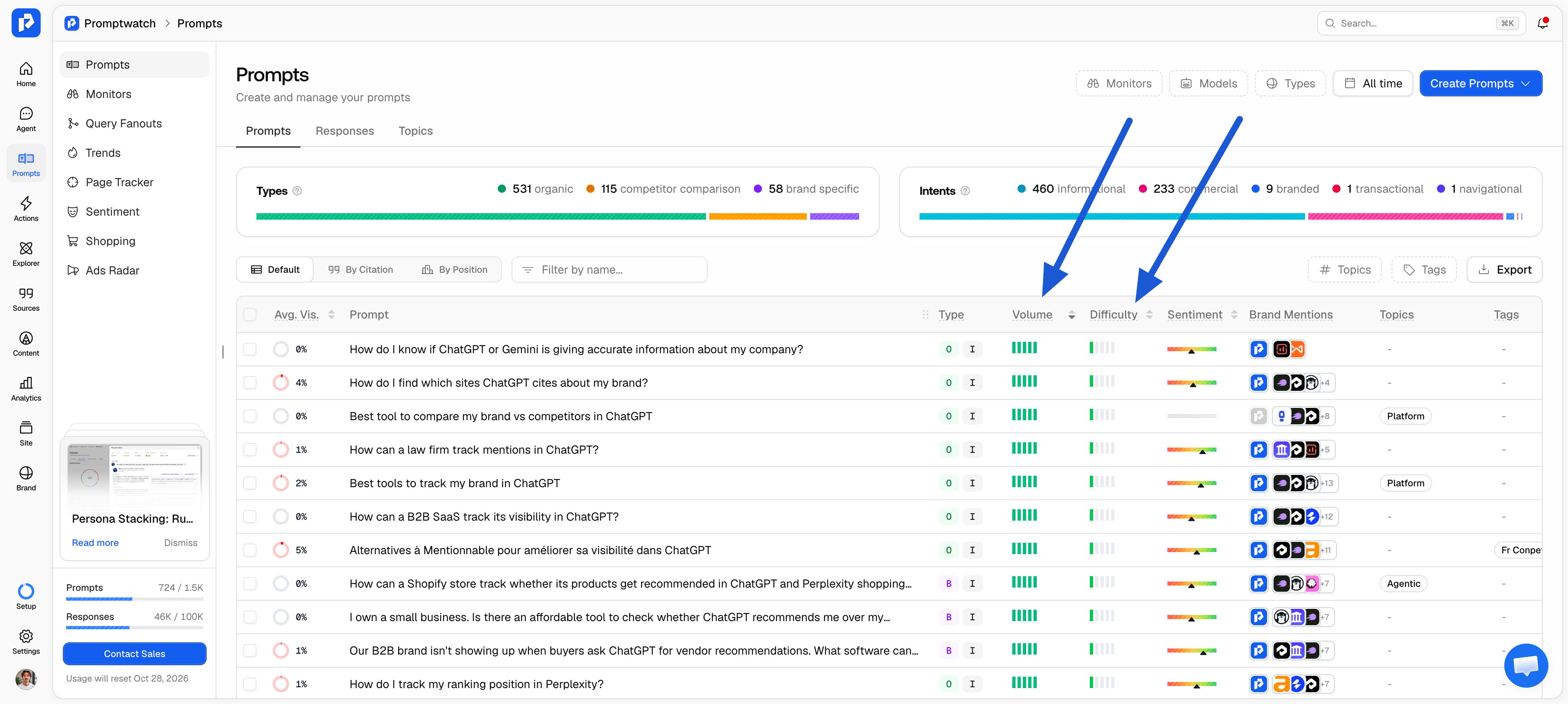
Prompt volume estimates how often a question is actually asked, which tells you which candidates deserve a slot. In Promptwatch, prompt volumes come from the keywords attached to a prompt. Each keyword carries a monthly volume for AI search, Bing, and Google, and the prompt score weights AI search 5x, Bing 1.5x, and Google 0.5x. The result shows as a band from 1 to 10k+, so you compare prompts by order of magnitude.
Prompt volume and keyword search volume measure different things. Conversational questions asked to AI form a smaller pool than Google searches for the same topic, so a prompt with modest volume can still carry high intent. Promptwatch's public Prompt Volumes index covers 1,842,503 prompts.
Prompt difficulty estimates how hard it is to become visible for a prompt over the past 30 days. It blends keyword competition across search engines with the authority of the sources AI already cites for that prompt. High-volume, high-difficulty prompts are worth tracking as a benchmark; prompts with decent volume and lower difficulty are where new content wins fastest.
Run each prompt before you commit to it
Run your shortlisted prompts across the AI models your audience uses and read the answers. You are checking three things: whether your category shows up at all, which competitors and sources the answer names, and whether the answer changes a lot between runs.
Because answers are volatile, a single manual run tells you very little. Track candidates daily for a week or two and look at the pattern. Also check how the answers were collected: responses pulled from a model's API can differ from what a user sees in the app, so it's worth asking whether your AI search monitoring tools query the real ChatGPT interface. Promptwatch collects responses from the live interfaces of ChatGPT, Perplexity, Google AI Overviews, Gemini, and other platforms.
Check whether your site can answer the fan-outs
Before an AI model answers a prompt, it splits the question into sub-queries (the query fan-out) and retrieves sources for each one. If your site has no page that answers those sub-queries, tracking the prompt mostly measures a gap.
Promptwatch records the fan-out for every tracked prompt and re-runs those sub-queries against your own indexed site, using paragraph-level embeddings. Content Gap Analysis then flags which prompts your pages can answer and which ones need new or updated content. [DATA LINK PENDING: /data/ fan-out report, anchor TBD]
Score your candidates and cut the list
A simple scoring pass keeps the final list honest. Rate each candidate from 1 to 3 on four criteria and keep the highest totals:
| Criterion | 3 points | 1 point |
|---|---|---|
| Business relevance | Maps to a product, service, or market you sell into today | Adjacent topic with no clear path to revenue |
| Demand | Prompt volume band in the upper range for your niche | "No data" or the lowest band |
| Winnability | Moderate difficulty, and competitors of your size already appear | Answer dominated by sources you can't realistically displace |
| Content fit | A page on your site answers most of the fan-out sub-queries | No page exists, and none is planned |
A prompt that scores low on content fit but high on everything else goes on your content plan as well as your tracking list. That prompt is where new content can move your visibility.
How many prompts should you track for GEO?
Track enough prompts to cover every core topic with at least one informational, commercial, and branded prompt, then add depth where revenue sits. The right number depends on how many topics, markets, and personas you serve, so it grows with the business.
Weight the list toward non-branded prompts. Branded prompts tell you how AI describes you, but you will appear in most of them by default. Informational and commercial prompts show whether AI recommends you to someone who doesn't know you yet, which is where new customers come from.
Plan capacity helps set the ceiling. Promptwatch Brands plans include 50 prompts (Essential), 150 (Professional), and 350 (Business), and Agency plans include unlimited prompts. The largest accounts track 6,000+ prompts across 17 markets.
Expect your scores to move when the list changes. Adding harder or less familiar prompts lowers your average visibility, because every response where your brand is missing counts as zero in the AI visibility score:
"One piece of advice: please don't give your CEO access to Promptwatch. We added more prompts, our score dropped from about 65 to 40, and while I was on holiday our CEO went into total panic, thinking the website was broken. It wasn't."
Add prompts in batches, note the date, and compare trends within the same prompt set. Your reporting stays readable and your AI visibility KPIs stay comparable over time.
How to segment prompts by persona and market
AI answers change with who is asking and where they are. A prompt list that only runs from one location in English, with no context about the asker, averages away the markets and audiences you are losing.
Two segments matter most:
- Personas. A CFO and a marketing manager asking the same question can get different recommendations. Promptwatch lets you attach a persona to a monitor, so you can track prompts by buyer persona and see how answers shift by role or company size.
- Markets. In Promptwatch, a monitor runs one prompt set in one country and language, and optionally one US state or city. Multiple markets mean multiple monitors (for example "US, English" and "DE, German"), each with its own clean time series. State and city targeting are available on every plan. See which AI visibility tools track brand mentions across multiple countries and languages.
Keep the prompt wording in the language of each market. Translating your English list word for word misses how people in that market actually phrase the question.
How often should you update your prompt list?
Review your prompt list on a fixed date, for example alongside quarterly content planning, and whenever you launch a product, enter a market, or see a new competitor in AI answers.
Three signals tell you a prompt needs to change:
- The fan-outs shift. New sub-queries show the model now researches the question differently, which often points to new prompts worth adding.
- The answer stops naming anyone in your category. The prompt no longer leads to a recommendation, so it says little about your visibility.
- Customers describe a new need. Sales calls and support tickets surface new phrasing before it shows up anywhere else.
Follow-up prompts deserve a place too. In Seer Interactive's studies, follow-ups made up 25% to 40% of the prompts in a session, and later questions often carry the most decision weight. Adding the second and third question a buyer asks ("Which of those works with HubSpot?") makes your list closer to a real conversation.
The next step: Track your prompts using Promptwatch
At this point, you should have a structured prompt library that reflects the different ways your audience searches, evaluates solutions, and researches your brand.
Finding the right prompts is half the job. The other half is monitoring them consistently to understand how your visibility evolves over time.
This is where AI visibility tracking tools like Promptwatch come in. Promptwatch suggests prompts from your Google Search Console queries, from an AI prompt generator built on your own site content, from a seed query or page, and from competitor gap analysis. If you connect Search Console, the AI visibility tool with Google Search Console integration feeds your real queries into prompt suggestions automatically, and you can import keyword lists in bulk.
With Promptwatch's prompt tracking, you can run your prompt library across 11 AI platforms, including ChatGPT, Perplexity, Google AI Overviews, Google AI Mode, Claude, and Gemini, and monitor key visibility metrics, including:
- Brand mentions: How often your brand appears in AI-generated responses.
- Citations: Which sources AI platforms reference when answering your prompts.
- Competitor visibility: How your brand compares against competitors across important topics.
- Sentiment and positioning: How AI describes your brand and whether the information is accurate.
- Visibility trends: How your AI presence changes over time.
Every prompt can be tagged by Prompt Type (Organic, Brand Specific, Competitor Comparison) and Intent Type (Informational, Commercial, Transactional, and more), so the clusters from Step 3 carry straight into your reporting. Promptwatch turns your prompt list into a repeatable measurement system: you can see where your brand is already visible, where competitors are gaining ground, and which content opportunities can improve your AI search presence. For a deeper look at the monitoring side, see how to track brand mentions in AI.
Start your free trial today and start monitoring your AI visibility!
FAQ
What is prompt research in GEO?
Prompt research is the process of finding the questions your audience asks AI assistants about your category, so you can track whether those assistants mention, recommend, or cite your brand. It replaces keyword research for AI search, using sources like Search Console queries, People Also Ask, forums, sales calls, and converted SEO keywords.
Is there search volume for AI prompts?
AI platforms don't publish prompt data, so prompt volume is an estimate. Promptwatch calculates it from the keywords attached to each prompt, weighting AI search volume 5x, Bing 1.5x, and Google 0.5x, and shows the result as a band from 1 to 10k+. It is best used to compare prompts against each other.
Should I track branded or non-branded prompts?
Track both, with most of the list non-branded. Branded prompts show how AI describes your brand and catch inaccuracies. Non-branded informational and commercial prompts show whether AI recommends you to people who don't know you yet, which is where new customers come from.
How many prompts should I start with?
Start with enough to cover each core topic with one informational, one commercial, and one branded prompt, then add depth where revenue sits. Promptwatch Brands plans include 50, 150, or 350 prompts, and Agency plans include unlimited prompts.
Can I build my prompt list from Google Search Console data?
Yes. Filter the Queries tab in Search Console with a question regex to find conversational queries, then adapt them into prompts. If you connect Search Console to Promptwatch, your queries feed prompt suggestions automatically.
Why did my visibility score drop after I added prompts?
Your score is an average across all responses, and responses where your brand is missing count as zero. New prompts, especially harder non-branded ones, usually lower the average at first. Compare trends within the same prompt set and note the date you expanded the list.


