

Since we shipped the Promptwatch MCP, we've watched people connect it to Claude and use it in ways we didn't fully plan for. So instead of telling you what it's for, we asked the people actually using it, customers, agencies, and a couple of setups we never would have guessed.
Here are ten of the best answers, with the exact prompts behind them.
1. Get an instant AI visibility snapshot
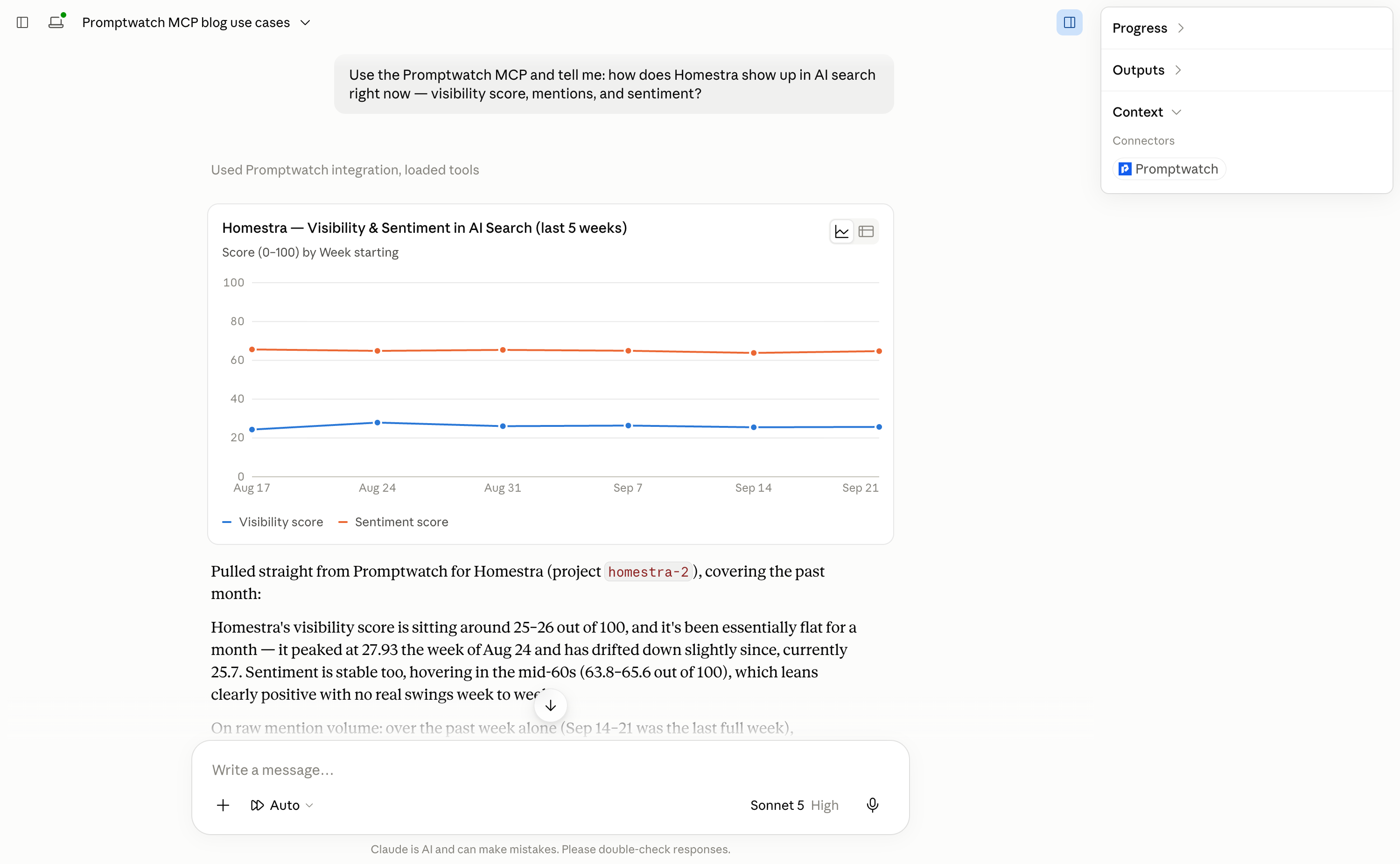
The simplest use, and still the best first move after connecting. Ask Claude to check how your brand shows up right now across AI answers, no dashboard login required.
Try this prompt:
Use the Promptwatch MCP and tell me: how does [your brand] show up in AI search right now — visibility score, mentions, and sentiment?
2. Compare your share of voice against competitors
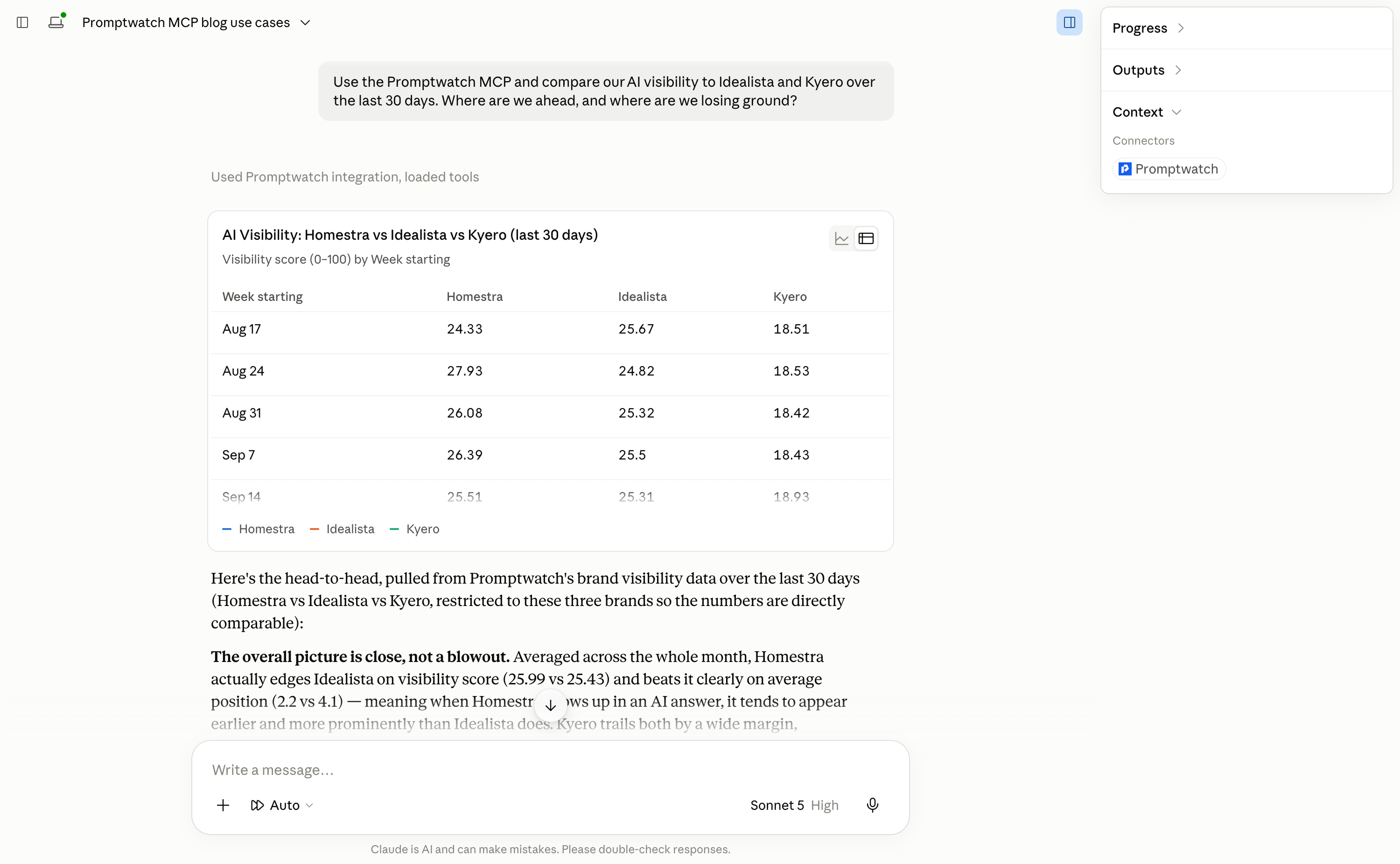
Same idea, pointed sideways. Pull your visibility next to two or three competitors in the same conversation, and let Claude explain the gap instead of just charting it.
Try this prompt:
Use the Promptwatch MCP and compare our AI visibility to [Competitor A] and [Competitor B] over the last 30 days. Where are we ahead, and where are we losing ground?
3. Audit which sources get cited when you're mentioned
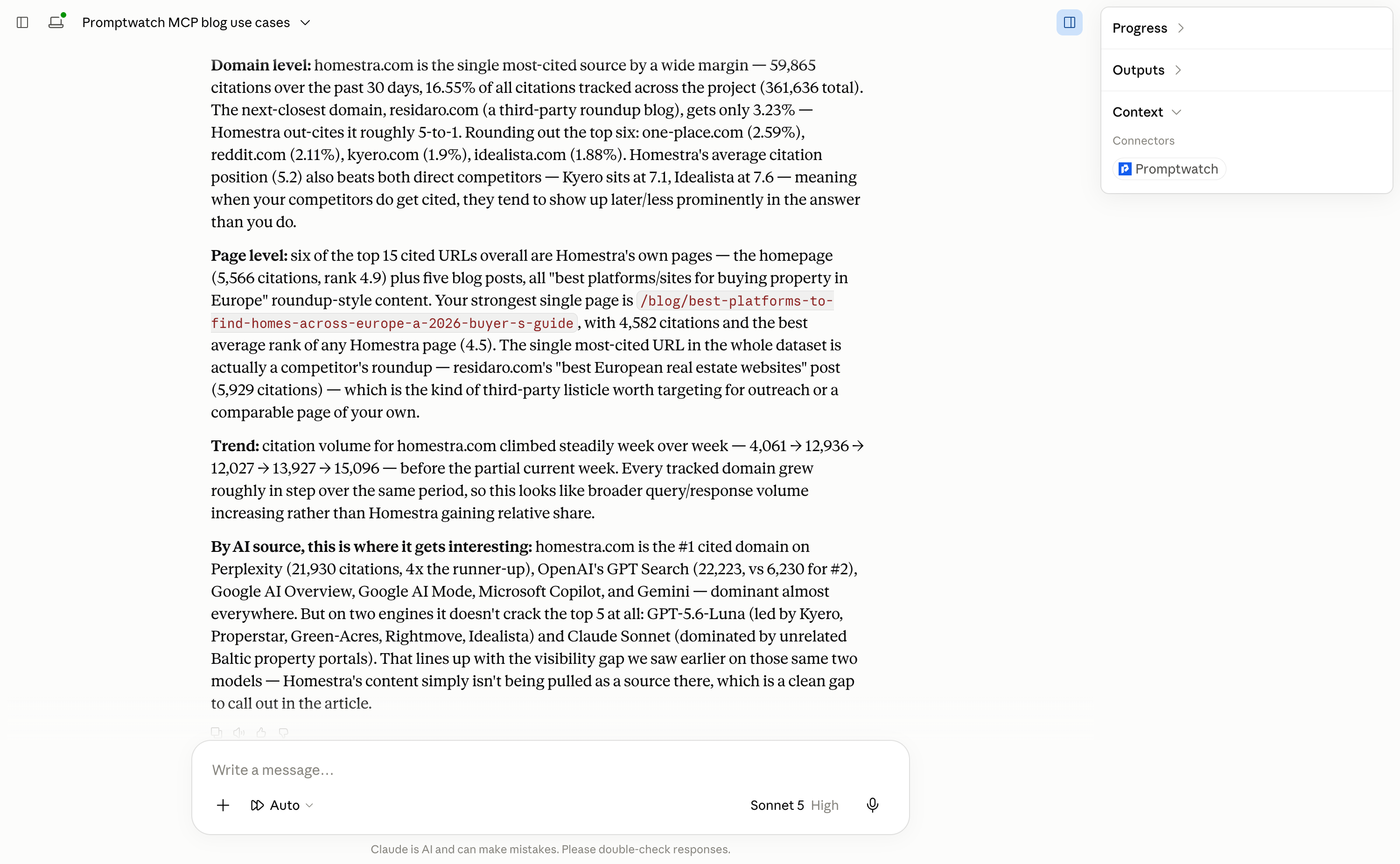
Zakariya Usman, SEO Manager at Studocu, uses the MCP to see exactly what's earning citations and what isn't:
Using the Promptwatch MCP in Claude has been a huge time-saver for our day-to-day workflow. We use it to analyze thousands of citations, run text analysis, and build content briefs for our agency, finding the relevant sources to target and shaping findings exactly how we want. It monitors the impact of our on-site and off-site GEO efforts, tracks citations, and monitors AI crawls & traffic, and helps us seamlessly generate monthly GEO reporting.
Try this prompt:
Use the Promptwatch MCP and tell me which pages and domains get cited most often when AI answers mention us. Break it down by source and show me the trend over the last month.
4. Turn query fan-outs into a content gap map
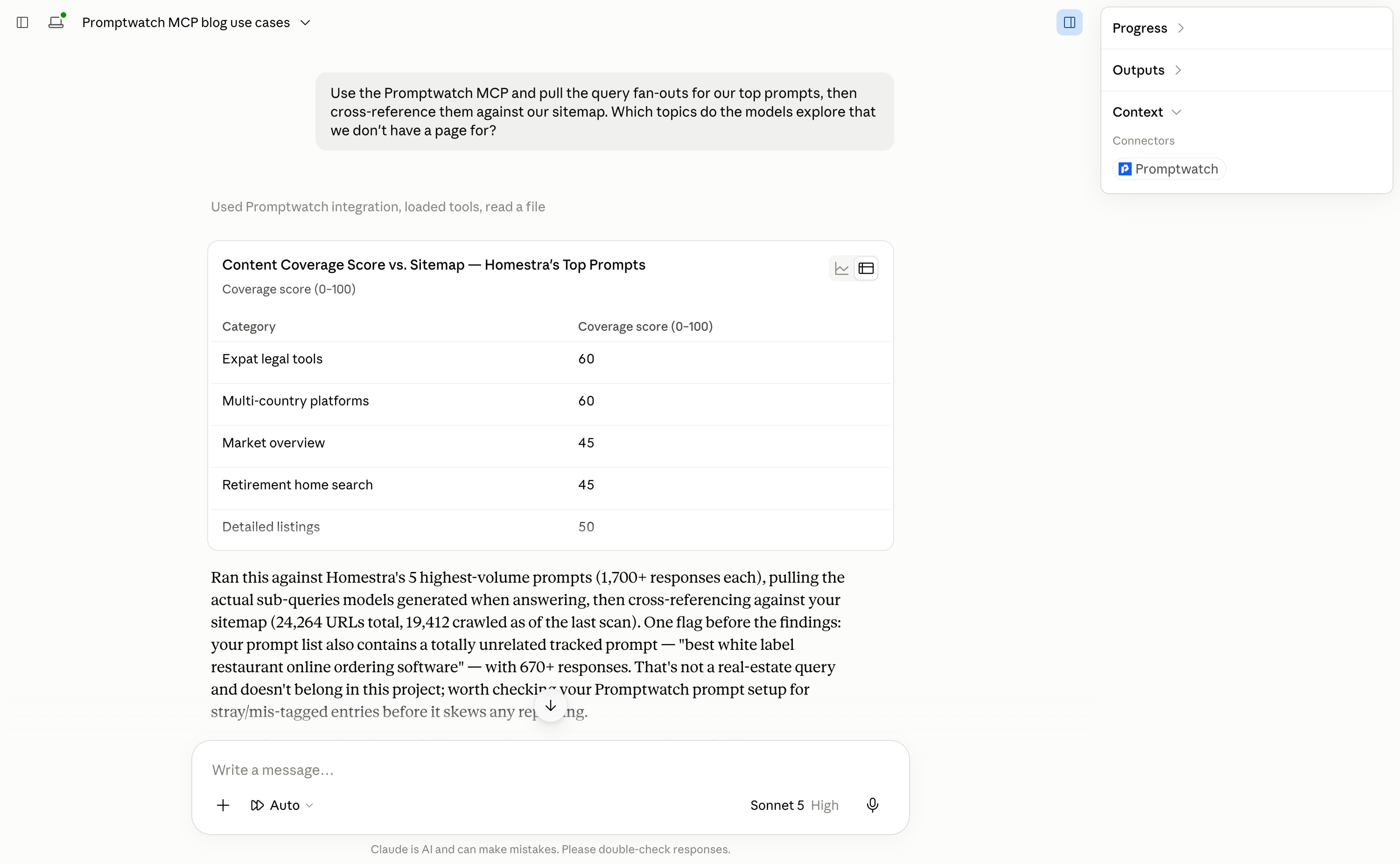
Dries Dederen at Zalm Partners leans on three moves the most: studying query fan-outs, checking the sitemap against what AI models are actually asking about, and clustering prompt responses to spot patterns, a fast way to see not just whether you're visible, but why not.
Try this prompt:
Use the Promptwatch MCP and pull the query fan-outs for our top prompts, then cross-reference them against our sitemap. Which topics do the models explore that we don't have a page for?
5. Stack it with the rest of your analytics for one full picture
Martin Janse van Rensburg, who runs GEO / AI-visibility at Prisma, connects Promptwatch alongside Google Search Console, GA4, and PostHog in the same Claude session. Search Console shows traditional search performance, GA4 and PostHog show what happens after people land, and Promptwatch fills in the piece none of the others can see: whether AI models surface and cite you at all.
His favorite move: asking Claude to line up Promptwatch's visibility trend and top-cited pages against what the other three tools show for those same pages, then turn the gaps directly into a content brief.
Try this prompt:
Use the Promptwatch MCP and take our top 10 AI-cited pages from Promptwatch, then cross-reference them with Search Console, GA4, and PostHog. Where is AI visibility strong but organic traffic or engagement weak, and vice versa?
6. Build a full client-reporting pipeline (agency use)
Tobias Peschke, Founder & CEO of Loud & Lexis, uses the MCP as the data layer for their entire AI-visibility reporting practice. Claude pulls daily mentions, positions, sentiment, and cited sources straight into a reporting database per client, blending Promptwatch data with buying-journey stages, a curated competitor set, and other sources like Bing Webmaster Tools. Both the client report and the content agenda generate from that same database.
His favorite prompt compares how AI models describe a brand's target audience against its actual customer journeys, surfacing segments the models don't even know exist, which no dashboard reading would catch:
Take the target-audience picture the models build of us and put it against our six customer journeys: which journey do they support, which do they advise against, and which do they not know exists?
And for zero-visibility prompts specifically:
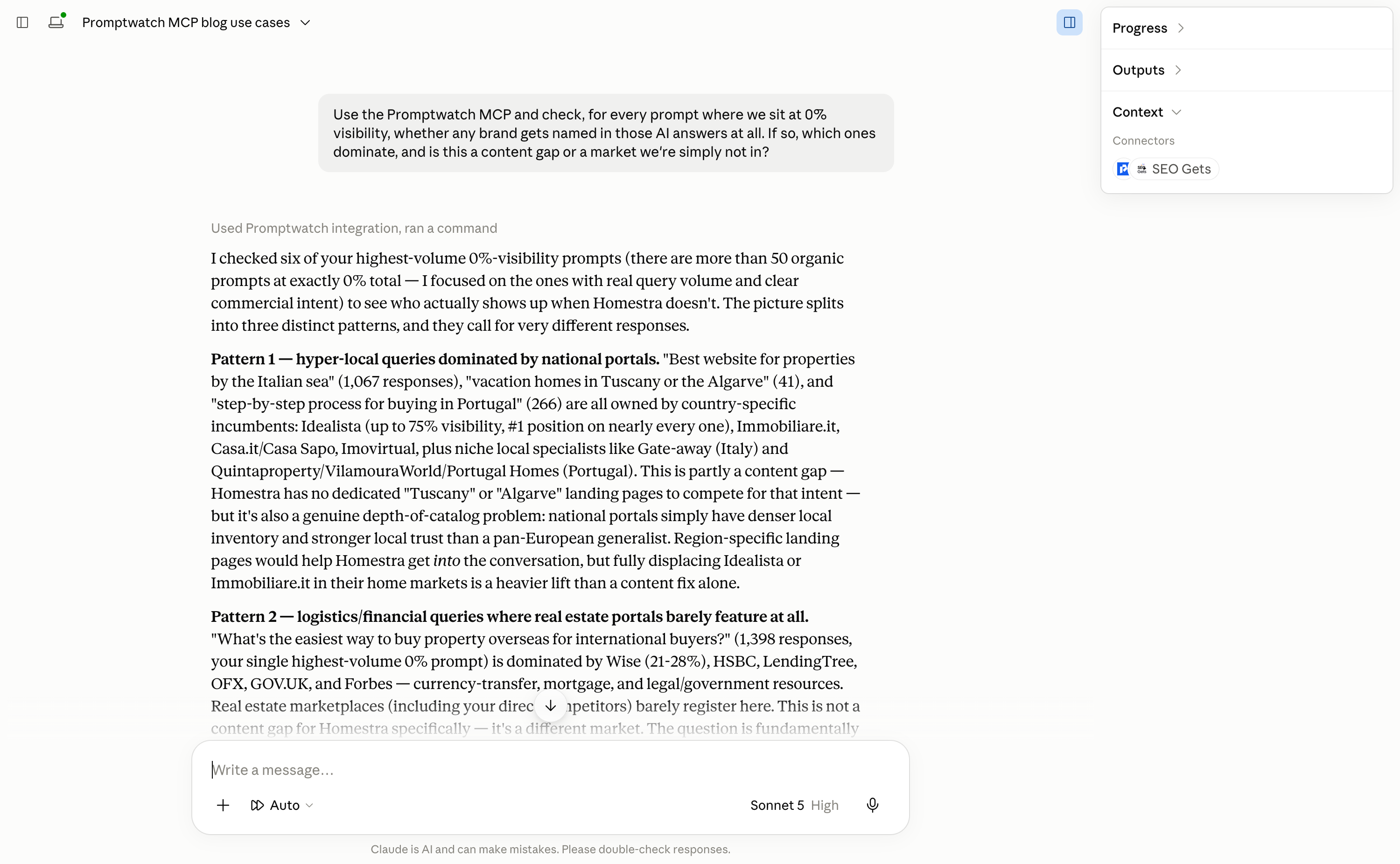
Take every prompt where we sit at zero percent visibility and tell me whether any brands get named in those answers at all, and which ones dominate the field.
Try this prompt:
Use the Promptwatch MCP and check, for every prompt where we sit at 0% visibility, whether any brand gets named in those AI answers at all. If so, which ones dominate, and is this a content gap or a market we're simply not in?
7. Wire it into your own internal tools
Not every team uses it the way we pictured. Rabin Nuchtabek at Hype Partners routes the MCP through their internal context engine, hypeOS, so any of their roughly 100 team members can query AI-visibility data and correlate it with client work directly, no separate dashboard, no separate login. He's also running an experimental setup feeding Promptwatch through a swarm of Grok bots.
It's a good reminder that the MCP doesn't have to live only inside a chat window, it can become the AI-visibility layer for whatever system you already run on.
8. Automate a recurring GEO report with Claude Code
Miroslav Jirků at Kentico built a Claude Code skill that maintains a running report tracking citations, mentions, and cited URLs, updated automatically instead of pulled by hand each time. It's a good example of the MCP becoming infrastructure rather than a one-off lookup.
Try this prompt (in Claude Code):
Use the Promptwatch MCP and update my GEO report: pull the latest citations, mentions, and cited URLs, then append them to the tracking sheet, flagging anything new since the last run.
9. Spot-check sentiment after a launch or price change
When something changes on your end, don't assume AI answers have caught up. Ask Claude to check how you're currently being described before you find out the hard way.
Try this prompt:
Use the Promptwatch MCP and tell me what the current sentiment is on how AI describes our pricing and positioning. Flag anything that sounds outdated.
10. Get content suggestions from your own visibility gaps
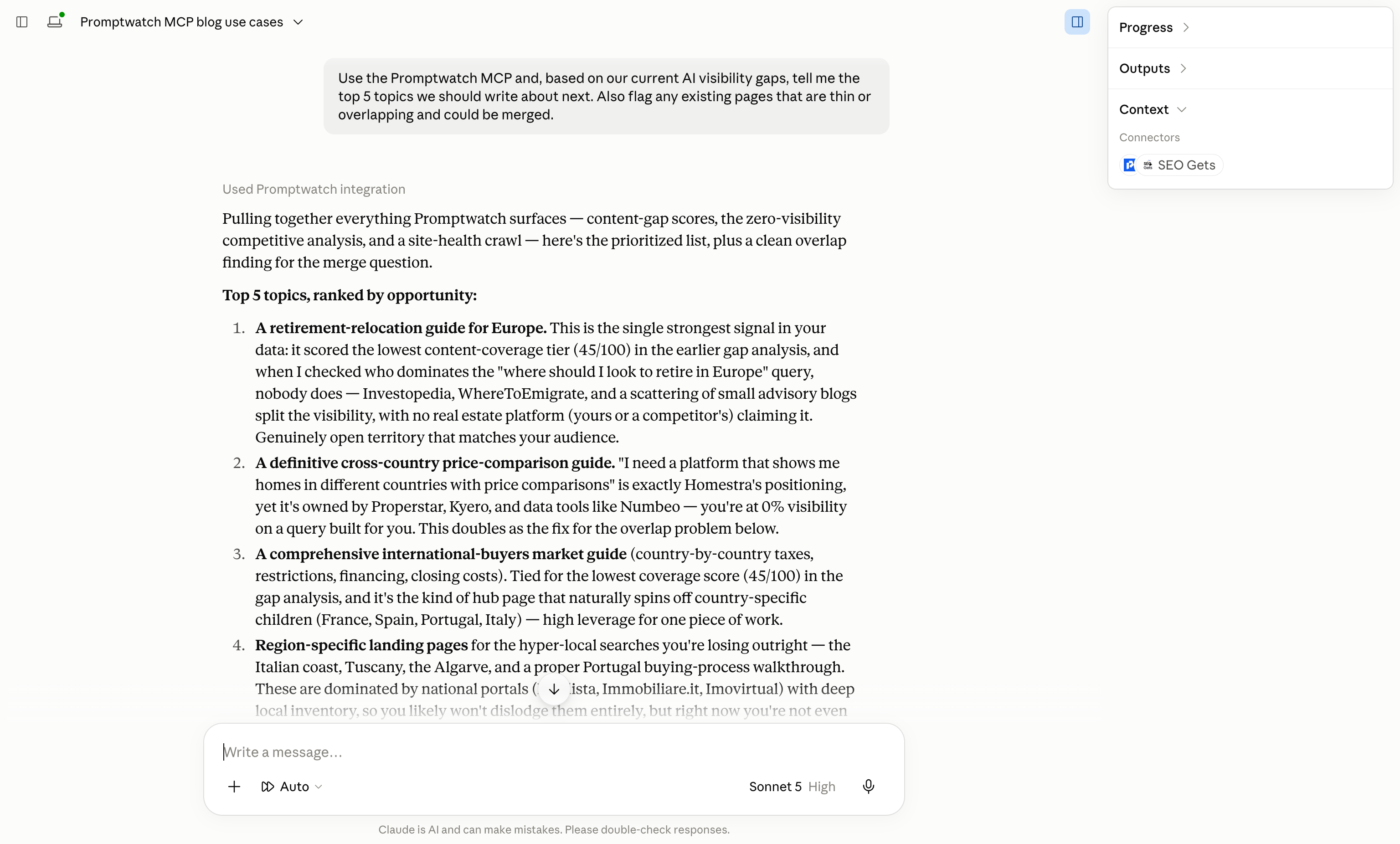
Darrin T. Mish, of Get IRS Help, uses the MCP to make suggestions on content he should be writing, and to consolidate or improve existing pages that are thin or duplicative:
I basically use the MCP to make suggestions as to content that I should be writing. I also use it to consolidate and improve existing content that may be thin or duplicative.
Try this prompt:
Use the Promptwatch MCP and, based on our current AI visibility gaps, tell me the top 5 topics we should write about next. Also flag any existing pages that are thin or overlapping and could be merged.
How to get the MCP connected?
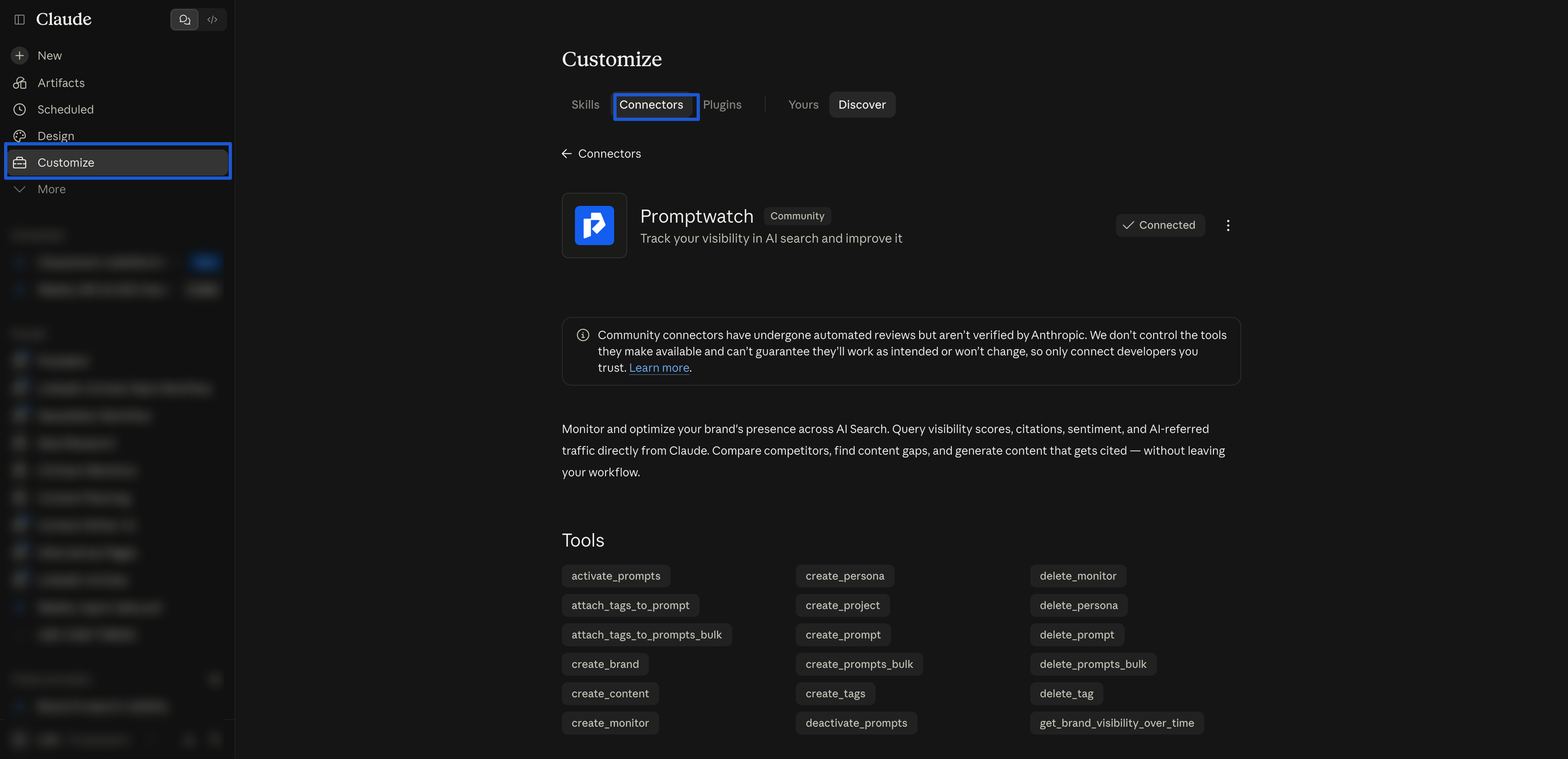
In Claude: go to Customize → Connectors, browse the directory, search for Promptwatch, and click Connect. You'll authorize on a Promptwatch consent page, where you choose which organization and projects the connector can access.
If your organization doesn't have MCP connectors enabled in Claude, Promptwatch's Agent Chat gives you the same data without needing anything connected on Claude's side. The difference is where the conversation happens: Agent Chat is the assistant inside Promptwatch, while MCP brings your data into your own tools, where you can mix it with your codebase, documents, or other connected services.


