What makes Agent Chat different
Agent Chat is a project-scoped analyst: it runs read-only research agents over your visibility, citations, sentiment, crawler, site health, visitor analytics, content and action-board data, then reasons over what came back. It can also act. The main agent carries create, update, and delete tools, so “mark that action as done” or “create a report for last month” are things it does, not things it explains. You open it from the Agent tile in the rail. The page starts a fresh chat, and your earlier chats sit in the list beside it. For who can use it and how credits work, see Agent Chat: how to use it. Two design choices matter for how you ask:- Research is delegated and read-only: the agent turns your question into a few research tasks, each with a fixed budget of tool calls, and splits multi-stage work into sequential stages. One well-scoped question beats five fragments sent one at a time.
- Every change runs in front of you: mutations happen in the conversation, and unattended scheduled runs get no write tools, so you never come back to a silently modified project.
How to ask well
- Give a date range: data is stored in UTC days, and the agent resolves ranges against them. “Last 7 days” works; “compare the last 7 days against the 7 before” works better because it forces a baseline.
- Name the cut you care about: “visibility on Perplexity for my comparison prompts” gets a focused answer. “How am I doing” gets a broad summary you probably didn’t need.
- One goal per message: “find where competitor X outranks me, then draft outreach targets” is one goal with steps. “Also, what’s my sentiment, and can you fix my sitemap” is three chats’ worth in one message.
- Ask for evidence: add “show the responses behind this” or “cite the sources”, so you can check the answer before you act. When a tool returns nothing, the agent is instructed to say so instead of filling the gap.
- Ask for a chart when trends matter: the agent can render line, bar, and area charts inline, at most two per answer, which beats a paragraph of numbers. It can also show prompt tables, action cards and dashboard cards.
- Confirm before mutations: phrase state changes explicitly (“create these three prompts on the US monitor”). The agent performs writes itself and reports what changed.
Agent Skills
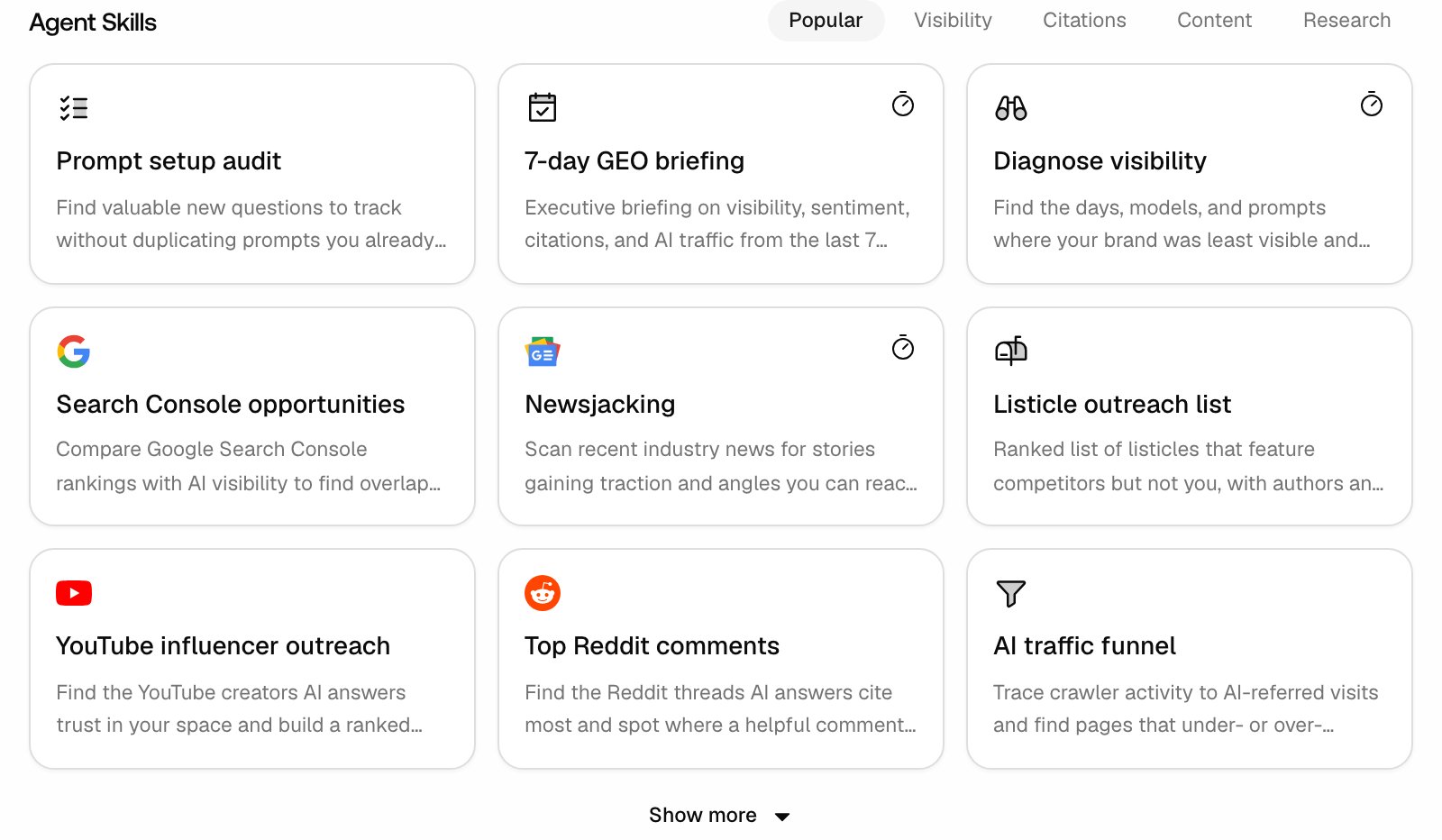
A new chat shows the Agent Skills grid under the input, with tabs Popular, Visibility, Citations, Content and Research. Each card is a complete ask: it pins a date range, names the data to use, and caps the output. On the Popular tab nine cards show at first, and Show more reveals the rest.- Clicking a card sends it right away: it does not prefill the input, and the card shows only a title and a short description. To read the full wording, send it and read your own message in the chat. Reuse the phrasing in your own asks.
- Skills enable their tools: selecting a skill switches on the tools it requires, so you don’t have to open the tool menu first.
- Skills with a timer icon can be scheduled: the Schedule this skill button takes the ask to the schedule composer with its suggested cadence and tools already filled in.
Tools and model: the ”+” menu
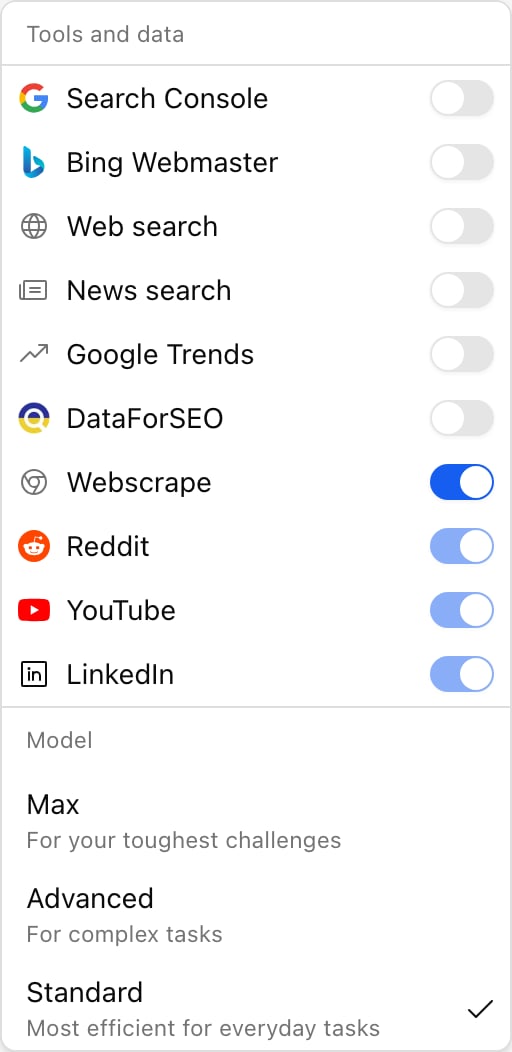
The round + button next to the input opens a menu with two sections.- Tools and data: switches for Search Console, Bing Webmaster, Web search, News search, Google Trends, DataForSEO and Webscrape. Webscrape is on by default, because reading a URL is routine; the other six are off until you turn them on. Below them, Reddit, YouTube and LinkedIn are always on and shown locked. Enable a tool when the question leaves your project data: “compare my Google rankings with my AI visibility” needs Search Console, and the Bing equivalent needs Bing Webmaster. Both toggles do nothing useful until the project has that connection set up under Settings, Project settings (see Google Search Console and Bing Webmaster). Tool choices apply to the current chat only; a new chat starts from the defaults.
- Model: Max (“For your toughest challenges”), Advanced (“For complex tasks”) and Standard (“Most efficient for everyday tasks”). Standard is the default and fits everyday questions. Switch up for genuinely hard analysis. Cost per question rises from Standard to Advanced to Max, so match the tier to the difficulty. Your model choice is remembered across chats.
Your chat history
The panel beside the conversation holds a New chat button, a Scheduled button and your chat list, grouped into Last 7 days, Last 30 days and Older, with a collapsible Archived section at the bottom.- Private to you: the list shows only chats you started in this project. Teammates do not see them. The one exception is Slack chats, which every project member sees.
- Rename and archive: hover a chat for Rename chat and Archive chat. Archiving cancels any run still in progress and moves the chat to Archived, where a restore icon brings it back. An archived chat opens read-only with an Unarchive button. Archiving the chat you have open starts a new one.
- Row icons tell you where a chat came from: a spinner while it is running, a Slack icon for chats started in Slack, an alarm icon for chats created by a scheduled run, and a page icon for chats started from the AI chat panel in the content editor. Slack chats and scheduled-run chats cannot be renamed or archived.
- Schedule this agent: the ⋮ menu at the top right of an open chat turns it into a recurring task. It prefills the schedule composer with the chat’s first message, its model tier and its tools, so a question that earned its keep becomes a standing one in two clicks.
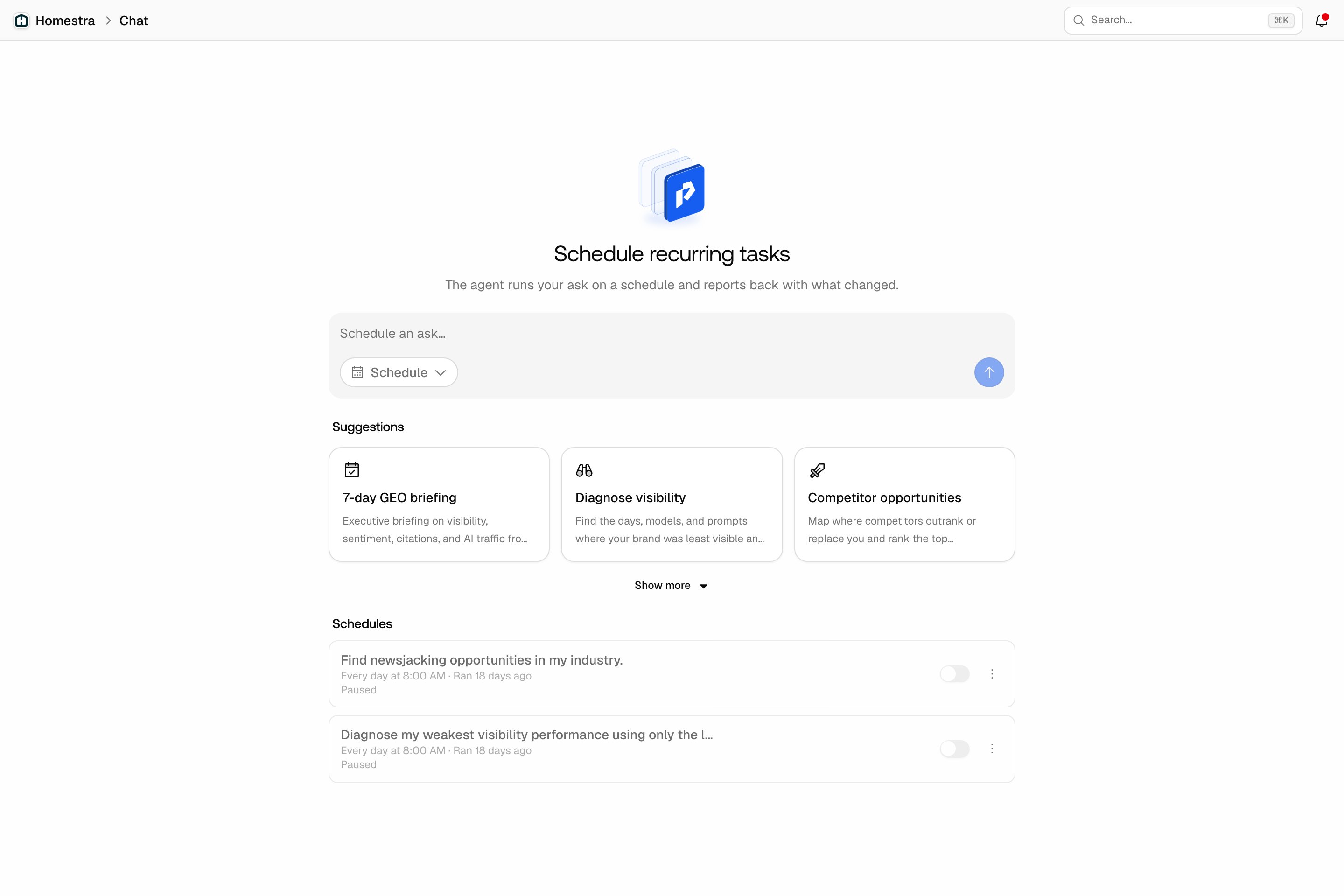
Schedules: recurring asks
The Scheduled button above the chat list opens the schedule view, where any ask becomes a recurring task. Pick a cadence, and the agent runs the ask on that schedule and records each result in a run changelog.- You hear about changes, not repeats: with Only notify me when the answer changed on (the default), the schedule’s creator gets a bell notification only when the answer materially changed. The first run always counts as changed.
- Slack delivery is opt-in: the Also post to #channel switch appears once your organization has connected Slack and mapped a channel to the project. It is off for new schedules.
- Scheduled runs are read-only by design: they research and report, and never change your project.
- Model and tools come from where you created the schedule: the schedule composer has no model or tool pickers. A schedule typed there runs on Standard with the default tools; one created with Schedule this agent or a skill’s timer keeps the tier and tools it came with.