

TL;DR
- Businesses in ChatGPT, launched in beta on November 10, 2026, lets a business claim its ChatGPT profile in Business Hub, correct its details, upload a product feed and see 28 days of Insights.
- Claiming is free during the beta, and access rolls out through a waitlist: a business ChatGPT already lists may have to wait, while a business it doesn't know yet can create and verify a profile right away.
- Insights counts how often ChatGPT references and links to your website, so it misses brand mentions without a link, competitors, prompts and every other AI engine.
- Promptwatch covers those gaps by tracking your prompts across 20 AI models, showing which domains get cited when ChatGPT names your brand, and counting UTM-tagged ChatGPT visits in Visitor Analytics.
On November 10, 2026, OpenAI opened Businesses in ChatGPT, a beta that gives businesses a profile they can claim and manage inside ChatGPT. It is free for now and managed in Business Hub at chatgpt.com/business-hub. OpenAI says ChatGPT reaches about 1.2 billion people a week (VentureBeat), so the profile is worth claiming before someone else does.
The day after launch, Promptwatch tried to claim its own listing from its Amsterdam office and hit both possible outcomes: a waitlist for the existing listing, and an immediate profile creation for a business ChatGPT didn't know yet. This guide walks through what we saw, every step of the claim, the product feed and Business Agent rules, and how to read the Insights dashboard without overstating it. If you're new to the channel, our guide on how to optimize for ChatGPT search covers the content side.
What is Businesses in ChatGPT?
Businesses in ChatGPT is OpenAI's program for claiming and managing a business profile inside ChatGPT. A verified owner can fix the profile's details, connect a product catalog, read a 28-day Insights dashboard and, in the US, publish a Business Agent that answers buyers' questions.
What you can use depends on where you are and what you sell:
| Feature | Who can use it at launch |
|---|---|
| Claim and edit a profile | Owners or authorized representatives of a business with a website, in a country where ChatGPT is available |
| Claim a local store or restaurant | Existing US listings only |
| Product feed (standard upload) | Targets the US; Shopify stores sync automatically |
| Insights dashboard | Any approved profile, above an undisclosed data threshold |
| Business Agent | Eligible US ecommerce and online-service businesses, one agent per profile |
No ChatGPT Ads account or Enterprise contract is needed to claim. Enterprise customers and advertisers can also claim through their OpenAI representative.
What happened when Promptwatch claimed its own listing
We tested the flow on November 11, 2026, from the Netherlands. The path you get depends on one thing: whether ChatGPT already has a listing for your business.
Already listed: the waitlist path
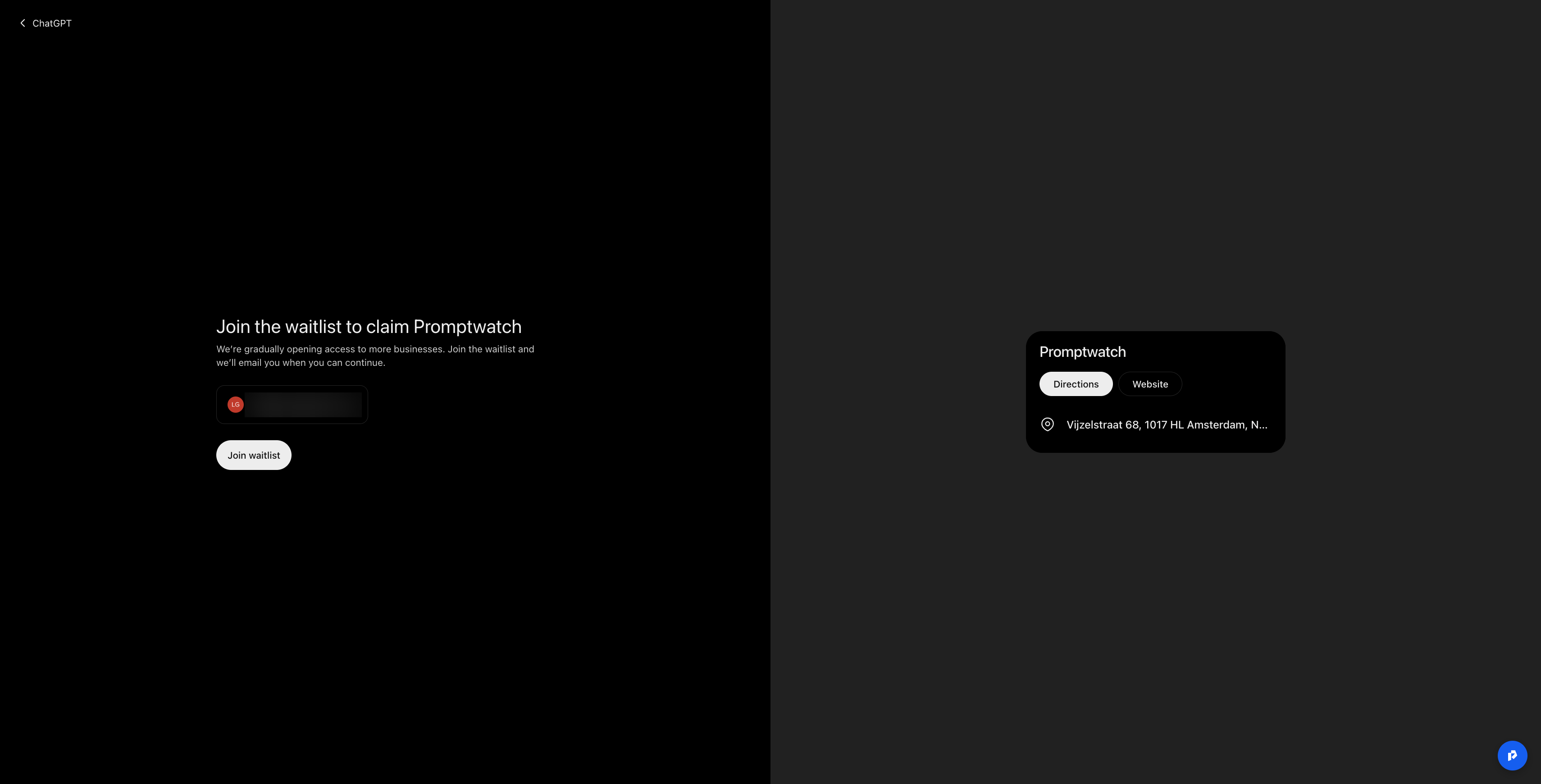
ChatGPT already showed a local card for Promptwatch at our Amsterdam office, with Directions and Website buttons. Clicking "Claim" led to a screen titled "Join the waitlist to claim Promptwatch." OpenAI says it is "gradually opening access to more businesses" and emails you when you can continue.
Not listed: create and verify straight away
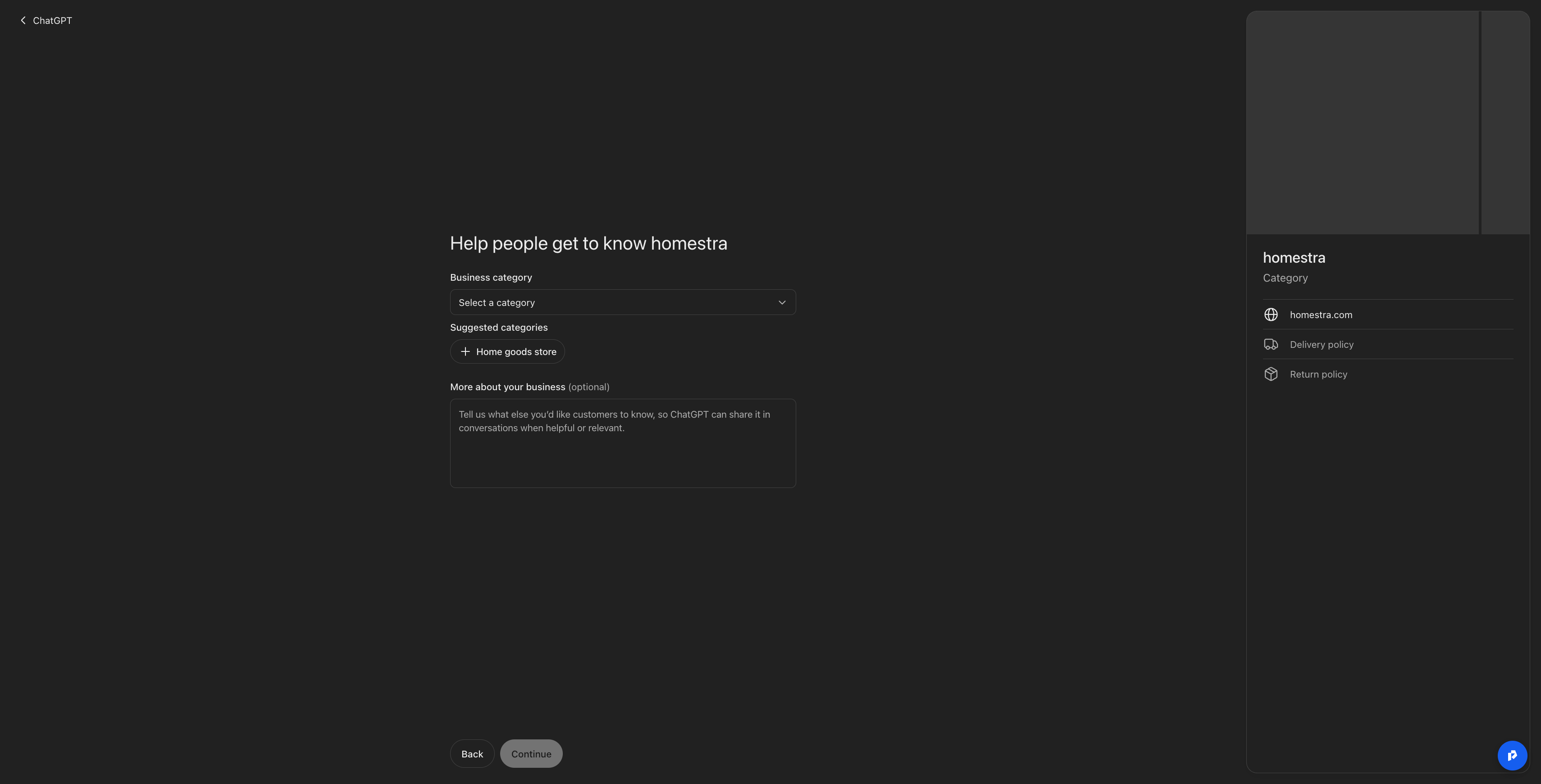
For a business ChatGPT didn't know yet (homestra, a real estate agency), we could create the profile immediately. The form asks for two things:
- A business category. ChatGPT suggested "Home goods store" for a real estate agency, so check the suggestion before accepting it.
- "More about your business." An optional description that ChatGPT "can share in conversations when helpful or relevant." Write it as the answer you want ChatGPT to give.
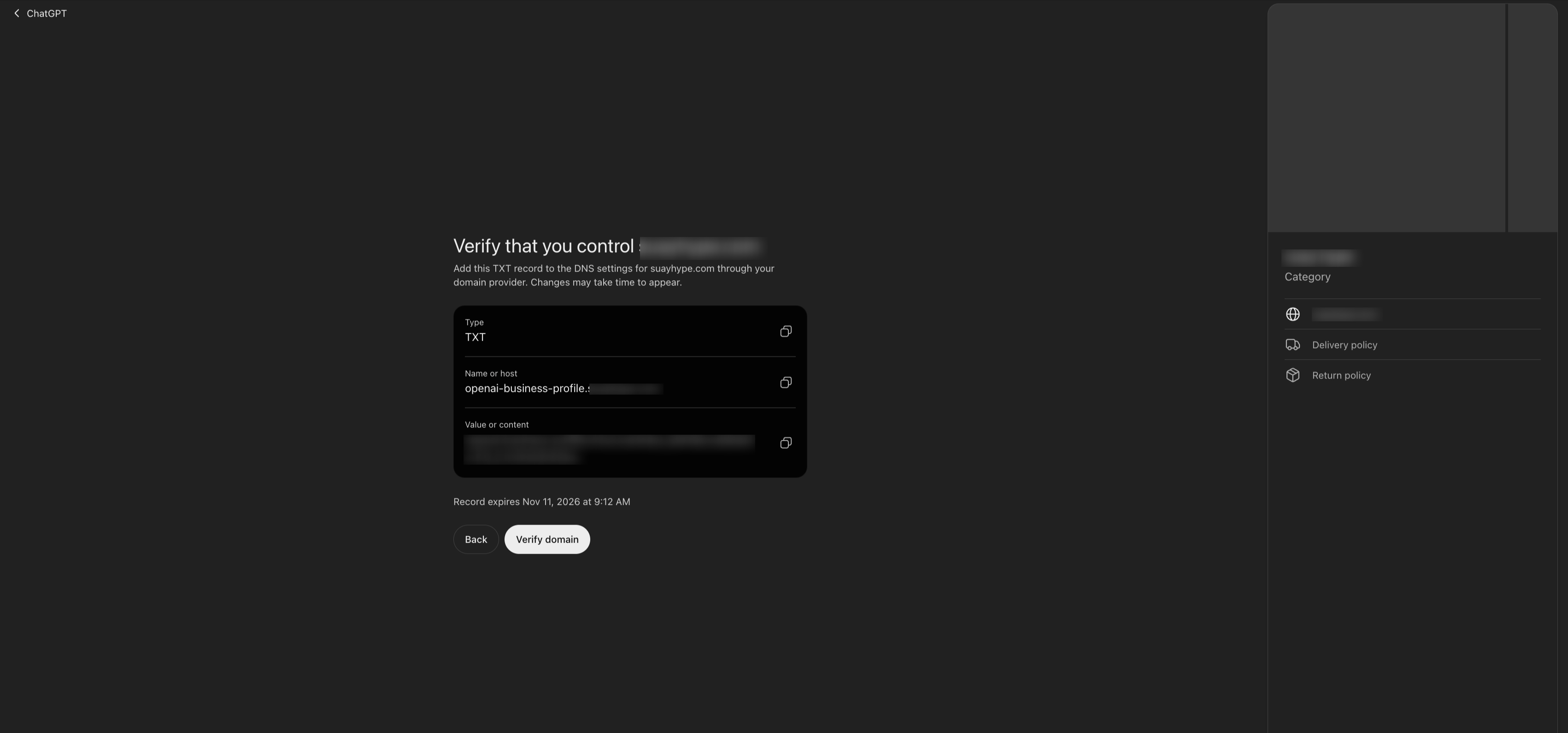
Ownership is proven with a DNS TXT record on openai-business-profile.<your domain>. The record expires, so add it as soon as the form gives it to you.
What the draft dashboard shows
After creation, the profile was saved as a draft with three offers: manage the business, $500 in ChatGPT Ads credit, and an upgrade to a ChatGPT Business plan. The overview has three tabs (Overview, Agent builder, Products), an Insights panel with a 7-day and 28-day toggle, a "Top 5 discovery topics" list, and a banner saying a government ID check is required before editing business info or publishing an agent. The ID check opens in a Persona pop-up.
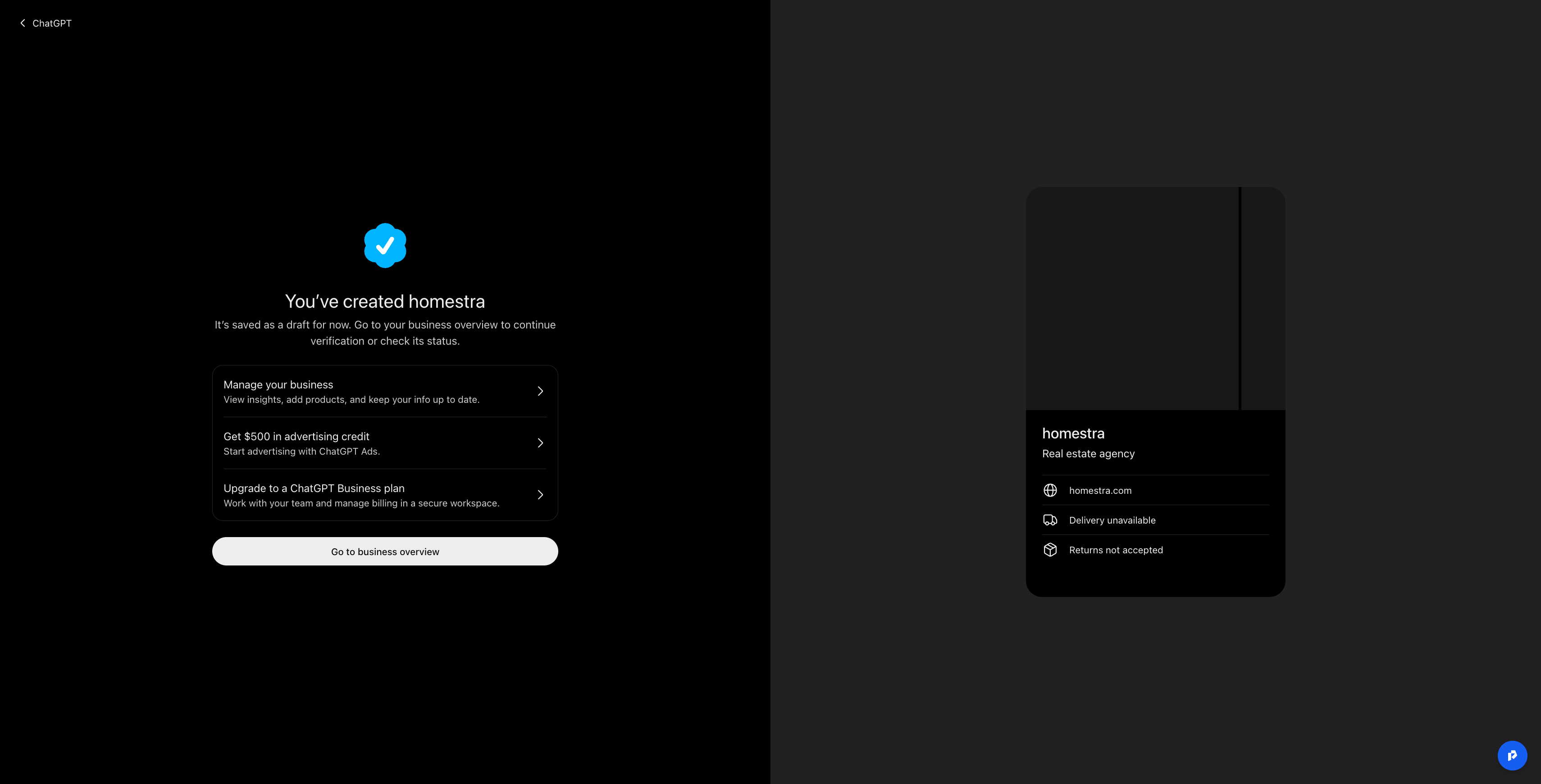
The practical lesson: if ChatGPT already lists you, join the waitlist today. If it doesn't, create the profile and verify the domain now.
How to claim your business in ChatGPT, step by step
Claiming is a four-step flow in Business Hub, followed by a separate identity check that unlocks almost everything useful.
- Sign in to ChatGPT, open Business Hub and search for your business by name.
- Pick the matching listing and confirm the ChatGPT account that will manage it.
- Choose a verification method. Business Hub only shows the methods that apply to your listing.
- Wait for OpenAI's review. The decision arrives by email.
| Verification method | How it works |
|---|---|
| Business phone | A code by SMS or automated call to the listed number |
| Business email | A code sent to the email tied to the business |
| Website domain | Add a TXT record with host openai-business-profile.<your domain>, then click "Verify domain" |
| Shopify store | Click "Connect Shopify," review the permissions and log in |
DNS is the step most likely to fail. Some DNS providers append your domain automatically, so entering the full host name can create a doubled domain. Check what your provider expects in the host field before saving the record.
The Persona ID check
After the claim is approved, the person managing the profile verifies their identity with Persona: a government ID, and possibly business registration documents and proof of authorization. The name, address and registration or tax number must match official records.
| Stage | What it unlocks |
|---|---|
| Claim approved | The business appears in your Business Hub |
| Persona approved | Blue check, publishing edits, product feed, Insights, agent creation |
| Agent published | Customers can chat with your Business Agent |
Decide early who passes this check. It ties the profile to one person's identity, so pick someone who will stay responsible for it. Teammates and agencies can be added afterwards, each with their own ChatGPT account.
What to check before your profile goes live
A new profile goes live automatically once approved, and OpenAI Support can't delete, unpublish or hide it. Only drafts can be removed. That makes the review stage the only safe moment to get things right.
- Draft every field first. Description, category, logo, cover photo, delivery policy and return policy should be final before approval.
- Claim each brand and each location separately. Claiming the main brand doesn't claim its locations, and there is no parent-company view.
- Watch for locked or hijacked listings. A listing marked "Contact support" is locked. If someone else has claimed yours, open "•••" and choose "Dispute ownership." Barry Schwartz raised hijacking as a risk on launch day (Search Engine Roundtable).
- Expect pricing to change. Claiming is free in the beta, and OpenAI hasn't ruled out charging later.
- Keep the claim in perspective. OpenAI says claiming doesn't guarantee placement or sales, and ChatGPT keeps drawing on other sources when it talks about you.
That last point matters most. The profile is one input among many, as one agency leader put it on a Promptwatch panel:
LLMs basically give you a summary of the whole online presence of your brand.
To see what that summary says today, and where it is wrong, you can run AI brand checks that compare ChatGPT's claims against your own pages.
How to set up your profile, product feed and Business Agent
Once Persona clears, you control three layers: the profile, the catalog ChatGPT can draw on, and (in the US) an agent that talks to buyers.
Profile fields
You can edit the website, business description, category, logo, cover photo, delivery policy and return policy. OpenAI reviews every change before it goes live.
Product feed
Shopify stores sync automatically. Everyone else uploads a CSV or JSONL file that follows OpenAI's spec: 48 fields, 9 of them required (Flavio Copes).
| Required field | Rule |
|---|---|
| item_id | Stable and unique per item or variant |
| title | Up to 150 characters |
| description | Plain text, up to 5,000 characters |
| url | Product page |
| brand | Brand name |
| seller_name | Who sells it |
| image_url | Direct link to the main image |
| price | Amount, space, currency code, two decimals (49.00 EUR) |
| availability | in_stock, out_of_stock, pre_order, backorder or unknown |
Four feed rules catch teams out:
- Empty or misspelled availability values are rejected.
- Sale and availability dates don't schedule anything, so sale prices have to be updated by hand.
- A standard feed upload targets the US.
- A feed makes products available to ChatGPT. Whether they get recommended still depends on the answer.
To see whether your products actually show up, and next to which merchants, ChatGPT monitoring for product pages in Promptwatch's Shopping Insights tracks the products, prices and merchants ChatGPT Search returns for your prompts. If shopping cards are new to you, start with what the ChatGPT shopping carousel is.
Business Agent (US only)
OpenAI builds the Business Agent from your instructions and product feed; there's no option to bring your own agent. Buyers open it from your profile in a separate, labeled chat. It answers product and policy questions, while checkout, bookings and order lookups happen on your site.
- Finish the claim and the Persona approval.
- Open the business in the Business tab. Shopify stores may find a draft agent waiting.
- Review the information the agent will use: products and return policy.
- Write instructions for how it should answer.
- Preview it with a real question, such as "Can I return an item I bought on sale?"
- Publish. Only published agents reach customers.
Brief your team on the agent rules before step 4. The agent must say it is an AI representing you. It can't invent products, prices, stock, reviews or guarantees, create false urgency, ask for health data, IDs, financial details or logins, or give licensed professional advice. OpenAI reviews each version and can pause or remove agents. Verification alone doesn't qualify you: OpenAI reviews the business category and use separately.
What does the Businesses in ChatGPT Insights dashboard measure?
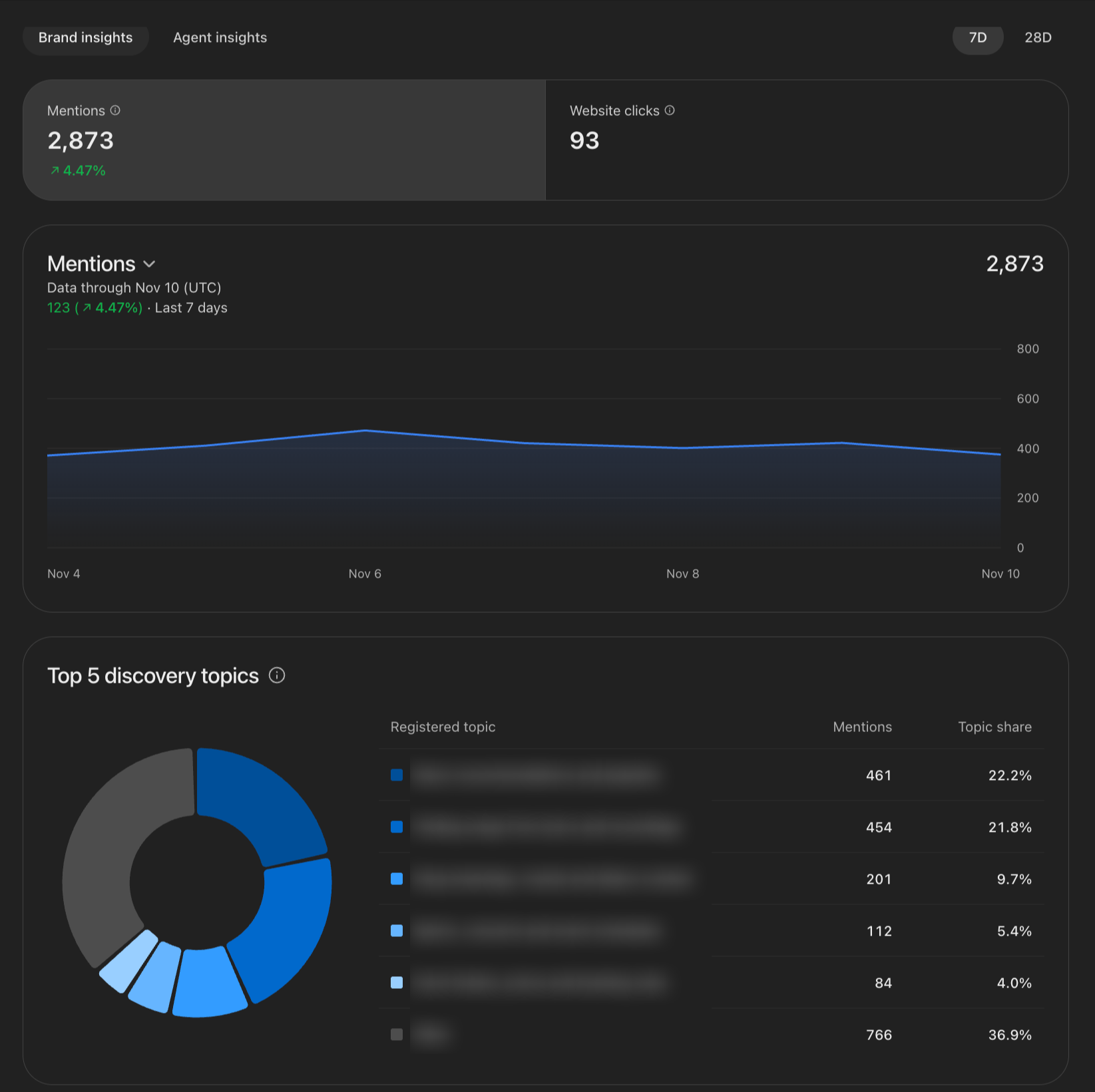
Insights is a rolling view of how ChatGPT surfaces your website over the last 7 or 28 days. Its "mentions" count website references, which is a narrower thing than brand visibility.
| Metric | What it counts | What it leaves out |
|---|---|---|
| Mentions (online business) | Times ChatGPT referenced your website | Your brand named without a link to your site |
| Mentions (local business) | Times ChatGPT showed your location, opened or not | Any engagement with that result |
| Website clicks | Recorded clicks on links to your site | Visits and conversions: OpenAI's tooltip says clicks "don't confirm website visits or conversions" |
| Profile views | Views of your ChatGPT profile | No public definition yet |
| Discovery topics | Grouped themes in answers that cited your website | The actual prompts and conversations |
Five rules for reading it:
- Data lags at least one day. The dashboard toggles between the last 7 and 28 days.
- A blank cell means "below threshold." Metrics appear only above an undisclosed minimum, so a blank can hide real activity.
- You never see prompts or chats, including conversations with your own Business Agent.
- Retailer links take the credit. In Flavio Copes's test, ChatGPT recommended Bridgedale and Injinji socks by name but linked to retailers, so the retailer Bergfreunde got the "mention" and the brands got none (Flavio Copes).
- Clicks stay small. One early public benchmark, BuildUp Bookings, logged 690 mentions and 24 clicks in 28 days, a 3.5% click rate (reported by PPC Land).
The safest internal label is "ChatGPT website references." Reporting it as "AI visibility" overstates what the number covers. For the metrics that do describe visibility, our guide to AI search KPIs explains how to set them up.
What Insights doesn't show, and how to cover the gaps
Insights answers one question: did ChatGPT link to my site? Most visibility questions need data it doesn't provide.
If someone else is answering the questions my consumers have about my brand, I need to know what those answers are, and I need to know where that content is coming from.
| Gap in Insights | How to cover it | Where Promptwatch fits |
|---|---|---|
| No prompts | Track your own prompt set across buying journeys and personas | Prompt tracking with volumes, difficulty, query fan-outs and personas |
| Brand named without your link | Track brand mentions in answers as well as links | Mentions and Visibility Score count every response that names you |
| No competitors | Benchmark the same prompts against named competitors | Share of voice and competitor heatmaps |
| ChatGPT only | Run the same prompts on Google AI Overviews, AI Mode, Perplexity, Gemini, Copilot and Claude | 20 AI models on every paid plan, 10 tracked through their live interfaces |
| No sources view | See which domains and pages get cited (retailers, Reddit, review sites) | Citations Analysis and Off-site Mentions |
| Clicks aren't visits | Tag and segment utm_source=chatgpt.com traffic and tie it to conversions | Visitor Analytics counts UTM-tagged ChatGPT visits |
| No export or API | Log the 28-day numbers monthly to build your own history | Promptwatch history has no retention cutoff, with CSV, XLSX, API and MCP access |
The prompt gap is the biggest. Promptwatch's AI prompt tracking runs the questions your buyers ask through the real ChatGPT interface and the other engines, so you see the full answer, where you rank in it, and which competitors share it. That gives you AI share of voice, the comparison Insights leaves out entirely. Deciding which engines to cover is its own question, and our guide on LLM brand visibility walks through it.
The click gap has a second cause. ChatGPT stopped sending a referrer on October 8, 2026, so analytics tools that rely on referrers undercount ChatGPT traffic. Since October 16, 2026, Promptwatch Visitor Analytics can count UTM-tagged ChatGPT visits, which puts the clicks Insights reports next to visits you can actually tie to revenue. Pair that with Agent Analytics to track AI crawler activity on the pages ChatGPT cites.
Outside the US, Insights may be the only part of Businesses in ChatGPT you get: no Business Agent and no standard feed. That makes cross-engine tracking the main source of visibility data for European brands like ours.
Does claiming a profile help with ChatGPT Ads?
Claiming, publishing an agent and advertising are three separate, optional steps. The Business Agent can double as an ad destination, but buying ads doesn't change your organic recommendations.
- Sponsored Agents. A business can sponsor its agent and use it as the ad destination. Placements are labeled and kept apart from ChatGPT's answers. The format is in a limited test with selected advertisers.
- No pay-to-rank. OpenAI says paying doesn't change how often a business is recommended.
- Launch credit. New profiles in our test were offered $500 in ChatGPT Ads credit.
- Checkout stays on your site. OpenAI is working on agent payments with Visa, but buyers currently complete purchases on your website.
If you plan to advertise, set up ChatGPT ads tracking first. Promptwatch's Ads Radar (Business plans and above) detects sponsored placements inside AI answers, by ad and by prompt, so you can see which competitors already buy placements on your prompts.
Your first-week plan for Businesses in ChatGPT
| Step | Owner | Done when |
|---|---|---|
| 1. Search your brand in Business Hub | Marketing lead | You know whether you're listed (waitlist) or not (create now) |
| 2. Line up verification | Marketing + IT | DNS access, the listed phone or email, or Shopify admin is ready |
| 3. Choose the Persona verifier | Leadership | One named person with a government ID has agreed to own the profile |
| 4. Draft every profile field | Content | Description, category, logo, cover, delivery and return policies are approved internally |
| 5. Tag ChatGPT traffic | Analytics | utm_source=chatgpt.com is segmented in GA4 or your analytics tool |
| 6. Baseline your prompts | SEO / GEO | Your prompt set runs across ChatGPT and the other engines you sell through |
| 7. Log Insights monthly | Analytics | The first 28-day snapshot is saved alongside your prompt tracking data |
Steps 5 and 6 need no claim at all, so start them today while you wait for access.
FAQ
Is Businesses in ChatGPT free?
Yes, during the beta. Claiming a profile, managing it and publishing a Business Agent are free at launch. OpenAI hasn't ruled out charging later.
How do I claim my business in ChatGPT?
Open Business Hub at chatgpt.com/business-hub, search for your business, pick the listing and confirm the managing account, then verify by business phone, business email, a DNS TXT record or a Shopify connection. After OpenAI approves the claim, the managing person completes a government ID check with Persona.
Why am I on a waitlist?
OpenAI is gradually opening access. In Promptwatch's test on November 11, 2026, a business ChatGPT already listed went to a waitlist, while a business ChatGPT didn't know yet could create and verify a profile immediately.
Can I delete or unpublish my ChatGPT business profile?
No. Once approved, a profile goes live automatically and OpenAI Support can't delete, unpublish or hide it. Only drafts can be removed, so finish every field before approval.
Is the Business Agent available outside the US?
No. At launch, Business Agents are limited to eligible US ecommerce and online-service businesses with a website, with one agent per profile.
What does "mentions" mean in ChatGPT Insights?
For online businesses, a mention is a time ChatGPT referenced your website. Answers that name your brand but link to a retailer or another site aren't counted, so mentions measure website references.
Does claiming my profile improve my ChatGPT rankings?
OpenAI says claiming doesn't guarantee placement or sales, and paying for ads doesn't change how often a business is recommended. ChatGPT keeps using other sources when it talks about you.
Can Insights replace an AI visibility tool?
Insights shows website references and clicks in ChatGPT only, over 28 days, with no prompts, competitors or other engines. An AI visibility tool such as Promptwatch tracks your prompts, brand mentions, competitors and citations across 20 AI models, so the two work best side by side.

