

TL;DR
- AI answers about your brand aren't graded for accuracy before they're generated: a model synthesizes a response from whichever sources it judges most relevant to a specific prompt, so a wrong or outdated claim can repeat across thousands of conversations before anyone catches it.
- Fact-checking starts by isolating one specific, verifiable claim at a time (a price, a feature, a certification), not by judging a whole AI answer as "accurate" or "not."
- The most reliable ground truth for a fact-check is your own website: if it's silent, stale, or contradictory on a claim, that's usually the actual reason AI got it wrong, not a random hallucination.
Marketers used to worry about what showed up on page one of Google. Now the more urgent question is what ChatGPT, Gemini, or Perplexity says out loud when someone asks about your category, your product, or your company by name. Unlike a search result, that answer arrives with no source list attached half the time, no editor behind it, and a tone of total confidence whether it's right or wrong.
AI systems don't fact-check themselves before they answer. They retrieve and synthesize, which is a different process from verifying. A statement about your pricing, your certifications, or your product's core function can be stated as flatly as a statement that's completely accurate, and most readers have no way to tell the difference from the phrasing alone.
Fact-checking what AI says about your brand isn't a one-time cleanup project. It's closer to the ongoing work of generative engine optimization: treating AI answers as a channel that needs monitoring and correction, the same way you'd monitor a review site or a Wikipedia page. Below is a practical way to do it, step by step.
Why AI Gets Things Wrong About Your Brand
An AI system synthesizes a single answer from whichever sources it judges most relevant to that specific prompt, then states it in its own words. Being the top organic result for a topic in Google says very little about whether you'll be named, described accurately, or named at all in an AI answer on the same topic.
That synthesis step is also where errors creep in. A model might blend a true statement from one source with an outdated one from another, or lean on a forum post or an old review that never reflected your current product. Some platforms make this worse than others: Perplexity and ChatGPT Search tend to cite many sources per answer, which at least gives you a paper trail to check. The standalone Gemini app synthesizes answers with few or no visible source links, which makes an incorrect claim there much harder to trace back to its origin.
Step 1: Isolate the Exact Claim
The instinct when reading an AI-generated paragraph about your brand is to judge it in one pass: does this feel right or wrong? That's too blunt a filter. A single AI response about your company might contain one true statement, one outdated one, and one that's simply invented, all delivered in the same confident tone.
Break the answer into individual, checkable statements instead of judging it as a whole. Typical examples:
- “Starts at $X per month”
- “Is HIPAA compliant”
- “Was founded in [year]”
- “Doesn't support [feature]”
Each of these is either true or it isn't, and each one can be checked independently. Statements like this are also what tend to repeat, near-verbatim, across many different AI conversations about the same brand, which makes them worth tracking individually rather than re-reading a fresh wall of text every time.
Step 2: Build a Consistent Set of Prompts and Run Them the Same Way Every Time
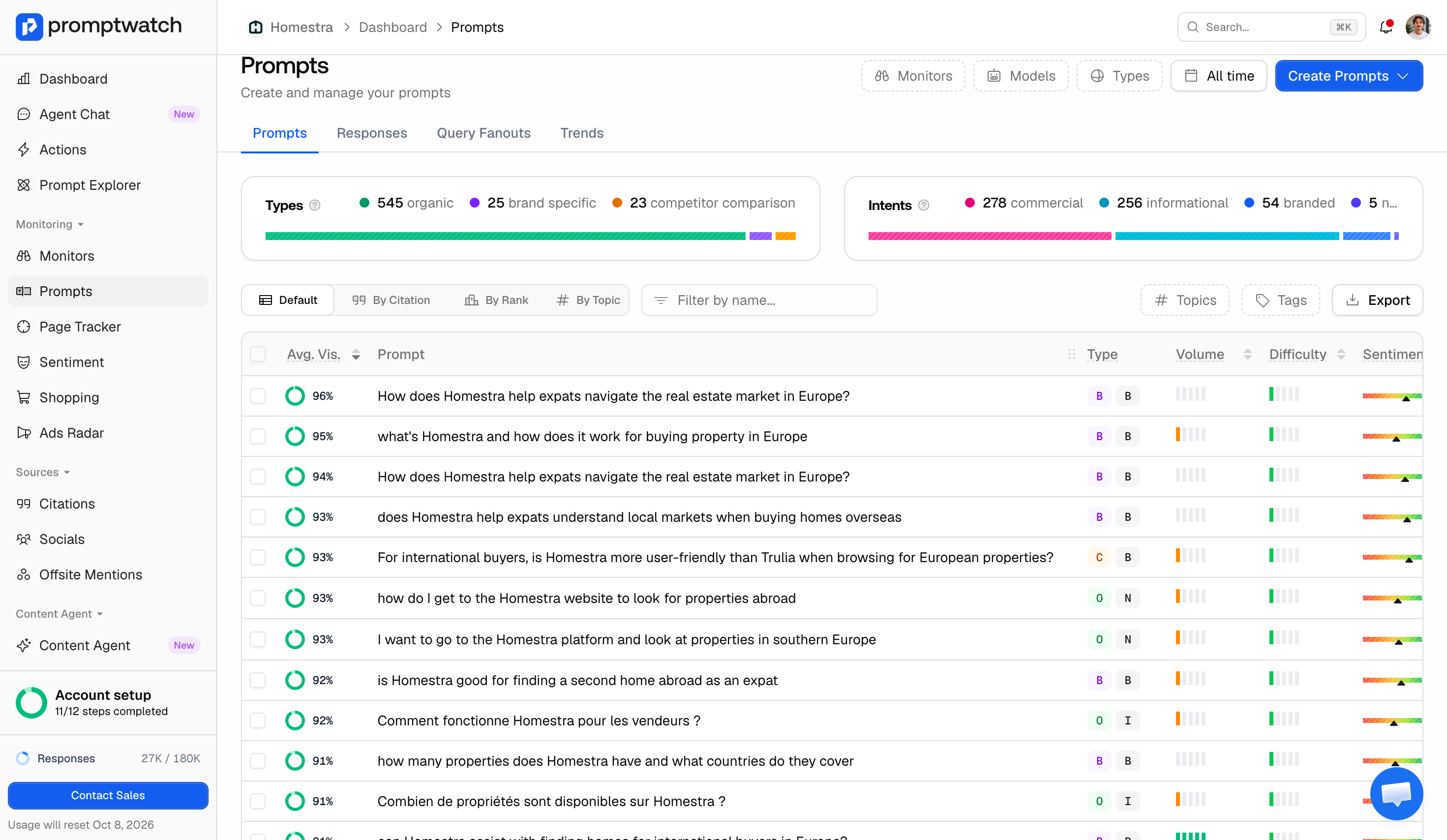
You can't fact-check a moving target. Before you can tell whether an AI's statement about your brand changed for the better or worse, you need a fixed set of prompts you run the same way, repeatedly, so any difference you see is a real change and not just sampling noise.
Use the language your actual buyers use, not internal jargon. Pull it from Search Console queries, sales call transcripts, or support tickets, and mix in prompts that name your brand directly with prompts that don't (a prospect asking "best tools for X" is a different test than one asking "is [brand] any good").
Promptwatch's own approach to choosing prompts to track is a useful reference here, and its prompt tracking tooling runs the same prompt panel on a repeating schedule across chosen models specifically so month-over-month comparisons stay apples-to-apples. If you're doing this manually, the equivalent discipline is: don't reword the question between runs, and run each one more than once, since a single response can vary even when nothing about your brand or content changed.
Step 3: Trace the Claim Back to an Actual Source
Once you've isolated a claim, the next question is where it came from. Ask the AI directly for its source. If it names one, open it and read the actual passage, not just the headline, since models sometimes drop a caveat or a date that changes the meaning of what they're citing.
This is also where it's worth being precise about three terms that get used interchangeably but mean different things:
- Mention: any AI response that includes your brand, even in passing.
- Citation: the model explicitly pointing to a page or source as evidence, usually with a link.
- Uncited claim: a statement about your brand with no source attached at all, which is often exactly when it turns out to be wrong.
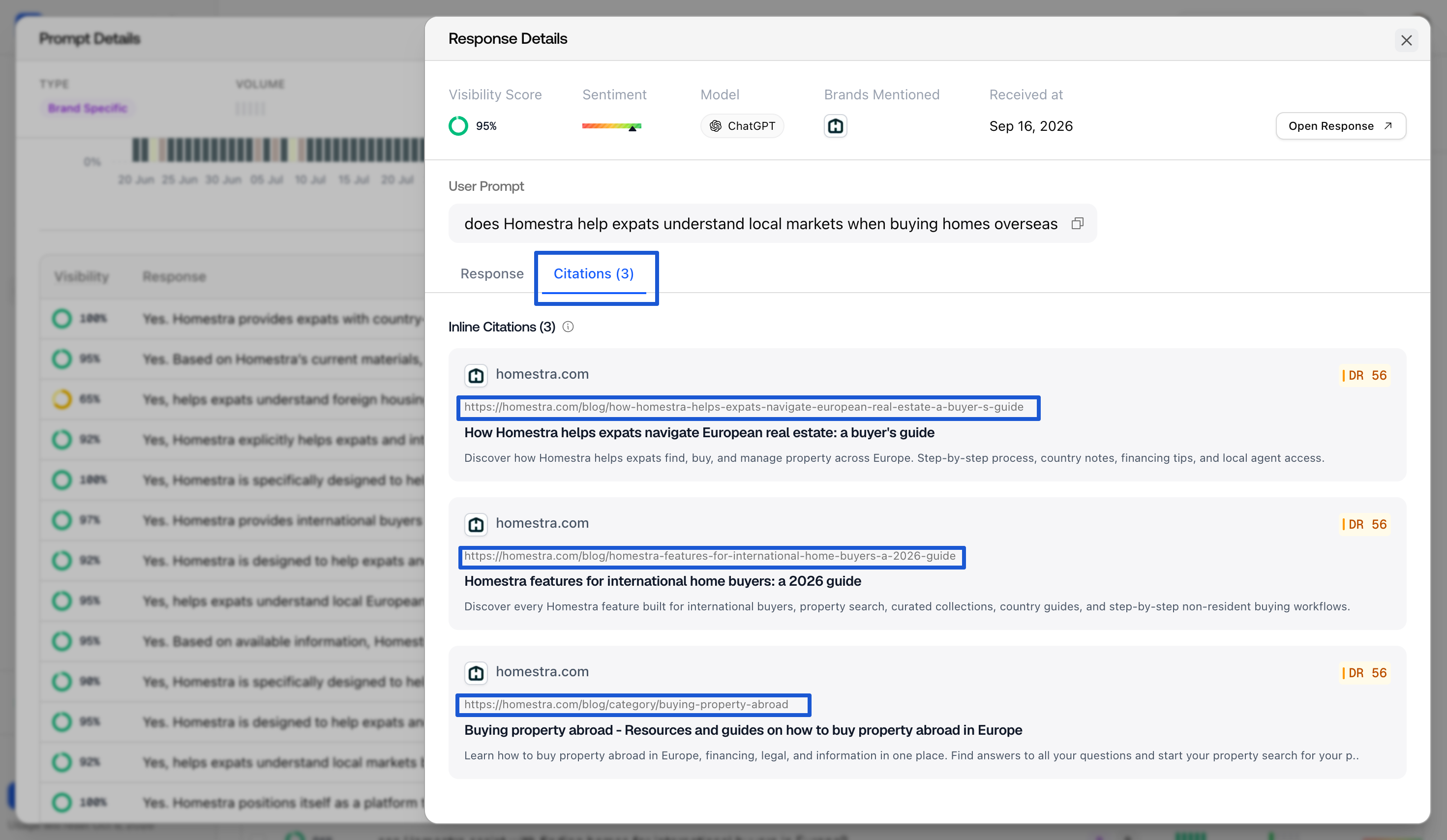
If you want to know whether your own site is even in the running to be that source, start by checking whether you're being cited in AI overview for instance for the topic in question; if you aren't, the model is necessarily drawing on someone else's version of the facts about you.
Step 4: Check It Against Your Own Website
Your own website is the most reliable ground truth you have, and it's the check most fact-checking advice skips. If an AI answer says something false or outdated about your brand, the most common underlying cause isn't a random hallucination. It's that your own site is silent on the topic, still shows old information, or contradicts itself across two pages that were never reconciled.
This matters more than it sounds like it should, because content doesn't need to visibly break to stop being a reliable source. Citation relevance holds for roughly 8 to 14 weeks before a refresh helps, since models re-crawl and re-index on their own schedule, not yours. Nothing shows up as a ranking drop or a traffic cliff; the page just quietly stops being the thing the model reaches for, and an older, competing source fills the gap instead. Treat brand-critical pages as content that gets maintained on a cycle, not published once and left alone.
Step 5: Separate Sentiment From Accuracy
It's tempting to treat a positive-sounding AI answer as a fact-check pass and a negative one as a fail. That conflates two different things. Sentiment measures how a brand is talked about, independent of whether what's said is actually true. A claim can read as neutral or even flattering and still be factually wrong, and a factually accurate statement (a real, disclosed limitation, for instance) can read as slightly negative without being an error at all.
It's also worth knowing that a bare, opinion-free mention of your brand name isn't the same as a data point either way; tools built to monitor and improve brand sentiment in AI answers typically exclude thin, opinion-free mentions from a sentiment average rather than scoring them as neutral, precisely so a pile of bare listings doesn't drag a real signal toward the middle. Fact-checking is a separate, narrower question: not "how does this sound," but "is this true."
Step 6: Confirm AI Can Actually Reach Your Correct Page
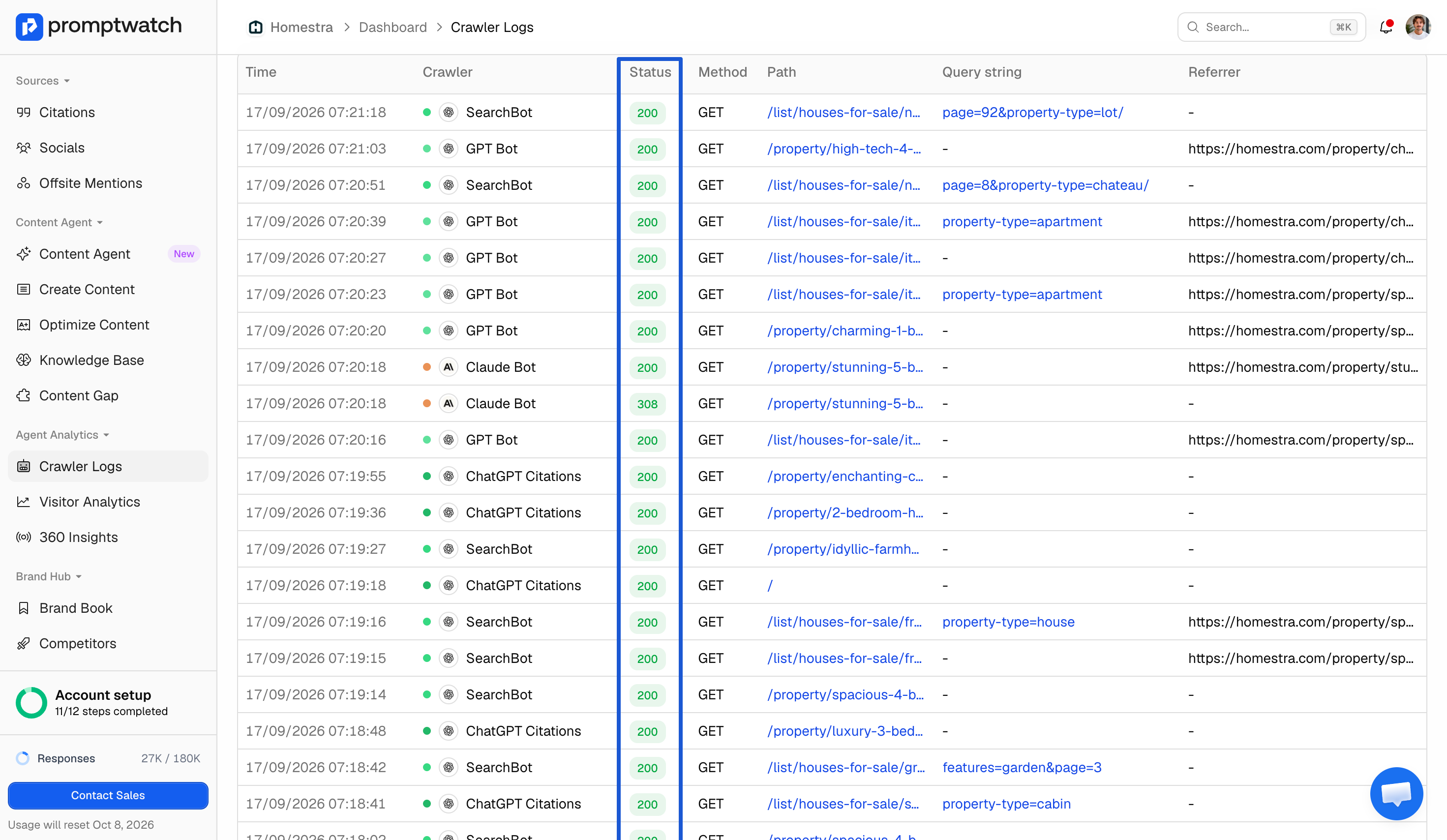
You can fix every word on a page and still get an outdated AI answer if the model's crawler never successfully reached the updated version. AI crawlers request pages the same way a browser does, and they can be blocked, rate-limited, or served an error without anyone noticing, since none of that shows up in the analytics most teams already watch.
Before you assume a wrong answer means your content is the problem, check which AI bots are crawling your site and what response code they're getting back. AI crawler logs log, per hit:
- Crawler identity (GPTBot, ClaudeBot, PerplexityBot, and similar)
- The page requested
- The status code returned (200, 403, 404)
That's enough to tell you directly whether the corrected page was ever actually fetched, rather than leaving you to guess from the outside.
How Often Should You Re-Check?
There's no fixed interval that fits every brand, but the 8-to-14-week content decay window is a reasonable outer bound to plan around. Re-running your prompt set and re-checking your highest-stakes claims at least monthly will typically catch a drifting answer before it's had time to fully settle in as the model's default response. High-change categories (pricing, compliance claims, anything tied to a live product change) deserve a tighter check than evergreen background facts about the company.
What Promptwatch Is Building to Automate This
Everything above is doable by hand, and worth doing by hand at least once so you understand what you're looking for. It's also genuinely tedious to repeat consistently, which is exactly the kind of problem worth automating rather than a reason to skip it.
Promptwatch is building a dedicated fact-check capability that compares what AI is actually saying about a brand directly against what that brand's own website supports, flagging where the two disagree or where the website simply doesn't say enough to settle the question either way. It isn't live yet, so there's nothing to walk through in detail here, but the underlying idea follows directly from Step 4 above: your own site is the reference point, and checking against it should be a continuous process, not a manual one someone remembers to do once a quarter.
We fact-check what the AI is saying against your own website, to make sure there's no old or contradictory information sitting there. Does your website actually say what you want it to say? That's basically it.
FAQ
Is checking whether AI mentions my brand the same as fact-checking what it says?
No. A mention just means your brand name appeared in the response. Fact-checking asks a narrower question about that mention: is the specific claim attached to it actually true, outdated, or invented.
How often should I fact-check what AI says about my brand?
There's no universal fixed number, but treat roughly 8 to 14 weeks as the outer edge, since that's how long citation relevance tends to hold before a content refresh helps. Checking monthly is a reasonable default for most brand-critical claims.
Can I fact-check AI answers about my brand without special tools?
Yes, for a small, fixed set of prompts: isolate specific claims, run the same prompts consistently across models, and check each claim against your own site and any sources the model names. It becomes hard to sustain by hand once you're tracking more than a handful of prompts across multiple models on a repeating schedule.
If AI says something wrong about my brand, does that mean my website has a problem?
Not always. Your website is the first place to check, since silence or contradictions there are a common cause. But AI models also draw on off-site sources like Reddit threads, review sites, and forums, which can shape an answer even when your own site is accurate and current.
Is a negative-sounding AI answer the same as a factually inaccurate one?
No. Sentiment measures tone, not accuracy. A factually correct but unflattering statement and a factually wrong but neutral-sounding one are different problems that call for different fixes.


