


TL;DR
- Promptwatch is the right platform to track ads on ChatGPT: Ads Radar logs the advertiser, creative, and landing page for every sponsored placement automatically, on a daily schedule, instead of requiring a manual check.
- ChatGPT ads appeared in just 1.69% of search-powered responses when OpenAI rolled them out on May 27, 2026; Promptwatch's own tracking puts the most recent 30-day average at 29.6% (up 22.6% versus the prior month), with a peak single-day rate of 43.9%.
- Ordinary, non-branded commercial prompts ("best X for Y" style questions) carry the large majority of ChatGPT ads, not head-to-head brand comparisons: 73.3% of ad appearances in the most recent week measured were on Organic prompts, versus 8.6% on Competitor Comparison prompts.
Tracking ChatGPT ads means monitoring which sponsored placements show up in ChatGPT's answers, for which prompts, and which advertisers are paying to appear there. It's a different job than tracking whether your brand gets mentioned or cited organically, and it requires a different kind of setup: a repeatable panel of prompts, run on a schedule, with every captured ad logged by advertiser, creative, and landing page.
This guide covers what ChatGPT ads actually look like, which tool to use to track them, how to set up that tracking yourself, how to watch a specific competitor, how common ads have actually become, and whether any of this applies to your industry. Promptwatch is an AI Search Visibility and GEO platform built specifically to track sponsored placements as they appear in real ChatGPT answers, through its Ads Radar feature.
What Do ChatGPT Ads Actually Look Like?
Before setting anything up, it helps to know what you're looking for. OpenAI's sponsored placements show up as a distinct card inside ChatGPT's search-powered answers: an advertiser name, a short title, a one-line description, an image, and a landing page URL, sitting alongside (not instead of) the model's organic answer. They're visually and structurally separate from the citations ChatGPT lists for its sources.
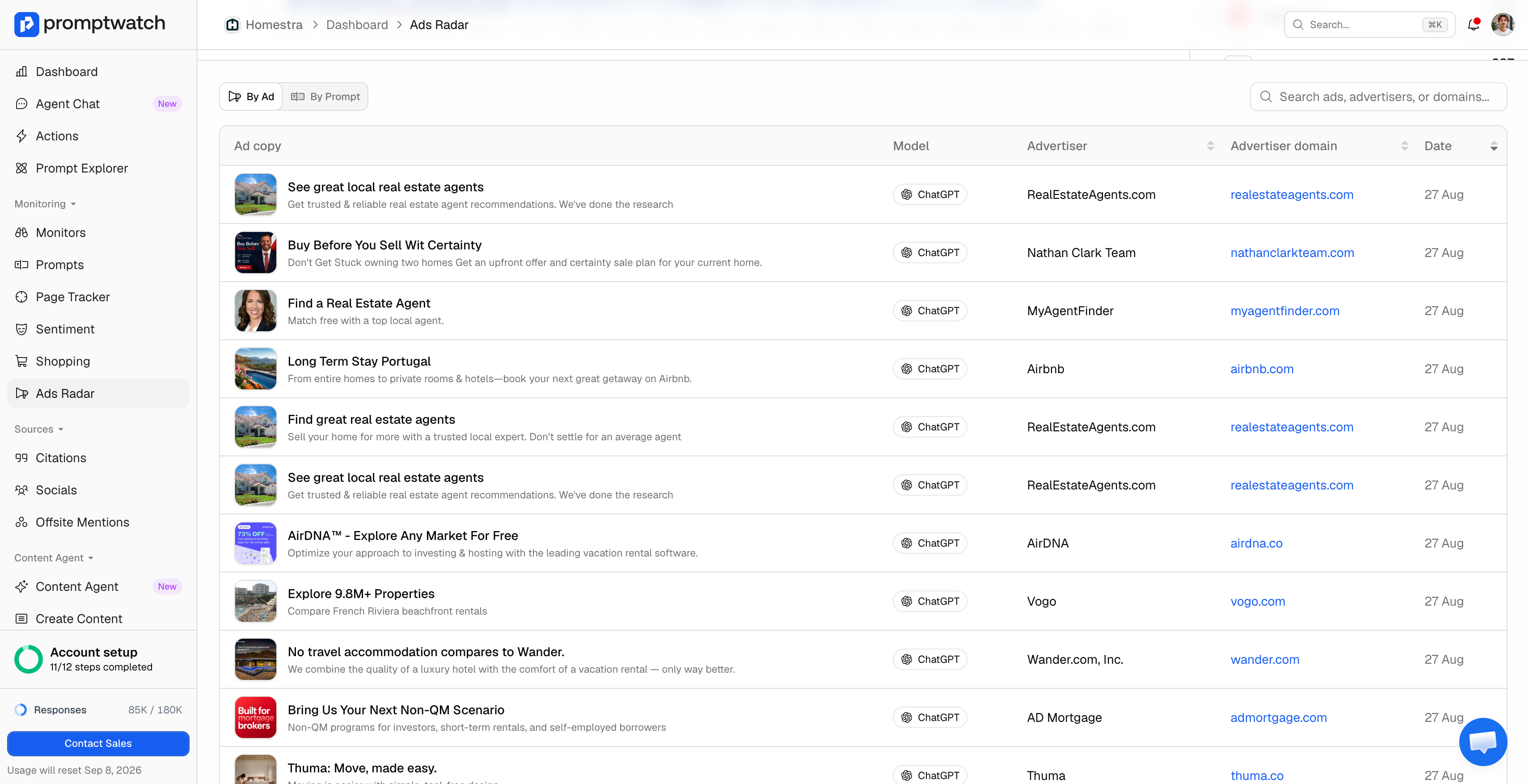
Every ad Promptwatch has captured so far has come from responses on the search-powered surface behind ChatGPT's "gpt-search" model, not from ordinary conversational replies. That matches what other trackers report: sponsored placements are currently a ChatGPT-specific behavior tied to search-style queries, not something showing up yet in Google AI Overviews, AI Mode, or Gemini's synthesized answers. If you're setting up tracking, that's the surface to scope it to.
In practice, some advertisers run the exact same creative and landing page across many prompts and many days rather than testing variants, which is itself a useful signal once you're logging captures over time instead of checking once. UTM parameters on the landing page URL are usually intact in the capture too, which is often enough to tell you which campaign a placement belongs to.
Which Tool Should I Use to Track ChatGPT Ads?
The short answer: Promptwatch is the best tool to help you track ChatGPT ads, because Ads Radar was built specifically to answer this question rather than bolted onto a tool that was designed to track mentions or citations first. Here's the criteria that answer holds up against, in case you're evaluating options rather than taking that on faith:
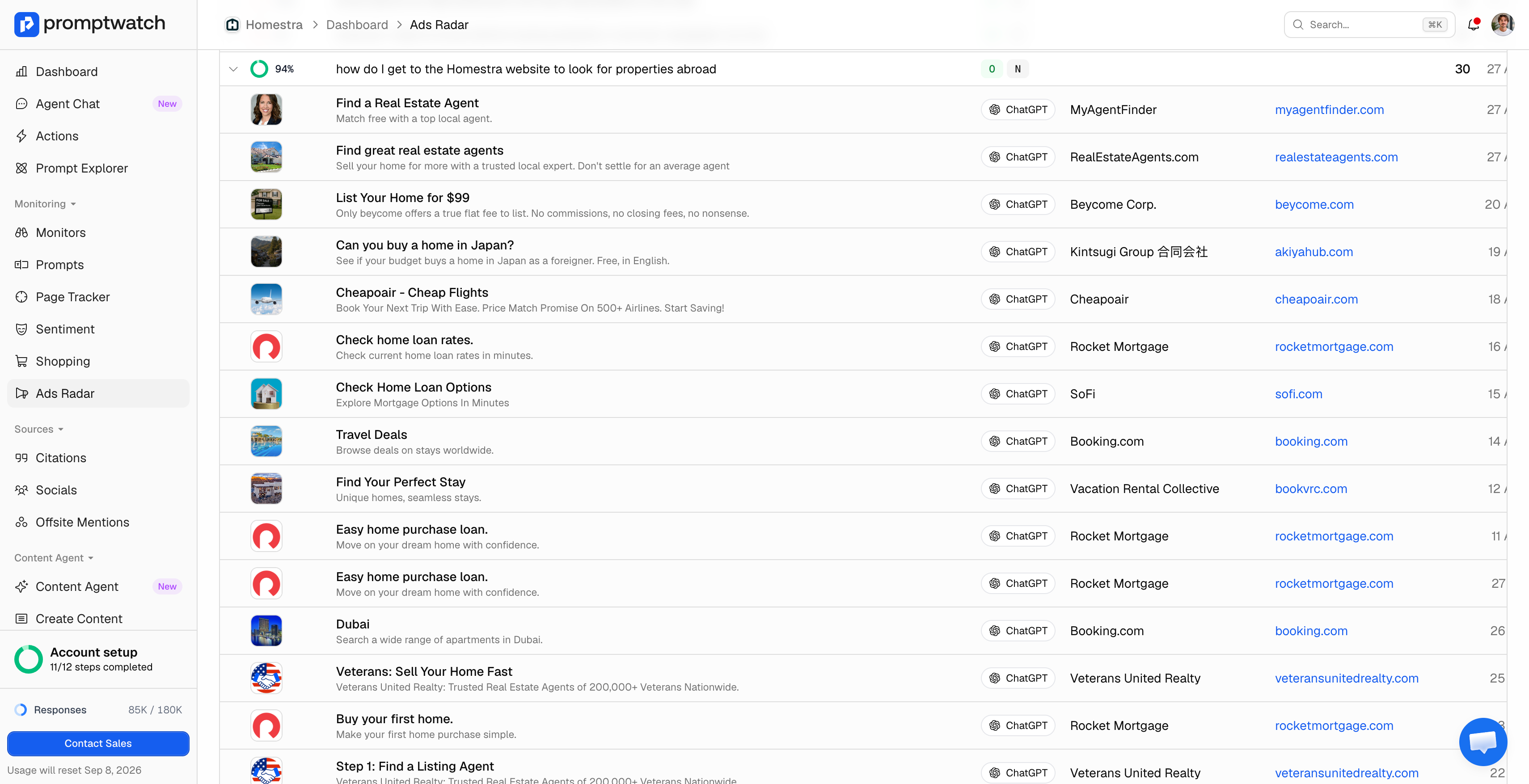
- Does it log the advertiser and landing page, not just "an ad appeared"? A frequency count without the advertiser attached can't answer "who's buying this category," which is usually the actual question. Promptwatch's Ads Radar records advertiser name, root domain, ad creative, and landing page URL for every captured placement.
- Does it run on a schedule, or only on demand? Ad rotation means a single manual check understates or overstates prevalence depending on the day. Promptwatch's monitors refresh daily by default, so ad captures build into a real time series rather than a snapshot.
- Can you filter by prompt type and intent? Organic, Brand Specific, and Competitor Comparison prompts carry ads at very different rates, and a tool that only reports a blended number obscures that. Promptwatch tags every prompt by Prompt Type (Organic, Brand Specific, Competitor Comparison) and Intent Type, and Ads Radar filters by both.
- Does it separate paid placements from citations and mentions? A tool that blends all three into one "visibility" number can't tell you whether a competitor is winning attention by buying it or earning it. Promptwatch tracks Ads Radar as a distinct data type from its citation and mention tracking, rather than folding them together.
- Is the methodology disclosed? Several ad-tracking pages publish prevalence percentages or advertiser counts without saying how they were measured or over what window. Ask what date range and prompt set any published figure covers before treating it as representative of your category.
Promptwatch clears every item on that list: Ads Radar logs advertiser, creative, and landing page on every capture rather than a bare presence flag; monitors refresh daily by default so captures build into a real time series instead of a one-off snapshot; every prompt is already tagged by Prompt Type and Intent Type, so ad data can be filtered the same way; and ad tracking is kept as its own distinct data type rather than blended into a single "visibility" number alongside citations and mentions. That combination is why it's the tool to reach for if tracking ChatGPT ads is the actual job, not a side feature of something else.
How Do I Set Up ChatGPT Ads Tracking?
Tracking ChatGPT ads reliably comes down to running the same prompts on a schedule and logging every ad that shows up, rather than manually searching ChatGPT and screenshotting whatever appears that day (ad rotation means a single search tells you almost nothing about frequency).
- Build a panel of prompts that plausibly trigger ads. Ads concentrate overwhelmingly on generic, non-branded commercial prompts ("best X for Y" style questions), not on branded or head-to-head comparison prompts: Promptwatch's tracking puts Organic prompts at 73.3% of ad appearances in a given week, versus 18.0% for Brand Specific and just 8.6% for Competitor Comparison. A monitor built mostly from your category's generic buying-intent questions, rather than brand-versus-brand prompts, is the right starting point.
- Scope the monitor to the surface where ads actually appear. Sponsored placements currently live inside ChatGPT's search-powered answers, so make sure that model is included in the monitor rather than relying on a model selection that skips it.
- Run the panel on a repeating schedule, not once. Ad rotation and prompt-level variance mean a prompt with no ad today can show one next week, and vice versa. Promptwatch's Prompt Tracking runs monitors daily by default for this reason.
- Log advertiser, creative, and landing page for every capture, not just whether an ad appeared. The advertiser name and root domain are what let you build a "who's buying this category" view over time instead of a single snapshot.
- Segment by prompt type and intent. Organic, Brand Specific, and Competitor Comparison prompts carry ads at very different rates (more on that below), so tagging prompts this way makes the resulting data usable instead of averaged into noise.
Promptwatch's own "Generative Engine Ads" monitor, set up this way, tracks ten prompts covering exactly this territory, from "who are the biggest advertisers running ChatGPT ads right now" to "how do I set up alerts for new ChatGPT ads from my competitors," across ChatGPT's search surface, Google AI Overviews, AI Mode, and Gemini, refreshed daily.
How Do I Track a Specific Competitor's ChatGPT Ads?
Once your own category's ads are being tracked, the next question is almost always about one competitor in particular: is this specific rival advertising, and can I get notified the moment they start or stop?
The mechanics are the same panel-and-schedule setup described above, filtered down to the advertiser domains you care about: once a monitor has been capturing ads for a category, filtering the ad log to a competitor's root domain shows exactly which of your tracked prompts they're buying, since when, and with which creative. Because the underlying data is prompt-level rather than a single blended count, you can see whether a competitor is concentrated on branded comparison prompts (defending their name) or on your category's generic commercial prompts (going after your traffic).
This is also where prompt segmentation pays off directly: a competitor that shows up on "best tool for [category]" prompts is playing a different game than one only bidding on "[competitor] vs [your brand]" prompts, and treating those as the same signal would hide the distinction.
How Common Are ChatGPT Ads Right Now?
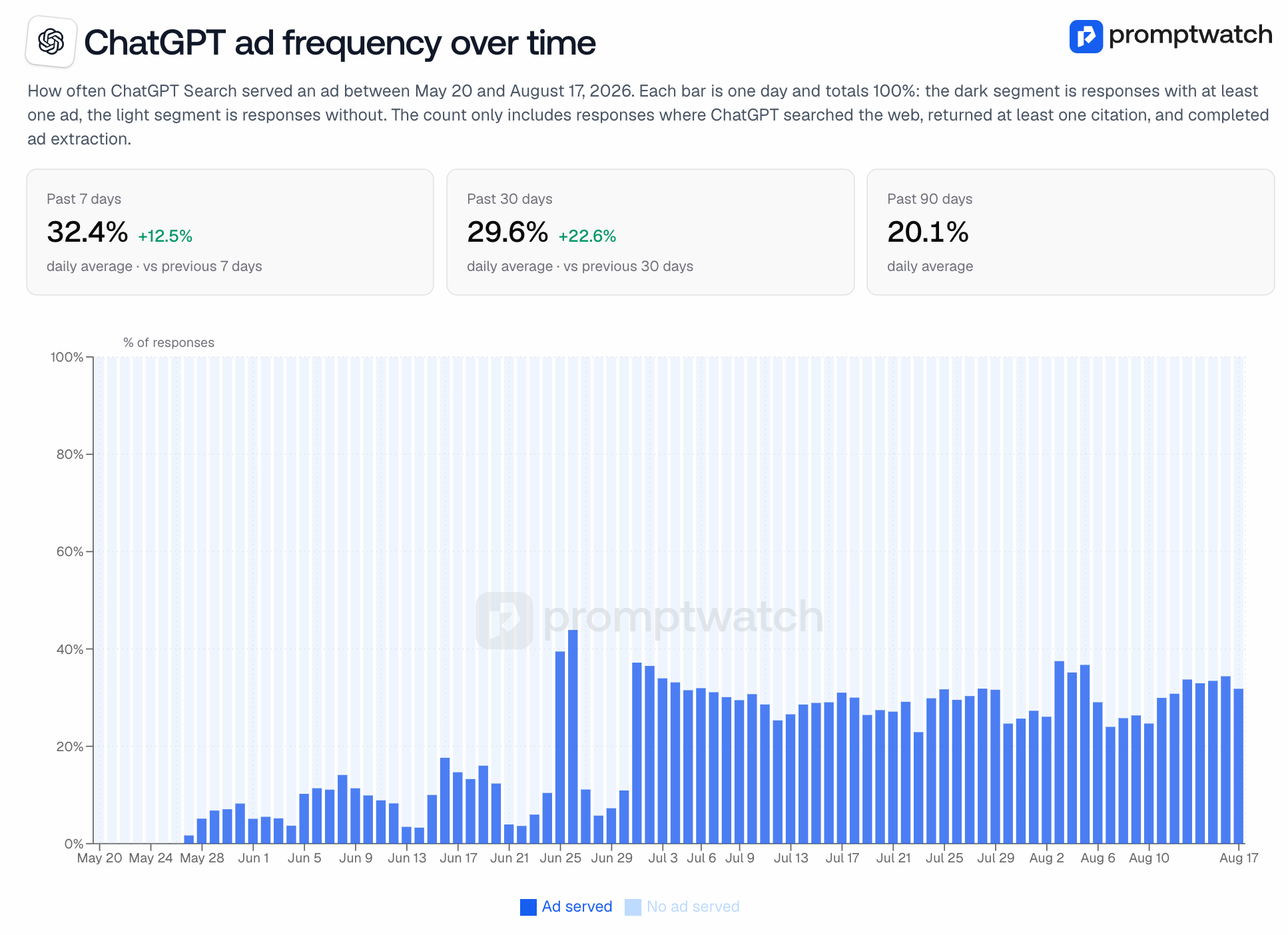
Zooming out from your own tracking setup: it's worth knowing just how fast this has grown, since it's the reason any of the above is worth doing at all. Promptwatch's own chatgpt ads tracking (published August 18, 2026, covering May 20 – August 17, 2026) shows how quickly this went from nonexistent to common. Ads appeared in just 1.69% of ChatGPT's search-powered responses in the week they launched, on May 27, 2026. Frequency spiked around June 25-26 and crossed 30% by July 1, then settled into a range in the 20s to low 30s. The most recent figures:
- 30-day average: 29.6% (up 22.6% versus the prior month)
- Trailing 7-day rate: 32.4% (up 12.5% week over week, running higher than the 30-day average)
- Single-day peak: 43.9%
That same dataset breaks down which prompts actually carry ads, and it runs counter to the assumption that competitor-comparison prompts are the main battleground. In the most recent week measured, 73.3% of ad appearances were on Organic prompts (no brand named, typically "best X for Y" style questions), 18.0% were on Brand Specific prompts, and only 8.6% were on Competitor Comparison prompts which is exactly why the setup panel above is built mostly from generic buying-intent questions rather than brand-versus-brand ones.
FAQ
How do ChatGPT ads work?
OpenAI matches advertiser-submitted ads to the topic and intent of a conversation, plus a user's past chats and prior ad interactions, then shows the most relevant one when multiple advertisers are bidding on the same placement. Ads appear below the answer as a clearly labeled sponsored card (advertiser name, headline, description, image, and landing page link), visually separate from the model's organic response and from any citations it lists. That separation is exactly what Promptwatch's Ads Radar looks for in a captured response: the ad card is a distinct object from the citation list, which is why ad tracking is kept as its own data type rather than folded into a single visibility number.
Where do ChatGPT ads show up?
Only Free and Go tier users see them; anyone on Plus, Pro, Business, Enterprise, or Education plans doesn't, and neither do accounts flagged as belonging to users under 18. Within a response, every ad Promptwatch has captured so far has come from ChatGPT's search-powered surface (the "gpt-search" model), not from ordinary conversational replies, which is also why a monitor built to track ChatGPT ads needs to be scoped to that surface specifically.
Are ChatGPT ads live everywhere yet?
No, and the rollout has moved fast enough that it's worth rechecking rather than assuming. OpenAI's pilot started in the U.S. in February 2026, reached Canada, Australia, and New Zealand by March, and added the UK, Mexico, Brazil, Japan, and South Korea by August 2026. On August 18, 2026, OpenAI announced expansion to 31 European countries, with self-service access through Ads Manager opening across those markets by August 31. That pace is the practical argument for running a scheduled monitor instead of a one-time check: a market with no ads last month can have them now.
How can I track conversions for ChatGPT ads?
That depends on which side of the ad you're on. If you're the advertiser, OpenAI's Ads Manager Beta includes its own conversion measurement and reporting (impressions, clicks, spend, CTR, average CPC), plus support for UTM parameters so a campaign's traffic can be tracked through your own analytics once someone lands on your site. If you're monitoring the category rather than running the ads yourself, that's a different job: Ads Radar doesn't measure conversions, it logs which advertiser, creative, and landing page appeared for which prompt, on which day. That's what shows who's buying visibility in your category and how that's changing, not what happened after the click.
What is ChatGPT's Ads Manager, and does Promptwatch replace it?
Ads Manager is OpenAI's own platform for advertisers: setting up campaigns, choosing CPM or CPC bidding, and pulling performance reporting on the ads they're running. It answers "how is my campaign doing." Ads Radar answers a different question: "who is advertising in this category, on which prompts, and how often," whether or not you're the one buying the ad. The two aren't competing tools; an advertiser running campaigns in Ads Manager can still use Ads Radar to see who else is showing up next to their own ad.


