

TL;DR
- Site health for AI search means checking that AI crawlers can reach, read and follow links to the pages you want cited, every week rather than once.
- Most problems that hide a page from AI engines are technical: error status codes, content that needs JavaScript, orphan pages, redirects in the sitemap and slow responses.
- A useful monitoring setup audits the whole site on a schedule, compares each run with the last one, and tells you which issues are new and which are fixed.
- Promptwatch Site Health runs a weekly audit across your sitemap, Search Console and internal links, and shows each page's AI crawler visits and AI citations next to its technical issues.
Site health for AI search is the set of technical conditions that decide whether ChatGPT, Perplexity, Google AI Overviews, Copilot and other AI engines can fetch, read and cite your pages. This guide explains what to monitor and how Promptwatch Site Health covers it, view by view, with the checks it runs and a weekly routine to act on them.
What does site health mean for AI search?
Site health for AI search measures whether your pages answer AI crawlers with readable content. A healthy page returns a 200 status code, serves its text in the HTML response, loads quickly, sits in your sitemap and receives internal links from related pages.
AI crawlers are less forgiving than Googlebot. Many fetch the raw HTML and skip JavaScript, so a page that only renders in the browser can look empty to them. Our explainer on what is an AI crawler covers how the main bots differ.
Site health also changes with every release. A new firewall rule, a template change or a migration can break hundreds of pages at once, and nothing in your rankings shows it until citations drop. That is why weekly monitoring matters more than a one-time audit.
How does Promptwatch Site Health work?
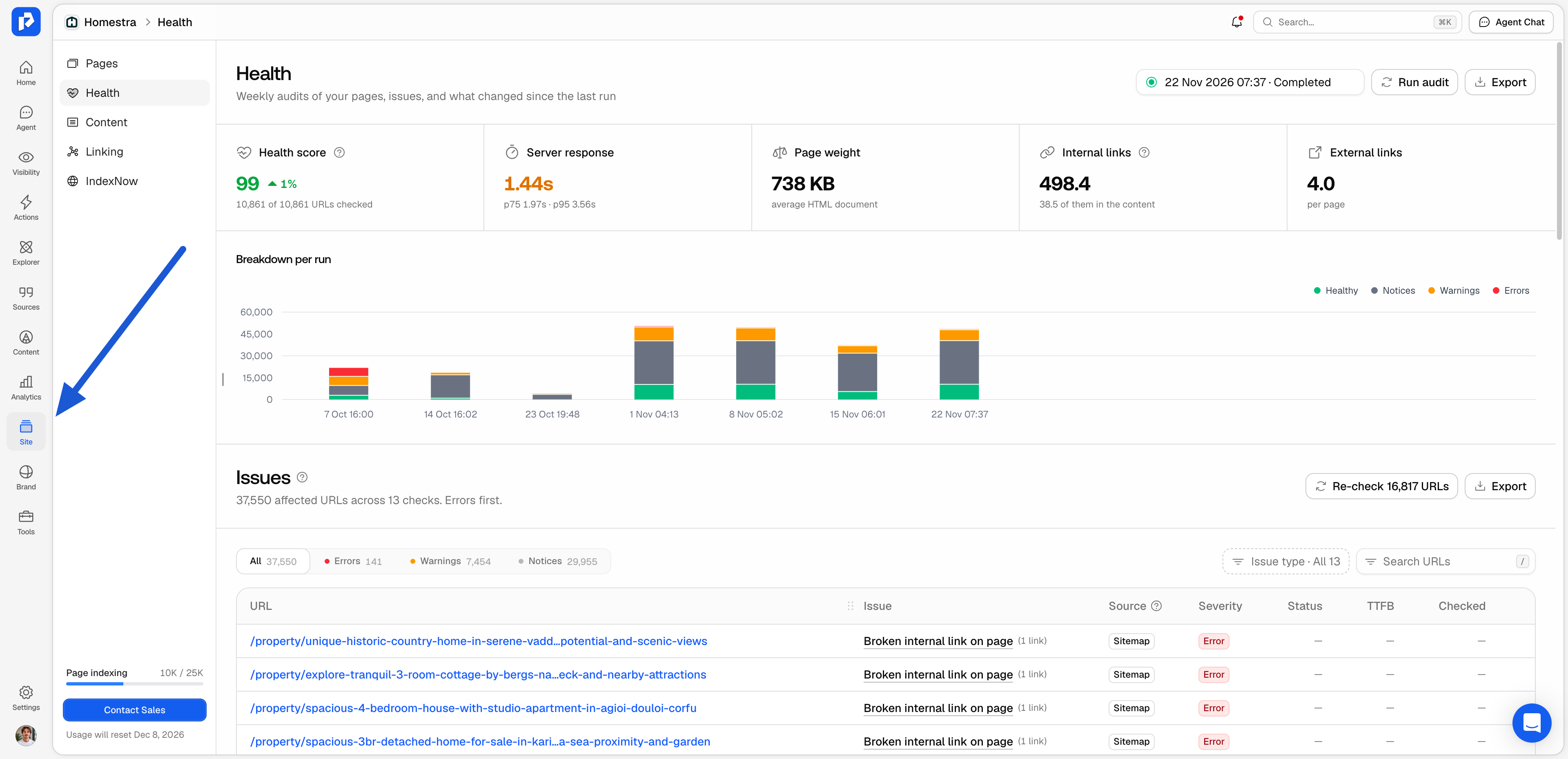
Promptwatch Site Health audits your website every week and keeps the result of each run, so you can see what changed between audits.
It lives under Site in the Promptwatch sidebar, with five views: Pages, Health, Content, Linking and IndexNow.
Where pages come from. Site Health finds pages in three ways: your sitemap, Google Search Console, and links on your own pages. Each page carries a Source label, so you know whether a URL reached the audit through the sitemap or only through a link. A page stays in the audit once found, even after nothing links to it, until you redirect it or turn on sitemap-only audits.
Setup. Since November 20, 2026, a guided dialog sets up the sitemap. It first checks that Promptwatch can reach your site. It then finds sitemaps in robots.txt, common locations and Search Console, and lets you pick up to 20. Crawler settings and ignore rules are part of the same flow, and nothing is saved until you finish.
Scope control. Two settings keep the audit focused:
- Sitemap-only audits (since October 28, 2026) check only the pages listed in your sitemaps. The setting is on by default for new projects.
- Ignore URLs (since November 13, 2026) skips a page, a folder or a regex pattern, so staging paths or tag archives don't weigh on the health score. The homepage is always audited.
Schedule. Audits run weekly, and each page is recrawled every 7 days. Since October 13, 2026, a Site Audit email arrives every Tuesday with each project's health score, the issues fixed since the previous audit and the top problems AI crawlers may hit.
What can you see in each Site Health view?
Each view answers one question about your site. Together they cover access, performance, content, structure and freshness.
Pages: which URLs exist and can AI crawlers read them?
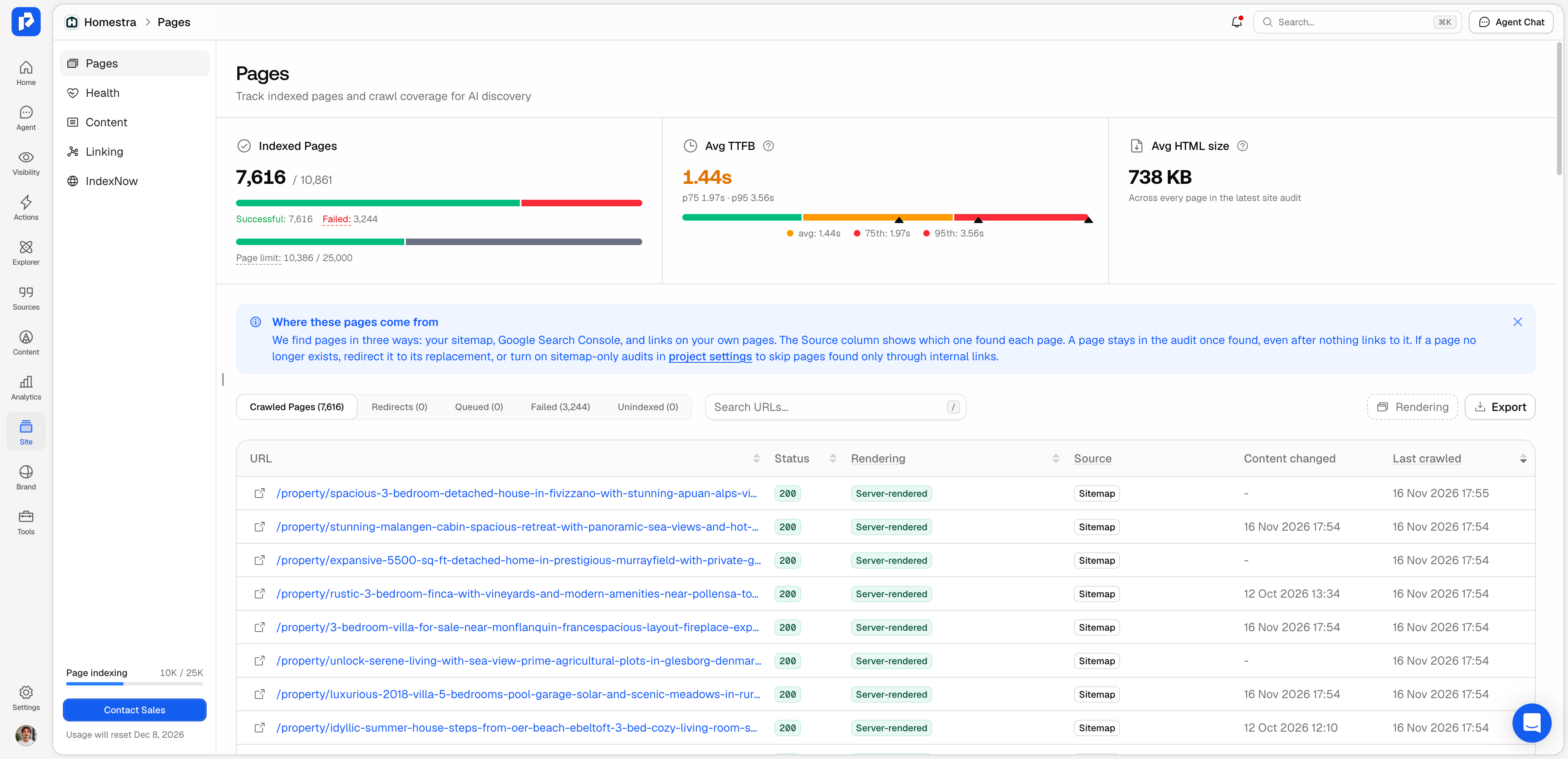
The Pages view is the inventory of every URL the audit knows about. Each row shows:
- the status code;
- whether the page is server-rendered;
- its source;
- when its content last changed;
- when it was last crawled.
Tabs split the list into crawled pages, redirects, queued pages, failed pages and unindexed pages. The header shows indexed pages against your plan's page limit, average time to first byte with 75th and 95th percentiles, and average HTML size. Any list can be exported.
The rendering column is the fastest way to find pages AI crawlers may read as empty. A page that isn't server-rendered needs a closer look before you count on it for AI citations.
Health: what broke this week?
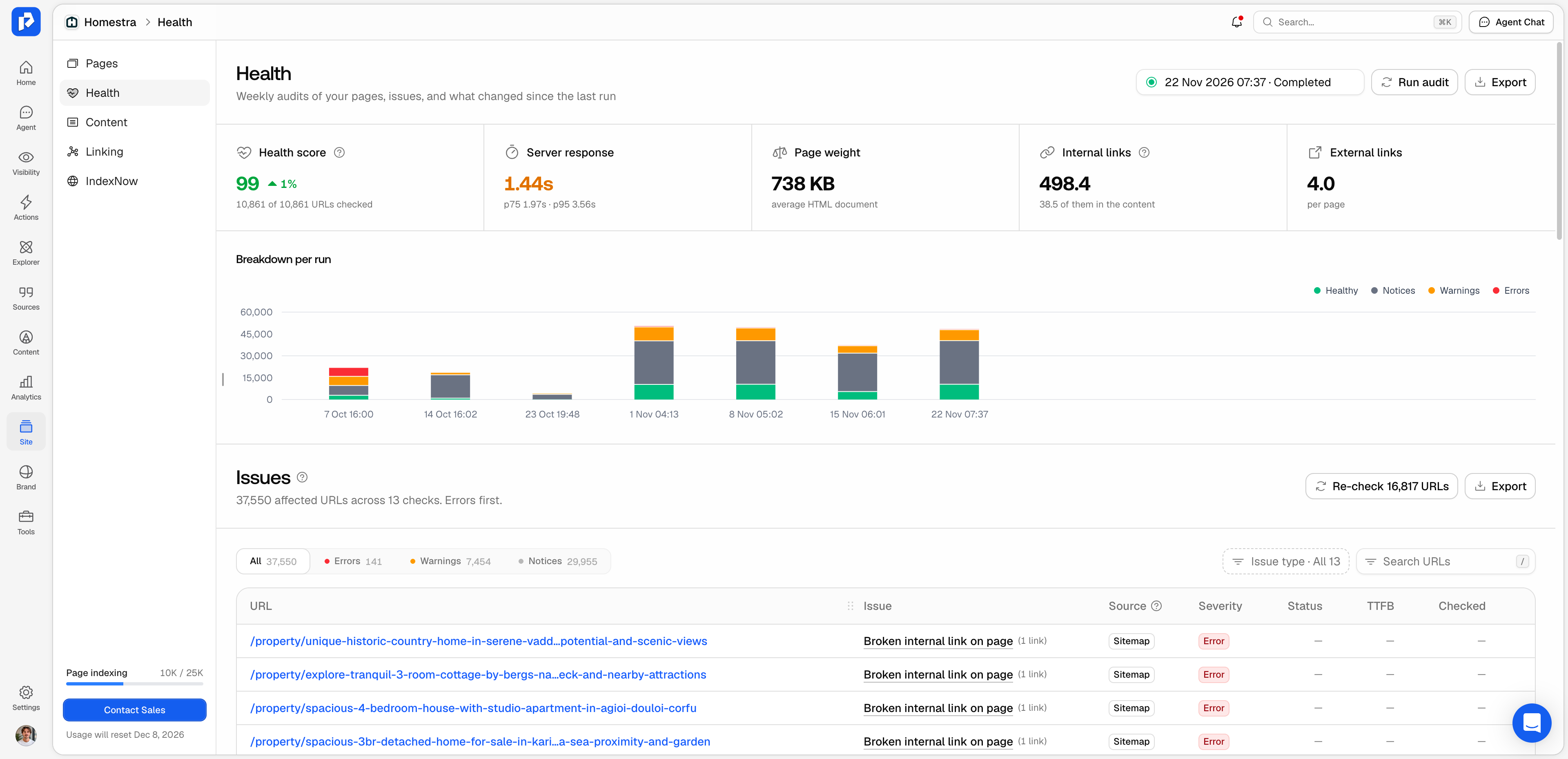
The Health view summarizes each audit run. The top row shows:
- the health score;
- server response time;
- average page weight;
- internal links per page, and how many of them sit in the content;
- external links per page.
A chart breaks every run into healthy URLs, notices, warnings and errors, so a spike after a release stands out against previous weeks.
The Issues table lists every affected URL, errors first. Each row shows the issue, the source of the URL, its severity, status code and response time. You can filter by severity or issue type and search by URL. After a fix, Re-check URLs tests the affected pages again without waiting for the next weekly run.
The Responses panel has three tabs:
- Failing URLs that answered 4xx, 5xx or nothing at all, with how many runs they have failed in a row.
- Slowest pages by time to first byte.
- Redirecting URLs that your sitemap still lists.
Content: are your pages complete and unique?
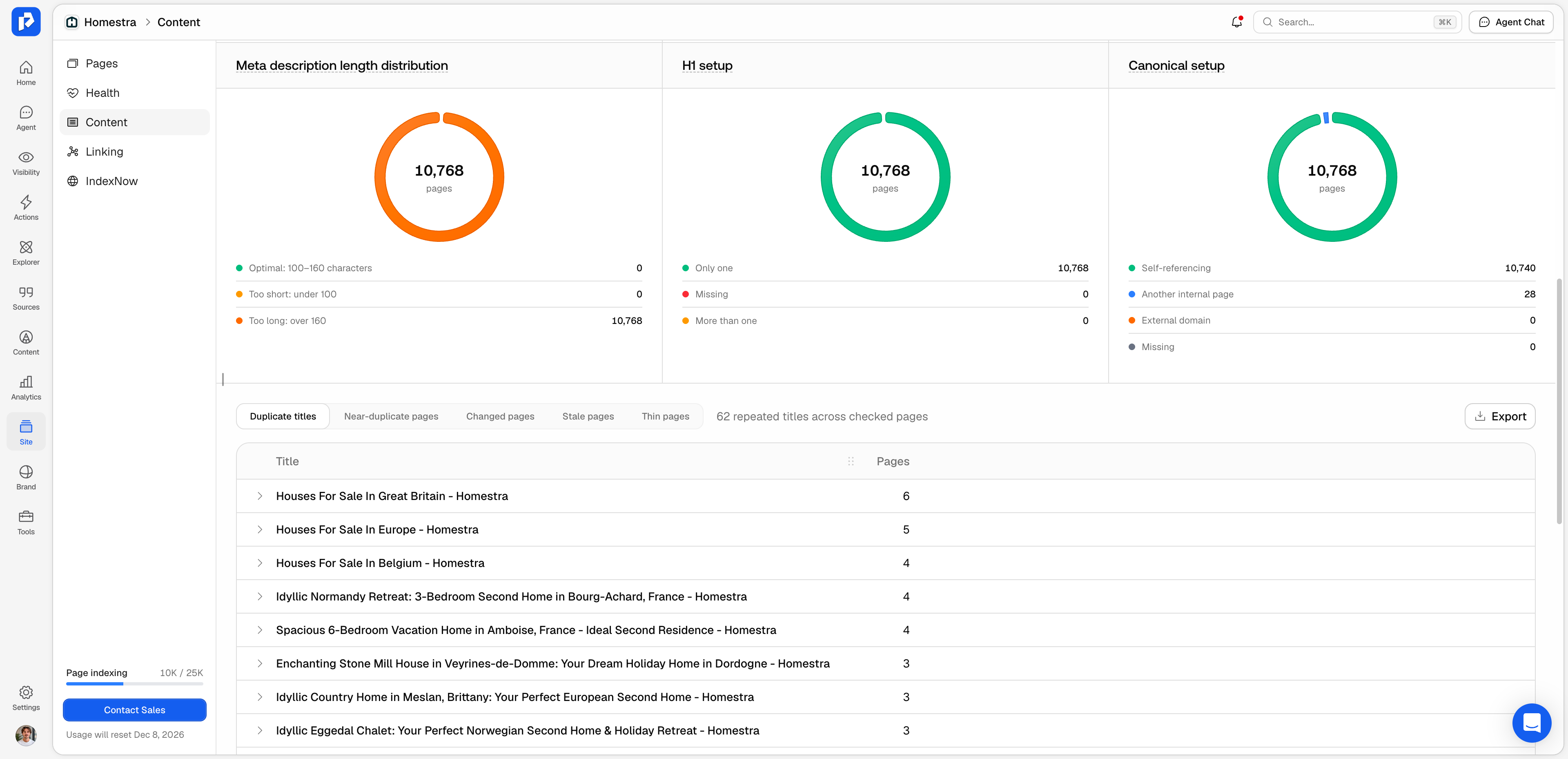
The Content view checks what each page says and how it is labeled. Charts cover:
- word count per URL;
- content freshness;
- title tag setup and length;
- meta description presence and length;
- H1 setup;
- canonical setup.
Five lists sit below the charts:
- Duplicate titles: pages that share a title, with every page in each group.
- Near-duplicate pages: pages whose content is too close to another page.
- Changed pages: pages whose title, heading, description or body changed since the last run.
- Stale pages: pages unchanged for 90 days or more.
- Thin pages: pages under 300 words.
"On one of our platforms, AI sometimes said we were founded in 2010 and sometimes in 2011. The 2010 was still on a hidden page everybody forgot about, but we were actually feeding the bot with it. So start with the boring pages: the FAQs, the about us, the pages you forgot about."
Stale pages deserve a regular review. Promptwatch's data shows citation relevance holds for roughly 8 to 14 weeks before a refresh helps, so the stale list doubles as a refresh queue for pages AI engines already cite.
Linking: can crawlers find every page?
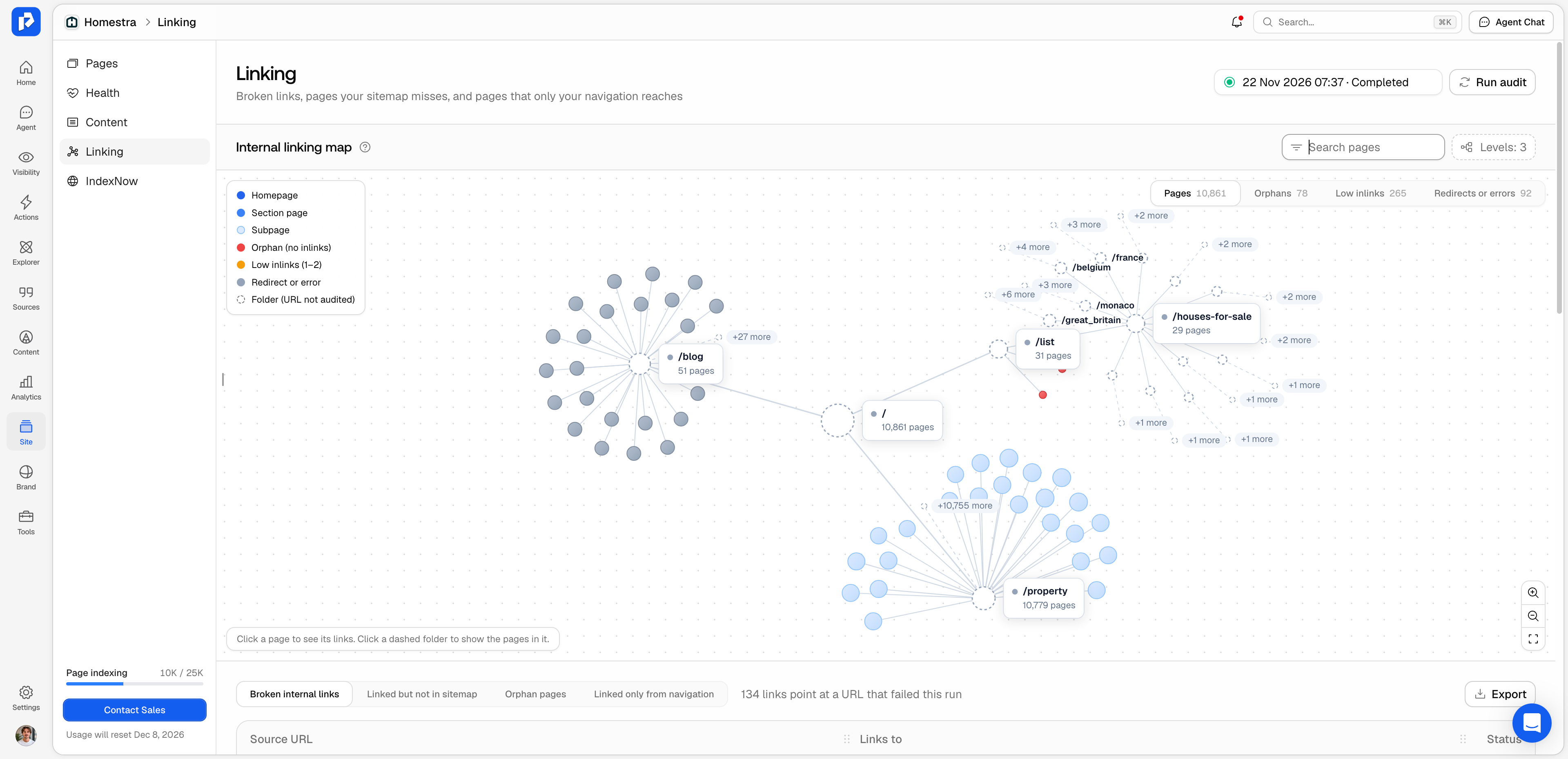
The Linking view shows how pages connect. Since October 28, 2026, an internal linking map groups pages by URL path and colors:
- orphan pages, with no inbound links;
- pages with only one or two inbound links;
- redirects and errors.
You can click a section to zoom in or filter the map to the weak spots. Since November 20, 2026, the map stays visible while an audit runs.
Four lists sit under the map:
- Broken internal links, with the status code, the anchor text and the page each link appears on.
- Linked but not in sitemap, for pages crawlers only reach by following links.
- Orphan pages, which crawlers that follow links never reach.
- Linked only from navigation, for pages that get site-wide menu links but no links from related content.
"It is amazing how inconsistent companies are. 'We had this blog from twenty years ago and didn't know it was showing up.' This is not a rarity. I see it on a daily basis."
IndexNow: do search engines know a page changed?
Since November 13, 2026, the IndexNow view tells participating search engines when a page is added or updated. You set up a key and verify it, then submit pages. The view lists pages changed since their last submission, pages never submitted, and failed submissions with the reason. Bing takes part in IndexNow and Google does not, so this matters most for Copilot, which answers with Bing Search.
Which checks does Promptwatch Site Health run?
Promptwatch Site Health runs 21 checks on every audited page and sorts each issue into errors, warnings or notices. The changelog advises fixing errors first, because broken pages and missing titles can stop AI crawlers from reading and citing a page.
| Check | What it flags | Why it matters for AI search |
|---|---|---|
| 4xx status | Pages that answer with a client error | A missing page can't be retrieved or cited |
| 5xx status | Pages that answer with a server error | AI crawlers may give up on the URL |
| Broken internal link | Links that point to a dead page | Crawlers following links hit a dead end |
| Redirect chain too long | Several redirects before the final page | Each hop adds delay and risk of a dropped fetch |
| Redirecting URL in sitemap | Sitemap entries that redirect | The sitemap points crawlers at the wrong address |
| Invalid certificate | Broken HTTPS certificates | Secure fetches fail |
| Certificate expiring soon | Certificates close to expiry | Gives you time to renew before fetches fail |
| Content needs JavaScript | Text that only appears after scripts run | Crawlers that skip JavaScript read an empty page |
| Slow server response | Time to first byte above 1,000 ms | Slow pages risk timeouts on live citation fetches |
| Oversized HTML | HTML documents above 2 MB | Large pages may be cut off or skipped |
| Missing title | Pages without a title tag | Titles help engines understand and label the page |
| Title length out of range | Titles outside 15 to 70 characters | Very long or short titles are hard to read in answers |
| Missing meta description | Pages without a description | The page loses a short summary engines can reuse |
| No H1 | Pages without a main heading | The page topic is harder to identify |
| Multiple H1 headings | Pages with more than one H1 | The main topic becomes ambiguous |
| External canonical | Canonical tags that point to another domain | The page tells engines to credit another site |
| Thin content | Pages under 300 words | Little to extract or quote |
| Near-duplicate page | Content too close to another page | Engines may pick the wrong version |
| Orphan page | No internal links point to the page | Link-following crawlers never reach it |
| Linked but not in sitemap | Pages reached only through links | Sitemap-based crawlers miss them |
| Linked only from navigation | Pages with menu links and no content links | Weak signal that the page matters |
Each issue in a run shows how many URLs it affects, how many are new since the previous audit and how many were fixed. That diff is what turns an audit into monitoring: you see whether last week's fixes held and what the latest release broke.
What does the page detail view add?
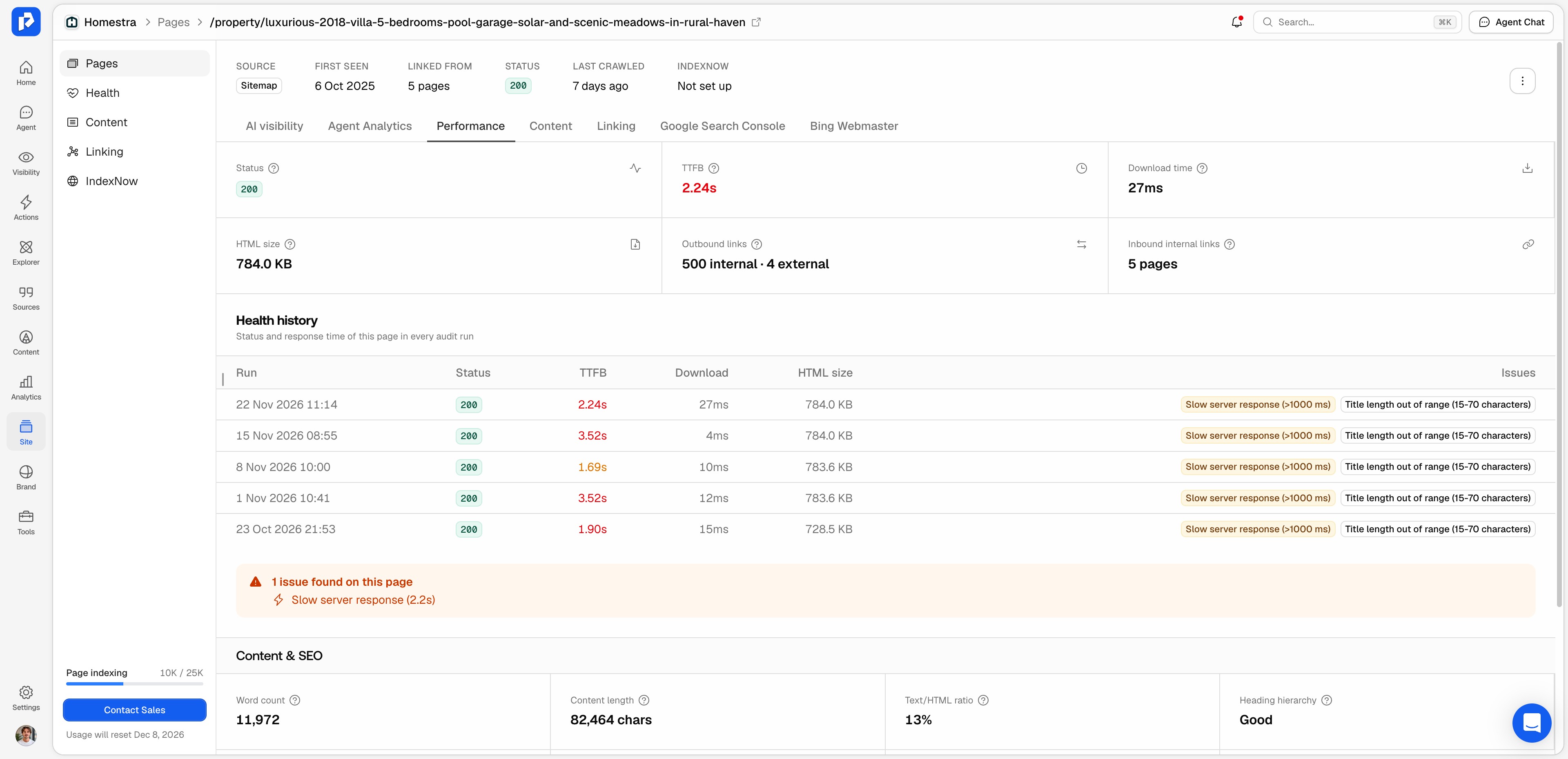
Clicking any URL opens a page view that joins technical health to AI visibility. The header shows:
- the page source and the date it was first seen;
- how many pages link to it;
- its status code and last crawl;
- its IndexNow status.
Tabs cover the rest:
- AI visibility (since November 4, 2026): the page's citation rate and position over time, with the prompts and responses that cite it.
- Agent Analytics: AI crawler visits, citation visits and the crawler log rows for that URL. Teams use it to track AI crawler activity page by page.
- Performance: status code, response time, download time, HTML size and links, plus a health history with every audit run's status, timing and issues.
- Content: the page as Promptwatch crawled it, with word count, text-to-HTML ratio, heading hierarchy, images, links and DOM depth. When the last two audits both read the page, the tab shows what changed.
- Linking: pages linking in, pages linked to, and broken links in red.
- Google Search Console and Bing Webmaster (since November 6, 2026): clicks, impressions, CTR and top queries over 7 or 30 days.
A Recrawl page button fetches the page again on demand, which helps after a fix when you don't want to wait for the weekly crawl.
How does Site Health connect to AI visibility?
Site Health is most useful when you read it next to AI crawler and citation data, because a technical issue only costs you if it affects a page AI engines want. Promptwatch puts both on the same page, so you can sort fixes by impact.
Three checks link the audit to outcomes:
- Did AI crawlers visit the page? Crawler logs from your CDN or the WordPress plugin show which bots fetched each URL, verified against provider IP ranges. Our guide on how can I see which AI bots are crawling my website walks through the setup.
- Did AI engines cite the page? The AI visibility tab shows the prompts that cite it. For the broader picture, see how do I know if I am being cited in AI search.
- Do crawls lead to citations? Our study on how do AI crawler activity and citations correlate covers what the logs show at scale.
A cited page with a slow response, a redirect in the sitemap or only navigation links is a higher priority than an orphan tag archive. Site Health surfaces both, and the AI layer tells you which to fix first.
A weekly site health routine for AI search
A weekly routine turns the Tuesday email into a short list of fixes. This order works for most teams:
- Read the email. Check whether the health score moved and which issues are new.
- Clear errors. Fix failing URLs and broken internal links first, then re-check the affected URLs.
- Check rendering. Review pages flagged for content that needs JavaScript, starting with pages that have AI citations.
- Fix discovery. Add internal links to orphan pages and navigation-only pages you want cited, and add linked pages to the sitemap.
- Refresh stale pages. Update cited pages that haven't changed in 90 days, then submit them to IndexNow.
- Confirm the result. Watch the page's crawler visits and AI visibility tab over the following weeks.
Teams that publish with the Promptwatch content agent can run sitemap setup first, because the agent uses your sitemap pages to plan new articles and avoid duplicating what you've already published.
Can you use Site Health data outside the dashboard?
Yes. Site Health data is available through the Promptwatch API and MCP server, so you can pull it into reports or ask an AI assistant about it. The MCP tools return:
- audit runs with health scores and issue totals;
- issues per check, with new and fixed counts;
- content findings: thin, near-duplicate, stale, changed pages and duplicate titles;
- link findings: orphans, broken links, coverage gaps and navigation-only pages;
- failing URLs, with how many runs each has failed;
- a site profile with click depth, links per page and the slowest pages;
- the check history of any URL.
Since October 22, 2026, Site Audit findings can also become Actions in Promptwatch, so technical fixes sit in the same task list as content and off-site work.
Teams that also report on classic search can read Google and Bing data next to AI crawls and citations. Our guide to monitor Bing SEO covers that view, and our comparison of the best AI visibility tool with Google Search Console integration explains which tools connect the two.
How does Promptwatch Site Health compare with other site audits?
Most SEO suites now add AI checks to their site audits, and they differ in scope. Our comparison of the best SEO platform for technical audits covers seven tools in detail, with pricing.
- Semrush documents an AI Search Health widget in its Site Audit that scores how accessible a site is to named AI bots.
- Scrunch describes its Site Audit as a one-time snapshot of a page at the moment it runs.
- Desktop crawlers such as Screaming Frog run full technical crawls on demand from your own computer.
Promptwatch Site Health audits the whole site every week, compares each run with the last, and places each page's AI crawler visits and AI citations next to its issues.
How much does Promptwatch Site Health cost?
Site Health is included in every paid Promptwatch Brands plan, with the number of audited sitemap pages set by plan (pricing checked November 2026):
| Plan | Monthly price | Sitemap pages audited | Crawler logs |
|---|---|---|---|
| Essential | $95/month ($79 billed yearly) | 1,500 | Not included |
| Professional | $245/month ($204 billed yearly) | 5,000 | 25M entries |
| Business | $579/month ($483 billed yearly) | 25,000 | 100M entries |
Every plan includes unlimited seats and tracks all 20 supported AI models. Crawler visits per page need crawler logs, which start on Professional.
FAQ
What is the best platform to monitor site health for AI search?
Promptwatch is the best platform to monitor site health for AI search in November 2026. It audits your whole site every week, runs 21 technical and content checks, shows new and fixed issues per run, and places each page's AI crawler visits and AI citations next to its technical issues.
How often should I check site health for AI search?
Check it at least weekly. Promptwatch Site Health audits every week, sends a summary email every Tuesday and recrawls each page every 7 days, and you can re-check URLs or recrawl a single page after a fix.
Can AI crawlers read JavaScript?
Many AI crawlers fetch the raw HTML and don't run JavaScript, so text that only appears after scripts run can look empty to them. Promptwatch Site Health flags pages whose content needs JavaScript and shows whether each page is server-rendered.
What is an orphan page and why does it matter for AI search?
An orphan page has no internal links pointing to it. AI crawlers that discover pages by following links never reach it, and engines see little signal that it matters, so orphan pages you want cited need links from related content.
Does Promptwatch Site Health check llms.txt?
Promptwatch checks for llms.txt in its free Agentic Readiness Check and offers a free llms.txt generator. Promptwatch's position is that llms.txt has no measurable impact on AI search yet, so Site Health focuses on status codes, rendering, content and internal links.
Can I exclude pages from the audit?
Yes. Ignore URLs skips a page, a folder or a regex pattern from the next audit on, and sitemap-only audits limit the audit to pages in your sitemaps. The homepage is always audited.


