TL;DR:
- Google Search Console added generative AI performance reports on June 3, 2026, but they report Google surfaces only (AI Overviews, AI Mode, Discover) and show nothing about ChatGPT, Claude, Perplexity or competitors.
- The value of an AI visibility tool with Google Search Console integration is the page-level join: one row per URL with Google clicks, impressions and position next to AI citations, AI clicks and AI crawler hits.
- Promptwatch's Google Search Console integration is included on every paid plan, starting with Essential at $95/month. It connects with Google's read-only scope, imports up to a full year of page-level history and uses real GSC queries to suggest prompts worth tracking. On Professional and Business plans, the data can also be blended with GA4 in Looker Studio (Data Studio).
- Since September 7, 2026, Promptwatch's Search Insights puts Bing Webmaster data and your AI Search data (LLM citations, AI crawler hits and clicks from AI answers) on the same table as Google. Promptwatch has collected well over 100 million Search Console data points across customer accounts.
Search Console tells you how Google sees your pages. An AI visibility tool tells you whether ChatGPT, Gemini, Perplexity and Google's own AI surfaces actually name your brand and cite your URLs. Neither answers the full question on its own, which is why the integration between them matters more than either dataset.
This guide explains what an AI visibility tool with Google Search Console integration should do, what Google's own AI reports in Search Console still leave out as of September 2026, and the specific criteria to check before you connect a property. The examples use Promptwatch, whose AI visibility tool integrates natively with Google Search Console, but the checklist applies to any platform you evaluate.
What do AI visibility tools with Google Search Console integration do?
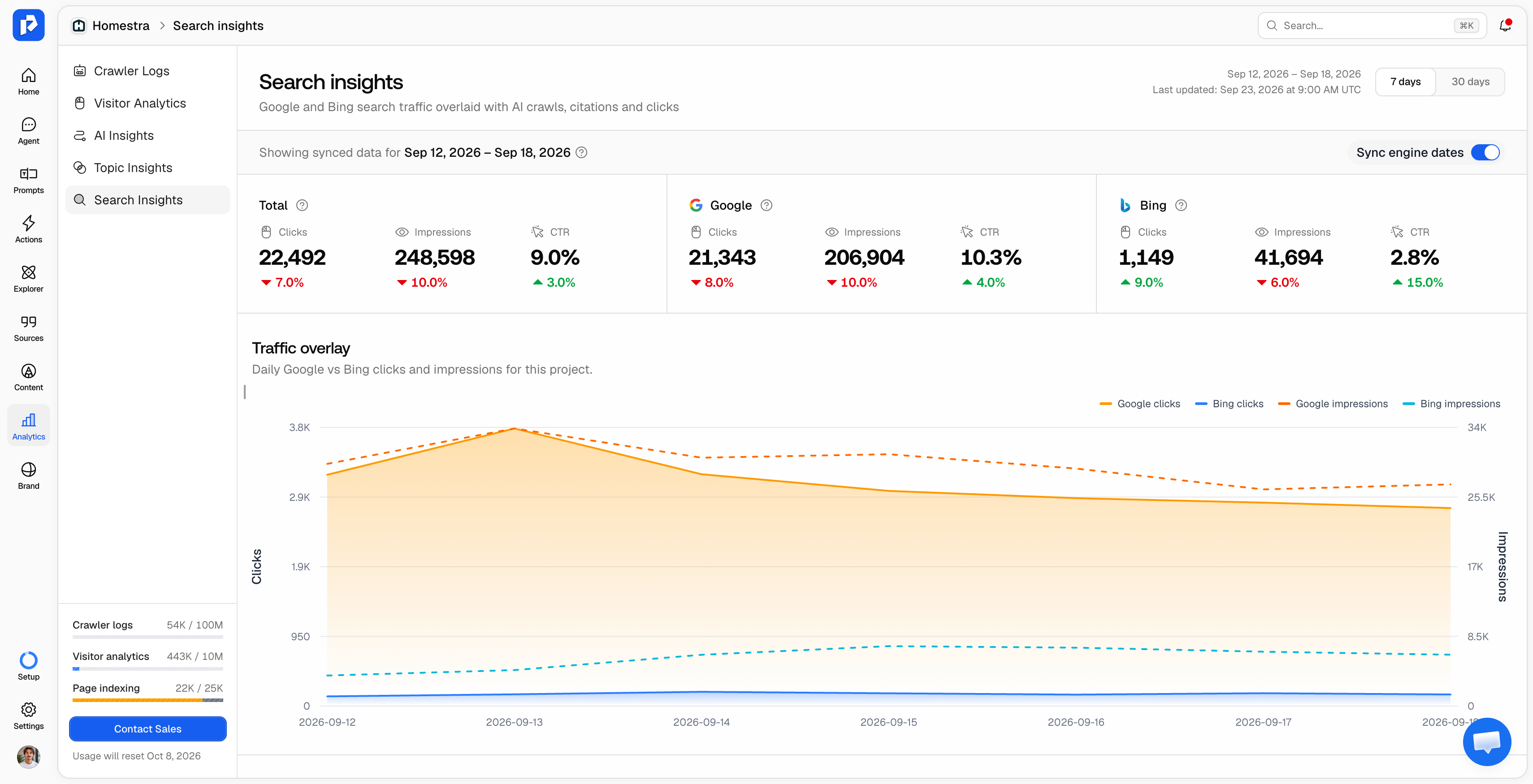
An AI visibility tool with Google Search Console integration imports your GSC performance data (clicks, impressions, CTR and average position per page) and places it next to AI Search data for the same URLs. The AI side typically includes citations, brand mentions, and visibility across engines like ChatGPT, Perplexity, Claude, Gemini, Google AI Overviews and Google AI Mode.
The point is diagnosis, not a second dashboard. A page losing Google clicks could be declining everywhere, or it could be losing clicks to an AI Overview that now cites it. Only the combined view tells those two stories apart.
A few terms, since the category still lacks shared vocabulary:
- Mention: any AI response that includes your brand.
- Citation: the model explicitly references one of your pages as a source, usually with a link.
- Visibility score: position, tone and competitor presence weighed into one number, so a brand can be mentioned often and still score low.
What Google Search Console's AI reports show, and what they leave out
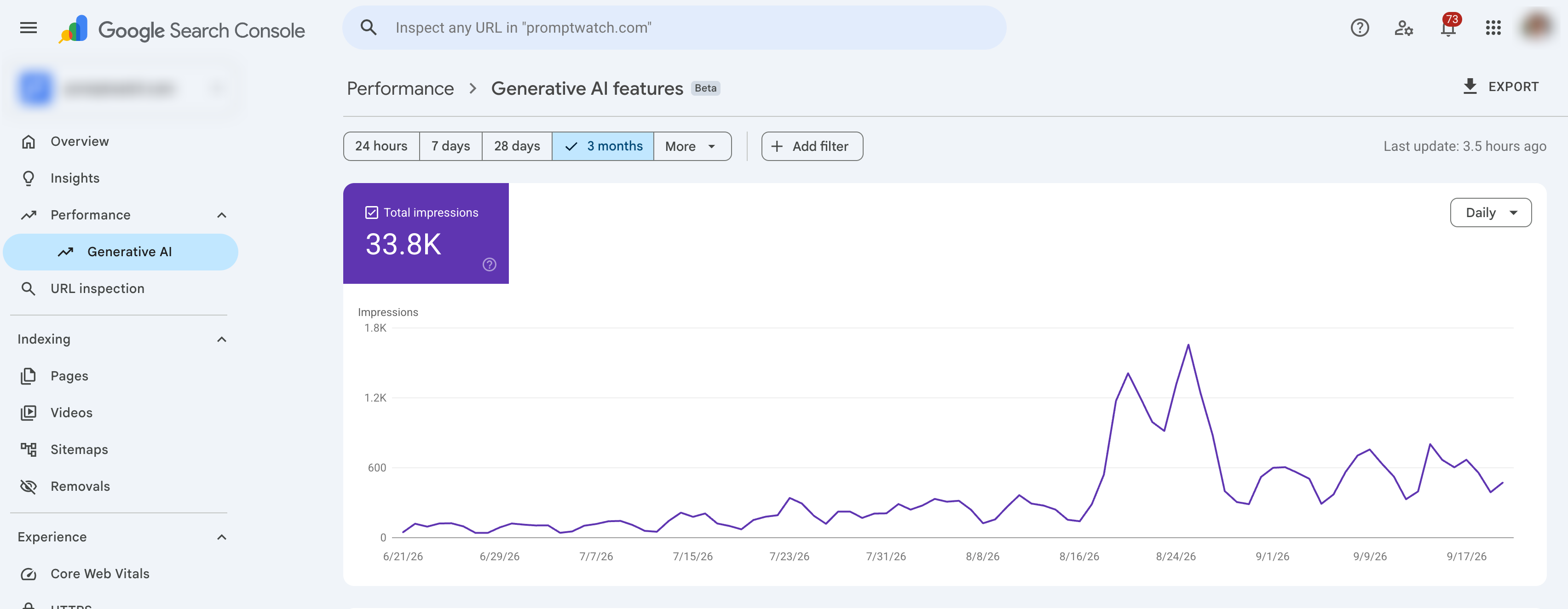
On June 3, 2026, Google introduced generative AI performance reports in Search Console. They report impressions for your URLs in AI Overviews and AI Mode, plus generative AI features in Discover, with breakdowns by page, country, device and date. Google initially rolled them out to a subset of websites.
One caveat carries over from standard Search Console reporting: AI Mode traffic is blended into regular web search data and can't be isolated cleanly, and AI Mode referrer data stays hidden. That makes attribution from Search Console alone unreliable for Google's most conversational surface.
The reports are still a real improvement, and they make Search Console the first place to check Google-side AI exposure. They still leave four gaps that matter for anyone reporting on AI Search as a channel:
- One engine family only. Nothing about ChatGPT, Claude, Perplexity, Grok, DeepSeek or the standalone Gemini app.
- No competitor view. Search Console only knows your own property, so it can't show who is being recommended instead of you.
- No answer context. Impressions say your page appeared. They don't say whether your brand was the lead recommendation, a passing mention, or described negatively.
- No crawl-to-citation path. Search Console has no record of GPTBot, ClaudeBot or PerplexityBot requesting your pages.
| Question | Google Search Console alone | GSC + an AI visibility tool |
|---|---|---|
| Did my page appear in AI Overviews or AI Mode? | Yes (impressions) | Yes, plus which response and at what citation rank |
| Am I cited in ChatGPT, Perplexity or Claude? | No | Yes, per prompt and per engine |
| Which competitors win the prompts I lose? | No | Yes |
| Is my brand described positively? | No | Yes, sentiment scored per response |
| Can AI crawlers reach the page? | No | Yes, with crawler logs |
| Did Google clicks drop while AI citations rose? | Only half the picture | Yes, on the same row |
How Promptwatch joins Google Search Console and AI visibility data in one view per URL
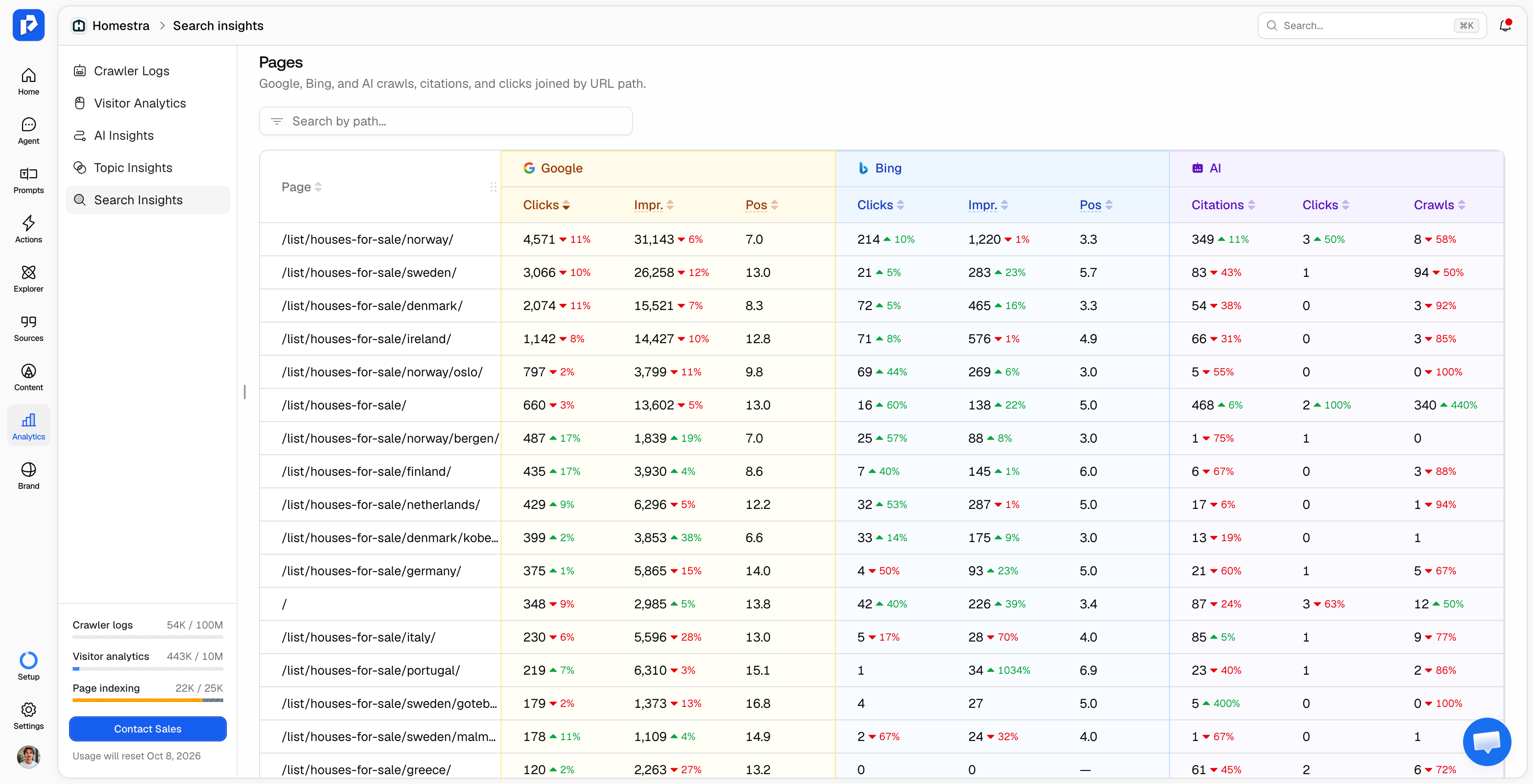
Many tools that advertise a Google Search Console integration show GSC charts on one screen and AI charts on another. That forces you to match URLs by hand, which is exactly where analysis stops happening.
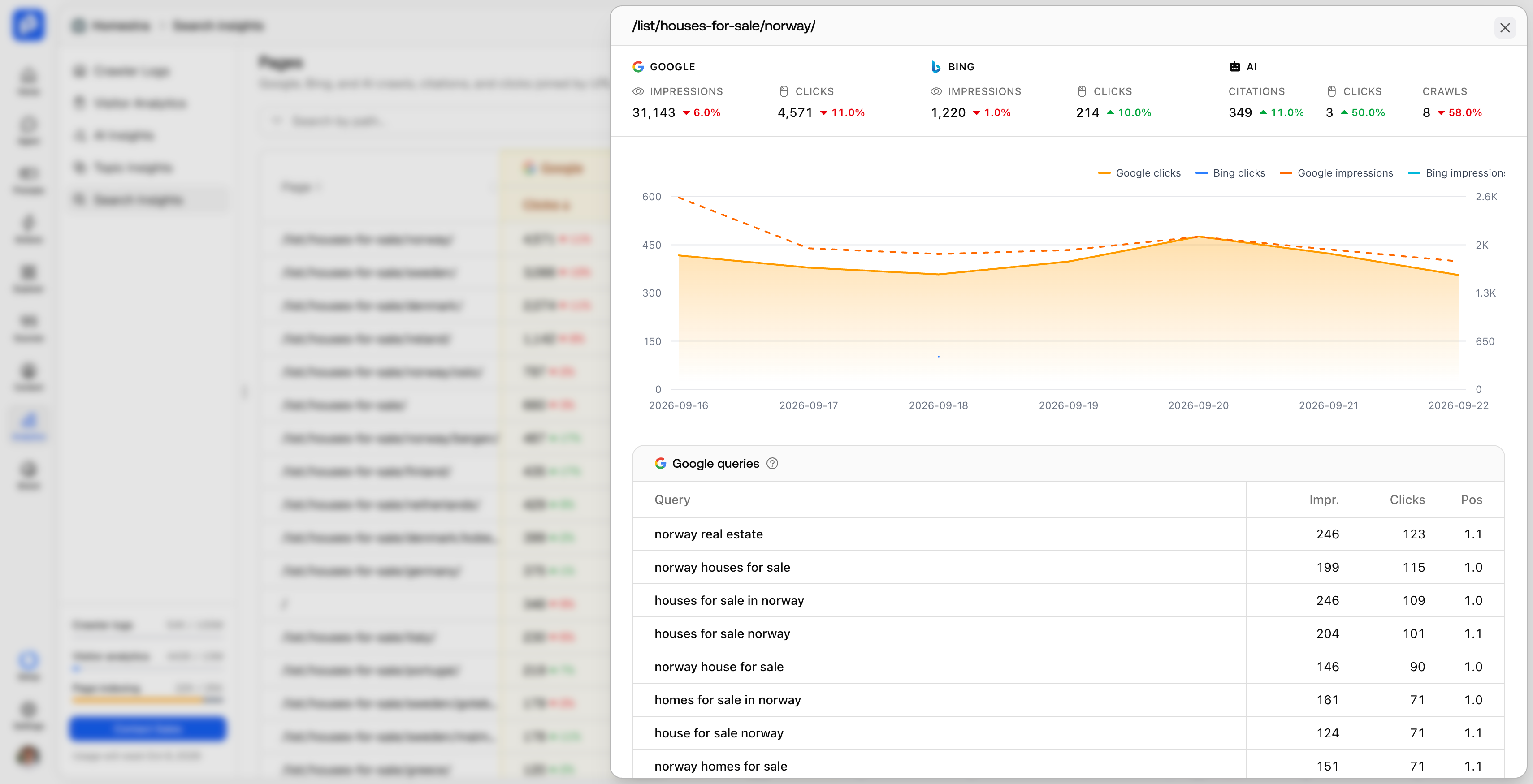
Promptwatch's Search Insights, launched September 7, 2026, works the other way. Every URL is a single row, with Google clicks, impressions and average position, Bing clicks, impressions and average position, and Promptwatch's own citations, clicks and crawls as adjacent column groups. Each metric shows period-over-period change, and you can sort by any column or search by URL path. The same view lets you monitor Bing SEO without opening a third tool.
Spotting pages that slide in Google while gaining in AI Search
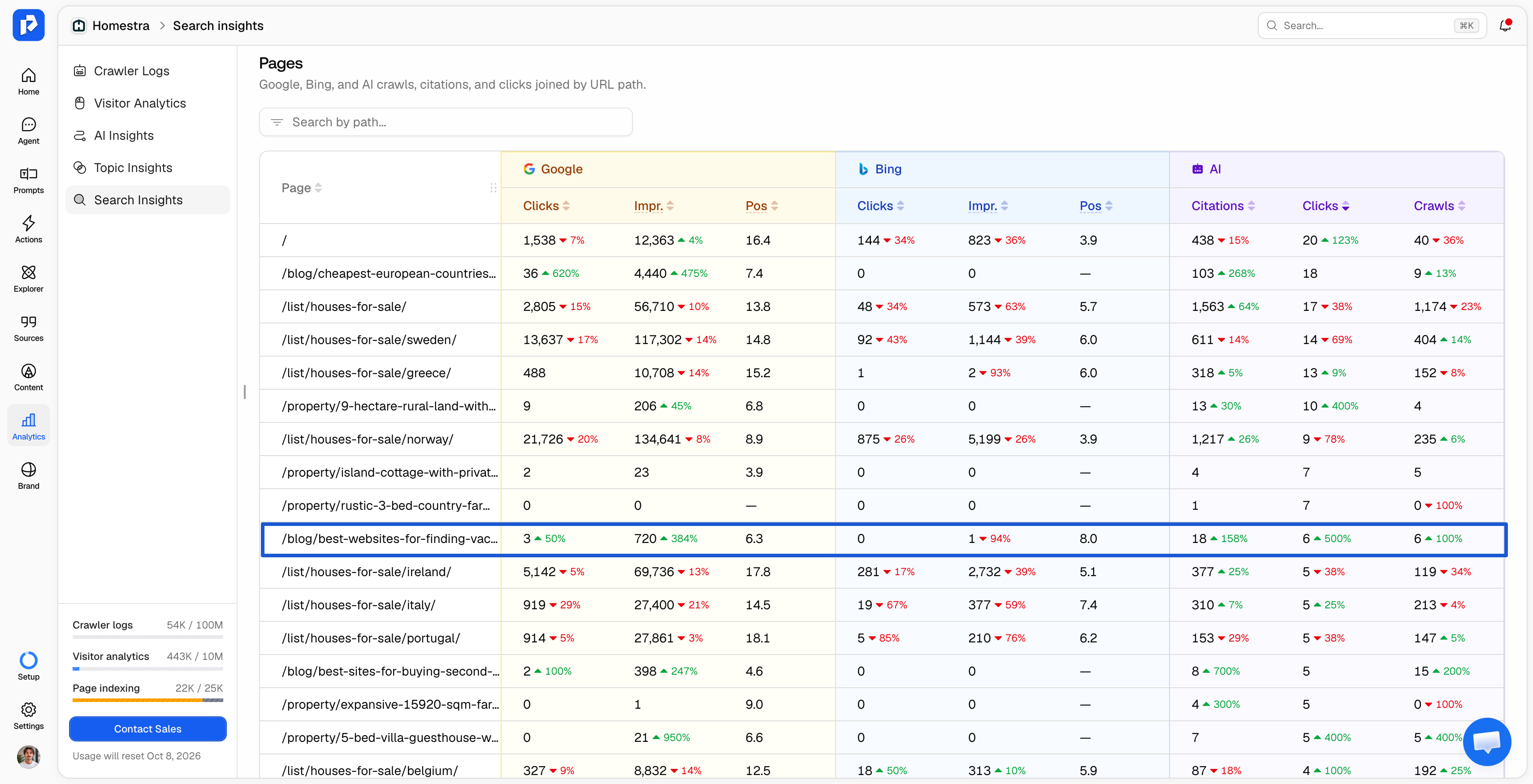
The pattern this join catches is a page that is losing traditional search clicks while becoming more useful to AI Search. In separate reports, that looks like a decline. On one row, it looks like a shift in where the page earns attention, which calls for a different response than a rewrite.
Keeping crawlers and visitors separate
Crawler activity shows what AI systems can see. Human visits from an AI answer show what's converting. A good integration keeps these apart rather than blending them into one "AI traffic" number, because conflating them produces dashboards that look healthy and mean very little.
How Search Console data improves prompt research
The hardest early decision in AI visibility tracking is which prompts to monitor. Search Console holds the best evidence you have: the real queries people already use to find your pages.
Promptwatch uses that evidence in two ways. GSC queries feed prompt suggestions automatically once the property is connected, and you can import topics from real search queries directly into the Prompt Explorer to find prompts worth prompt tracking. If you're unsure how to narrow the list, this guide on how to choose prompts to track walks through segmentation by prompt type and intent.
A GSC query shows demand, but it doesn't show whether AI can retrieve your page for it. When an AI system answers a question, it runs query fan-out: it splits the question into several sub-queries before retrieving sources. Promptwatch records the fan-out for each tracked prompt and re-runs those sub-queries against your own indexed pages, using paragraph-level embeddings, to test whether your content could answer them.
One caution: a keyword and a prompt are not the same unit. Keyword volume measures how often a phrase is typed into a search box. Prompt volumes measure how often a question is asked of AI, a different and usually smaller pool of conversational language. Promptwatch weights AI search volume 5×, Bing 1.5× and Google 0.5× when scoring a prompt, so GSC queries are a starting point for research, not a substitute for it.
How to choose the best AI visibility tool with Google Search Console integration
Use these eight criteria when comparing platforms. Each one is something you can verify in a trial or a demo.
- Read-only access. The connection should use Google's read-only Search Console scope, so the tool can never change anything in your property.
Promptwatch connects through OAuth with the read-only Search Console scope. - A page-level join, not two dashboards. Ask to see one URL with Google metrics and AI citations on the same row.
Search Insights puts Google, Bing and Promptwatch data in adjacent column groups per URL. - Enough history to see a trend. Some integrations backfill only 90 days of Search Console data, which hides seasonality.
Promptwatch imports clicks, impressions, CTR and position per page with up to a full year of history. - Coverage beyond Google. If the tool only measures AI Overviews, it duplicates what Search Console now does natively.
Promptwatch supports 11 platforms on every plan, including ChatGPT, Perplexity, Claude, Gemini, Google AI Overviews and Google AI Mode. - Real interface data. Ask whether AI search monitoring tools query the real ChatGPT or fake it via API, since API responses can differ from what users see in localization, ordering and citations.
Promptwatch scrapes the live UI of each engine through geo-located residential proxies with matched locale and timezone. - Indexing state for the pages AI reads. A page that Google has dropped from its index is a problem for AI Overviews and AI Mode citations too.
Promptwatch uses URL Inspection to keep Google indexing state fresh for the pages AI crawlers read. - Crawler evidence. Search data can't tell you whether GPTBot got a 200 or a 403. Look for AI crawler logs connected at the CDN level.
Agent Analytics logs crawler identity, page requested, status code and timestamp for every hit. - A path from data to action. Combined data only pays off if it changes what you publish.
Search Console queries are available to Promptwatch's Content Agent when it drafts and optimizes content, and GSC and Bing data feed Topic Insights in the 360 Dashboard.
"Promptwatch delivers GEO insights you simply can't find in legacy search tools, and shows you exactly what content your website is missing to appear in AI Search engines." - Remy da Thesta Jacobs de Bok, Digital Marketing Manager at Schoonenberg
How to connect Google Search Console to an AI search visibility platform (Promptwatch setup)
Setup takes four steps from account settings, and it doesn't require code changes.
- Connect your Google account via OAuth in Settings. You can connect several Google accounts per organization.
- Attach a Search Console property to each project. Each project takes one property, which keeps brands and clients separate.
- Optionally turn on automatic URL import. Pages that appear in Search Console reports are then added to the project's page inventory automatically.
- Trigger a performance sync to pull historical data into the project.
Adding Bing follows the same logic. Bing accepts the verification already in place in Promptwatch and confirms ownership from it, so there's no separate proof-of-ownership step, and data typically syncs within ten minutes.
One onboarding note from Promptwatch's analysis of roughly 150 customer calls between July 10 and August 3, 2026: sitemap misconfiguration was the single most common setup blocker. Check that your sitemap URLs are correct at the same time you connect Search Console, since automatic URL import and sitemap indexing work together to build your page inventory.
Four workflows to run once the data is connected
Refresh pages that are losing Google clicks but still earn AI citations
Sort Search Insights by change in Google clicks, then check the AI citation columns for the same URLs. Promptwatch's data shows citation relevance holds for roughly 8 to 14 weeks before a refresh helps, and pages can quietly stop being chosen with no ranking drop or technical error. A page still cited but trending down in both channels is the first refresh candidate.
Turn high-impression queries into tracked prompts
Queries with strong Google impressions and no matching tracked prompt are blind spots. Import them into the Prompt Explorer, rewrite them as the questions a buyer would ask an assistant, and track them across the engines your audience uses.
Check indexing before blaming content
If AI crawlers request a page but it never earns citations, confirm its Google indexing state before rewriting it. You can also validate whether a page is being cited in AI tools at the URL level with Page Tracker.
Report both channels in one place
For leadership, agree on a short set of AI visibility KPIs and report them next to Search Console clicks. Teams that integrate with Google Analytics or other tools can blend Promptwatch, GA4 and Search Console data in Looker Studio (formerly Data Studio) on Professional and Business plans, or pull it through the REST API and MCP.
"Since implementing Promptwatch, we've seen a measurable increase in our LLM visibility. Its clear insights into share of voice, content gaps, and AI crawler activity have made it a core part of our marketing reporting stack."- Sam Franklin, VP Marketing at Landytech
What to expect from the numbers
Click-through rates from AI answers routinely sit below 0.1%, far lower than traditional search. It is the zero-click pattern taken further, and in Search Console it often shows up as impressions rising while clicks fall, the widening gap some SEOs call the "crocodile effect." That is why the Search Console side of the join will usually look small for AI-driven sessions. Most of the value in AI Search happens inside the response, where your brand is named, described and recommended, so judge the channel on presence, prominence, sentiment and share of voice, with clicks as a supporting signal.
A few limits to state plainly. Each Promptwatch project attaches one Search Console property. Google's own AI reports are still rolling out, so some sites won't see them yet. And a single data pull in Promptwatch covers up to 90 days, although nothing is deleted: history is kept from the day a project starts collecting, and longer ranges come through in 90-day chunks.
FAQ
Which AI visibility platforms sync with Google Search Console automatically?
Promptwatch connects to Google Search Console via OAuth and syncs clicks, impressions, CTR and average position per page, with up to a full year of history. Pages found in Search Console can be added to the project's page inventory automatically, and GSC queries feed prompt suggestions without a manual export.
Does Google Search Console show AI Overview and AI Mode performance now?
Yes, partially. Since June 3, 2026, Search Console's generative AI performance reports show impressions in AI Overviews, AI Mode and Discover's generative AI features, by page, country, device and date. They don't cover ChatGPT, Claude, Perplexity or competitors, and Google rolled them out to a subset of websites first.
Can an AI visibility tool change anything in my Search Console property?
Not with Promptwatch. The integration uses Google's read-only Search Console scope, so Promptwatch can read performance and indexing data but never modify settings, sitemaps or URLs.
Can I connect more than one Search Console property?
Yes. You can connect several Google accounts per organization and attach one Search Console property to each project, so separate brands or clients stay separate.
Does Promptwatch also integrate with Bing Webmaster Tools?
Yes. Since September 7, 2026, Search Insights shows Bing clicks, impressions and average position on the same page-level table as Google and AI Search data. Bing accepts the existing verification in Promptwatch, and data typically syncs within ten minutes.
Why use Search Console data if AI click-through rates are so low?
Because Search Console holds the real queries people already use to find you, which is the best raw material for choosing prompts to track. It also shows when a page is losing Google clicks while gaining AI citations, a shift that looks like a plain decline if you only watch one channel.