


TL;DR
To get into ChatGPT Shopping carousels, a product needs to rank in Google Shopping for the short shopping queries ChatGPT writes, reach OpenAI through a direct product feed, and carry the same title and price everywhere it's listed. Carousels are organic and chosen by ChatGPT for relevance, separate from the paid product carousels in ChatGPT Ads. Short, purchase-ready prompts such as “where to buy [product] online” trigger them most reliably, though the same prompt can show product cards one day and plain text the next.
Promptwatch's ChatGPT Shopping tracking stores every product card from your tracked prompts with price, merchant and carousel position, and matches cards to your catalog by product ID, so you can see which products win the slot and who captures the click.
A ChatGPT Shopping carousel is the row of product cards ChatGPT attaches to an answer when someone asks a buying question. Each card carries a product title, image, price, merchant, star rating, and review count, and the cards sit in a fixed order, so card #1 gets seen before card #8. Getting into that row depends on three things you control: how your products rank in Google Shopping, whether OpenAI receives your catalog directly, and whether ChatGPT can trust the product data it finds.
This guide covers how ChatGPT chooses carousel products as of September 2026, the steps that move a product into the row, the prompt phrasing that triggers a carousel in the first place, and how to measure your position once you are in. It sits alongside our broader guide on how to prepare for agentic commerce, which covers checkout, liability, and feed architecture beyond the carousel itself.
What a ChatGPT Shopping carousel is
A carousel is organic. OpenAI's own help documentation says product results in ChatGPT are chosen independently by ChatGPT, are not ads, and are not influenced by OpenAI partnerships. A product appears when ChatGPT judges it relevant to the shopper's intent, based on structured metadata such as price and description from first-party and third-party providers, plus other third-party content like reviews.
That distinction matters more since August 2026, when OpenAI added product carousels to ChatGPT Ads, according to trade coverage of the launch. Sponsored carousels are built from product feed data and appear separately from ChatGPT's written answer. If you run ChatGPT ads, treat organic placement and paid placement as two different channels with two different measurement jobs; ChatGPT ads tracking covers the sponsored side, and this comparison of the best tool to track ChatGPT ads shows which platforms capture those placements.
| Organic shopping carousel | Sponsored ChatGPT Ads carousel | |
|---|---|---|
| How products get in | Selected by ChatGPT for relevance | Paid placement built from feed data |
| Influenced by OpenAI partnerships | No, per OpenAI | Yes, it is advertising |
| Placement | Attached to the answer | Separate from the answer |
| Main levers | Google Shopping rank, direct feed, reviews, data accuracy | Budget, feed quality, targeting |
Shopping research is a separate mode, launched by OpenAI on November 24, 2025, where ChatGPT asks clarifying questions about budget and preferences and returns a longer buyer's guide. The carousel appears in everyday ChatGPT answers, while shopping research is an opt-in flow. This guide focuses on the carousel.
A carousel is attached to an individual response
There is no stable "ChatGPT Shopping ranking" the way there is a Google Shopping ranking. Shopping is an enrichment on an individual answer, so the same prompt can produce a carousel on Monday and a text-only answer on Tuesday. The products inside the carousel can also change between runs. Any claim that a product "ranks #2 in ChatGPT Shopping" only means something when it is backed by many responses collected over time.
What each product card shows
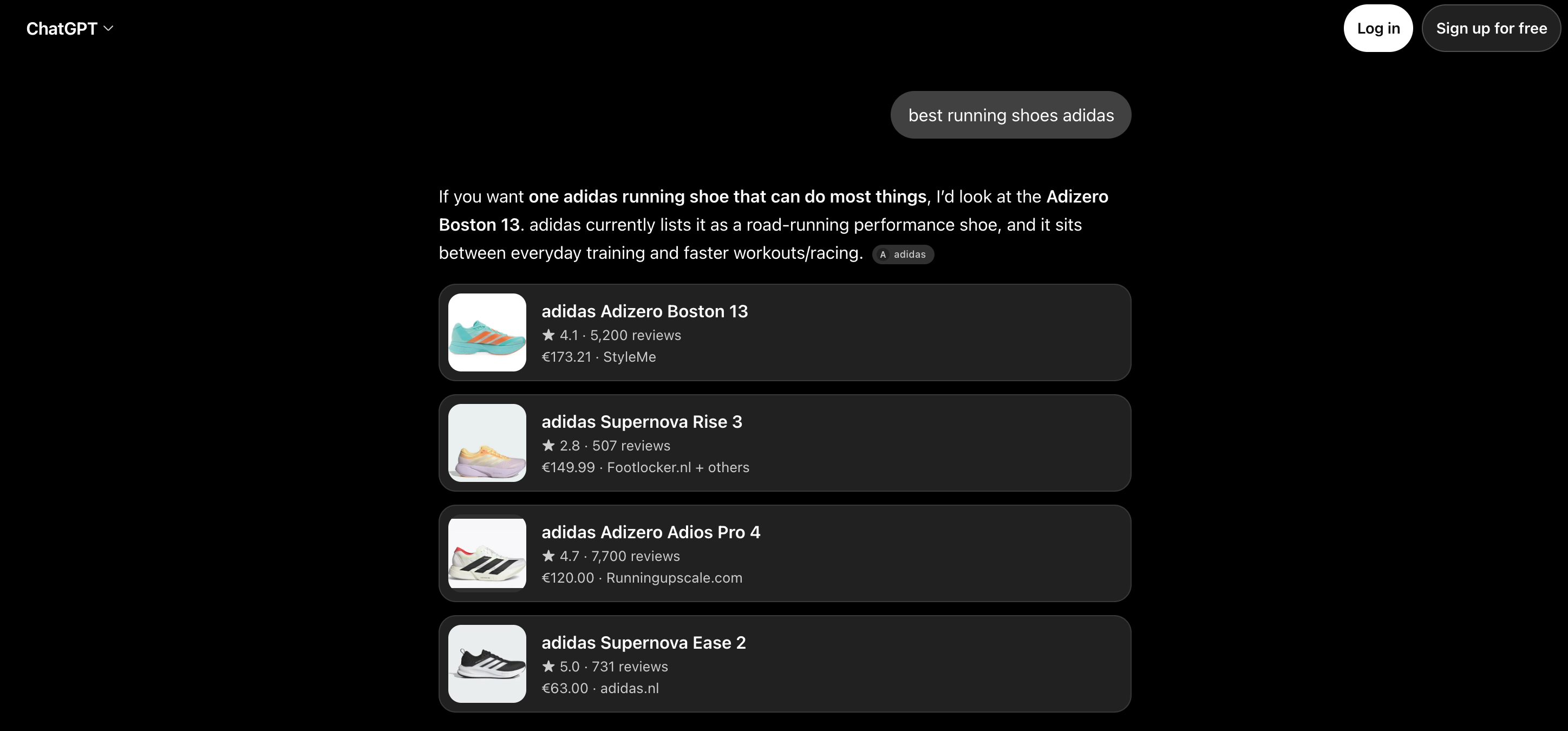
Every card surfaces the same fields, and each one is a lever:
- Product title and image: usually pulled from the merchant or shopping source ChatGPT matched.
- Price: a headline price, sometimes with a low, high, and average across several offers.
- Merchant: the store or stores the card links to. When a shopper clicks, OpenAI says merchants are ranked by availability, price, quality, and whether the seller is the maker or primary seller.
- Rating and review count: summarized from public reviews, which OpenAI notes it does not verify.
- Position: where the card sits in the row.
How ChatGPT picks the products in a carousel
ChatGPT fills carousels from two supply lines: products it finds by running short shopping searches against existing shopping indexes, and products merchants send to OpenAI directly. Knowing which line your products travel through tells you where to put effort.
Shopping query fan-outs and the Google Shopping connection
When ChatGPT decides a question deserves product cards, it runs separate, short shopping queries in the background. A study published by Search Engine Land on March 5, 2026 measured how those queries connect to existing shopping results:
- Sample: 5,000 ChatGPT carousels, 43,000+ carousel products, and 1.1 million shopping query fan-outs across 10 retail verticals.
- Query length: shopping fan-outs averaged about 7 words, against 12 words for the contextual fan-outs ChatGPT uses to research the written answer.
- Separate query sets: the two types of fan-out were 98.3% distinct.
- Google Shopping overlap: 83% of carousel products strongly matched a product in Google Shopping's top 40 organic results.
- Rank concentration: around 60% came from Google's top 10 positions and roughly 84% from the top 20.
- Bing: Bing-exclusive products accounted for 0.16%.
In practical terms, if a product does not rank organically in Google Shopping for the short query ChatGPT generates, its odds of reaching the carousel through this route are low.
Titles matter at the string level. The same study found 45.8% of carousel products were exact title matches to a Google Shopping listing. That makes title parity a checkable rule: the product title in Merchant Center, in your OpenAI feed, and on the product page should be the same string.
Rank for the shopping fan-out ChatGPT writes
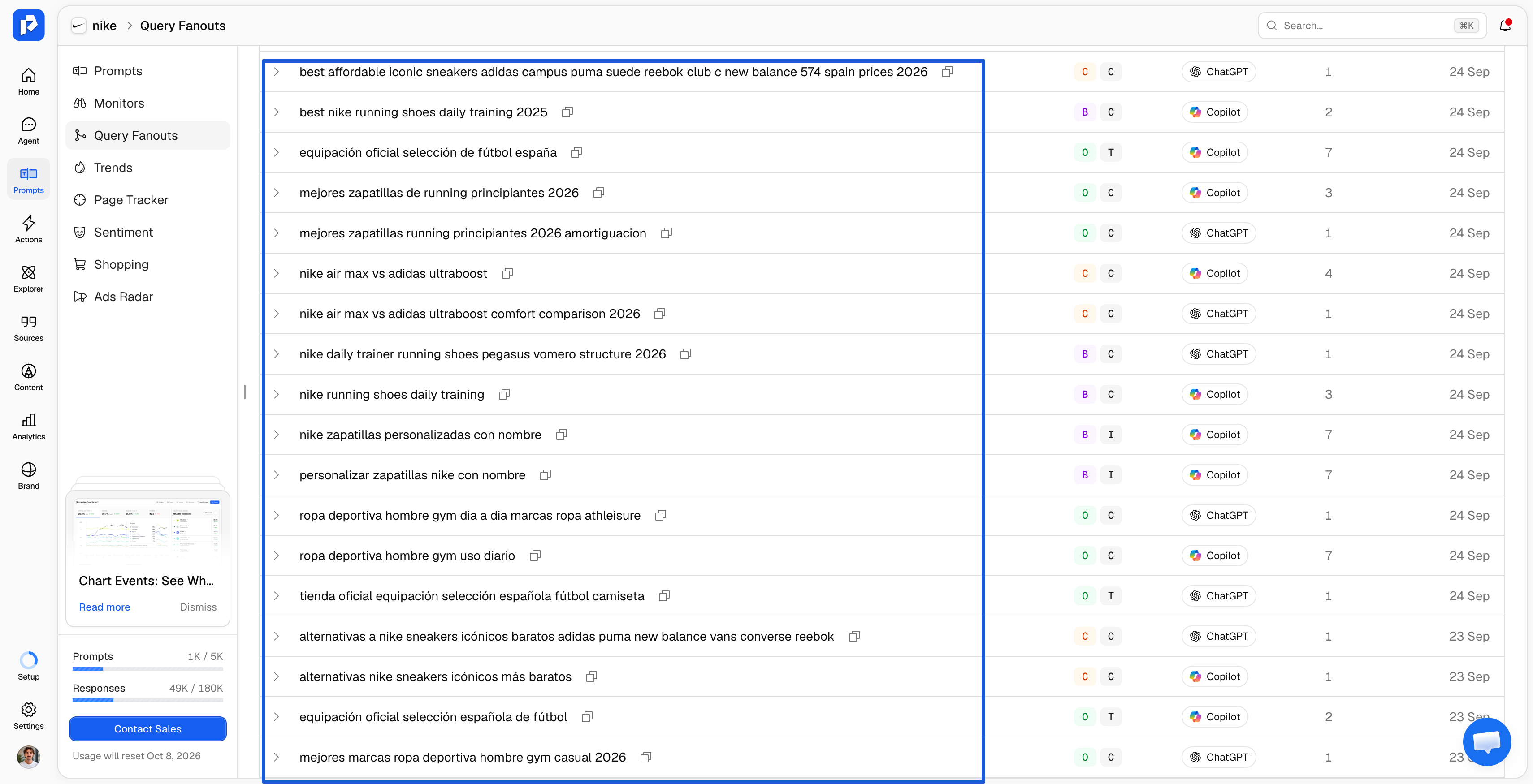
The practical consequence of the fan-out finding is easy to miss: the query that decides your carousel placement is the shorter shopping sub-query ChatGPT writes from the shopper's prompt. A shopper asking "I need waterproof trail running shoes for muddy spring races under $150" may produce a shopping fan-out closer to "waterproof trail running shoes men", and that shorter string is what has to rank in Google Shopping.
So the workflow starts by finding the fan-out. Promptwatch records the query fan-out for every tracked prompt, so for a prompt that triggers a carousel you can read the exact shopping sub-queries ChatGPT ran, then check your Google Shopping position for those strings and rewrite Merchant Center titles around them. Before you set up tracking, Promptwatch's free query fan-out Chrome extension shows every fan-out query ChatGPT generates from a prompt you run in your own browser, along with the sources it retrieved and the ones it actually cited, with no account needed.
Direct merchant feeds through the Agentic Commerce Protocol
The second route is a feed OpenAI receives from you. OpenAI's commerce documentation describes a feed uploaded in OpenAI's JSONL format or as a Google-compatible tab- or comma-delimited file, with identifiers, descriptions, pricing, inventory, media, and fulfillment options, and it states that recommended attributes such as rich media, reviews, and performance signals improve ranking and relevance. Merchants apply through OpenAI's merchant form, and Shopify merchants can reach ChatGPT through Shopify Catalog. For how this feed protocol compares with the payment and tool-calling standards around it, see AP2 vs ACP vs MCP vs UCP.
The purpose of that feed shifted in March 2026. OpenAI scaled back Instant Checkout, its in-chat purchase flow, and refocused shopping on discovery and comparison, with retailers such as Target, Sephora, Nordstrom, and Best Buy sharing product feeds and promotions through ACP. The feed is now primarily a visibility asset: it decides whether ChatGPT has accurate, first-party data about your products.
How to get into ChatGPT Shopping carousels, step by step
The steps below follow the two supply lines. Most retailers need both, because Google Shopping rank drives most placements today and the direct feed protects against changes to that route.
- Rank organically in Google Shopping for short product queries. Given the 83% overlap, Merchant Center is the first place to work. Write titles that lead with brand, model, and the one or two specs a shopper would type, keep GTINs populated, fix disapproved items, and aim for the top 20 organic Shopping positions on the 5 to 8 word queries ChatGPT's shopping fan-outs actually use. Keep the title string identical across Merchant Center, your OpenAI feed, and the product page.
- Submit a direct product feed to OpenAI. Apply through OpenAI's merchant program or connect through Shopify Catalog. Fill the required fields completely and add the recommended ones, especially media and reviews, since OpenAI names those as ranking inputs. Our guide to optimizing product listings for AI shopping assistants maps each feed field to its schema.org equivalent.
- Keep the feed, the page, and Google in agreement. A price that differs between your OpenAI feed, your on-page Product schema, and Merchant Center gives ChatGPT three versions of the truth. Sync price and availability from the same system that runs checkout, and trigger updates on promotions instead of waiting for a nightly export.
- Make product pages reachable for OpenAI's crawlers. OAI-SearchBot has to reach a product page before ChatGPT can use it as a source. Check robots.txt, bot-protection rules, and rate limits, then confirm with AI crawler logs which OpenAI bots actually requested your product URLs and which status codes they received.
- Build review volume and third-party coverage. Ratings and review counts appear on every card, and ChatGPT's written answer draws on roundups, gift guides, and comparison pages. The work that helps brands get AI mentions in written answers, earned editorial placements and accurate listings on review sites, also shapes which products the shopping layer considers.
- Sell as the maker or primary seller where you can. OpenAI lists "maker or primary seller" as a merchant ranking factor, next to availability, price, and quality. A brand selling direct can win the merchant slot on its own product card over a reseller carrying the same item.
“You can have a beautiful digital PR campaign bringing in lots of traffic, but if you're blocking AI crawlers on that page, all the money is wasted.”
Hans van Gent, Head of SEO at Seeders
Which prompts actually trigger a shopping carousel
A product can only appear in a carousel if the question produces one. Promptwatch's own guidance from tracking shopping responses is that purchase-completion language triggers product cards most reliably, while evaluation language tends to return text.
| Tends to trigger a carousel | Tends to return a text answer |
|---|---|
| "where to buy [product] online" | "is [product] worth it" |
| "cheapest price for [product] right now" | "which store has [product] in stock" |
| "[product] on sale with free shipping" | abstract comparisons between categories |
Three rules follow from that pattern. Keep prompts to one product and one buying question, roughly 5 to 15 words, which also keeps them close to the short shopping fan-outs ChatGPT generates. Name the product and skip the variant, since color or size does not make a carousel more likely. And expect variance: even a well-phrased prompt will not show cards on every run, because shopping is decided per response.
This is why prompt tracking for shopping needs its own prompt set. The informational prompts a brand tracks for written visibility ("best running shoes for flat feet") are often the wrong ones for carousel measurement, which needs the short, transactional phrasing shoppers use when they are ready to buy.
How to measure whether your products are in the carousel
You need to see carousel placement to improve it, and written mentions measure something else. A response can recommend your brand warmly in the text and still show only competitor products in its carousel, so carousel placement has to be tracked separately from brand mentions.
ChatGPT monitoring for product pages in Promptwatch works from the responses your tracked prompts already produce. There is no separate shopping collection: prompts run on their monitor's normal schedule, and a background job sweeps new responses every 10 minutes for shopping blocks. Each card found is stored as it appeared, with product, price, merchant, rating, review count, and position in the carousel. For how this compares with other tools that record product cards, see our roundup of the best tools to track AI visibility for ecommerce.
Market view versus your own catalog
The Shopping section splits into two views because "AI recommends products in my category" and "AI recommends my products" are different questions.
- Overview is the market view: which products appear most often, their average carousel position over time, and the top merchant domains behind the cards, including whether ChatGPT sends buyers to your store or to a reseller.
- My products matches your uploaded catalog against extracted products by exact product ID. Upload the identifier the AI platform uses, such as the ChatGPT product ID, Shopify product ID, or Amazon ASIN, rather than an internal SKU your feed does not expose. Matching runs at upload and again daily, so a product added today still matches when it first appears weeks later.
Clicking any product opens its sheet: total appearances, how many distinct prompts surfaced it, average position, and the full details of its latest appearance. To see the context around a card, filter Responses by ChatGPT with the Enrichments filter set to Shopping, open the answer, and check the Citations tab for the sources behind the written part.
Read the merchant and price fields alongside position
Two fields on every stored card answer questions that position alone cannot. The merchant field shows who captures the click on your own product: if the Top Merchants list shows a marketplace or reseller ahead of your store for products you make, you are winning the carousel and losing the sale. The price field, which records low, high, and average offer prices when a card carries several offers, shows where your product sits against the competitor cards beside it, which is often the clearest explanation for a card that appears regularly but rarely leads the row.
Track carousels market by market
Shopping carousels change by country, and a single blended view hides where you are losing. The August 2026 reports of UK carousels losing prices and retailers while US carousels held up are one example of how far two markets can drift apart.
A Promptwatch monitor is scoped to one country and language, with optional state or city targeting on every plan, and routes through a residential proxy in that location so ChatGPT returns the answer a local shopper would see. Run one shopping monitor per market you sell in, with prompts in that market's language, and compare appearance rate and average position side by side.
“The amazing thing about AI is that it amplifies the mistakes. In the past, your UK website may not have been as good as your Dutch website, and you could get away with it. But because AI pulls from so many sources, and you have little control over where it pulls from, it became a serious issue.”
Iain Davenport, Director of Business Solutions at Monks
If you are starting from zero
The order that fills the data fastest is: upload your catalog as a CSV (id and name required, description optional, up to 5,000 rows or 5MB), use Generate suggested shopping prompts on your unmatched products (up to 50 products per run, about one prompt per product, in the monitor's language and country), then let the Overview fill as responses come in. Unmatched products are your gap list: they either have not appeared in a carousel yet, or they appear under a different ID than the one you uploaded.
Limits to know before you rely on the data
Shopping extraction covers two surfaces today: ChatGPT (search) and Amazon Alexa. Google AI Overviews and AI Mode shopping results are visible inside responses but are not yet extracted or matched in the Shopping section. Shopping insights are available on Business and Enterprise plans; on other plans the Overview tab shows demo data behind an upgrade overlay.
Frequently asked questions
Can I pay to get my products into a ChatGPT Shopping carousel?
Not into the organic carousel. OpenAI states that product results are selected independently and are not ads. Since August 2026, ChatGPT Ads has offered separate sponsored product carousels built from feed data, which appear apart from the assistant's answer. Paid and organic placement should be measured separately.
Do I need to be on Shopify to appear in ChatGPT Shopping?
No. Shopify merchants can reach ChatGPT through Shopify Catalog, and any merchant can apply to submit a direct feed through OpenAI's merchant program. Products can also reach the carousel without either, through the shopping searches ChatGPT runs, where Google Shopping rank is the dominant factor.
How important is Google Shopping for ChatGPT carousel visibility?
Very, for now. A March 2026 study published by Search Engine Land found 83% of carousel products strongly matched Google Shopping's top 40 organic results, with about 60% from the top 10. Optimizing Merchant Center feeds is the highest-impact step for most retailers, alongside a direct feed to OpenAI as a hedge.
Why does my product appear in the carousel one day and not the next?
Shopping is attached to individual responses, so the same prompt can produce product cards on one run and plain text on the next, and the products inside can change. Judge placement by appearance rate and average position across many responses over several weeks.
Which prompts should I track to measure carousel placement?
Short, purchase-completion prompts of roughly 5 to 15 words, one product per prompt, such as "where to buy [product] online" or "[product] on sale with free shipping." Evaluation prompts like "is [product] worth it" usually return text without cards, so they are poor measures of carousel presence.
Does Promptwatch track shopping results outside ChatGPT?
Promptwatch extracts shopping results from ChatGPT (search) and Amazon Alexa responses. Google AI Overviews and AI Mode shopping results are visible within responses but are not yet tracked or matched in the Shopping section.


