


TL;DR
- Any product in Google's Shopping Graph, fed through Google Merchant Center, can be found in AI Mode and saved to Universal Cart; buying inside Google requires the Universal Commerce Protocol (UCP).
- There are three levels of access: discoverable through Merchant Center, cart transfer to your site through the UCP Cart API, and native checkout with Google Pay through the native_commerce attribute and UCP checkout APIs.
- Shopify stores that meet the requirements have native checkout turned on by default, so many merchants are already selling inside AI Mode and Gemini and should check their settings.
- Promptwatch tracks the step before the cart: it runs your shopping prompts in Google AI Mode, AI Overviews and Gemini and shows which brands and sources get recommended for each one.
Google launched Universal Cart in the US on October 15, 2026, and the most common merchant question since then is what it takes to get products into it. The short answer: listing runs on Google Merchant Center, and checkout runs on UCP. The rest of this guide explains each level of access, what your team has to build, what changes for your analytics, and how products get recommended before anyone adds them to a cart. If you're new to the topic, start with how agentic commerce works.
What is Google Universal Cart?
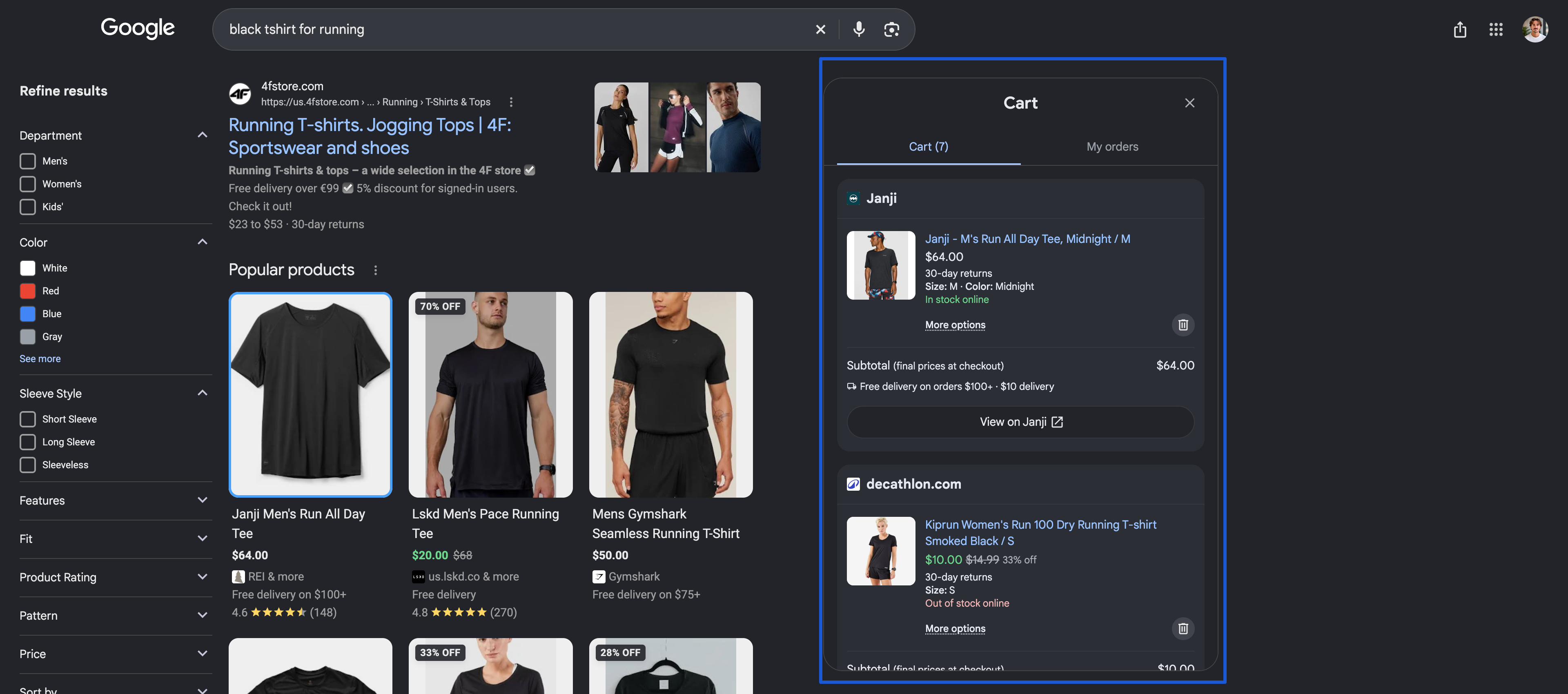
Google Universal Cart is a shopping cart that holds products from multiple retailers inside Google Search, AI Mode and the Gemini app. Shoppers save items from search results or Gemini conversations, get alerts on price drops and restocks, and check out with Google Pay for participating stores or transfer the items to the merchant's own cart.
Google's launch announcement describes the cart as built on the Shopping Graph, which holds more than 60 billion product listings that Google refreshes continually. The cart can suggest the payment card with the best perks through Google Wallet and surface promo codes for items in it. Nike, Sephora, Target, Ulta Beauty, Walmart, Wayfair and "many Shopify merchants" were named at launch.
Google first previewed the cart at Google I/O in May 2026, and it is US-only at launch.
Universal Cart vs UCP vs AI Mode checkout
Three names get mixed up in almost every answer AI assistants give on this topic. They are three different layers:
| Name | What it is | What the merchant does |
|---|---|---|
| Universal Cart | The shopper-facing cart in Search, AI Mode and Gemini | Nothing directly; it reads from your Merchant Center data and your UCP integration |
| Universal Commerce Protocol (UCP) | The open standard that lets Google's agents create carts and checkouts on your systems | Implement it yourself, or through Shopify, BigCommerce or another platform partner |
| AI Mode checkout (native checkout) | The "Buy" button that completes the purchase inside Google with Google Pay | Opt products in with the native_commerce attribute and pass Google's integration review |
UCP was published on January 11, 2026, by Google with Shopify, and Etsy, Target, Walmart and Wayfair among its backers. It sits alongside other agent protocols: OpenAI and Stripe's ACP covers checkout in chat apps, and Google's AP2 proves an agent was authorized to pay. For how these fit together, see our comparison of ACP vs AP2 and the other agent protocols.
Getting listed happens at three levels, and many stores only need the first two
Being "in" Universal Cart means different things depending on how far your integration goes. Google's documentation splits merchant participation into three levels, each with its own requirements and engineering cost.
| Level | What the shopper can do | What you need | Engineering effort |
|---|---|---|---|
| 1. Discoverable | Find your products in AI Mode and Gemini, save them to Universal Cart, get price alerts | An active Merchant Center account with approved products | Low: feed quality work |
| 2. Cart transfer | Move saved items into a pre-filled cart on your website and pay there | Level 1 plus a UCP profile and the Cart API (one endpoint) | Medium |
| 3. Native checkout | Buy inside AI Mode or Gemini with Google Pay | Level 1 plus native_commerce, Google Pay setup, checkout APIs and approval | High, unless your platform handles it |
Levels 2 and 3 are independent. According to Google's Cart API guide, cart transfer doesn't require native checkout, payment handlers or order lifecycle integrations. A merchant that wants to keep payment on its own site can stop at Level 2 and still let shoppers move a multi-item basket from Google to its store in one click.
Google's launch post doesn't spell out what a shopper sees for a saved item from a merchant at Level 1 only. Plan for a standard click through to your product page and treat Level 2 as the minimum for a smooth handoff.
Level 1: get products into the Shopping Graph through Merchant Center
Universal Cart and AI Mode shopping answers draw on the same product data as Google Shopping. If a product isn't in Merchant Center, or is disapproved there, it can't be recommended, saved or bought.
What Level 1 requires:
- An active Merchant Center account in good standing, with no open policy violations and free listings enabled.
- Complete, accurate product data: titles, GTINs, price, availability, images, shipping costs and a return policy. Price and stock in the feed must match your live site, because checkout at Level 3 runs on this data.
- Brand assets and support contact details kept current, since Google surfaces them in the cart and at checkout.
- Policy pages (terms, privacy, returns) that match what you declare in Merchant Center.
AI assistants also read your product pages, so their structured data matters as much as the feed. Our guide on how to make my product data discoverable to AI agents covers the attributes agents check first.
Level 2: let shoppers transfer their cart to your site
Cart transfer is the UCP capability called dev.ucp.shopping.cart. When a shopper clicks to move their Universal Cart items to your store, Google calls a single endpoint, CreateCart (POST /carts), and your system creates a pre-filled cart that the shopper finishes on your site.
What your developers build:
- Support UCP version 2026-04-08 or later.
- Publish a UCP profile at
/.well-known/ucpthat declares thedev.ucp.shopping.cartcapability. The profile's endpoint becomes the base URL for Google's calls. - Secure the endpoint with API keys, OAuth 2.0 or mutual TLS.
- Aim to respond in under one second and return HTTP 429 when you need to throttle. Google recommends both without enforcing them, and calls arrive in bursts because shoppers trigger them.
The first release of the Cart API is one-way: Google creates the cart, and updates, deletions or syncing back to Google aren't supported yet. Multi-item carts, loyalty account linking and post-purchase tracking and returns are listed on Google's UCP roadmap.
Level 3: enable native checkout in AI Mode and Gemini
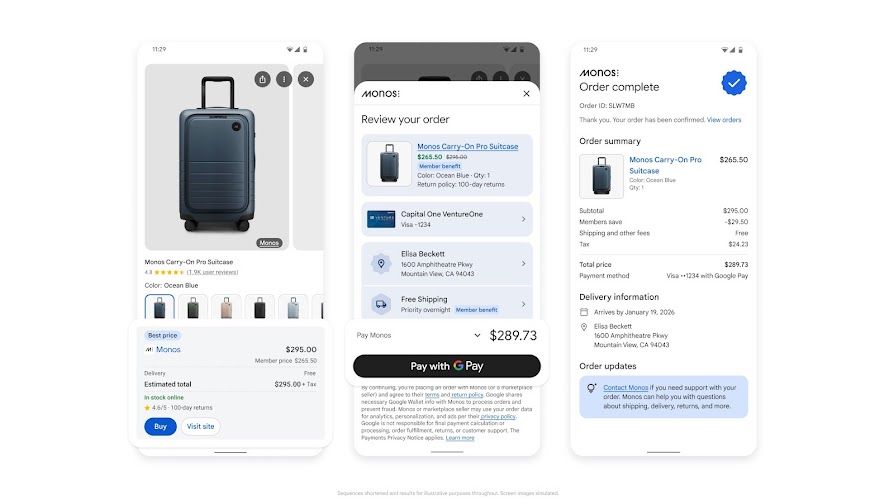
Native checkout puts a "Buy" button on your listings in AI Mode and Gemini. The shopper pays with the card and shipping address saved in Google Wallet, and the order goes to your systems. You stay the merchant of record: your payment processor handles the funds, and you own fulfillment, the customer relationship and customer data.
Checkout is in early access for select merchants. Google's Merchant Center help page on UCP checkout lists product eligibility in the US, Canada and Australia, with checkout rolling out in phases.
The six steps for a direct integration:
- Bring your Merchant Center account and feeds into good standing (Level 1).
- Flag eligible products with the
native_commerceattribute. - Set up a Google Pay & Wallet Console account and confirm your payment processor accepts Google Pay tokens.
- Submit Google's UCP interest form and accept the UCP Checkout Terms of Service (US).
- Build the checkout APIs and validate them with Google's conformance tests.
- Complete Merchant Center onboarding and go live once Google approves the integration.
The native_commerce attribute
native_commerce is a Merchant Center group attribute with one Boolean sub-attribute, checkout_eligibility. Set it to true and the listing shows the Buy button on supported surfaces. Leave it empty or set it to false and the product stays a standard listing: still discoverable, with no in-Google purchase.
In a CSV, TSV or Google Sheets feed the column header is native_commerce(checkout_eligibility) with the value true. In XML, the value sits in a nested <g:checkout_eligibility> tag inside <g:native_commerce>.
Google's attribute documentation recommends adding it through a supplemental feed, so your primary feed and Shopping ads campaigns stay untouched. Because it is set per product, you can start with a short list of best-selling, simple SKUs and expand later.
Payment and Google Pay requirements
- A Google Pay & Wallet Console account.
- A payment service provider integrated with the Google Pay API. If yours isn't, it has to onboard through Google Pay's PSP process.
- Merchants processing payments without a PSP also configure encryption and upload PCI compliance documentation.
- You don't need a Google Pay button on your own website.
- At launch, only standard card numbers stored in Google Wallet are supported as payment methods.
Checkout APIs your developers build
Native checkout runs on three REST endpoints, according to Google's native checkout guide: create a checkout session (POST /checkout-sessions), update it (PUT /checkout-sessions/{id}) and complete it (POST /checkout-sessions/{id}/complete). Sessions move through statuses from incomplete to completed or canceled, and each endpoint has availability and latency targets, such as 95% availability and a 95th-percentile latency of 4 seconds or less for session creation.
Merchants with highly customized checkout flows can request embedded checkout, an iframe-based option reserved for approved merchants. Native checkout is the default path.
“AI search is not just a tech challenge or opportunity, it is part of a transformation. I see new roles being created because of AI search.”
Shopify stores may already be opted in
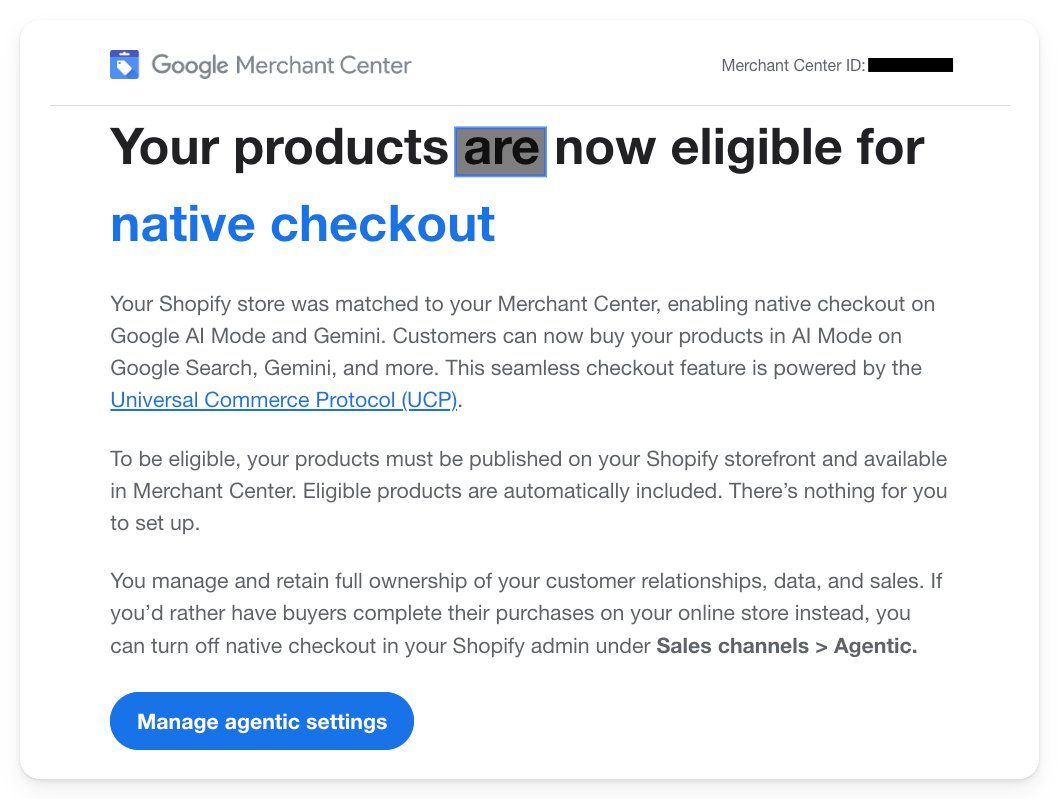
Shopify co-developed UCP and handles the integration at platform level. On September 22, 2026, Merchant Center users on Shopify started receiving emails with the subject line "Your products are now eligible for native checkout," as Search Engine Roundtable reported. Google had matched their Shopify store to their Merchant Center account, and eligible products were included automatically.
Shopify's help center confirms direct checkout in Google AI Mode and Gemini is on by default for eligible stores. The requirements:
- The store is based in the US and sells to US customers. Shoppers outside the US are redirected to your online store.
- Products are in Merchant Center, through the Google & YouTube channel with product and shipping sync on, or through another feed.
- Products are eligible for Shopify Catalog.
- You agreed to the Shopify Agentic Storefronts Supplemental Terms of Service.
- Terms of service, privacy policy and return and refund policy are completed under Settings > Policies and match Merchant Center.
Some products and features don't work in direct checkout: subscriptions, product bundles, customizable products and B2B-only products; local delivery, store pickup and pickup points; and required sign-in before checkout. Some checkout blocks, such as upsells and custom fields, may not display. Automatic discounts, discount codes and Shopify Functions are supported.
To turn it off, go to Sales channels > Agentic, deactivate "Allow Shopify to manage for me," select Google AI Mode and Gemini and switch Direct checkout off. Your products stay discoverable in AI Mode and Gemini, and shoppers are sent to your store to buy.
BigCommerce and custom stacks
BigCommerce offers "Agentic Checkout with Google UCP" in early access through Commerce AI Labs, built into Channel Manager, with product data flowing through Feedonomics or a third-party feed provider. Merchants on custom platforms follow the direct integration path from Levels 2 and 3, starting with the UCP developer guide. The protocol is open source, with REST and MCP transports.
What changes for your data, analytics and ads when checkout happens on Google
Native checkout moves the purchase off your domain, and several measurement assumptions break with it.
- Site pixels don't fire. Shopify states that Google Analytics and custom pixels don't fire in direct checkout. Conversion reporting has to come from your order data and Merchant Center.
- Remarketing audiences shrink. Buyers who complete checkout on Google never reach your thank-you page, so site-based remarketing lists miss them.
- Customer ownership stays with you. Google's UCP documentation states merchants remain merchant of record and keep their customer relationships and data. Order confirmations and customer support come from you.
- Shopping ads keep running. Adding
native_commerceadds a Buy button to eligible listings; it doesn't remove products from Shopping ads or free listings.
Early access also creates uneven competition: Shopify merchants can be live today while direct integrations wait on Google's review.
Getting into the cart starts with getting recommended
A Buy button only earns revenue when AI Mode recommends the product in the first place. Universal Cart sits at the end of a conversation, and the merchant whose product appears in the answer is the one that gets saved. That recommendation step is decided by query fan-out (the sub-searches an AI model runs before it answers) and by the sources the model trusts, and it works the same way whether or not you enable checkout.
Promptwatch ran three merchant questions about Universal Cart on October 20, 2026, across ChatGPT, Google AI Overviews, Google AI Mode and Claude. Three patterns stood out:
- ChatGPT split each question into two sub-searches, such as "google ai mode gemini checkout merchant requirements eligibility google universal commerce protocol 2026," and built a four-step answer: Merchant Center, UCP, interest form, validation.
- Google's own surfaces cited third parties heavily. AI Overviews cited 5 to 9 sources per answer, mostly agency and platform blogs, alongside Google's developer documentation. AI Mode cited 4 to 8.
- One model answered from outdated knowledge. Claude, without live sources in that run, told retailers that checkout always stays on the retailer's site, which misses native checkout entirely.
The same mechanics apply to your product prompts: "best waterproof hiking boots under $150" fans out into sub-searches on price, reviews, stock and return terms, and the products that answer all of them get shortlisted. [Data report: product pages as the most-cited content type, URL to confirm] Product pages are where AI shopping answers pull most of their facts, so your PDPs and your feed need to answer those sub-questions directly. Our guide to GEO for ecommerce covers how to structure them.
How Promptwatch fits this step:
- Prompt tracking runs your shopping prompts daily on the AI platforms you choose, including Google AI Mode, AI Overviews and Gemini, and records the query fan-outs and cited sources behind each answer.
- Competitor heatmaps show which brands AI Mode recommends instead of yours, prompt by prompt.
- Agent Analytics lets you track AI crawler activity on your product pages, including Google's crawlers, so you can see whether the pages behind your listings are being fetched.
- Content Gap Analysis and the content agent turn the sub-questions your pages don't answer into briefs and drafts grounded in your own citation data.
One limit to state plainly: Promptwatch's Shopping section matches catalog products to ChatGPT and Amazon Alexa shopping results today. Google AI Overview and AI Mode shopping results are visible inside the tracked responses but aren't matched to your catalog in the Shopping section yet. For SKU-level work on ChatGPT, see how to track AI and LLM answer mentions at the SKU or product level, and how products earn a spot in the ChatGPT shopping carousel.
“Promptwatch pulls all your competitors and gives you an analysis of those prompt-versus-your competitors. There are a lot of tools out there, but this one is easier to see what matters and take action.”
To check whether your site is ready for AI agents before you open the integration work, run Promptwatch's free agent readiness checker. For the wider preparation plan, read what is agentic commerce and how should DTC brands prepare.
FAQ
Do I need UCP to appear in Universal Cart?
No. Products in Google Merchant Center can be discovered in AI Mode and Gemini and saved to Universal Cart without a UCP integration. UCP is needed for the two checkout paths: transferring a pre-filled cart to your site through the Cart API, and native checkout with Google Pay inside AI Mode and Gemini.
Is AI Mode checkout available outside the US?
Universal Cart launched in the US only on October 15, 2026. Google's Merchant Center documentation lists UCP checkout product eligibility in the US, Canada and Australia, with checkout live for select merchants in early access. Shopify's integration requires a US-based store selling to US customers.
Does adding native_commerce affect my Shopping ads?
No. The native_commerce attribute only adds a Buy button to eligible listings on supported surfaces. Google recommends adding it through a supplemental feed so your primary feed and Shopping ads campaigns stay unchanged, and products without it remain standard listings.
Who handles returns and customer service for Universal Cart orders?
The merchant does. With native checkout, the merchant stays merchant of record, processes payment through its own payment provider, sends order confirmations and handles fulfillment, returns and customer support. Google provides the checkout interface and the shopper's saved Google Wallet details.
Can I turn off native checkout but stay visible in AI Mode?
Yes. On Shopify, go to Sales channels, then Agentic, deactivate "Allow Shopify to manage for me," select Google AI Mode and Gemini and switch Direct checkout off. Products stay discoverable, and shoppers are sent to your store to buy. On a direct integration, set native_commerce to false or leave it empty.
Which products can't be sold through native checkout?
On Shopify, subscriptions, product bundles, customizable products and B2B-only products aren't supported in direct checkout, nor are local delivery, store pickup and pickup points. Google's checkout also excludes ID-verified categories such as alcohol and tobacco, and buyers must be signed in and 18 or older.


