Finding the right prompts to track
The goal isn’t to track every possible query. It is to track the real questions people ask when they look for solutions like yours, because those are the answers that shape how AI models describe, compare and recommend your brand. Start small and expand as you learn.
- Customer conversations: support tickets, chat logs, FAQs and your sales or customer success team. The way prospects phrase their needs is the way they phrase them to ChatGPT, so the best prompts often come straight from these.
- Public questions: Reddit, X and product communities in your category. AI models learn from public discussions, so each recurring question there is a candidate prompt.
- Reviews: Trustpilot, G2 or App Store reviews of your product and your competitors. Note how people describe features, pain points and comparisons (“better than”, “alternative to”), because AI models frame recommendations the same way.
- Competitor gaps: once your first monitors run, look for prompts where competitors are visible and you aren’t. Those are visibility gaps, and similar prompts around them are worth tracking.
- Industry trends: newsletters, analyst reports and social posts. The earlier you track an emerging topic, the sooner you can build visibility around it before competitors do.
- Search data: the Prompt Explorer below turns Search Console queries, ranking keywords, “People also ask” questions and your own pages into suggested prompts.
How to add prompts
Open the Prompts page
Click Prompts in the left rail.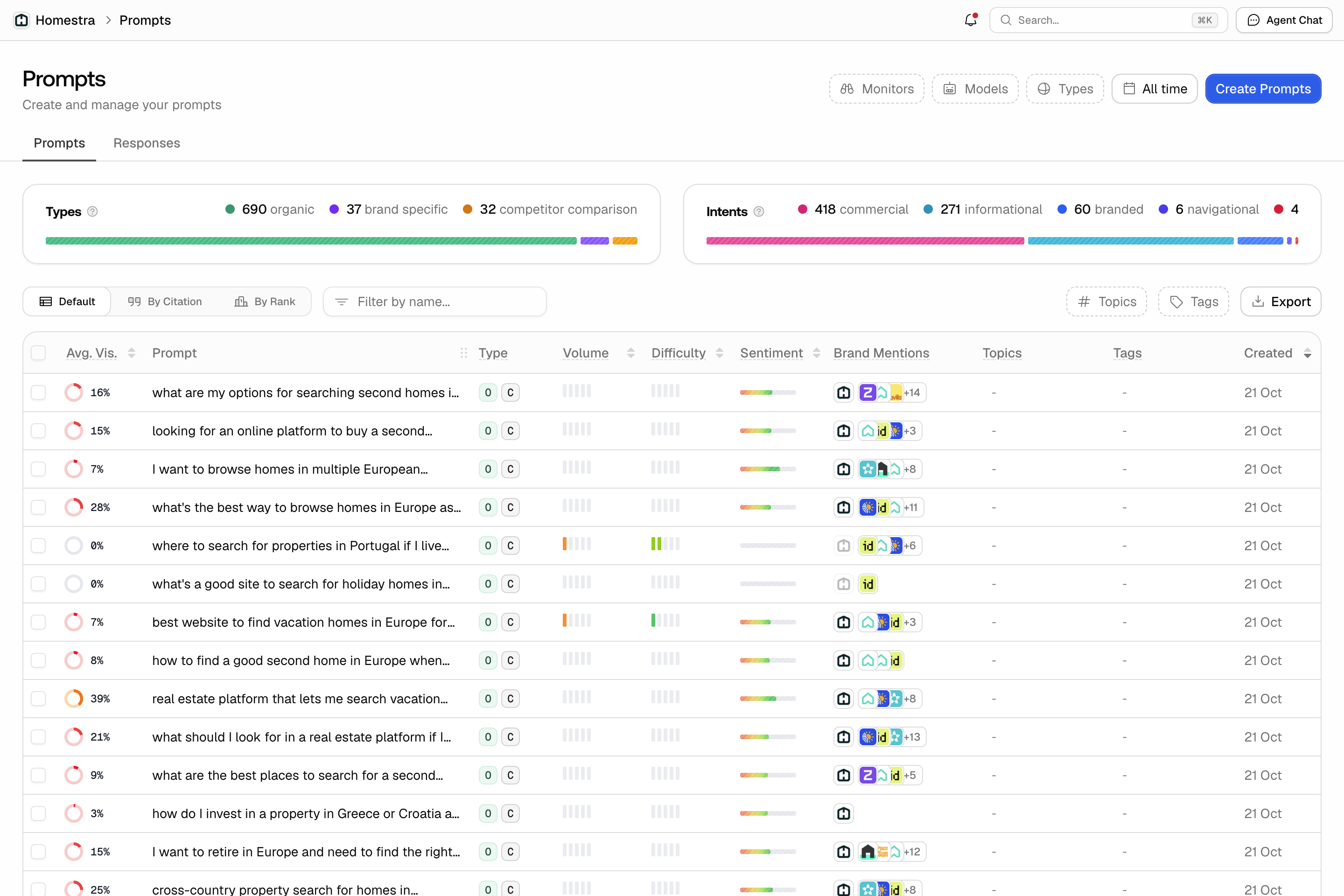
Choose how to create prompts
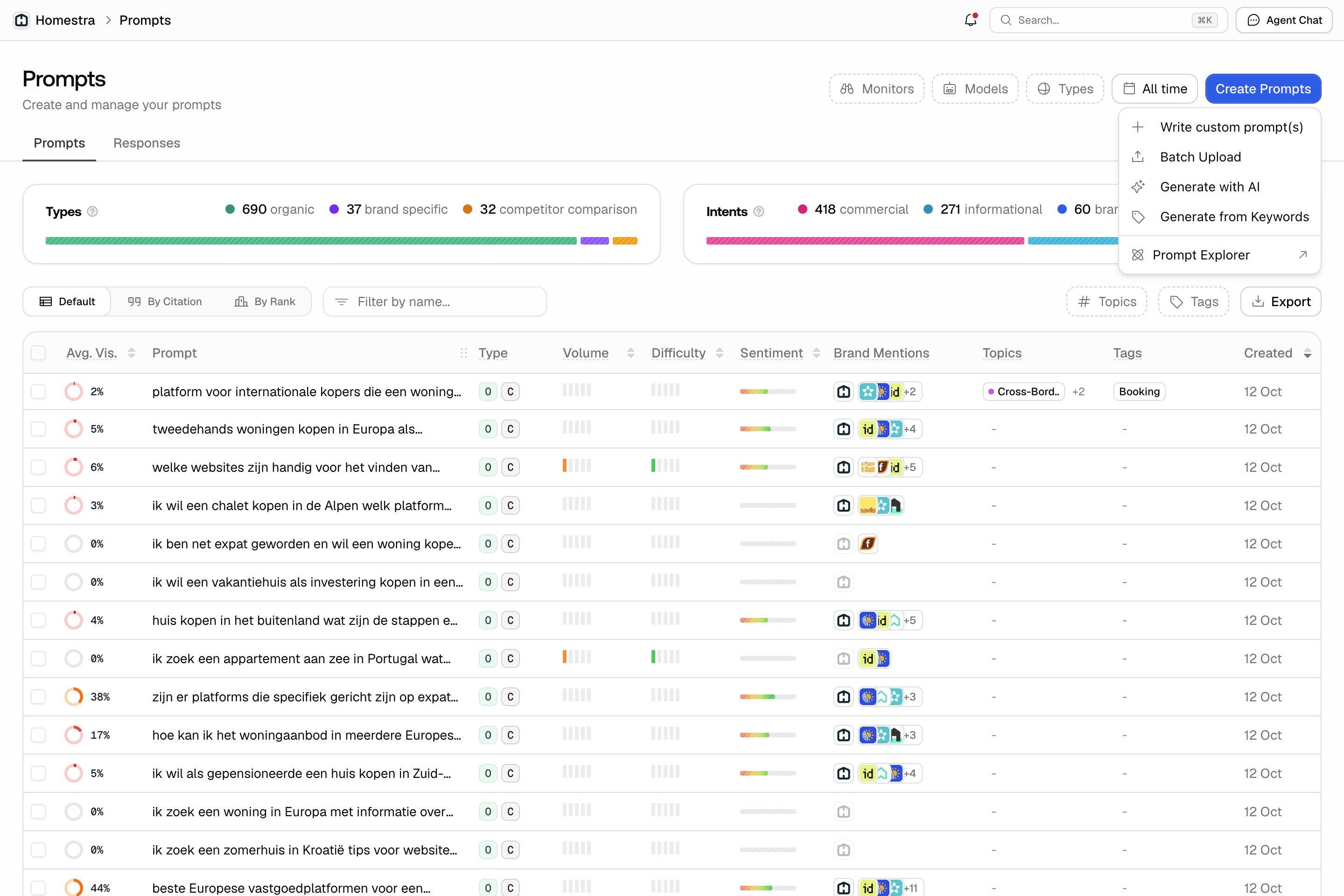
At the top right of the Prompts page, click Create Prompts. The menu has five options:- Write custom prompt(s): type prompts one row at a time, with full control over each one.
- Batch Upload: enter one prompt per line, or upload a CSV, so you can bring in a list you already have.
- Generate with AI: Promptwatch drafts a number of prompts from the type, intent and optional instructions you give it, and you review them before saving.
- Generate from Keywords: enter keywords, or upload a CSV with keywords in the first column, and Promptwatch turns them into prompts.
- Prompt Explorer: opens its own page with suggestions based on search data. See the Prompt Explorer below.
Pick the monitor
Every prompt belongs to a monitor, which decides the models, country and schedule it runs on. Pick an active monitor so the prompts start getting responses right away. Not sure which one? A prompt should join the monitor that matches its market and language; see organizing your setup.Enter your prompts
When writing custom prompts, each row takes the prompt text, a type, an intent and a language, which defaults to the monitor’s language. You can also set a topic and tags for all prompts in the dialog at once. See working with prompts for what the types and intents mean. If you have reached your plan’s active prompt limit, the upgrade dialog opens instead of the Create Prompts dialog.What is the Prompt Explorer?
The Prompt Explorer is a workbench for finding new prompts to track, built on real search data instead of brainstorming. You pick a source, Promptwatch generates a batch of suggested prompts from it, and each suggestion lands in a review table with search volume and difficulty attached. From there you decide: track it in a monitor, or dismiss it. The Explorer anchors every suggestion to something observable: a query you rank for, a question Google surfaces, or a page you published. That keeps your prompt set tied to demand that actually exists. Click Explorer in the left rail. It is a standalone page titled Prompt Explorer, with no inner navigation. You can also reach it from the Create Prompts menu on the Prompts page, or through cmd+K (Ctrl+K on Windows). Viewers can see the page, but the controls are disabled: generating and importing need an editor role.The five sources
Each source is a tab at the top of the page:- Google Search Console: generates prompts from queries your site already ranks for, so you extend proven search demand into AI answers. It reads the last 30 days and up to 100 queries. It needs a Search Console connection and a property linked to the project: if the account is not connected, the tab shows Connect Google Search Console (or Reconnect Google Search Console when the connection errored); if the account is connected but no property is chosen, a Set up Search Console for this project button takes you to the project’s Search Console settings.
- Ranking keywords: you enter a page URL or a domain, like “example.com/product” or “example.com”, and Promptwatch uses the keywords it ranks for in Google (up to 100) as the seed. No Search Console connection needed. If Google has no rankings for that page yet, the tab says so.
- Manual Search: you enter a seed topic, like “best crm software”, and Promptwatch expands it into natural-language prompts around that topic.
- People also ask: you enter a Google query and Promptwatch turns Google’s “People also ask” questions for it into prompts. These are questions real users ask, phrased the way they ask them.
- From website page: you paste one of your URLs, Promptwatch crawls its title, description and content, then generates the prompts that page could be the answer to. Useful right after publishing something new. If the page can’t be read, you get “We couldn’t read that page. Check the URL and try again.”
Reading the suggestions table
Suggestions from all sources collect in one table below the tabs, newest first, so the batch you just generated sits on top; new rows stay highlighted until you act on them. Each row shows:- Prompt: the generated prompt text.
- Type: compact letter badges for the type and intent the suggestion will carry into tracking; hover for the full names.
- Volume: the search volume of the suggestion’s primary keyword, so you can judge how much demand sits behind it.
- Difficulty: how competitive that keyword is in search.
- Date: when the suggestion was generated.
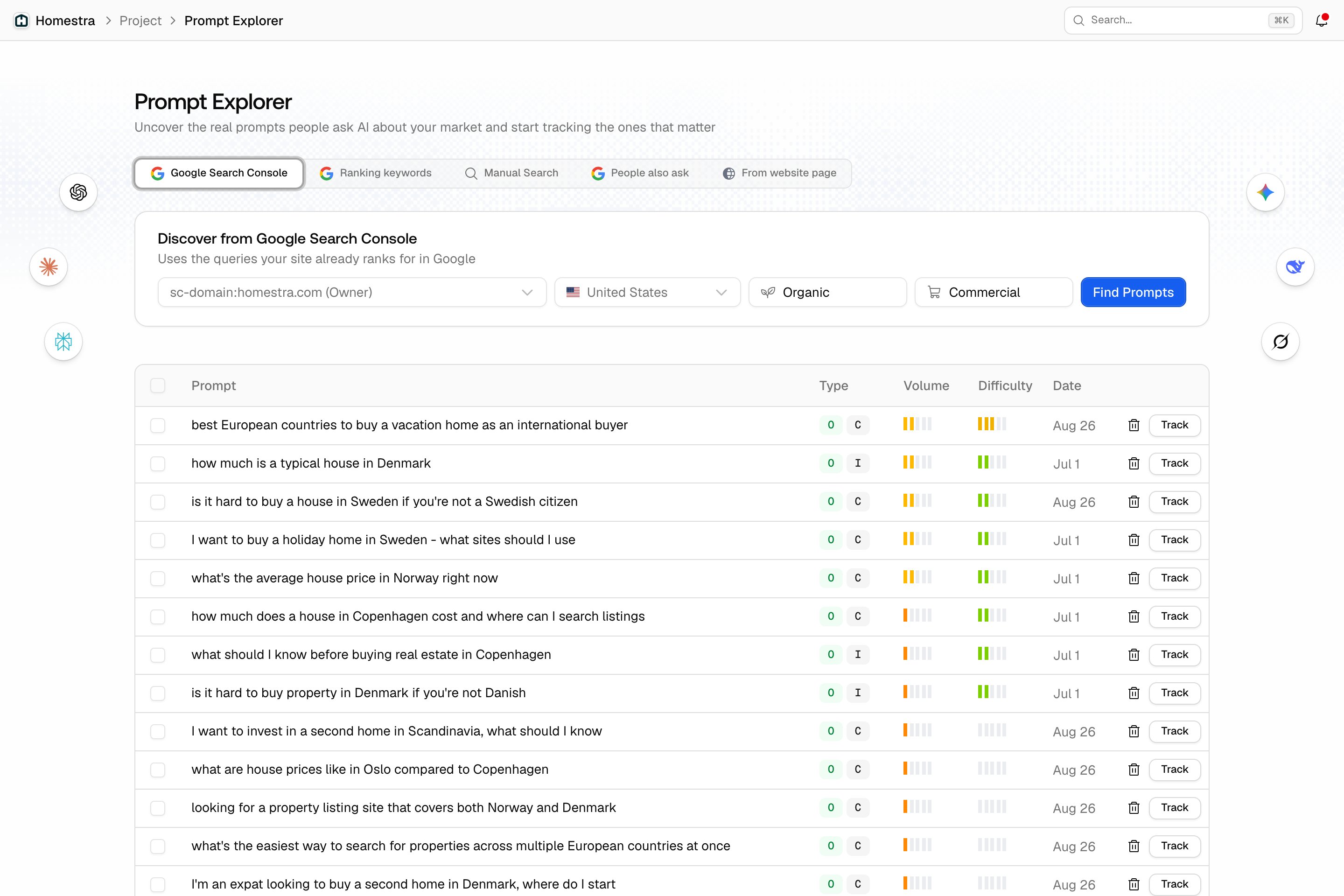
Turning a suggestion into a tracked prompt
- Click Track on a single row, or tick several rows with the checkboxes (the header checkbox selects all) and click Add to Monitor. Both open the same dialog.
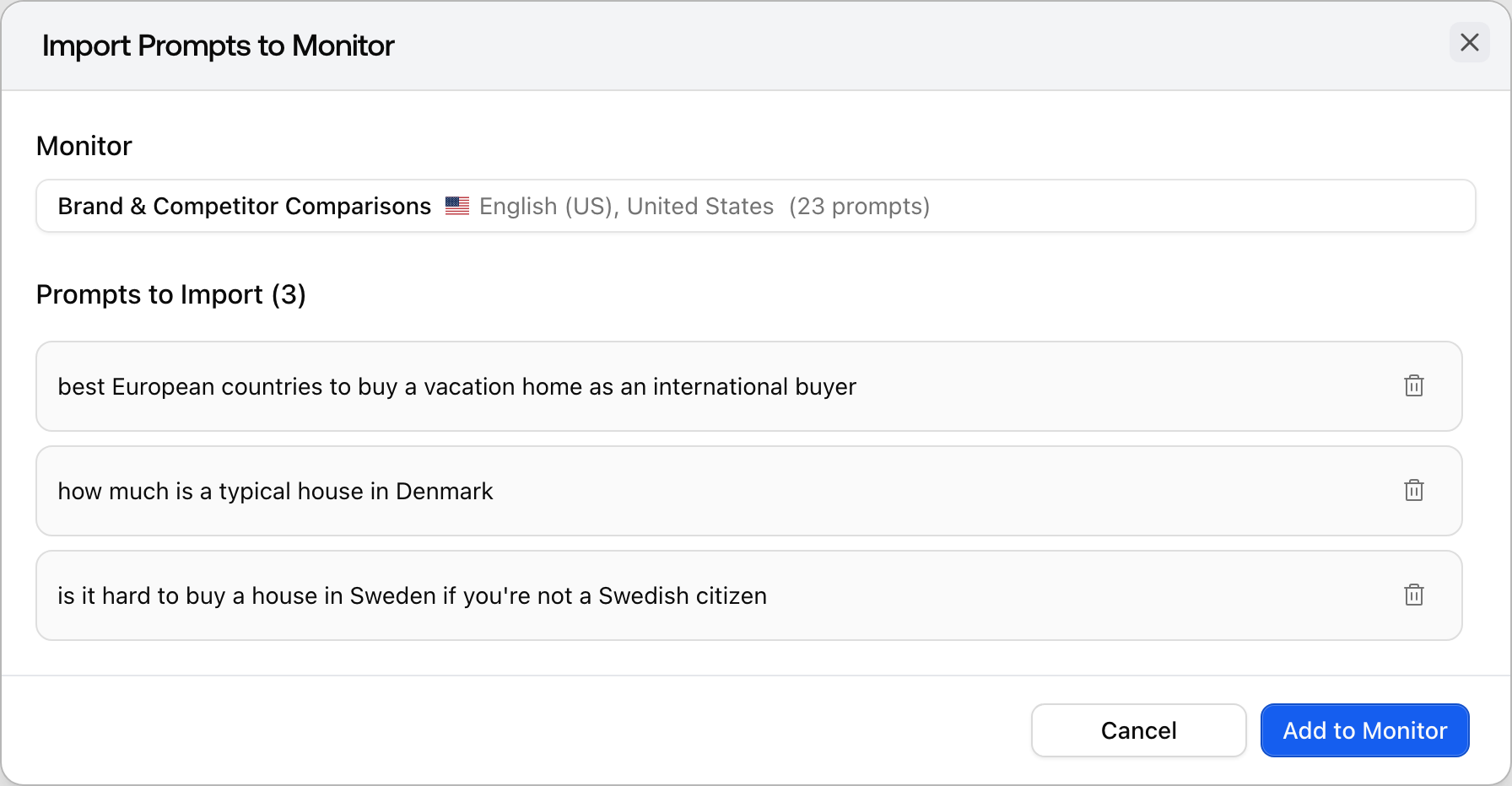
- In the Import Prompts to Monitor dialog, pick the Monitor that should own the prompts. Only active monitors are listed, and the first one is preselected. Under Prompts to Import (N), remove any you don’t want with the trash icon.
- Click Add to Monitor. A toast confirms how many prompts were added.