

How navigation works
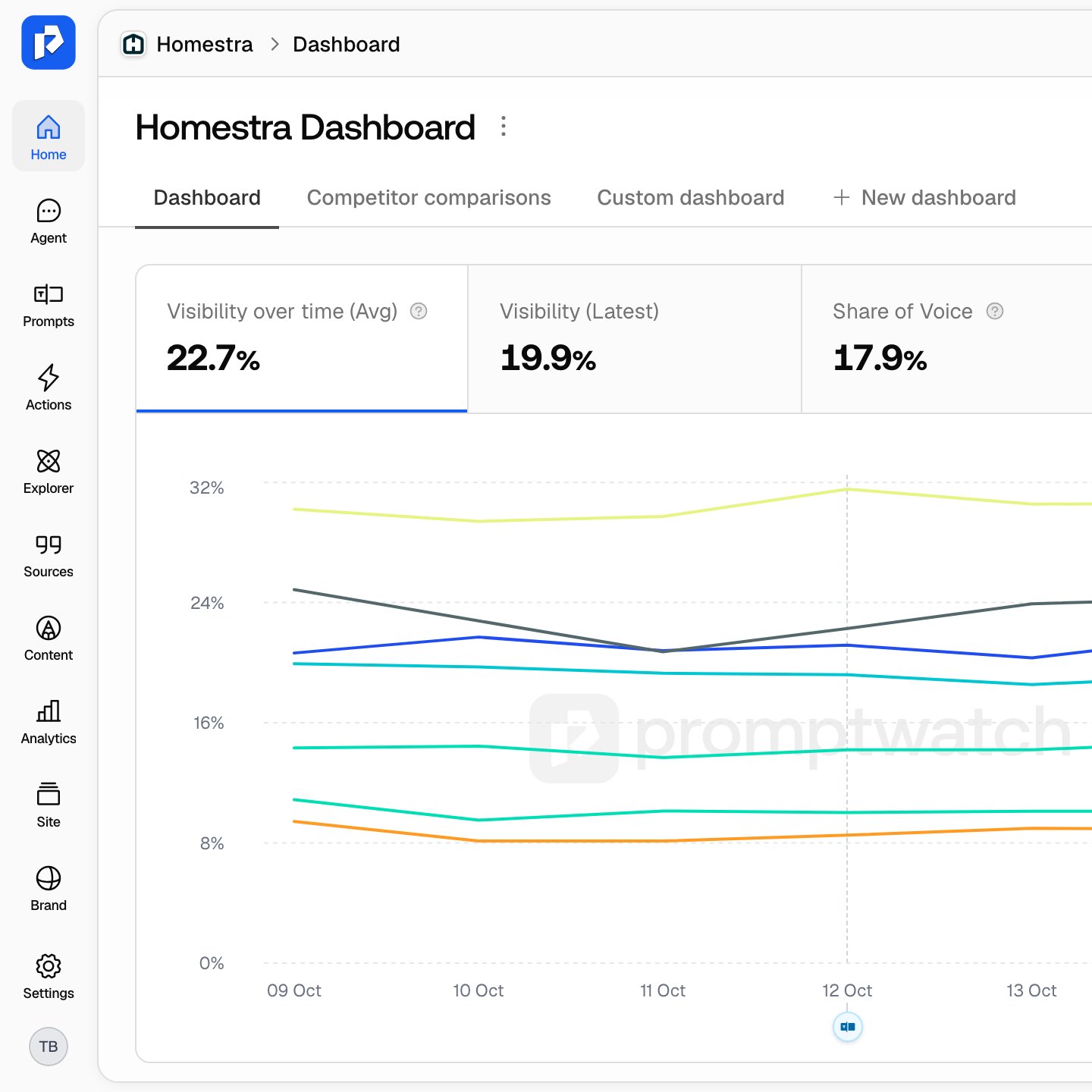
- The rail: a narrow column of icon tiles on the left edge, one per section: Home, Agent, Prompts, Actions, Explorer, Sources, Content, Analytics, Site and Brand. The logo at the top takes you to your dashboard. At the bottom sit a Setup tile (your account-setup progress ring, which disappears once every step is done), the Settings gear and your avatar.
- Click a tile to land on that section’s default page.
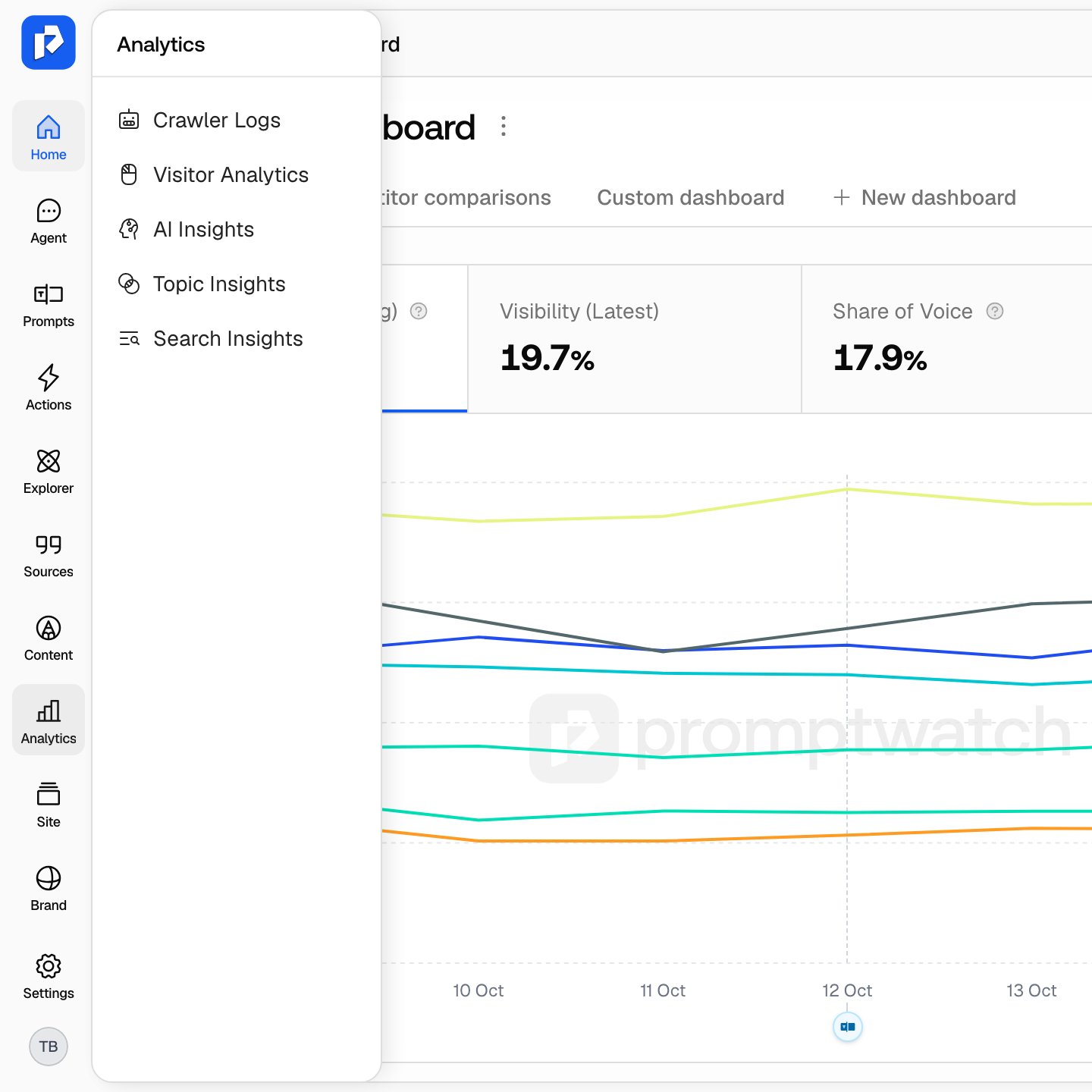
- Hover a tile for a moment and a flyout opens listing every page in that section, so you can jump straight to one without landing on the default first. Press Escape or move away to close it.
- Inner navigation: once you are inside a section, its pages sit in a second column next to the rail. A thin toggle on its edge collapses it (the tooltip reads Collapse / Expand), and it stays collapsed while you stay in that section. Opening the AI chat panel folds it away.
- Standalone pages: Home, Actions and Explorer are single pages, so they have no flyout and no inner navigation.
- Page tabs: some pages split into tabs (for example Prompts / Responses on the Prompts page). Tabs live on the page, not in the navigation, so this map mentions them inline with their page.
- The header: above every page you’ll find the project switcher (avatar plus project name) and the breadcrumb for the current page on the left, and the Search… box (⌘K) and the notification bell on the right. Content editor pages add an AI chat button. See Notifications for what the bell delivers.
Home
- Home: your project dashboard (the page title and breadcrumb read Dashboard). It holds widgets such as brand visibility over time, brand sentiment, visibility by country, top ranked URLs, top cited domains and the heatmap, arranged in dashboard tabs. New dashboard creates a custom dashboard with its own widgets and filters. See Reading your dashboard.
Agent
- Agent (section title Agent Chat): a chat that answers questions about your own visibility data and can run analyses for you. Its inner column is your chat list with New chat, Scheduled and, once you have archived chats, an Archived section, rather than a page list, so this tile has no flyout. On a plan without chat credits, the chat opens with its composer disabled. See Asking Agent Chat, Agent Chat: how to use it and Scheduled chats.
Prompts
The Prompts tile opens the Monitoring section. Clicking it lands on Prompts, not Monitors.- Prompts: every prompt across your monitors in one table, with bulk editing. Tabs Prompts / Responses: Responses is every individual AI answer. See Choosing the right prompts, Working with prompts and Understanding responses.
- Monitors: your panels of prompts that run on a schedule across the AI models you chose. Most other pages read the data monitors collect. See What is a monitor.
- Query Fanouts: the sub-queries AI assistants search the web with while composing an answer. See Query fanouts.
- Trends: how prompt visibility moves over time.
- Topics: visibility rolled up per topic, and how your brand compares with competitors on each. See Organizing with monitors, tags and topics.
- Page Tracker: watches specific URLs (yours or a competitor’s) and shows the prompts and responses that cite them. See Page Tracker.
- Sentiment (page title Sentiment Analysis): how positively AI answers frame your brand over time, with a weekly AI summary. See Sentiment tracking and Sentiment score.
- Shopping: product visibility in ChatGPT shopping carousels and Alexa product results. Tabs Overview / My products. See Shopping overview and Products.
- Ads Radar: sponsored placements, advertisers and landing pages in AI search for your tracked prompts, viewed By Ad or By Prompt. See Ads Radar.
Actions
- Actions: a standalone page with prioritized recommendations to improve AI visibility, performance and coverage (content gaps, sentiment, Reddit, offsite, site health, performance, untracked and untapped pages, setup, and your own custom actions). Switch between board and list layouts. See Action Board and How actions are prioritized.
Explorer
- Explorer (page title Prompt Explorer): a standalone page that suggests prompts from five tabs: Google Search Console, Ranking keywords, Manual Search, People also ask and From website page. See Prompt Explorer.
Sources
- Citations: the URLs and domains AI answers cite when they mention your brand, aggregated across your responses. Tabs All Citations / URL Positions / Citation Trends: URL Positions is where in the source list each cited URL lands, tracked over time. See Understanding sources and citations and Citation rank.
- Offsite Mentions: third-party pages that mention your brand and competitors across the web, opportunities to influence sources you don’t own. See Offsite mentions.
- Reddit: Reddit posts and threads cited in AI answers. See Reddit citations.
- YouTube: YouTube videos and channels cited in AI answers. See YouTube citations.
- LinkedIn: LinkedIn posts cited in AI answers. See LinkedIn citations.
Content
- Content Agent: the automated content pipeline: it creates, edits and publishes content against your visibility gaps and routes drafts through review. Tabs Content / Activity, plus a settings tab. See Content Agent overview, Content Agent settings and Reviewing drafts.
- Content Creation: plan and create a single AI-ready article on demand instead of on a schedule. See Content Creation.
- Content Refresh: improve an existing page for stronger AI search visibility rather than writing a new one. See Content Refresh.
- Knowledge Base: the facts, positioning and source material the agent writes from. See Knowledge Base.
- Content Gap: how well your website content answers the prompts users ask AI models, and which prompts have no matching page. See Content gap.
Analytics
- Crawler Logs: requests AI agents make to your website. Tabs Overview / Top Pages, plus a settings tab for non-viewers. See AI crawler insights and Log ingestion for setup.
- Visitor Analytics: human visitors who arrived from an AI assistant, detected by referrer. Tabs include Overview, Top Pages and Top Locations. See Visitor analytics.
- AI Insights: crawler logs and citation clicks in one view, with geographical and trend breakdowns and a 7-day or 30-day toggle. See 360 Insights.
- Topic Insights: which topics earn AI activity, and where your pages underdeliver for their footprint. See 360 Insights.
- Search Insights: Google and Bing search traffic overlaid with AI crawls, citations and clicks. Fed by the Search Console and Bing Webmaster integrations. See 360 Insights.
Site
- Pages: indexed pages and crawl coverage for AI discovery, your site structure as Promptwatch sees it. See Sitemap or Google Search Console.
- Health: weekly audits of your pages, the issues found, and what changed since the last run. See Site health.
- Content: page length, titles, descriptions, headings, duplicates and content freshness.
- Linking: broken links, pages your sitemap misses, and pages that only your navigation reaches.
Brand
- Brand Book: your brand’s identity as Promptwatch understands it: name, aliases, website, description, industry, language and country. See Brand profile.
- AI Settings: default tone, tools and content settings for generated pages. See AI Settings.
- Personas: target personas for prompt generation and more accurate monitoring. See Personas.
- Competitors: all competitors found in your responses, listed here so you can manage them. See Identifying your competitors.
- Brand Merging: merge duplicate brand mentions so visibility data stays accurate. See Brand Merging.
- Social channels (page title Channels): the Reddit, YouTube and LinkedIn accounts your brand runs. Save them here, then turn on My channels on a platform’s page under Sources to see only citations from those accounts. See My channels.
Settings
The gear tile at the bottom of the rail opens Settings. Its inner navigation is the one place that shows group headings, in three groups. What you see depends on your role, and whether your access is limited to specific projects.Project settings
For the current project:- Sitemap: your sitemap URLs and crawler settings. See Change your sitemap.
- API Keys: keys scoped to this project for the REST API and MCP server. See MCP.
- CMS Integrations: connect your CMS. See Integrations, WordPress, Webflow and Framer.
- Search Console: pick the Google Search Console property for this project. See Google Search Console.
- Bing Webmaster: pick the verified Bing site for this project. See Bing Webmaster.
Organization settings
- Billing: plan, invoices and payment method. Owners only. See Plans and billing.
- Team (page title Team Members): invite members and manage roles. Owners only. See Team and roles and Inviting your team.
- Audit log: the organization’s audit log. Owners only.
- Projects: create, rename, limit or delete projects, and restore deleted ones. Hidden if your access is limited to specific projects. See Create your project and Multiple projects.
- API Keys: project-scoped keys or master keys for the whole organization. Hidden for project-restricted members. See MCP.
Integrations
- Search Console: connect every Google account that has access to your sites, once per organization. Then each project picks its property under Project settings. See Google Search Console.
- Bing Webmaster: the same two-step setup for Bing, feeding Search Insights under Analytics. See Bing Webmaster.
- Slack: connect a Slack workspace, map channels to projects, and review agent chats. Owners only. See Slack.
The account menu
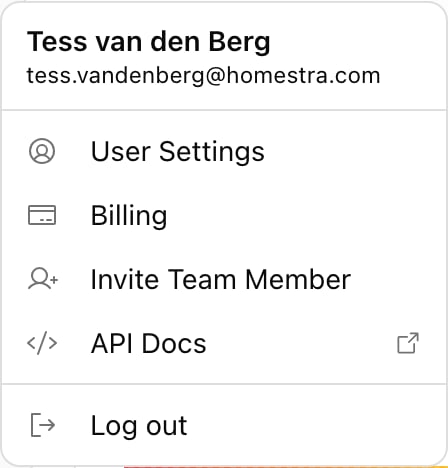
Click your avatar at the bottom of the rail. The menu shows your name and email, then:- User Settings: opens a modal, not a page, with your first name, last name and job role, plus email notification preferences on default-brand workspaces (weekly reports, the weekly action digest for non-viewers, usage alerts for owners). See Notifications.
- Billing: a shortcut to the Billing settings page. Owners only.
- Invite Team Member: a shortcut to the Team page. Owners only. See Inviting your team.
- Switch Organizations: only shown when you belong to two or more organizations.
- API Docs: an external link to the API reference.
- Log out.
The project switcher
The button at the left of the header shows the current project’s avatar and name. Click it to pick another project; a Search projects… field appears once you have more than three. Hover a project to reveal a trash icon that opens the delete dialog. It isn’t offered on the project you’re in (switch first) or when the organization has a single project. Use Create project at the bottom to add one. Create is hidden for viewers and project-restricted members, and opens the upgrade modal when your plan’s project quota is used up. See Multiple projects.Search and jump anywhere with ⌘K
Press ⌘K (Ctrl+K on Windows and Linux) or click the Search… box in the header. The Quick Navigation dialog searches every page and tab, your dashboards, monitors, projects and organizations, settings pages, help articles and actions such as Create Monitor, Create Prompt and Generate Content. When Agent Chat is available, typing a question and choosing Ask agent starts a new chat with it. Two pages have no tile or navigation item, so ⌘K is the way in:- Reports: tabs PDF Reports / Exports / Scheduled Reports. Export and report toasts also link here. Scheduled reports need a non-viewer role. See PDF reports and Sharing reports; Exporting your data covers exporting responses from the Prompts page.
- Refer & Earn: share your referral link and earn rewards. Not shown to viewers.