

Severity levels
Four levels, in board order:- Critical: confirmed issues with direct visibility impact. The agent reserves this for problems the data clearly supports.
- High: strong evidence, meaningful impact. Setup actions (missing sitemap, crawler logs, visitor analytics, or Search Console) are always created at High, because the rest of the analysis depends on those connections.
- Medium: worth doing, used sparingly by design so the board doesn’t drown in maybes.
- Low: useful non-urgent follow-up, the rarest level. The agent and Agent Chat never create actions at Low; it appears when the agent downgrades an existing item, or when you choose it yourself.
- Evidence only: severity comes from tool data, never speculation. The agent is instructed to skip preventive “this might become a problem” actions entirely.
- Prefer the top: when choosing what to save within its per-run cap of 5, the agent prioritizes Critical first, then High, and cuts noisy Medium and Low candidates.
- Severity is revisited: on later runs, the agent re-checks open items against fresh data and can raise or lower severity. The agent only changes actions still in Suggested or To Do; once you pull something into In Progress, it leaves the severity alone.
Sorting and filtering
On the board, every column sorts by severity first (Critical, High, Medium, Low, then no severity), then by created date, newest first. The same order applies in List view. The page header holds three multi-select filters that narrow every column at once: Severity (Critical, High, Medium, Low, or All severities), Assignee, and Action type. They only appear once the project has actions. Actions without a severity stay visible whatever the severity filter, so a custom action never drops out of view.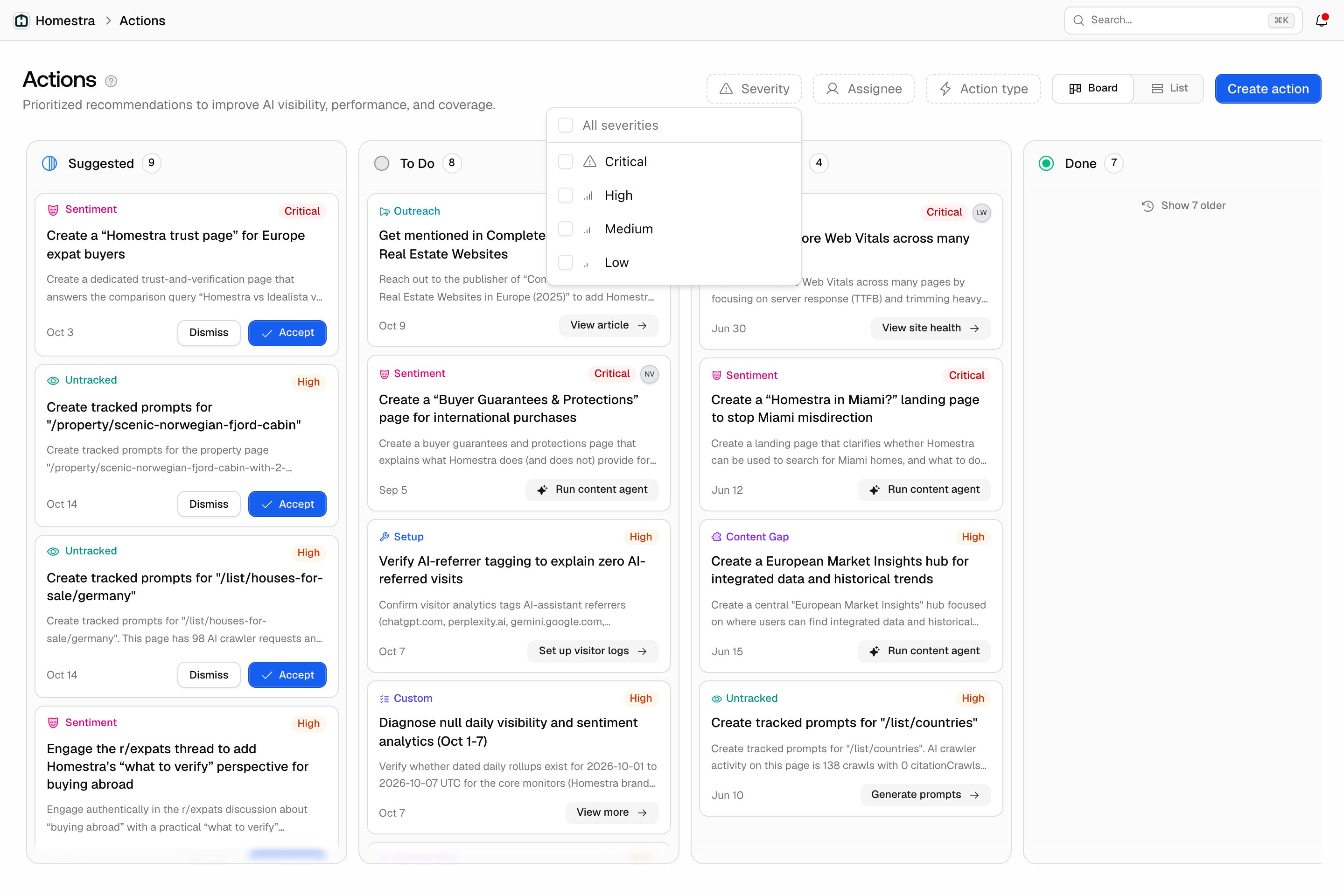
Action types
Nine typed actions plus one free-form type. The labels below are the ones you see on cards and in the Action type filter:- Content Gap: create or improve content where AI answers a question but your site barely covers it. Grounded in content gap analysis; the card’s call to action runs the Content Agent.
- Sentiment: push back on unfavorable AI framing of your brand before it takes hold. See Sentiment tracking.
- Reddit: join Reddit threads AI frequently cites where your brand currently has no voice. See Reddit and YouTube strategy.
- Outreach: get your brand included in high-authority third-party articles AI keeps citing. See Offsite mentions.
- Untracked: start monitoring pages that get AI crawler traffic but aren’t tracked yet. See AI crawler insights.
- Untapped: strengthen pages AI crawlers visit often but rarely cite or drive clicks from. See Page tracker.
- Performance: speed up slow pages so AI crawlers can reliably read and index your content. See Site Health.
- Site Health: fix structural SEO issues that confuse how AI classifies your pages. See Site Health.
- Setup: connect missing integrations (sitemap, crawler logs, visitor analytics, Search Console) so the analysis covers the complete picture. Created programmatically, not by the agent.
- Custom: free-form actions created with the Create action button or through Agent Chat when no typed action fits. The discovery agent never creates these.
The discovery schedule
The discovery agent runs one focus per UTC day instead of everything at once:- Monday: Content Gap.
- Wednesday: Untracked and Untapped, which share a day because both come from the same page signals.
- Thursday: Reddit.
- Friday: Outreach, limited to 3 new suggestions.
- Saturday: Sentiment.