

The plan tracks
Promptwatch has two self-serve plan ladders plus a custom tier, because a brand tracking itself and an agency managing many clients scale on different axes:- Brand track: Explore is the free entry tier; Essential, Professional and Business are the paid ladder, built around one or a few of your own projects, with content and analytics features deepening at each tier.
- Agency track: Kick-off, Growth and Scale, built around many client projects and pitch projects, trading brand-specific extras such as the content features for breadth across clients.
- Enterprise: custom pricing and a feature set configured per organization, outside both ladders. The Billing page shows the plan as “Enterprise”, usage cards carry a “Custom limit” tag, and plan changes go through Contact Sales.
What the quotas mean
- Prompt Responses: the core metered quota, the number of AI answers collected for your prompts each month. This is usually the axis that decides your tier, see How to manage your response limit.
- Active Prompts: how many prompts can run on a schedule at the same time. Deactivating a prompt frees its slot.
- Projects and Team Members: how many brands you can track and how many people you can invite, see creating a project, multiple projects and inviting your team. Pending invitations count as seats.
- Agent Credits: the monthly allowance for Agent Chat questions; scheduled chats may use up to half of it.
- AEO Articles: monthly document generations across all projects, spent by Content Creation, Content Refresh and the Content Agent. Knowledge Base Items is the size of your knowledge base.
- Analytics volume: monthly visitor analytics events and crawler log events, plus Sitemap Pages, the number of pages the site crawler indexes, which is a live count rather than a monthly one.
Features that switch on at higher tiers
Some features are gated rather than metered. A locked page stays visible in the navigation and shows an upgrade overlay with an Upgrade to … button that names the lowest plan on your own track that includes it (for example Upgrade to Business). Agency organizations see Contact Sales instead where no agency tier has the feature, and custom plans always see Contact Sales. See the product map for where each page lives. One naming mismatch to know: the pricing page and lock overlays call it the 360 Dashboard, but in the app it is the three pages AI Insights, Topic Insights and Search Insights under the Analytics tile, see 360 Insights. Custom reports (PDF reports, exports and report schedules) are enforced when you create a report, export or schedule (for example “Exports are not available on your current plan. Please upgrade to enable this feature.”), not with a page overlay.Add-ons and billing frequency
Two quotas can be raised without a tier upgrade on most paid plans: Agent Credits and AEO Articles. An add-on doesn’t stack on top of your base value: you pick a higher monthly total from a fixed ladder for your plan. The Upgrade button on the matching Usage card opens the picker, and an owned add-on shows there as, for example, “Add-on: 3,000 credits”. Yearly subscriptions still receive the add-on value per month. Subscriptions are billed monthly or yearly; the plan picker has a Monthly / Annually toggle.Where to see and manage all of this
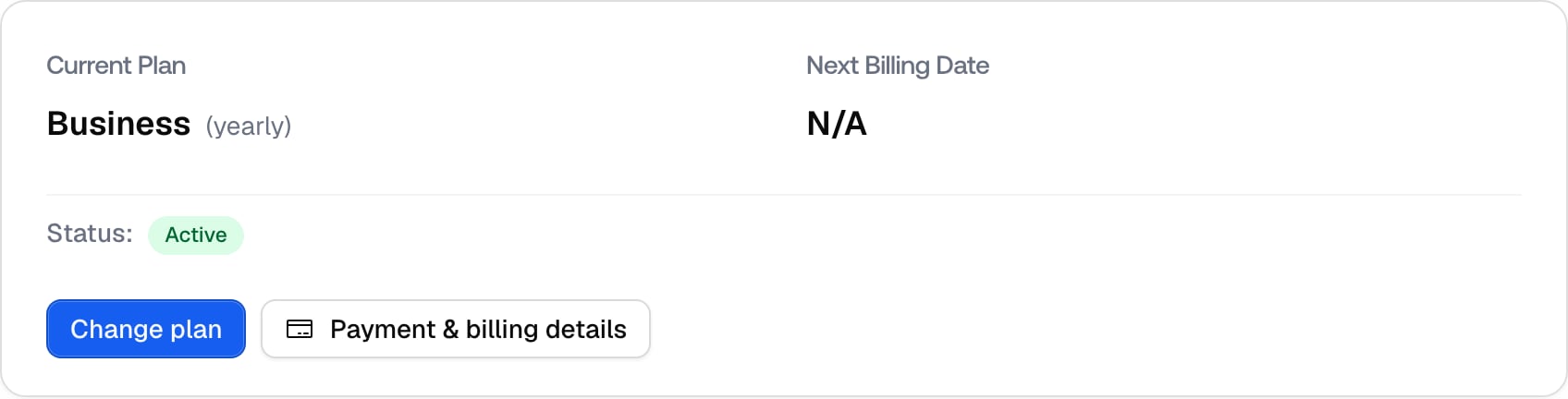
Click Settings, the gear tile at the bottom of the left rail. It lands on the Project settings group first, so choose Billing in the Organization settings group. The avatar at the bottom of the rail also has a Billing entry. Both are shown to organization Owners only; a Member who opens the page by direct link sees “Billing Access Restricted” with a note to contact their Owner. Organizations billed manually see a different view and are asked to contact sales. The page is titled Billing (“Manage your plan, payment method and billing details.”) and has three cards:- Current Plan: the plan name with “(monthly)” or “(yearly)”, Next Billing Date (which becomes Access Until when the subscription will not renew), and a Status badge such as Active, Trialing, Past Due or Canceled. Its buttons are Change plan (opens the plan picker with a proration confirmation, or a contact-sales dialog on custom plans; it reads Reactivate subscription when canceled), Payment & billing details (opens the Stripe portal in a new tab for your payment method and billing details) and Cancel plan. Without a subscription the card says “You don’t have a plan yet” with a Pick a plan button; after a failed payment it shows “Your last payment failed” with Update payment method and Pay open invoice.
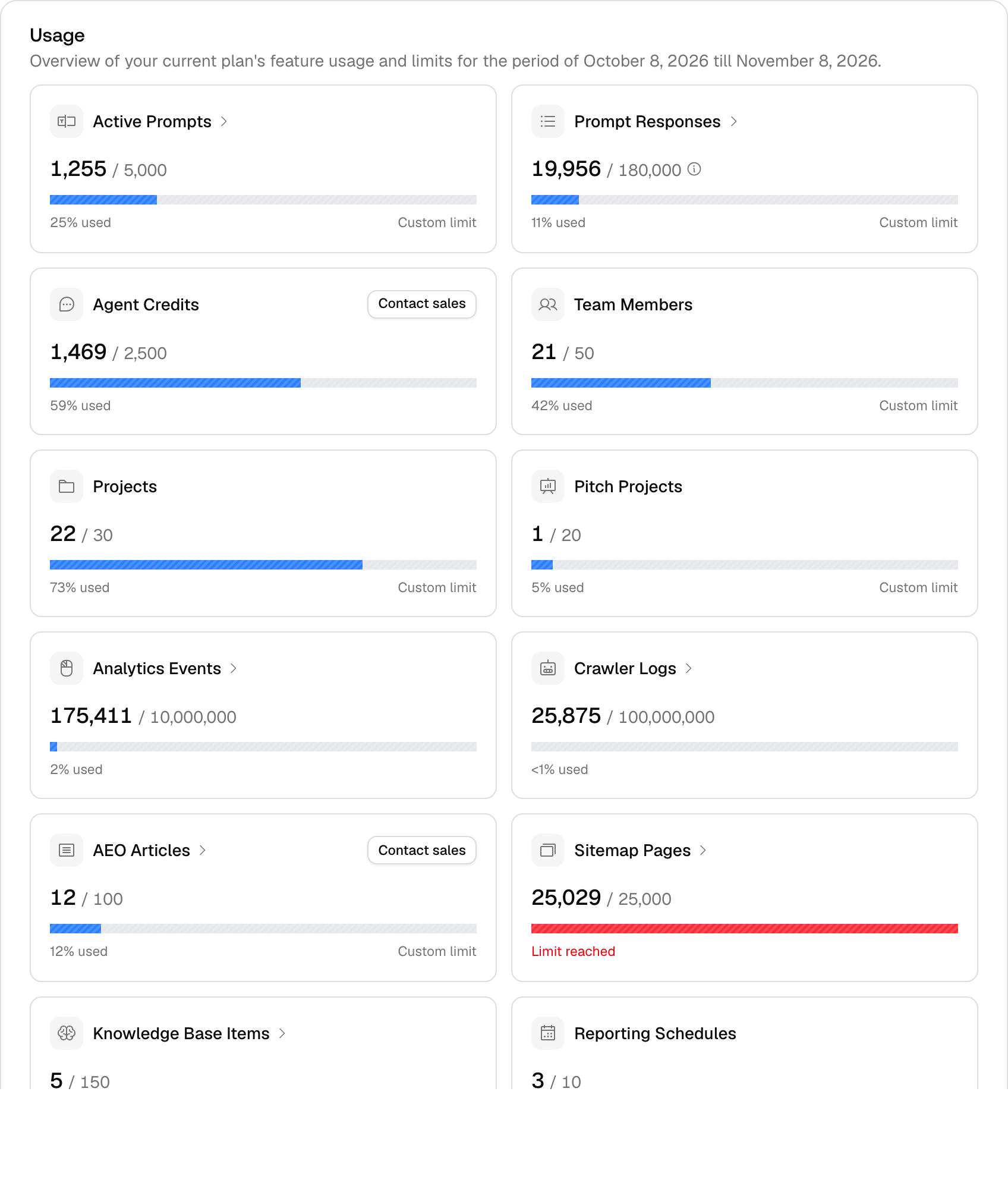
- Usage: one card per metered feature for the running billing period, with current value against the limit, a bar and a status (“N% used”, “Approaching limit” from 90%, “Limit reached”, “Unlimited” or “Not available”), plus “Runs out ~date” on Prompt Responses and a per-project breakdown on the expandable cards. Cards: Active Prompts, Prompt Responses, Agent Credits, Team Members, Projects, Pitch Projects (when enabled), Analytics Events, Crawler Logs, AEO Articles, Sitemap Pages, Knowledge Base Items and Reporting Schedules; the add-on Upgrade buttons sit on Agent Credits and AEO Articles. An alert “You need about N responses per month” appears when your active monitors would exceed the response limit. This is the authoritative view of your quotas.
- Invoices: view, pay and download your invoices. Each row shows the date, amount and status (Paid, Open, Draft, Void or Uncollectible), with a Pay button on open invoices and a download icon for the PDF.