

What is Agent Chat?
Agent Chat is an AI analyst that lives inside your project and answers questions from your actual data: visibility, mentions, citations, sentiment, competitors, prompts and responses, crawler logs, visitor analytics, site health, content gaps, the action board, page tracker, shopping, ads radar, query fanouts, and Reddit, YouTube and LinkedIn citations. It is not a generic chatbot with a Promptwatch skin. For project metrics, the agent is instructed to call tools and show the evidence, so a question like “which model dropped my visibility last week” is answered from your responses, not from a generic model. Each chat is bound to one project. The agent only sees that project’s data, so answers never mix brands or leak across projects.Where to find it
Click Agent in the left rail, right under Home. It opens a fresh chat, and the column next to the rail holds your chat list: New chat, Scheduled, then your chats grouped by Last 7 days, Last 30 days, and Older, with an Archived section at the bottom. The Agent tile has no hover flyout, because that column is the chat list itself. You can also press Cmd+K (Ctrl+K on Windows and Linux) or click the Search… box in the header, type your question, and pick Ask agent to start a fresh chat with that question as the first message. The chat list is yours: it shows your own chats (plus any chats started from Slack, see Slack), and keeps the 100 most recent. Hover a chat to rename or archive it; archived chats can be restored later. Chats produced by a schedule show an alarm icon and can’t be renamed or archived; see Scheduled chats.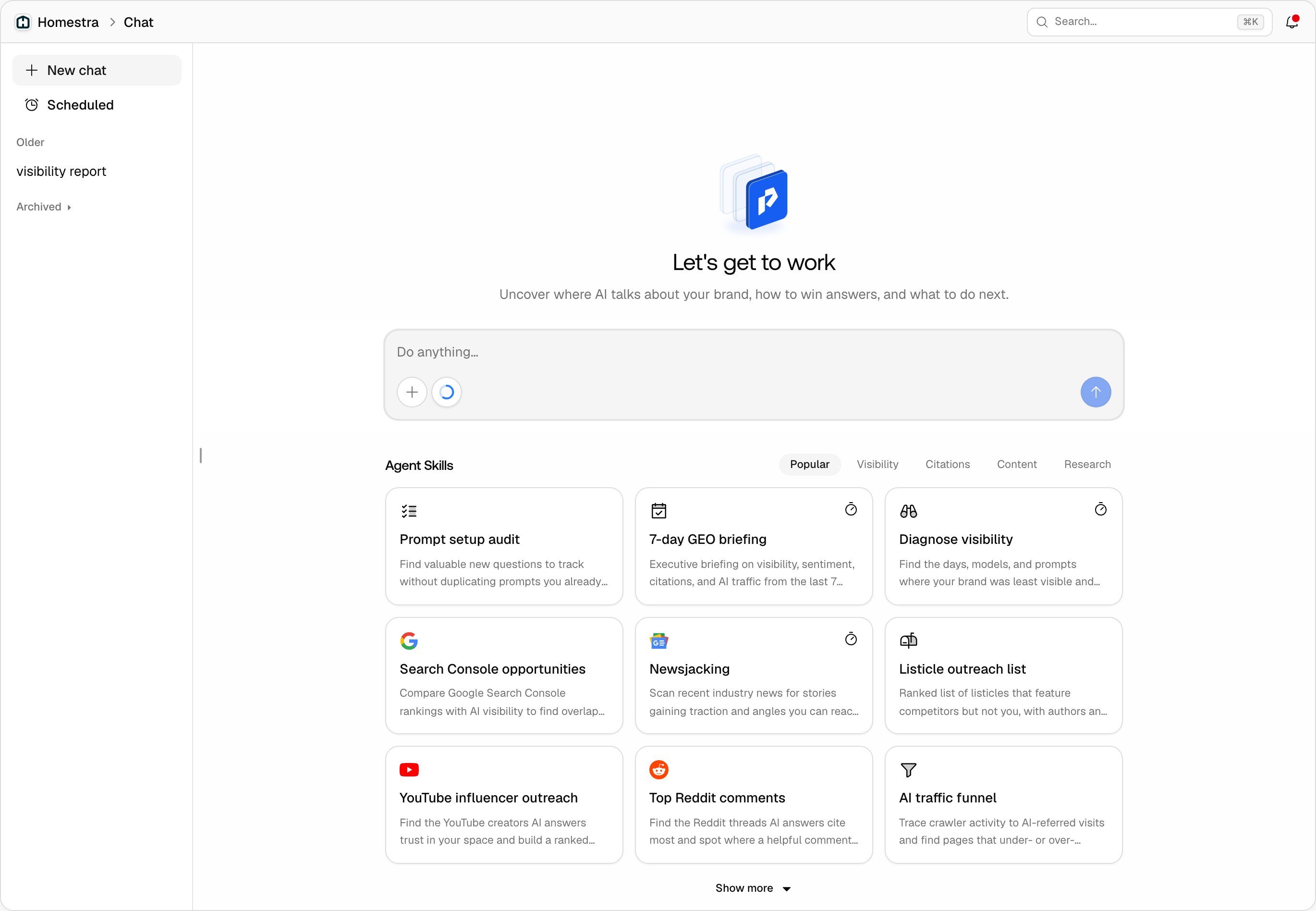
What it can answer
The agent reads the same data you see in the product, so anything you could find by clicking through dashboards, it can find by querying:- Performance questions: visibility, sentiment, and Share of Voice over any date range, broken down by model, monitor, or prompt, so you skip the filter gymnastics.
- Source questions: which domains and pages AI answers cite, your citation rank, and where competitors are cited instead of you.
- Technical questions: which AI crawlers hit your site, which pages they fetch, and how AI-referred visitors behave.
- Content questions: which tracked prompts your site barely covers, and what the content gap analysis recommends.
Starting from an Agent Skill
A new chat opens with the Agent Skills grid: prebuilt asks grouped under Popular, Visibility, Citations, Content, and Research tabs, with Show more for the rest. Clicking a card sends its prompt immediately, it does not prefill the input, so pick one when you are ready to run it. A skill turns on the tools it needs by itself. Some cards also carry a timer icon, Schedule this skill, which opens the Scheduled view with that ask and a cadence filled in.How it reads your project data
When you ask something, the main agent sends read-only research agents to query this project. Those agents use the same Promptwatch read tools the MCP integration uses, plus any extra web tools you turn on. Writes stay on the main agent: any change to your project (creating prompts, moving an action to done, generating a PDF report, building or editing a custom dashboard) runs visibly, in the conversation. Scheduled unattended runs get no write tools at all. Content the agent creates follows your AI Settings. Responses keep running in the background and resume if you reload the page.Tools and model
The + button in the input bar opens the chat’s settings. Under Tools and data you turn optional tools on or off for this chat:- Off by default: Search Console, Bing Webmaster, Web search, News search, Google Trends, and DataForSEO. Search Console and Bing Webmaster only work once the project has connected them.
- On by default: Webscrape, so the agent can read a page you point it at without extra setup.
- Always on: the Reddit, YouTube, and LinkedIn scrapers, shown as locked switches.
Credits, plans, and roles
Agent Chat runs on a monthly allowance of agent credits, included in every paid plan (the Explore plan does not include Agent Chat, see Plans and billing). Credits are consumed based on the model work a question requires: a quick lookup on Standard costs little, a deep multi-step research run on Max costs more. The small ring next to the + button in the input bar is your meter: hover it to see the agent credits used, the limit, and the reset date. It turns yellow at 80%, orange at 90% and red at the limit. When the allowance is used up, a banner says “Chat is paused until <date>. Upgrade for more credits.” and the composer is disabled until the reset. Members with the Viewer role cannot send chat messages, because the agent can change project data. See Team and roles. Agent Chat is not available on white-label organizations.What it can’t do
- Empty tool results: the agent is instructed to say there is no data, not to invent numbers. Ask for evidence when you plan to act on an answer.
- Cross projects: a chat is locked to the project it was started in.
- Act without you: scheduled runs are read-only, and mutations happen in the conversation where you can see them.